On this page
- Contents
- 1. How Much Is My Chromebook Worth?
- 1.1 The Exact Model Matters
- 1.2 Processor
- 1.3 RAM and Storage
- 1.4 Display and Form Factor
- 1.5 Physical and Functional Condition
- 2. How Fast Do Chromebooks Lose Value?
- Why Laptop Values Usually Decline
- 3. Where Can I Sell a Chromebook for Cash?
- 3.1 Specialized Online Laptop Buyers
- 3.2 Retail and Manufacturer Trade-In Programs
- 3.3 Local Computer Buyers
- 3.4 Direct Marketplace Sale
- 4. Chromebook Trade-In vs Selling for Cash
- 4.1 Trade-In Credit
- 4.2 Cash Sale
- 4.3 Compare the Whole Transaction
- 5. Can I Sell an Old Chromebook?
- 6. Can I Sell a Broken Chromebook?
- 6.1 Cracked Chromebook Screen
- 6.2 Weak or Failed Battery
- 6.3 Broken Keyboard or Missing Keys
- 6.4 Damaged USB-C or Charging Port
- 6.5 Broken Hinges
- 6.6 Chromebook Will Not Turn On
- 6.7 Liquid Damage
- 7. How to Find Your Chromebook Model
- 7.1 Look at the Bottom Label
- 7.2 Check ChromeOS
- 7.3 Check the Original Box or Receipt
- 7.4 Use the Manufacturer's Support Site
- 8. Why ChromeOS Update Support Matters
- 9. What to Do Before Selling a Chromebook
- 9.1 Back Up Important Files
- 9.2 Confirm That Synced Information Is Available
- 9.3 Remove Personal Accessories
- 9.4 Clean the Computer
- 9.5 Photograph Its Condition
- 9.6 Record the Model and Serial Number
- 10. How to Protect Your Data Before Selling a Chromebook
- 10.1 Powerwash the Chromebook
- 10.2 Work or School Chromebooks Require Special Attention
- 10.3 SellLaptopBack Data Handling
- 11. Should I Repair My Chromebook Before Selling It?
- 12. How to Get the Best Price for a Chromebook
- 12.1 Identify the Correct Model
- 12.2 Be Accurate About Condition
- 12.3 Do Not Wait for an Unused Laptop to Become Older
- 12.4 Compare Net Value
- 12.5 Keep the Chromebook in Reasonable Condition
- 13. How to Pack and Ship a Chromebook Safely
- 14. How Selling a Chromebook to SellLaptopBack Works
- 14.1 Get a Quote
- 14.2 Pack the Chromebook
- 14.3 Ship the Computer
- 14.4 Inspection
- 14.5 Payment
- 14.6 Check Real Seller Experiences
- 15. Popular Chromebook Brands
- 15.1 Acer Chromebook
- 15.2 ASUS Chromebook
- 15.3 Dell Chromebook
- 15.4 HP Chromebook
- 15.5 Lenovo Chromebook
- 15.6 Samsung Chromebook
- 15.7 Google Pixelbook
- 16. What Is Chromebook Plus and Does It Affect Value?
- 17. When Is the Best Time to Sell a Chromebook?
- 18. Should You Sell, Keep or Recycle Your Chromebook?
- Keep It When It Is Still Useful
- Sell It When You No Longer Need It
- Repair It When the Economics Work
- Recycle It When Reuse Is No Longer Practical
- 19. Selling Multiple Chromebooks
- 20. Frequently Asked Questions About Selling a Chromebook for Cash
- 20.1 Can I Sell My Chromebook for Cash?
- 20.2 How Much Is My Used Chromebook Worth?
- 20.3 Where Can I Sell My Chromebook?
- 20.4 Can I Sell an Old Chromebook?
- 20.5 Can I Sell a Chromebook With a Cracked Screen?
- 20.6 Can I Sell a Chromebook That Does Not Turn On?
- 20.7 Can I Sell a Chromebook With a Bad Battery?
- 20.8 Can I Sell a Chromebook Without the Charger?
- 20.9 Should I Powerwash My Chromebook Before Selling It?
- 20.10 Will Powerwash Delete My Google Drive Files?
- 20.11 How Do I Check When My Chromebook Stops Receiving Updates?
- 20.12 Does a Chromebook Plus Have More Value?
- 20.13 Can I Sell a School Chromebook?
- 20.14 What if I Cannot Find My Chromebook Model?
- 20.15 Is It Better to Sell a Chromebook or Trade It In?
- 20.16 Should I Repair a Broken Chromebook Before Selling It?
- 20.17 How Should I Ship a Chromebook?
- 20.18 How Do I Know Whether an Online Laptop Buyer Is Legitimate?
- 21. Turn Your Unused Chromebook Into Cash
- Authoritative Sources and Further Reading
Sell Chromebook for Cash | Get Cash for Your Used Chromebook
Have a Chromebook you no longer use? Instead of leaving it in a drawer while its resale value continues to decline, you may be able to sell your Chromebook for cash and recover some of its remaining value.
Whether you are upgrading to a newer Chromebook, switching to a Windows laptop or MacBook, replacing a school or work computer, or simply clearing out unused electronics, the first step is figuring out exactly what Chromebook you have and what condition it is in.
The value of a used Chromebook can depend on the manufacturer, exact model, processor, RAM, storage, screen, battery condition, cosmetic condition, age, remaining ChromeOS support and current demand. A newer Chromebook Plus system may be worth substantially more than an older entry-level Chromebook, but older, damaged and even non-working devices may still have resale, repair, parts or recycling value.
This guide covers the entire process: how Chromebook values are determined, where you can sell one, the difference between a cash sale and a trade-in, how to handle broken or older Chromebooks, how to safely erase your data, how to package the computer, and when selling may make more sense than keeping it.
If you already know your model, you can check your Chromebook or laptop for a cash offer now. If you cannot locate your exact Chromebook in the catalog, use the custom quote form rather than choosing a similar model.

Contents
- How Much Is My Chromebook Worth?
- How Fast Do Chromebooks Lose Value?
- Where Can I Sell a Chromebook for Cash?
- Chromebook Trade-In vs Selling for Cash
- Can I Sell an Old Chromebook?
- Can I Sell a Broken Chromebook?
- How to Find Your Chromebook Model
- Why ChromeOS Update Support Matters
- What to Do Before Selling a Chromebook
- How to Protect Your Data Before Selling
- Should I Repair My Chromebook Before Selling It?
- How to Get the Best Price for a Chromebook
- How to Pack and Ship a Chromebook Safely
- How Selling a Chromebook to SellLaptopBack Works
- Popular Chromebook Brands
- What Is Chromebook Plus and Does It Affect Value?
- When Is the Best Time to Sell?
- Should You Sell, Keep or Recycle Your Chromebook?
- Selling Multiple Chromebooks
- Frequently Asked Questions
- Turn Your Unused Chromebook Into Cash
1. How Much Is My Chromebook Worth?
There is no single resale value for every Chromebook. Two computers that appear almost identical can have very different cash values because manufacturers frequently sell several hardware configurations under the same general product name.
A Chromebook's value is normally influenced by a combination of the following factors:
- Manufacturer and exact model number
- Processor
- RAM
- Storage capacity
- Display size and resolution
- Touchscreen or non-touchscreen display
- Convertible or traditional laptop design
- Battery health
- Cosmetic condition
- Functional defects
- Age
- Remaining ChromeOS update support
- Current demand for the model
1.1 The Exact Model Matters
Simply knowing that you own an Acer, HP or Lenovo Chromebook is not enough for an accurate valuation.
For example, manufacturers may use one family name for several configurations containing different processors, amounts of RAM and storage capacities. The outside housing may look nearly identical even though the internal hardware is different.
When obtaining a quote, identify the model number printed on the Chromebook instead of selecting a computer merely because the photograph looks similar.
1.2 Processor
Chromebooks have been produced with a wide variety of processors, including Intel Celeron, Pentium, Core-series CPUs, AMD processors, MediaTek chips, Qualcomm processors and newer platforms designed for higher-performance Chromebooks.
The processor affects what the computer can comfortably do and therefore can affect resale demand.
1.3 RAM and Storage
Entry-level Chromebooks historically shipped with small amounts of RAM and eMMC storage, while newer and higher-performance systems may contain 8GB, 16GB or more RAM and substantially more storage.
A higher specification does not automatically guarantee a high cash offer, but RAM and storage are important parts of identifying the correct configuration.
1.4 Display and Form Factor
Chromebooks are available as traditional clamshell laptops, touch-screen computers, detachable devices and convertible 2-in-1 systems.
Features such as a higher-resolution display, touchscreen, convertible hinge and premium panel may contribute to demand, but their effect on resale value varies by model.
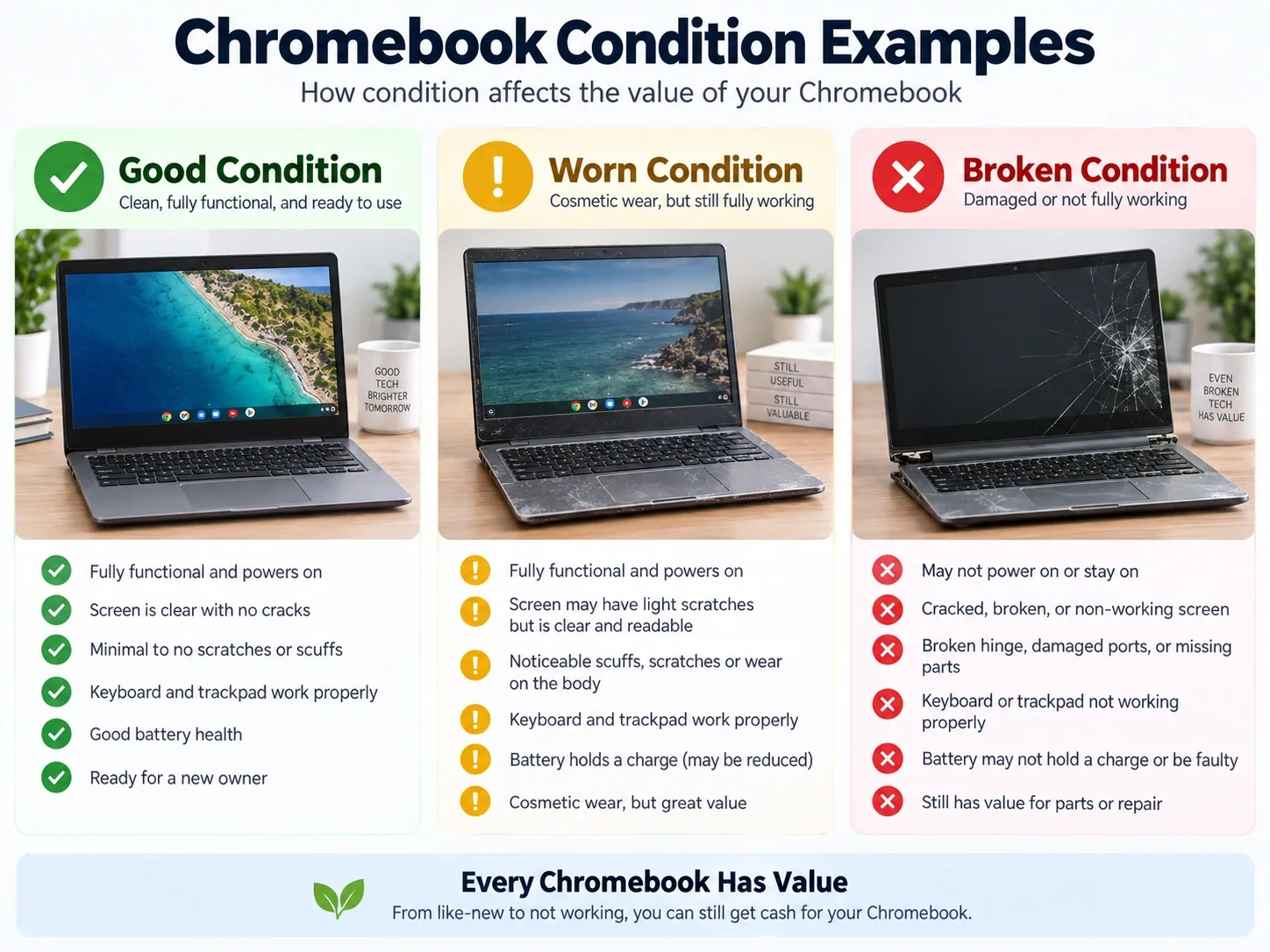
1.5 Physical and Functional Condition
Condition can make a major difference when selling any used laptop.
Inspect your Chromebook for:
- Cracked display glass or LCD damage
- Dead pixels or backlight problems
- Broken or loose hinges
- Missing keyboard keys
- Keyboard or trackpad problems
- Damaged USB-C or charging ports
- Weak or failed battery
- Cracked plastic or dented housing
- Liquid damage
- Wi-Fi or Bluetooth problems
- Device that does not power on
Describe defects accurately when requesting a quote. A realistic description is more useful than selecting a better condition just to see a higher initial number.
If your computer is damaged, you may also want to read about options for a broken laptop rather than assuming the device has no value.
2. How Fast Do Chromebooks Lose Value?
Chromebooks, like other laptops, generally depreciate as newer hardware reaches the market and older computers accumulate battery wear and cosmetic damage.
SellLaptopBack maintains a laptop depreciation guide based partly on its displayed catalog and category research. At the time this article was prepared, that catalog contained more than 16,000 laptop listings.
The guide estimates that a typical working laptop may lose roughly 45% of its original value during the first year, around 65% by the second year and around 78% by the third year. These figures are category-level estimates, not guaranteed values for an individual Chromebook.
Your actual offer depends on the exact model, specification, condition, defects and current demand.
Why Laptop Values Usually Decline
Several forces work against an unused laptop over time:
- New processor generations reach the market.
- RAM and storage expectations increase.
- Battery capacity declines with use and age.
- Replacement parts may become less desirable or harder to obtain.
- New operating-system features may favor newer hardware.
- Demand moves toward current models.
- Cosmetic damage can accumulate.
This is one reason selling a laptop you no longer use may make more financial sense than storing it for several additional years.
If your broader goal is simply to turn an unused computer into money, see the site's guide to getting cash for a laptop as well.
3. Where Can I Sell a Chromebook for Cash?
There is no single selling method that is ideal for everyone. The best option depends on whether you prioritize the highest possible selling price, convenience, speed, cash payment or minimal effort.
3.1 Specialized Online Laptop Buyers
An online laptop buyer can remove many of the steps involved in selling directly to another person.
Instead of photographing the computer, writing a marketplace listing, responding to messages and negotiating with individual buyers, you identify the model and condition and receive an offer.
SellLaptopBack's current How It Works process provides an instant catalog quote when the model is listed, a prepaid shipping-label option, inspection in Reno, Nevada, and payment after the device matches the submitted model and condition.
3.2 Retail and Manufacturer Trade-In Programs
Retailers and manufacturers sometimes operate trade-in programs for qualifying devices.
These programs can be convenient when you are already purchasing a replacement computer, but always check how the compensation is issued. A quoted trade-in amount may be paid as store credit, gift card or credit toward another purchase rather than unrestricted cash.
3.3 Local Computer Buyers
Some computer shops purchase used laptops locally. This can be convenient if you want an in-person transaction and a nearby business happens to need your particular model.
Inventory requirements and offers can vary considerably between stores.
3.4 Direct Marketplace Sale
Selling directly to another individual may sometimes produce a higher gross price, but the seller takes on more of the work and risk.
You may need to:
- Research a realistic asking price
- Take photographs
- Create a listing
- Answer buyer questions
- Negotiate
- Handle payment
- Package and ship the computer
- Manage potential returns or disputes
- Arrange an in-person meeting for local sales
Compare the net amount you keep, not merely the highest advertised selling price.
Marketplace fees, payment-processing fees, shipping expenses and your time all matter.
For a broader comparison of selling routes, see different places to sell a laptop.
4. Chromebook Trade-In vs Selling for Cash
The terms trade-in and sell are frequently used as though they mean the same thing, but the actual transaction can be different.
4.1 Trade-In Credit
A trade-in program may give you credit toward another product or provide a retailer-specific gift card.
That can be valuable if you already intend to purchase something from that company.
4.2 Cash Sale
Selling a Chromebook for cash means the value is not necessarily tied to buying another device from the same retailer.
If you are replacing a Chromebook with something purchased elsewhere, paying bills, buying unrelated equipment or simply want the money, a cash sale may offer more flexibility.
4.3 Compare the Whole Transaction
When comparing a trade-in and a cash offer, evaluate:
- Actual amount received
- Cash versus restricted credit
- Shipping cost
- Selling or payment fees
- Condition requirements
- Time needed to complete the transaction
- Whether damaged devices are eligible
- Whether the offer can change after inspection
- Return terms if you reject a revised offer
Read the terms before shipping any device. For SellLaptopBack-specific questions about inspections, revised offers and returns, review the selling FAQ.
5. Can I Sell an Old Chromebook?
Yes, some older Chromebooks can still be sold. Age alone does not determine whether a Chromebook has value.
An older model may still appeal to a buyer if it is functional, inexpensive, clean and appropriate for basic tasks. Other older systems may be more valuable for parts than as complete computers.
When evaluating an older Chromebook, check:
- Exact model number
- Processor
- RAM and storage
- Battery condition
- Screen condition
- Keyboard and trackpad
- Charging ports
- Remaining ChromeOS support
- Whether it is enterprise or school managed
- Whether it powers on normally
Google explains that older Chromebooks eventually stop receiving new software updates and recommends checking the device's Auto Update Expiration information to understand its remaining official support life. You can read Google's current guidance for using or upgrading an older Chromebook.
An older device reaching the end of its normal update period is not automatically worthless, but support life is a relevant consideration for future users.
6. Can I Sell a Broken Chromebook?
A broken Chromebook may still have value depending on the model and the type of damage.
A damaged computer might be repairable, refurbished for reuse, used as a source of parts or responsibly recycled if repair is no longer practical.
6.1 Cracked Chromebook Screen
A cracked display can significantly reduce value because replacement screens, touch assemblies and labor can be expensive relative to the value of an entry-level Chromebook.
Do not automatically replace a broken display before selling. First compare the likely increase in resale value with the cost of the repair.
6.2 Weak or Failed Battery
Lithium-ion batteries wear over time. A Chromebook may still function normally from its power adapter even when the battery holds very little charge.
Disclose a weak or failed battery when describing the device.
6.3 Broken Keyboard or Missing Keys
Keyboard problems range from one missing keycap to an entire keyboard that no longer responds.
The repair cost varies dramatically by model because some keyboards are easy to replace while others are integrated into a larger palmrest assembly.
6.4 Damaged USB-C or Charging Port
A Chromebook that cannot charge normally may still have value, but charging-port problems should be disclosed.
A damaged port can be a simple replaceable component on one model and a motherboard-level repair on another.
6.5 Broken Hinges
Do not repeatedly force a damaged hinge open and closed. A failed hinge or mounting point can cause additional damage to the display cable, bezel, LCD cover or palmrest.
6.6 Chromebook Will Not Turn On
A no-power condition can have many causes, including a bad battery, failed charger, charging-port damage or motherboard failure.
If you do not already know the cause, spending heavily on diagnosis solely to sell the computer may not make economic sense.
6.7 Liquid Damage
Liquid exposure can affect multiple components and cause corrosion even when the Chromebook initially appears to work.
Always disclose known liquid damage.
For damaged computers generally, see SellLaptopBack's information about selling a broken laptop for cash.
7. How to Find Your Chromebook Model
Correct model identification is one of the most important steps when requesting a Chromebook quote.
7.1 Look at the Bottom Label
Turn the Chromebook over and inspect the manufacturer's label.
You may find:
- Model number
- Product number
- Serial number
- Service tag
- Regulatory model
If you cannot find the Chromebook in the SellLaptopBack catalog, the custom quote page allows you to provide the information from the sticker or a photograph of it.
7.2 Check ChromeOS
If the computer starts normally, open Settings > About ChromeOS. This area can help confirm system information and, under additional details, show information about the device's update schedule.
7.3 Check the Original Box or Receipt
The original packaging, receipt or online order history may identify the exact product number and configuration.
7.4 Use the Manufacturer's Support Site
Manufacturer support tools can also help identify hardware from a serial number or product number. Useful official support destinations include:
These are preferable to guessing from photographs because several Chromebook configurations can share nearly identical external designs.
8. Why ChromeOS Update Support Matters
ChromeOS update support is one factor worth checking when evaluating an older Chromebook.
Google allows users to see the update schedule from Settings > About ChromeOS > Additional details. Google describes the Auto Update Expiration information as the most reliable way to determine a Chromebook's remaining period of official software support.
You can check Google's current Chromebook update guidance for details.
Google has also expanded support for many models. Certain eligible Chromebooks released before 2021 can opt into extended updates totaling up to 10 years from the platform's release. Google notes that extended updates on affected devices can involve feature changes, including removal of Android app and Google Play support.
Because policies and device-specific dates can change, check Google's current information for the exact Chromebook rather than relying on an old article or assuming that every Chromebook follows the same date.
9. What to Do Before Selling a Chromebook
Before selling or shipping your Chromebook, spend a few minutes preparing it properly.
9.1 Back Up Important Files
Check your Downloads folder and other local storage for anything you need to keep.
Copy important local files to Google Drive, another cloud-storage service or an external storage device before resetting the Chromebook.
9.2 Confirm That Synced Information Is Available
If you rely on synchronized Chrome settings, bookmarks or other Google-account information, make sure synchronization has completed before resetting the device.
9.3 Remove Personal Accessories
Remove SD cards, USB drives and any other removable storage that you do not intend to sell.
9.4 Clean the Computer
Remove dust, fingerprints and ordinary surface dirt using cleaning methods appropriate for electronics.
A clean computer is easier to inspect and photograph, but avoid aggressive cosmetic repairs that could create more damage.
9.5 Photograph Its Condition
Taking a few photographs before shipping provides a record of the Chromebook's cosmetic condition and how it looked before packaging.
9.6 Record the Model and Serial Number
Save the model and serial number for your records before you reset and ship the device.
10. How to Protect Your Data Before Selling a Chromebook
Data security should be part of any computer resale process.
The U.S. National Institute of Standards and Technology describes media sanitization as the process of making access to data on storage media infeasible for a given level of effort. For an ordinary personally owned Chromebook, Google's built-in factory-reset process is the practical starting point before transferring ownership.
10.1 Powerwash the Chromebook
Google calls the ChromeOS factory-reset process Powerwash.
According to Google's current Chromebook factory-reset instructions, a factory reset erases user data stored on the Chromebook, including files in the Downloads folder. Google recommends backing up files before proceeding.
The current standard procedure is:
- Sign out of the Chromebook.
- Press and hold Ctrl + Alt + Shift + R.
- Select Restart.
- Select Powerwash.
- Select Continue.
- Follow the instructions displayed on the screen.
Because software interfaces can change, verify the procedure against Google's current support page before resetting your computer.
10.2 Work or School Chromebooks Require Special Attention
A Chromebook managed by a school, employer or other organization may remain enrolled in that organization's management system.
Google specifically notes that users of work or school Chromebooks may need to contact their administrator to wipe and re-enroll the device.
Do not sell a Chromebook owned by an employer, school or other organization. If the computer is legitimately yours but remains managed, resolve the enrollment issue before attempting to sell it.
10.3 SellLaptopBack Data Handling
SellLaptopBack's current device-selling process also describes storage wiping on intake where applicable. Even so, you should back up anything you need and reset your own Chromebook before shipping whenever possible.
11. Should I Repair My Chromebook Before Selling It?
Not necessarily.
Repairing a device only makes financial sense when the increase in value is greater than the repair cost, time and risk.
Before repairing a Chromebook solely for resale, compare:
- Estimated value in its current condition
- Estimated value after the repair
- Replacement-part cost
- Labor cost
- Difficulty of the repair
- Possibility of additional hidden damage
- Time required
For example, paying for an expensive display assembly on a low-value Chromebook may recover less money than the repair costs.
On the other hand, a simple inexpensive fix may make sense when the problem is known and the repair can be completed reliably.
Do not assume that upgrades always increase a buyback offer dollar-for-dollar. Buyers value configurations according to demand, and aftermarket upgrade costs are not always recovered during resale.
12. How to Get the Best Price for a Chromebook
You cannot prevent normal depreciation, but you can avoid several mistakes that unnecessarily reduce the amount you receive.
12.1 Identify the Correct Model
Wrong-model submissions are one of the easiest problems to avoid.
Use the label, serial information, ChromeOS details or a custom Chromebook quote instead of choosing a similar-looking device.
12.2 Be Accurate About Condition
Report cracked screens, battery problems, damaged ports, missing keys, broken hinges and other known defects.
The most useful quote is one based on what the computer actually is, not the condition you wish it were in.
12.3 Do Not Wait for an Unused Laptop to Become Older
If you have already replaced the computer and know you will not use it again, additional storage time usually works against resale value.
SellLaptopBack's own laptop value research illustrates how quickly laptop values can decline during the first few years.
12.4 Compare Net Value
A private sale with a higher headline price is not always the transaction that leaves you with the most useful outcome.
Compare:
- Offer or selling price
- Marketplace fee
- Payment fee
- Shipping cost
- Packaging expense
- Return risk
- Time spent listing and negotiating
12.5 Keep the Chromebook in Reasonable Condition
If you are still using it, protect the screen, hinges, ports and case. Avoid storing the Chromebook in extreme heat and do not leave it where the chassis or display can be physically stressed.
13. How to Pack and Ship a Chromebook Safely
A working Chromebook can quickly become a damaged Chromebook if it is poorly packaged.
SellLaptopBack's current packing and shipping instructions recommend using a sturdy cardboard box with adequate cushioning around the device rather than mailing a laptop loose or in a thin envelope.
For a safer shipment:
- Shut the Chromebook down completely.
- Remove removable storage and personal accessories.
- Protect the laptop with appropriate cushioning.
- Use a sturdy cardboard shipping box.
- Prevent the computer from moving freely inside the box.
- Seal the box securely with packing tape.
- Follow the instructions associated with your shipping label.
- Keep your drop-off receipt and tracking information.
The current SellLaptopBack shipping page contains the detailed rules for prepaid-label eligibility, packing, insurance and location-specific shipping, so review it immediately before sending your Chromebook rather than relying on an older copy of the policy.
14. How Selling a Chromebook to SellLaptopBack Works
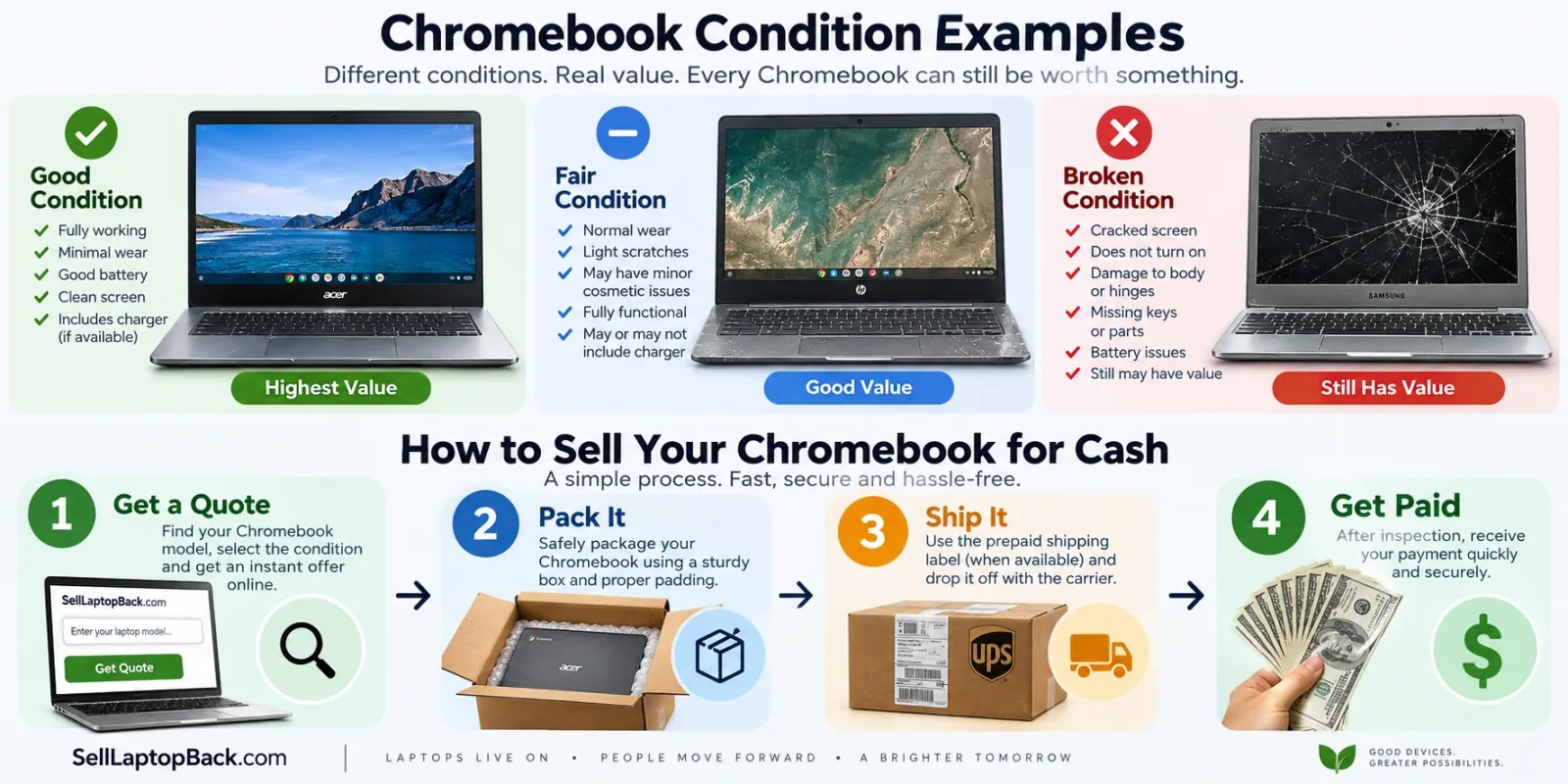
If you decide to use SellLaptopBack instead of managing a private sale, the current process is straightforward.
14.1 Get a Quote
Search the catalog for the Chromebook or laptop model, select the applicable condition and review the displayed offer.
If the exact model is not available, submit a custom personalized quote request.
14.2 Pack the Chromebook
Follow the current packing instructions and protect the device carefully.
14.3 Ship the Computer
SellLaptopBack's current How It Works page describes prepaid UPS or FedEx labels as available through its selling workflow. Follow the carrier and label shown for your actual order.
14.4 Inspection
After the computer arrives in Reno, the device is inspected to confirm the model and condition submitted with the quote.
If the Chromebook matches the submitted information, the quoted amount is paid. If something material differs, the current process provides a revised offer rather than silently treating it as accepted.
14.5 Payment
Current payment options are shown during the selling process and on the site's How It Works page.
Because payment and shipping options can evolve, rely on the current checkout and policy pages rather than an old screenshot or article.
14.6 Check Real Seller Experiences
Before selling electronics to any company, it is reasonable to look for evidence that other customers have completed the process. SellLaptopBack maintains a customer reviews page where prospective sellers can read previous customer experiences.
15. Popular Chromebook Brands
ChromeOS computers have been produced by many major computer manufacturers. SellLaptopBack's sitemap contains dedicated laptop sections for several brands that also manufacture Chromebooks.
15.1 Acer Chromebook
Acer has produced many entry-level, mainstream and convertible ChromeOS systems, including the Chromebook Spin family.
Browse the Acer laptop catalog when identifying an Acer Chromebook.
SellLaptopBack also has older Chromebook-specific content such as the Acer Chromebook 11 CB3-111, which helps connect older Chromebook content with the newer selling guide.
15.2 ASUS Chromebook
ASUS produces standard clamshell Chromebooks as well as Chromebook Flip convertible systems.
Browse ASUS laptops for relevant listed models.
15.3 Dell Chromebook
Dell has produced ChromeOS systems for education, business and general-purpose computing.
Browse the Dell laptop catalog or read the site's existing Dell Chromebook 11 guide.
15.4 HP Chromebook
HP Chromebook models include traditional laptops and convertible x360 systems.
Browse HP laptops to locate supported models.
15.5 Lenovo Chromebook
Lenovo has produced IdeaPad, Flex, Duet, ThinkPad and other ChromeOS product families.
Browse Lenovo laptops for matching systems.
15.6 Samsung Chromebook
Samsung has offered everything from basic Chromebooks to premium Galaxy Chromebook models.
Browse Samsung laptops for available models.
15.7 Google Pixelbook
Google's own ChromeOS hardware has included systems such as Pixelbook and Pixelbook Go.
Browse the Google laptop section for relevant devices.
16. What Is Chromebook Plus and Does It Affect Value?
Chromebook Plus is Google's higher-specification Chromebook category.
According to Google's current Chromebook Plus eligibility documentation, qualifying systems use a combination of higher minimum hardware specifications, including at least 8GB RAM and 128GB storage along with qualifying processors, display and webcam requirements.
Google's current Chromebook Plus overview also highlights newer productivity and AI capabilities associated with the category.
That does not mean every Chromebook Plus computer has the same resale value.
A Chromebook Plus model's value still depends on:
- Exact manufacturer and model
- Processor
- RAM
- Storage
- Age
- Physical condition
- Battery condition
- Current demand
- Defects
A newer designation is one piece of the valuation, not a substitute for identifying the exact computer.
17. When Is the Best Time to Sell a Chromebook?
For most personal electronics, a practical time to sell is when you have stopped using the device but it still has useful life and demand remaining.
You may want to consider selling when:
- You have already purchased a replacement laptop.
- The Chromebook has been unused for several months.
- You need more performance than the old Chromebook provides.
- You are moving from ChromeOS to Windows or macOS.
- You are replacing multiple household computers.
- Your business or organization is refreshing hardware.
- You would rather recover some remaining value now.
Waiting is not always harmful—you may still need the machine—but an unused computer generally does not become more desirable simply because it spends another year in storage.
The SellLaptopBack laptop depreciation guide provides additional context for how laptop values can decline as equipment ages.
18. Should You Sell, Keep or Recycle Your Chromebook?
Selling is not automatically the correct choice for every Chromebook.
Keep It When It Is Still Useful
If the computer performs the tasks you need and continues to receive the support you require, continuing to use it can deliver more value than selling it.
Sell It When You No Longer Need It
If you already replaced the Chromebook and it spends most of its time unused, selling can recover some remaining value before the device becomes older.
Repair It When the Economics Work
Repair makes sense when the cost is reasonable relative to the value and usefulness gained.
Recycle It When Reuse Is No Longer Practical
Some devices eventually reach a condition where repair or resale is uneconomical.
The U.S. Environmental Protection Agency recommends reuse and appropriate electronics recycling rather than treating computers as ordinary trash. The EPA's electronics recycling guidance also points consumers toward manufacturer, retailer and certified recycling options.
Reuse generally keeps a functional computer or its usable parts in service longer, while responsible recycling becomes important when reuse is no longer practical.
19. Selling Multiple Chromebooks
Businesses, repair shops, schools, resellers and IT departments may have multiple Chromebooks or laptops to dispose of at the same time.
For several devices, organization becomes especially important.
Create a simple inventory containing:
- Manufacturer
- Model number
- Quantity
- Processor if known
- RAM
- Storage
- Working or non-working condition
- Major defects
- Management or account-lock status
For larger quantities, use SellLaptopBack's bulk and reseller laptop quote process instead of entering every device as an unrelated consumer transaction.
Organizations should also follow their own data-retention and sanitization policies before transferring equipment. NIST's Guidelines for Media Sanitization are a useful authoritative reference for organizations developing formal media-disposition procedures.
20. Frequently Asked Questions About Selling a Chromebook for Cash
20.1 Can I Sell My Chromebook for Cash?
Yes. Depending on the model and condition, you may be able to sell a Chromebook to a specialized laptop buyer, local computer buyer or individual buyer. Some trade-in programs also accept Chromebooks, although their compensation may be store credit rather than cash.
20.2 How Much Is My Used Chromebook Worth?
The value depends on the exact model, processor, RAM, storage, age, physical condition, battery health, defects, update support and current demand.
Identify the model before requesting a quote instead of relying on an average Chromebook price.
20.3 Where Can I Sell My Chromebook?
Options include online laptop-buyback companies, direct marketplaces, local computer stores and qualifying manufacturer or retailer trade-in programs.
If convenience and a direct quote are important, start by checking the device through the SellLaptopBack catalog.
20.4 Can I Sell an Old Chromebook?
Yes, some older Chromebooks still have resale or parts value. The amount depends on the model, condition and remaining demand.
20.5 Can I Sell a Chromebook With a Cracked Screen?
Potentially. A cracked display normally lowers the value because repair cost must be considered, but screen damage does not automatically make every Chromebook worthless.
20.6 Can I Sell a Chromebook That Does Not Turn On?
A non-working Chromebook may still have parts, repair or recycling value. Clearly report the no-power condition when requesting an offer.
20.7 Can I Sell a Chromebook With a Bad Battery?
Possibly. Battery failure typically affects the value, but a Chromebook does not automatically become worthless because its battery needs replacement.
20.8 Can I Sell a Chromebook Without the Charger?
That depends on the buyer and model. Always state clearly what is and is not included. Check the buyer's current instructions before adding accessories to a shipment.
20.9 Should I Powerwash My Chromebook Before Selling It?
For a personally owned Chromebook, factory resetting the device after backing up your files is a sensible step before changing ownership. Google calls this reset process Powerwash and maintains the current instructions on its official Chromebook Help page.
20.10 Will Powerwash Delete My Google Drive Files?
Google states that Powerwash erases user data stored locally on the Chromebook but does not delete files stored in Google Drive or on external storage. Still, verify that important files are actually synchronized or backed up before resetting the computer.
20.11 How Do I Check When My Chromebook Stops Receiving Updates?
Open Settings > About ChromeOS > Additional details and look for the update schedule. Google's support documentation explains how to check the device-specific Auto Update Expiration information.
20.12 Does a Chromebook Plus Have More Value?
It may. Chromebook Plus represents a higher-specification category, but resale value still depends on the exact model, age, hardware and condition. The Plus designation by itself does not determine a cash offer.
20.13 Can I Sell a School Chromebook?
Only sell a device that you legally own.
If the Chromebook belongs to a school, employer or other organization, it should not be sold by the user. If you legitimately own an ex-school or ex-business Chromebook but it remains enterprise-managed, resolve the management status before selling it.
20.14 What if I Cannot Find My Chromebook Model?
Do not select a different model simply because it looks similar.
Use SellLaptopBack's custom quote form and provide the information from the device label.
20.15 Is It Better to Sell a Chromebook or Trade It In?
It depends on your goal. Trade-in credit can be useful if you already intend to shop with that retailer. A cash sale offers more flexibility because the money is not necessarily tied to another purchase.
20.16 Should I Repair a Broken Chromebook Before Selling It?
Only when the expected increase in value reasonably exceeds the cost, time and risk of repair.
20.17 How Should I Ship a Chromebook?
Use a sturdy box with enough cushioning to prevent the device from moving or taking a direct impact. Follow the buyer's current packaging rules and retain your shipment tracking information.
For SellLaptopBack orders, review the current packing and shipping policy before mailing the computer.
20.18 How Do I Know Whether an Online Laptop Buyer Is Legitimate?
Look for clear company information, understandable selling terms, current contact information, shipping and return policies, and customer experiences. Do not rely on a high advertised "up to" value without understanding what the specific device is actually being quoted.
SellLaptopBack provides its selling process, FAQ, customer reviews and shipping information publicly so sellers can review the process before submitting a device.
21. Turn Your Unused Chromebook Into Cash
A Chromebook does not need to be brand new to be worth checking.
The best starting point is simple:
- Identify the exact Chromebook model.
- Check its specifications.
- Evaluate its real physical and functional condition.
- Back up the data you need.
- Check remaining ChromeOS support if the computer is older.
- Compare your realistic selling options.
- Choose the option that provides the right balance of value, convenience and risk for you.
If you own an Acer, ASUS, Dell, HP, Lenovo, Samsung, Google or another Chromebook that is no longer being used, check whether it still has cash value before leaving it in storage or sending it directly to recycling.
You can sell your Chromebook or laptop for cash through SellLaptopBack by finding the model and reviewing the current offer.
If your exact Chromebook is not listed, request a custom quote.
If the Chromebook is damaged, see the options for a broken laptop.
And before shipping, review how the selling process works and the current packing and shipping instructions.
Authoritative Sources and Further Reading
- Google Chromebook Help: Reset your Chromebook to factory settings
- Google Chromebook Help: Use or upgrade an old Chromebook
- Google Chromebook Help: Extended updates support
- Google Chromebook Help: Chromebook Plus eligibility
- Google: Chromebook Plus
- NIST: Guidelines for Media Sanitization
- U.S. EPA: Electronics and e-waste guidance