





Find Out What Your Laptop Still Worth
An older laptop does not automatically become worthless when a newer model replaces it. Some machines still have strong resale value years later. Others are more useful for repair, replacement parts, donation or responsible recycling.
The difference depends on the computer you actually have: its exact model, processor, graphics hardware, RAM, storage, screen, battery, physical condition and whether it still works properly.
If you already know the model, you can find your laptop and check its current offer. If you are unsure whether an older computer is still worth selling, this guide will help you decide before you spend money repairing it or leave it sitting in a drawer for another year.
On This Page
- Is an Old Laptop Still Worth Money?
- What Determines an Older Laptop's Value?
- How Age Changes Laptop Value
- The Exact Model Matters More Than the Logo
- Should You Repair the Laptop Before Selling It?
- What If the Laptop Is Broken?
- Can an Old Laptop Still Be Valuable for Parts?
- Real Laptop Teardowns: What Is Actually Inside?
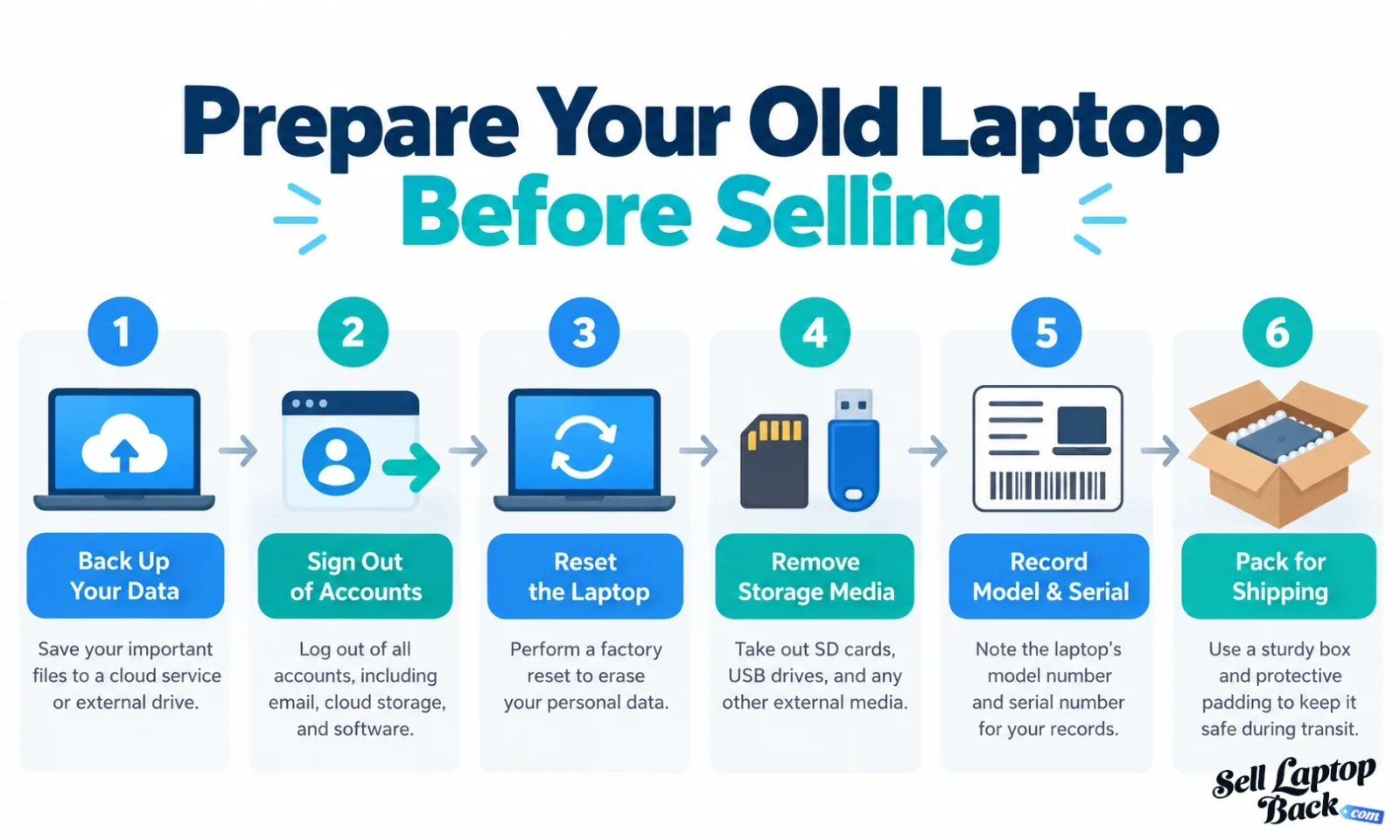
- Remove Your Personal Data Before Selling
- Where Can You Sell an Old Laptop?
- Older MacBooks
- Older Business Laptops
- Older Gaming Laptops
- Packing and Shipping an Older Computer
- When Donation or Recycling Makes More Sense
- Frequently Asked Questions
Is an Old Laptop Still Worth Money?
Very often, yes.
Age matters, but age by itself is a poor way to value a computer. A six-year-old mobile workstation with a dedicated GPU, upgradeable memory and usable replacement parts may still be worth considerably more than a newer entry-level notebook with a failed motherboard.
The same applies to premium ultrabooks, ThinkPads, Dell Precision workstations, MacBooks and gaming laptops. Some models remain useful for years because the hardware is still capable, replacement components are available, or buyers are specifically looking for that generation.
Instead of asking only, “How old is it?”, ask:
- What exact model is it?
- Which processor does it have?
- Does it have dedicated graphics?
- How much RAM is installed?
- What type and size of SSD does it have?
- Does the display work correctly?
- Does the battery still hold a charge?
- Are the hinges and chassis intact?
- Does it power on?
- What would it cost to repair its defects?
Our laptop depreciation guide looks at value loss in more detail, while the laptop model catalog lets you check a specific computer instead of estimating from age alone.
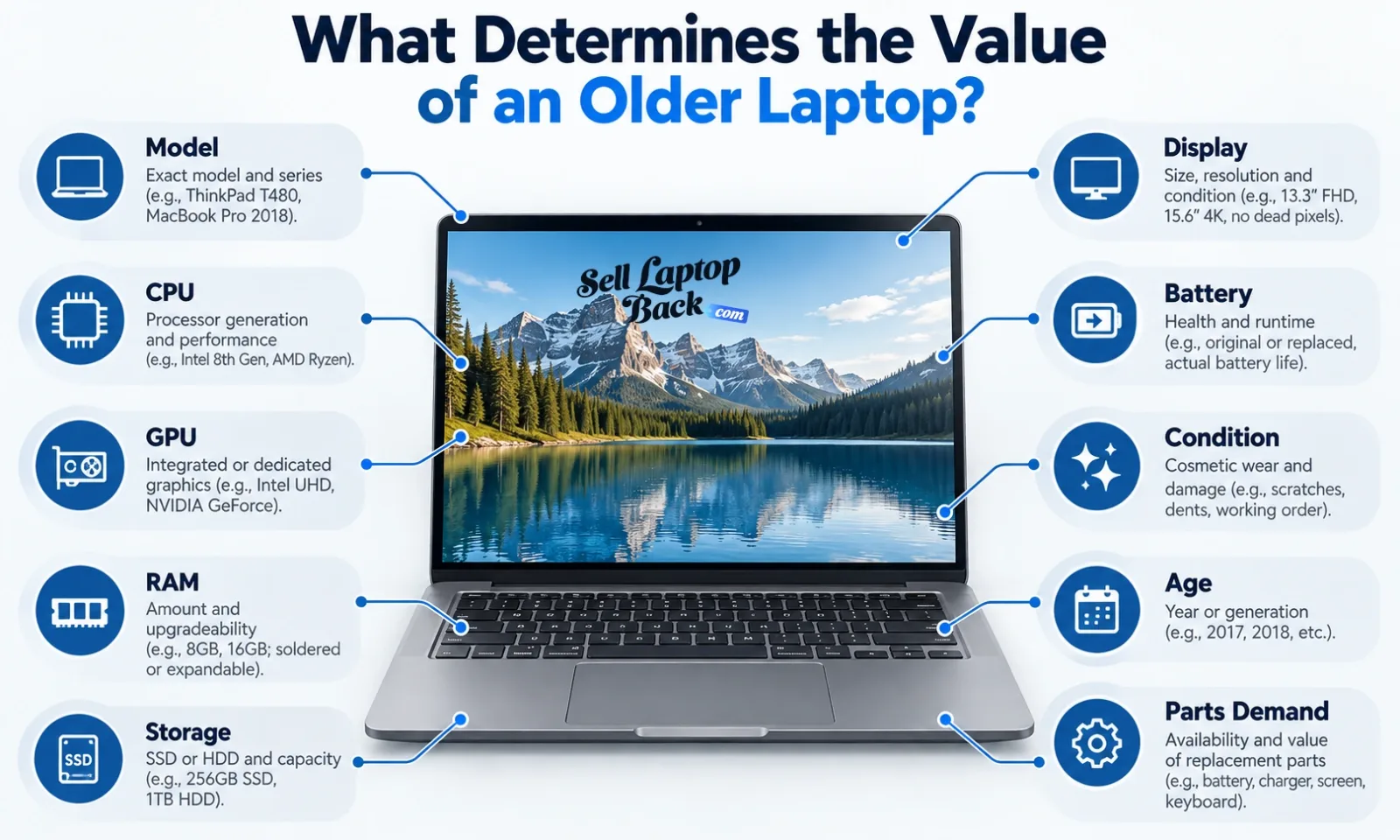
What Determines the Value of an Older Laptop?
Two computers from the same year can have completely different values because laptop families are often sold in many configurations.
Processor
The processor affects performance, operating-system compatibility and the type of work the machine can still handle. Generation matters, but so does the class of processor. An older high-performance Core i7, Ryzen 7 or workstation CPU may still serve a very different market from a low-power entry-level chip.
Graphics Hardware
Dedicated NVIDIA or AMD graphics can significantly change how useful an older machine remains for gaming, CAD, video work, 3D applications and GPU-accelerated software.
This is especially important with mobile workstations and gaming systems. Two laptops that look nearly identical from the outside may have very different graphics configurations inside.
RAM
Memory affects how well the machine handles modern applications and multitasking. It also matters whether RAM is replaceable, partially soldered or permanently soldered to the motherboard.
An older laptop with accessible SODIMM slots may remain attractive to someone who can upgrade it economically.
SSD and Storage
An SSD-equipped system generally offers a much better everyday experience than an otherwise similar computer running from an old mechanical hard drive.
Storage capacity also matters. A 1TB NVMe configuration is not the same machine, economically or practically, as a 128GB base configuration.
Display
The condition and specification of the screen can have a large effect on value.
Check for:
- cracks
- dead pixels
- pressure marks
- vertical or horizontal lines
- backlight problems
- touchscreen failure
- screen discoloration
A replacement display may be inexpensive on one model and uneconomical on another.
Battery
Battery wear is expected as a notebook ages. Reduced runtime is different from a battery that no longer charges, shuts the machine down unexpectedly or has physically swollen.
A failed battery does not necessarily destroy the value of the rest of the laptop, but its replacement cost should be part of the calculation.
Chassis and Hinges
Cosmetic wear usually matters less than structural damage. A scratched lid is one thing; a cracked palm rest, bent chassis or hinge pulling away from its mounting points is another.
These details help determine whether a machine is a straightforward used computer or a repair project.
How Age Changes Laptop Value
Electronics generally lose value as newer hardware arrives, but there is no honest universal rule such as “every laptop loses 3% each month.” Different product categories depreciate at different rates.
Several things happen as a computer becomes older:
- new processor and GPU generations appear
- new machines offer more performance at similar prices
- batteries accumulate wear
- software requirements change
- manufacturer support eventually ends
- some replacement parts become harder to justify economically
- buyer demand shifts to newer platforms
But older does not automatically mean obsolete.
Business laptops, gaming notebooks, mobile workstations, MacBooks, Chromebooks and inexpensive consumer systems all behave differently in the secondary market.
That is why our general laptop depreciation guide and separate MacBook depreciation guide are more useful than applying one percentage to every computer.
The Exact Model Matters More Than the Logo
Knowing that a computer is a Dell, HP or Lenovo is only the beginning.
A manufacturer may sell hundreds of machines under familiar family names. A Dell Latitude can be very different from a Dell Precision. A Lenovo IdeaPad is not the same type of system as a ThinkPad P-series workstation. An HP Pavilion serves a different market from some EliteBook and ZBook configurations.
You can browse specific manufacturer catalogs including:
- Apple laptops and MacBooks
- Dell laptops
- HP laptops
- Lenovo laptops
- ASUS laptops
- Acer laptops
- Microsoft Surface models
- MSI laptops
- Razer gaming laptops
The complete catalog includes additional manufacturers and thousands of individual configurations.
Identifying the exact model also makes repair research easier because components such as batteries, screens, keyboards, fans and motherboards are usually model-specific.
Should You Repair an Old Laptop Before Selling It?
Sometimes. But repairing a machine simply because something is broken is not always financially sensible.
The important calculation is:
Expected value after repair - current value - repair cost = whether the repair makes economic sense.
Suppose an older notebook is worth approximately $250 in good working condition but needs a display assembly that will cost $220 plus your time. That repair may not make sense purely for resale.
On the other hand, installing an inexpensive SSD or replacing accessible RAM may make an otherwise usable machine substantially more practical.
Repairs That Can Sometimes Make Sense
- replacing a standard SSD
- adding or replacing RAM
- replacing an inexpensive battery
- replacing a simple DC jack
- installing a missing bottom cover or inexpensive cosmetic part
- cleaning clogged fans and heatsinks
Repairs That Require More Careful Math
- motherboard replacement
- high-resolution or OLED display assemblies
- structural hinge damage
- liquid-damaged boards
- soldered storage or memory problems
- complex top-case or keyboard assemblies
If you are unsure whether a repair makes sense, compare the current-condition quote with the cost of parts first. Our laptop repair and teardown library can also show how difficult a component is to access before you begin taking the computer apart.
What If the Old Laptop Is Broken?
A broken computer is not automatically a worthless computer.
Many machines still contain usable components even when one major part has failed.
Common problems include:
- computer will not power on
- cracked display
- dead or weak battery
- missing keyboard keys
- broken hinge
- damaged charging port
- failed SSD
- overheating
- liquid damage
- motherboard failure
The economic effect depends on the machine.
A failed battery on a serviceable ThinkPad may be straightforward. A failed motherboard in an inexpensive notebook can be a completely different story.
If your computer has major damage, see our guide to selling a broken laptop rather than
Can an Old Laptop Still Be Valuable for Parts?
Yes. In some cases, the individual components are the reason an otherwise uneconomical computer still has value.
Depending on the model, reusable components may include:
- LCD or OLED display assembly
- keyboard
- trackpad
- palm rest
- bottom cover
- hinges
- cooling fan
- heatsink
- speakers
- Wi-Fi card
- RAM
- SSD
- motherboard
- USB or I/O daughterboards
This is another reason we care so much about exact model identification. A display from one generation may look similar to another while using a different connector, mounting system or panel specification.
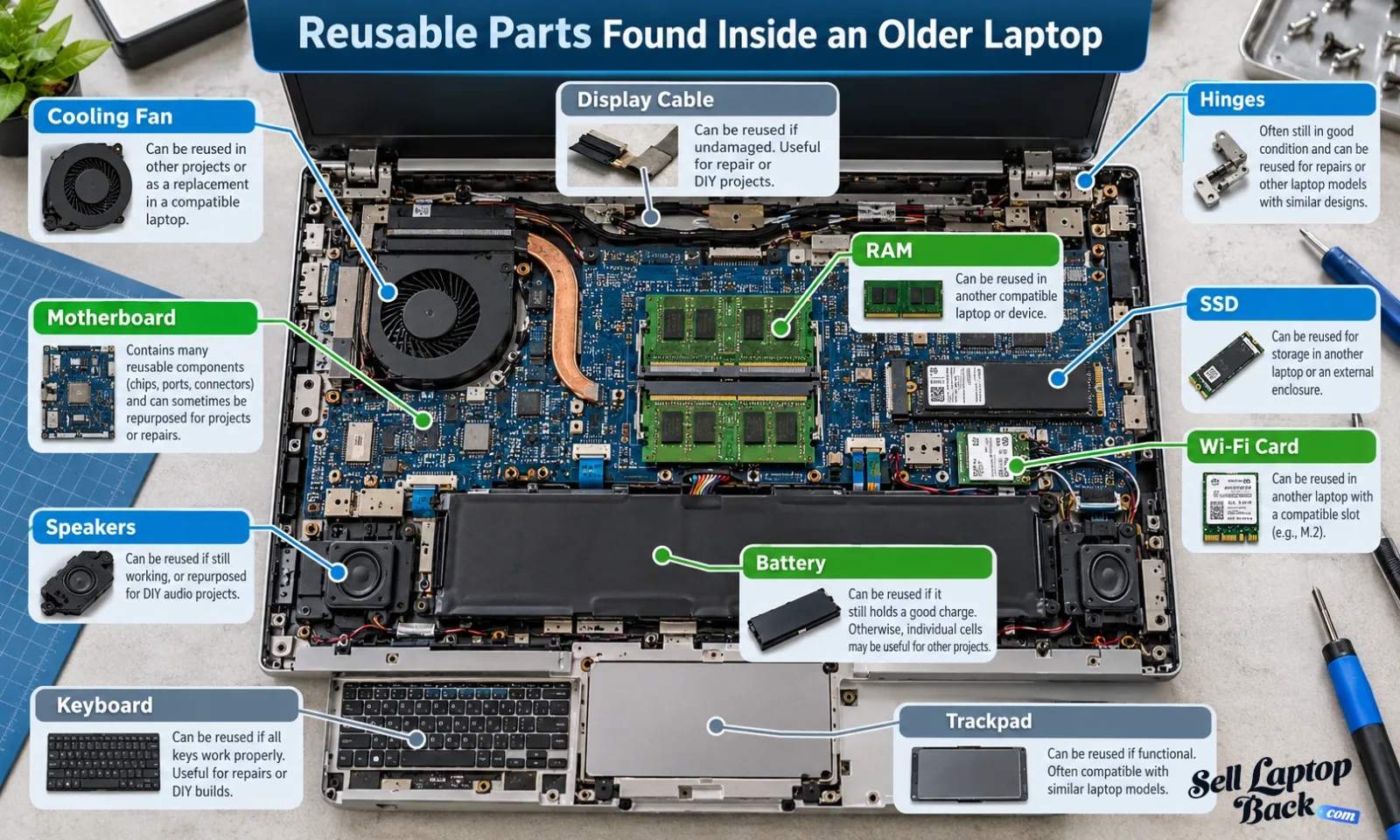
Real Laptop Teardowns: What Is Actually Inside?
We buy and work with real laptops, so a useful way to understand older hardware is to actually open it and look at the components rather than treating every notebook as the same product.
The SellBroke repair channel documents complete disassembly of laptops from Lenovo, Dell, HP, ASUS, MSI, Acer and other manufacturers. These videos show whether memory is replaceable, how many SSD slots a system has, how the battery is mounted, what is involved in replacing the display, and which parts can be removed independently.
Lenovo ThinkPad E14 Gen 2: RAM, SSD, Battery, Motherboard and Display
This ThinkPad teardown shows the battery, RAM, Wi-Fi card, SSD, cooling system, hinges, motherboard, I/O board, keyboard, trackpad, speakers and complete display assembly.
We also have a full internal article for this machine: Lenovo ThinkPad E14 Gen 2 disassembly and upgrade guide.
HP ProBook 445 G11: Full Component-Level Teardown
The ProBook example shows how even a fairly compact business laptop contains many individually identifiable components: RAM, NVMe storage, wireless card, battery, speakers, fan, heatsink, motherboard, I/O board, hinges, keyboard, touchpad and display assembly.
You can browse many more examples in our SellLaptopBack laptop repair library or visit the SellBroke laptop teardown channel on YouTube.
Remove Your Personal Data Before Selling
Before an old computer changes owners, protect the information stored on it.
Back up anything you want to keep before resetting or erasing the machine.
Windows PCs
Microsoft provides a current Reset your PC guide. For a computer being sold or given away, Microsoft describes the Remove everything option and also provides a drive-cleaning setting that makes removed files harder to recover.
Follow Microsoft's current instructions for the Windows version installed rather than an old third-party tutorial because reset options can change over time.
MacBooks
Apple publishes its own instructions for preparing a Mac before selling, giving it away or trading it in.
On supported Macs, Apple provides Erase All Content and Settings. Older models may require additional steps involving Apple ID, Find My, activation settings and disk erasure.
Also Remove Removable Media
Check for anything that may still be connected or inserted:
- SD or microSD cards
- USB flash drives
- wireless mouse receivers
- SIM cards where applicable
- external storage devices
It is also useful to keep your own record of the model and serial number before shipment.
Where Can You Sell an Old Laptop?
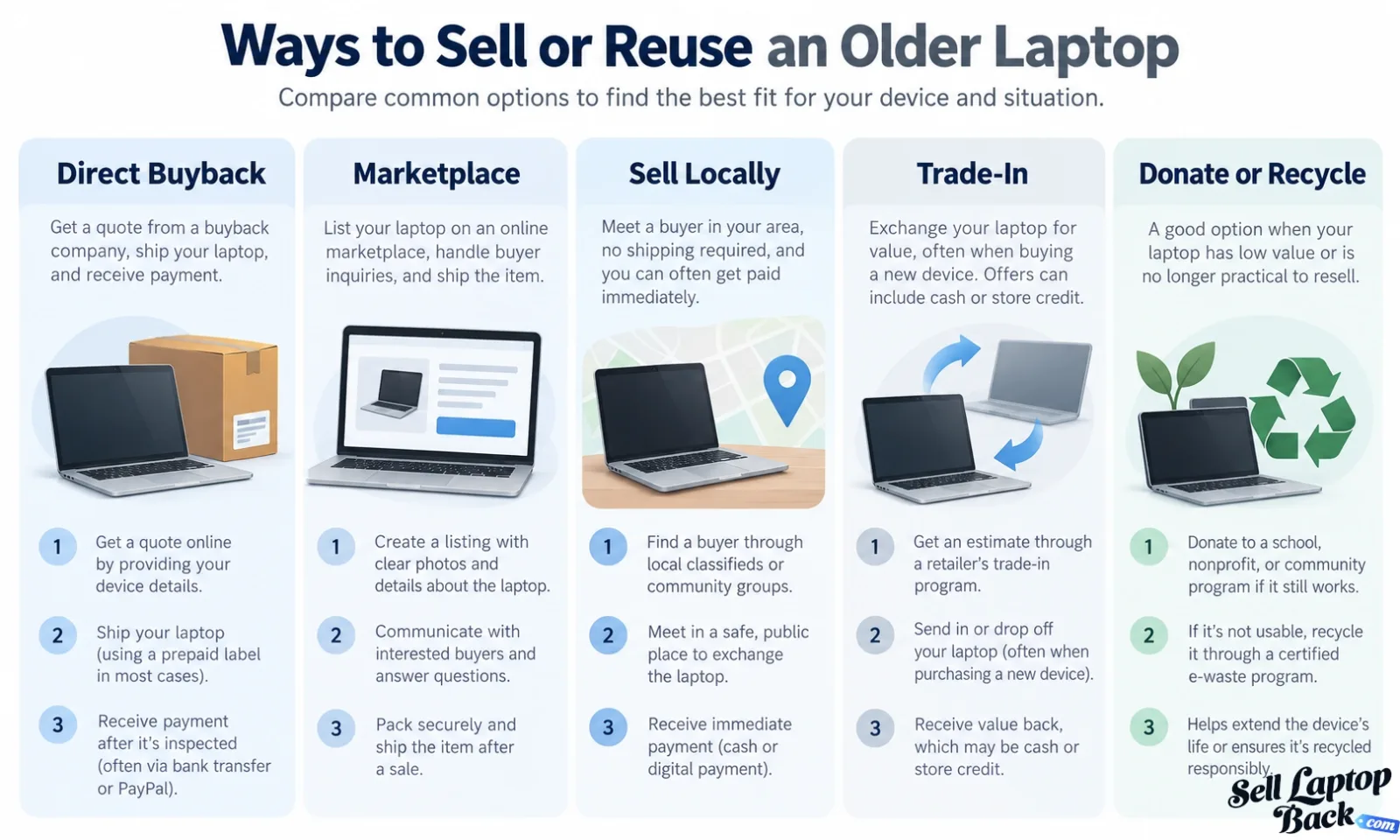
There are several legitimate approaches, and each solves a different problem.
Sell It to Someone You Know
A friend, relative or coworker may want a usable computer, particularly if you can clearly explain its age, specifications and condition.
This can be simple, but your personal network is obviously a much smaller buyer pool than the broader market.
Sell It Locally
Local marketplaces eliminate shipping and may provide immediate payment, but you will need to create a listing, communicate with buyers and arrange the transaction.
If you sell directly to strangers, review the Federal Trade Commission's guidance on scams affecting online sellers. Fake payment notifications, overpayment schemes and verification-code scams are common enough that sellers should understand them before accepting unusual payment instructions.
Use a Marketplace Such as eBay
A national marketplace can expose an unusual model or configuration to many more potential buyers.
The tradeoff is the work involved: photographs, description, buyer communication, pricing, platform fees, packing, shipping and potential returns.
We cover that approach separately in our guide to selling laptops on eBay.
Use a Manufacturer or Retail Trade-In Program
Trade-in programs can be convenient when you are already purchasing another device. Read the terms carefully because compensation may be store credit, purchase credit or another restricted form of value rather than cash.
Our laptop trade-in guide goes deeper into this option.
Use a Direct Laptop Buyer
A direct buyback removes the individual-buyer stage.
With SellLaptopBack, you identify the computer and its condition, receive a quote, ship it using the provided prepaid label, and the machine is inspected against the submitted information.
You can review the current process on the How It Works page or compare additional methods in our guide to the different places to sell a laptop.
What About an Older MacBook?
MacBook value depends heavily on exact generation and configuration.
“MacBook Pro” alone can describe machines separated by well over a decade of hardware development.
Important differences include:
- Intel processor vs. Apple silicon
- M1, M2, M3 and later chip generations
- screen size
- RAM or unified memory
- SSD capacity
- battery health
- display condition
- keyboard generation
- Touch Bar on applicable models
- Activation Lock status
An older Intel MacBook may behave very differently in the used market from an Apple-silicon MacBook Air even when both machines are physically clean.
Browse the Apple laptop catalog for specific models or use the MacBook depreciation guide to better understand how age affects Apple hardware.
Older Business Laptops Can Be Surprisingly Serviceable
Business-class notebooks often deserve special attention because many generations were designed with maintenance and component replacement in mind.
Common examples include:
- Lenovo ThinkPad
- Dell Latitude
- Dell Precision
- HP EliteBook
- HP ProBook
- HP ZBook
Depending on the model, these systems may offer replaceable RAM, multiple storage options, accessible batteries and modular daughterboards.
That does not guarantee high value, but serviceability changes repair economics.
For example, our ThinkPad E14 teardown shows how storage, memory, cooling, motherboard and other components can be reached individually.
You can also browse Lenovo, Dell and HP model catalogs to identify a machine precisely.
Older Gaming Laptops Need a Different Valuation
A gaming notebook cannot be valued only by its age because the GPU may be one of its most important components.
Things to identify include:
- exact NVIDIA or AMD GPU
- GPU memory
- processor
- RAM configuration
- SSD capacity
- display resolution
- refresh rate
- cooling condition
- power adapter
Cooling is especially important. Gaming systems move more heat than typical office notebooks, so clogged heatsinks, damaged fans, dried thermal material or prior overheating may affect the condition of an older system.
Our repair library includes models from ASUS, MSI, Razer and other gaming-oriented manufacturers.
Packing and Shipping an Older Laptop
An old computer may already have weakened hinges, worn plastics or a fragile display, making proper packaging especially important.
Use a strong box and enough protective material to prevent the machine from moving inside it.
Protect:
- the display
- corners
- hinges
- bottom cover
- power adapter
- loose accessories
Do not place a heavy charger directly against the screen where it can strike the panel during transit.
See our laptop packing and shipping guide for more detailed instructions.
When Selling Is No Longer the Best Option
Not every old laptop still has enough economic value to justify a sale.
A very old or severely damaged system may make more sense as a donation, parts source or recycling candidate.
Donation
A functional older machine may still be useful for basic web access, schoolwork, Linux, light office applications or another specialized purpose.
See our laptop donation information if reuse makes more sense than resale.
Recycling
If a system is no longer practical to reuse or repair, electronics should be handled appropriately rather than simply treated like ordinary household waste.
The U.S. Environmental Protection Agency provides information about electronics donation and recycling, including reuse and manufacturer or retailer recycling options.
Lithium-ion batteries require particular care. A swollen or physically damaged battery should not be punctured, crushed or casually shipped.
A Simple Way to Decide What to Do With an Old Laptop
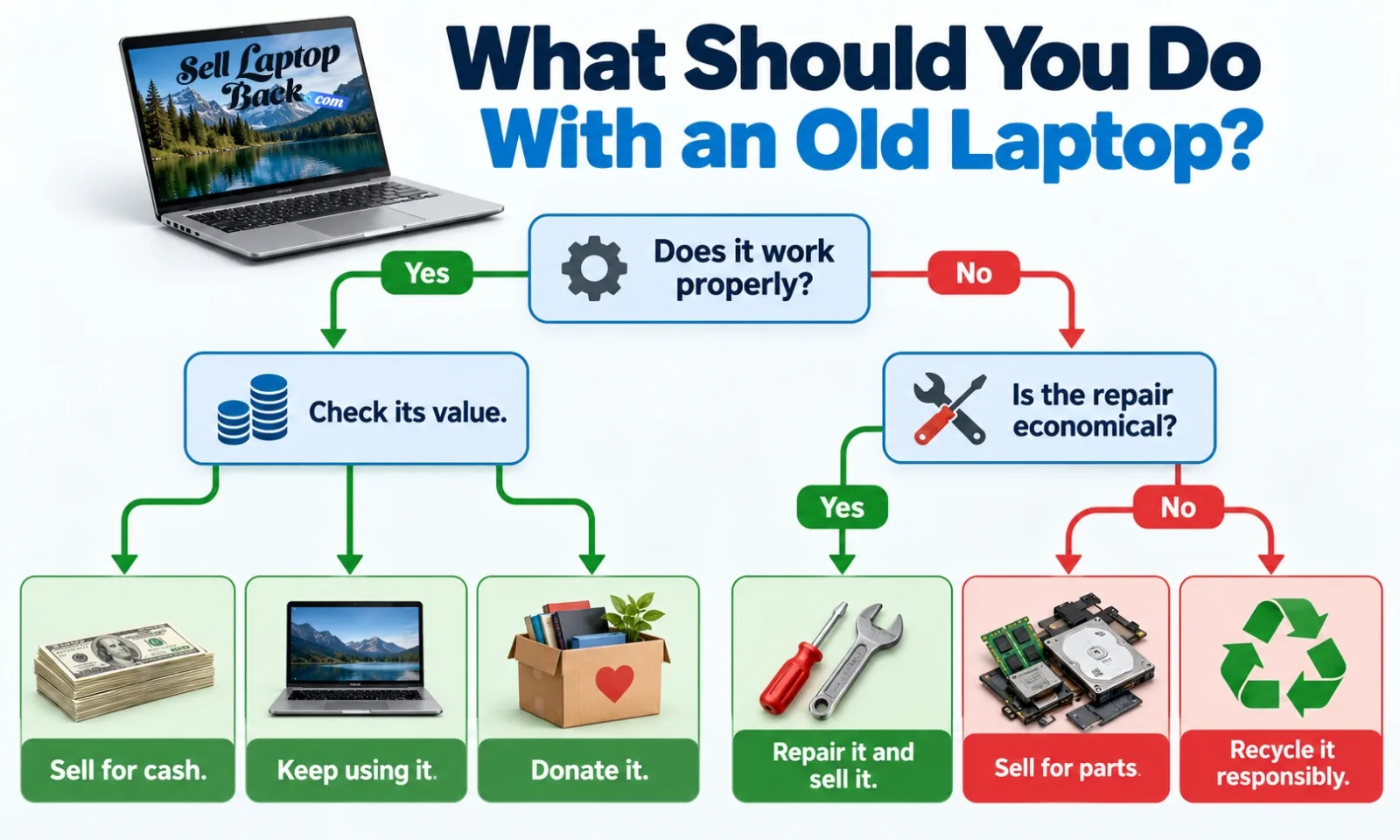
- Identify the exact model.
- Check its processor, GPU, RAM and storage.
- Test the display, keyboard, trackpad, battery and ports.
- Write down any damage or missing components.
- Check the machine's current value in its actual condition.
- Calculate whether repairs would add more value than they cost.
- Compare direct sale, marketplace, trade-in, donation and recycling options.
The important point is not to value an old computer using its original purchase price.
A laptop that originally cost $2,000 can eventually be worth less than a newer $700 machine, while another older workstation may remain useful because of its hardware and serviceability.
If you want a broader overview of the selling process, see our step-by-step laptop selling guide.
Frequently Asked Questions About Old Laptops
How much is my old laptop worth?
The answer depends on the exact model, processor, GPU, RAM, storage, display, battery and overall condition. Age alone is not enough information. Start by locating the model in our laptop catalog.
How old is too old to sell a laptop?
There is no universal age cutoff. Some older machines still have complete-system or parts value, while others eventually become uneconomical to repair or resell.
Can I sell a laptop that is five or ten years old?
Potentially. Exact model and condition matter more than a round age number. Business laptops, workstations, MacBooks and gaming systems can behave differently from inexpensive consumer models.
Can I sell an old laptop that does not turn on?
Possibly. A non-working machine may still contain usable components or be repairable. Report the problem accurately and check the broken laptop options.
Should I fix my old laptop before selling it?
Only when the expected increase in value justifies the parts, labor and risk involved. A low-cost SSD or RAM replacement may make sense, while an expensive motherboard or display repair may not.
Can I sell an old laptop without the charger?
Possibly, but a missing power adapter can affect usability, testing and value. Check the requirements for the particular model and condition.
Does an old laptop with a bad battery still have value?
It can. The battery is one component of the machine. Processor, memory, SSD, display, motherboard and other parts may still be perfectly usable.
Should I erase the laptop before selling it?
Yes. Back up any files you need first and follow the computer manufacturer's current process for resetting or erasing the device.
Where can I sell an old laptop for cash?
You can compare local buyers, online marketplaces, trade-in programs and direct buyback services. Each has different tradeoffs involving time, fees, shipping, payment and convenience. Our laptop selling comparison covers these choices in more detail.
Is an old MacBook still worth anything?
Many are, depending on generation and condition. Intel and Apple-silicon systems have different hardware and demand characteristics, so identify the exact MacBook before estimating its value.
What should I do with a laptop that has almost no resale value?
Consider reuse, donation, parts recovery or responsible electronics recycling rather than placing the entire device in household trash.
Check the Laptop Before You Give Up on It
An old laptop sitting in a closet may be worth very little, or it may still contain a useful computer, valuable components or hardware someone else needs.
The only practical way to know is to identify the machine and evaluate what is actually inside it.
Find the exact model, check its condition and compare the available options before paying for repairs or discarding it.