On this page
- 1. Professional Overview: Dell Precision 5690 Mobile Workstation Architecture & Service Potential
- 🔬 Precision 5690 Technical Specifications
- 🛠️ Precision 5690 Serviceability Advantages
- 🎯 Target Professional Markets & Applications
- ⚡ Professional Upgrade Opportunities Analysis
- 🏢 Enterprise Management & Integration
- 🔧 Professional Service Context
- 📊 Market Position & Competitive Analysis
- 📋 Pre-Service Professional Assessment Checklist
- 2. Professional Preparation & Safety Protocol for Dell Precision 5690 Service
- ⚠️ Enterprise-Grade Safety Requirements
- 🔍 Pre-Service Diagnostics & Documentation
- 💾 Enterprise Data Protection Protocol
- ⚡ Electrostatic Discharge (ESD) Protection Protocol
- 🛠️ Professional Workspace Configuration
- 🔧 Professional Tool Readiness Checklist
- 📞 Enterprise Communication Protocol
- ⚖️ Legal & Compliance Considerations
- ✅ Professional Verification Checklist
- ⏱️ Professional Time Management Guidelines
- 3. Essential Tools & Dell-Certified Equipment for Precision 5690 Professional Service
- 🔧 Enterprise-Grade Tool Classification
- 🏢 Dell-Certified Professional Toolkit
- ⚙️ Precision 5690-Specific Tool Requirements
- 💰 Enterprise Tool Investment Analysis
- 🏆 Recommended Professional Tool Kits
- 🔍 Dell Genuine Parts Identification Tools
- 🔬 Specialized Testing & Diagnostic Equipment
- 📦 Professional Consumables Inventory
- ⚖️ Tool Safety & Calibration Requirements
- 🛒 Enterprise Procurement Channels
- 🗄️ Professional Tool Storage & Organization
- 🚨 Emergency & Contingency Tool Planning
- 4. Dell Precision 5690 Bottom Cover Removal: Professional Access Procedure
- ⚠️ Pre-Removal Professional Assessment
- 🔍 Cover Configuration Identification
- 🔩 Professional Screw Pattern Analysis
- 🔧 Professional Removal Sequence
- 🚧 Professional Challenge Resolution
- 🛡️ Enterprise Damage Prevention Protocol
- 📋 Professional Documentation Requirements
- 🔍 Internal Component Access Assessment
- 🔬 Quality Control Inspection Points
- 🔒 Enterprise Security Considerations
- 🔁 Professional Reassembly Preparation
- 5. Dell Precision 5690 Battery Disconnection & Enterprise ESD Protection Protocol
- ⚠️ Enterprise Safety Mandate
- 🔋 Precision 5690 Battery Specifications & Compliance
- ⚡ Enterprise ESD Protection Protocol (ANSI/ESD S20.20)
- 🔌 Step-by-Step Professional Disconnection Procedure
- 🚨 Hazard Mitigation Strategies
- 🔬 Enterprise ESD Testing & Verification
- 🔧 Battery Removal Protocol (If Required)
- 🎯 ESD-Sensitive Components in Precision 5690
- 📋 Enterprise Documentation & Compliance Records
- 🚨 Emergency Response Protocol
- 🛡️ Professional ESD Protection Equipment
- 🔁 Battery Reconnection Safety Protocol
- 🎓 Enterprise Training & Certification Requirements
- 6. Dell Precision 5690 NVMe SSD Installation & Professional Configuration Guide
- 💾 Enterprise Storage Architecture Overview
- 🔧 Storage Configuration Options Analysis
- 🔍 SSD Compatibility Verification Protocol
- 🔧 Professional Installation Procedure
- ⚡ Enterprise Performance Optimization
- 🔄 Hardware RAID Configuration Guide
- 🖥️ Professional OS Deployment Methods
- 📦 Professional Driver Installation Sequence
- 📊 Enterprise Performance Validation
- 📁 Enterprise Data Migration Strategies
- 🔍 Troubleshooting Common SSD Issues
- 🔒 Enterprise Security Configuration
- 📋 Professional Documentation Requirements
- 📄 Enterprise Warranty Considerations
- 7. Dell Precision 5690 DDR5 Memory Upgrade: Professional Capacity & Performance Optimization
- 🧠 Precision 5690 Memory Architecture Overview
- ⚙️ DDR5 Memory Specifications & Compliance
- 🔧 Enterprise Configuration Scenarios
- 🔍 Professional Compatibility Verification Protocol
- 🔧 Professional Installation Procedure
- ⚡ Enterprise Performance Optimization
- ⚙️ BIOS Configuration Guide
- 🧪 Professional Validation Testing Protocol
- 🔍 Enterprise Troubleshooting Guide
- 📦 Enterprise Procurement Strategy
- 📋 Enterprise Documentation Requirements
- 🎯 Professional Workload Optimization Guide
- 📄 Enterprise Warranty & Compliance
- 🔮 Future-Proofing Strategy
- 8. Dell Precision 5690 Cooling System: Professional Maintenance & Thermal Optimization
- ❄️ Precision 5690 Thermal Architecture Overview
- 🔬 Thermal System Specifications & Design
- 📅 Enterprise Maintenance Schedule
- 🔧 Professional Cooling System Disassembly
- 🧪 Enterprise-Grade Thermal Materials
- ⚡ Professional Thermal Optimization Techniques
- 📊 Enterprise Diagnostics & Monitoring
- 💼 Professional Workload Thermal Profiles
- 🔍 Enterprise Troubleshooting Guide
- 🛡️ Professional Preventive Maintenance Program
- 🌬️ Enterprise Cooling Solutions
- 📄 Enterprise Warranty Considerations
- ✅ Performance Validation Protocol
- 💰 Enterprise ROI Analysis
- 9. Dell Precision 5690 Keyboard & Touchpad: Professional Service & Replacement Guide
- ⌨️ Precision 5690 Input Device Architecture
- 🔧 Keyboard Specifications & Options
- 🖱️ Touchpad Specifications & Technology
- 🔍 Professional Diagnostic Procedure
- 🔧 Professional Keyboard Replacement Procedure
- 🖱️ Professional Touchpad Replacement Procedure
- 📦 Enterprise Parts Procurement Guide
- 🔁 Professional Reassembly Guide
- 🧪 Enterprise Testing Protocol
- 🎯 Enterprise User Experience Optimization
- 🛡️ Professional Preventive Maintenance
- 📄 Enterprise Warranty & Compliance
- 🔍 Professional Troubleshooting Flowchart
- 💰 Enterprise ROI Analysis
- 10. Maximizing Dell Precision 5690 Resale Value After Professional Service
- 💰 Professional Resale Value Optimization Strategy
- 🔄 Professional Resale Platform Comparison
- 🏢 SellLaptopBack Optimization Guide
- ⚡ SellLaptopBack Optimization Guide
- 📊 Platform-Specific Value Factors
- 🔄 Selling Process Comparison
- 📝 Professional Listing Optimization
- 🔒 Data Wiping Requirements by Platform
- 🤝 Platform-Specific Negotiation Strategies
- 📦 Professional Shipping & Packaging Guide
- 📄 Post-Sale Documentation & Records
- 🏆 Professional Platform Recommendations
- Need to Sell Your Dell Laptop? Get Instant Cash!
1. Professional Overview: Dell Precision 5690 Mobile Workstation Architecture & Service Potential
The Dell Precision 5690 represents the pinnacle of mobile workstation engineering, combining desktop-grade performance with professional serviceability. As Dell's flagship 16-inch mobile workstation, it delivers unprecedented power for engineering, data science, and creative professional workloads while maintaining enterprise-grade reliability and upgradeability that distinguishes it from consumer laptops.
🔬 Precision 5690 Technical Specifications
| Component Category | Professional Specifications | Serviceability Rating | Business Impact |
|---|---|---|---|
| Processor | Intel Core i9 HX-series (up to 24 cores/32 threads) | High (requires thermal system service) | Desktop-replacement performance for demanding applications |
| Graphics | NVIDIA RTX Ada Generation (up to RTX 5000 Ada) | Moderate (integrated but serviceable) | ISV-certified for professional applications (SOLIDWORKS, AutoCAD, Revit) |
| Memory | 4x DDR5 SO-DIMM slots (up to 192GB) | Excellent (user-upgradeable) | Unprecedented capacity for virtualization and large datasets |
| Storage | 4x M.2 2280 PCIe Gen4 NVMe slots (RAID 0/1/5/10 capable) | Excellent (tool-less access on some models) | Extreme performance storage configurations possible |
| Display | 16" 4K OLED or IPS options with color calibration | Advanced (requires careful hinge service) | Color-critical work for creative professionals |
Professional Note: The Precision 5690 features Dell's most advanced cooling system with vapor chamber technology for sustained performance under professional workloads.
🛠️ Precision 5690 Serviceability Advantages
| Service Feature | Dell Implementation | Professional Benefit | Resale Value Impact |
|---|---|---|---|
| Tool-less Bottom Cover | Quick-release mechanism (select configurations) | 60% faster component access vs traditional designs | +10-15% for documented professional access |
| Modular Components | Individually replaceable sub-assemblies | Reduces repair costs, extends workstation lifespan | +20-30% for upgrade documentation |
| Standardized Parts | Common components across Precision 5000 series | Simplifies inventory, reduces repair time | +5-10% for proven compatibility |
| Dell Service Diagnostics | Integrated diagnostics and SupportAssist | Professional troubleshooting tools included | +5% for comprehensive health reports |
🎯 Target Professional Markets & Applications
- Engineering & Architecture:
- SOLIDWORKS, AutoCAD, Revit, CATIA certified
- Large assembly handling and simulation
- Building Information Modeling (BIM) workflows
- Finite Element Analysis (FEA) and computational fluid dynamics
- Data Science & Research:
- Local machine learning model training
- Large dataset processing and analytics
- Statistical modeling and visualization
- Research computing and simulation
- Creative & Media Production:
- 8K video editing and color grading
- 3D animation and visual effects
- Photogrammetry and 3D scanning
- Virtual production and real-time rendering
⚡ Professional Upgrade Opportunities Analysis
| Upgrade Component | Performance Improvement | Professional ROI Timeline | Service Complexity |
|---|---|---|---|
| RAM to 128GB/192GB | 300-500% for large dataset applications | 3-6 months (enterprise use) | Low (user-serviceable slots) |
| Dual/Triple NVMe RAID 0 | 700-1000% storage throughput | 2-4 months for media professionals | Medium (BIOS configuration required) |
| Thermal System Optimization | 20-30% sustained performance boost | Immediate for thermal-throttled systems | High (requires complete disassembly) |
| Professional Calibration | Color accuracy for critical work | Project-dependent for creative work | Medium (hardware + software configuration) |
🏢 Enterprise Management & Integration
- Dell Enterprise Tools Compatibility:
- Dell Command | Monitor for system health tracking
- Dell Command | Deploy for mass imaging
- Dell Command | Update for driver management
- Dell ProSupport Enterprise integration
- Third-Party Management:
- Microsoft SCCM/Intune compatibility
- VMware Workspace ONE integration
- Asset management system compatibility
- Professional service management tools
- Security & Compliance:
- TPM 2.0 with Intel Platform Trust Technology
- Optional SmartCard and fingerprint readers
- Dell Data Protection solutions
- FIPS 140-2 validated options available
🔧 Professional Service Context
- Warranty Considerations:
- Standard 3-year ProSupport with optional extensions
- Self-service doesn't void warranty for user-serviceable parts
- Documentation essential for component warranty claims
- Consider Dell TechDirect for certified technicians
- Parts Availability:
- Dell genuine parts through authorized channels
- Cross-compatibility with Precision 5000 series
- Third-party certified components available
- Enterprise spare parts programs
- Training & Certification:
- Dell Precision service certification programs
- Enterprise IT technician training
- Professional repair center certification
- Online training resources and service manuals
📊 Market Position & Competitive Analysis
- Competitive Advantages:
- Superior upgradeability vs HP ZBook Fury
- Better cooling system than Lenovo ThinkPad P16
- More storage options than Apple MacBook Pro
- Comprehensive ISV certification portfolio
- Resale Market Dynamics:
- High demand from small engineering firms
- Premium for documented upgrade history
- Strong residual value with enterprise configuration
- Active market for refurbished units
- Enterprise Adoption Factors:
- Total cost of ownership advantages
- Integration with existing Dell infrastructure
- Professional support and service options
- Security and manageability features
📋 Pre-Service Professional Assessment Checklist
- Verify Precision 5690 configuration via Service Tag
- Check remaining Dell ProSupport warranty status
- Document current performance benchmarks
- Backup critical professional data and configurations
- Assess upgrade needs based on professional workloads
- Plan service timeline considering business impact
- Gather appropriate tools and replacement components
2. Professional Preparation & Safety Protocol for Dell Precision 5690 Service
⚠️ Enterprise-Grade Safety Requirements
Proper preparation for Precision 5690 service requires enterprise-level safety protocols to protect both the technician and the substantial investment represented by this premium workstation. Failure to follow proper procedures can result in electrostatic damage, component failure, or voiding of Dell ProSupport coverage.
🔍 Pre-Service Diagnostics & Documentation
- Service Tag Verification:
- Record Dell Service Tag (located on bottom cover or in BIOS)
- Check Dell Support Site for exact configuration
- Verify remaining warranty and service contract
- Download service manual for specific configuration
- Performance Baseline Documentation:
- Run Dell SupportAssist system scan
- Document current SSD health with CrystalDiskInfo
- Capture current benchmark scores (Cinebench, SPECviewperf)
- Record thermal performance under load
💾 Enterprise Data Protection Protocol
| Data Type | Backup Method | Professional Tools | Verification Process |
|---|---|---|---|
| Work Project Files | Cloud sync (OneDrive, Dropbox Business) | Enterprise backup solutions | File integrity verification |
| Application Configurations | Export configuration files | Dell Command | Deploy images | Test on secondary system |
| ISV Application Settings | Vendor-specific backup tools | SOLIDWORKS PDM, AutoCAD profiles | Workspace restoration test |
| BIOS/UEFI Settings | BIOS configuration export | Dell Command | Configure | Settings validation post-restore |
⚡ Electrostatic Discharge (ESD) Protection Protocol
- Essential ESD Equipment:
- Certified ESD wrist strap (1MΩ resistance)
- ESD-safe work mat (minimum 6mm thickness)
- ESD-safe storage containers for components
- Humidity control (40-60% ideal)
- Professional Workstation Requirements:
- Precision components more ESD-sensitive than consumer
- GPU and CPU require highest protection level
- Enterprise-grade memory modules vulnerable
- Storage controllers easily damaged
🛠️ Professional Workspace Configuration
| Workspace Element | Minimum Requirement | Professional Standard | Enterprise Best Practice |
|---|---|---|---|
| Work Surface | Clean, dry table | ESD-safe mat with grounding | Dedicated repair station with proper grounding |
| Lighting | Adequate ambient light | 500 lux task lighting | Magnifying lamp with LED illumination |
| Organization | Basic containers | Magnetic parts trays | Component-specific organization system |
| Documentation | Notebook | Digital documentation | Asset management system integration |
🔧 Professional Tool Readiness Checklist
- Verification Tools:
- Digital multimeter for continuity testing
- Post-assembly diagnostic equipment
- Thermal imaging camera (optional but valuable)
- Precision torque screwdrivers
- Cleaning Supplies:
- 99% isopropyl alcohol (electronics grade)
- Lint-free cleaning cloths (microfiber)
- ESD-safe compressed air
- Thermal paste and pads inventory
📞 Enterprise Communication Protocol
- Stakeholder Communication:
- Schedule service during non-critical business hours
- Communicate expected downtime to end-user
- Provide alternative workstation if available
- Document business impact assessment
- Emergency Procedures:
- Establish escalation path for complications
- Identify Dell ProSupport contacts
- Prepare contingency plan for extended downtime
- Document incident response procedures
⚖️ Legal & Compliance Considerations
| Consideration | Impact | Required Actions | Documentation |
|---|---|---|---|
| Warranty Preservation | Maintain Dell ProSupport eligibility | Use Dell-certified procedures | Service records, part receipts |
| Data Privacy | GDPR, CCPA, HIPAA compliance | Secure data handling procedures | Data sanitization certificates |
| Asset Management | Financial reporting accuracy | Track component replacements | Asset tagging, depreciation records |
| Environmental Compliance | WEEE, battery disposal regulations | Proper recycling procedures | Recycling certificates, manifests |
✅ Professional Verification Checklist
- ✅ Dell Service Tag recorded and configuration verified
- ✅ All critical data backed up and verified
- ✅ ESD protection equipment tested and grounded
- ✅ Workstation powered down and disconnected
- ✅ Professional tools organized and accessible
- ✅ Workspace properly illuminated and clean
- ✅ Stakeholders notified of service schedule
- ✅ Emergency procedures documented and accessible
- ✅ Replacement components verified for compatibility
- ✅ Documentation system ready for service records
⏱️ Professional Time Management Guidelines
- Standard Service Times:
- Basic SSD upgrade: 45-60 minutes
- RAM upgrade: 30-45 minutes
- Complete thermal service: 2-3 hours
- Keyboard replacement: 1.5-2 hours
- Buffer Time Recommendations:
- Add 25% time buffer for unexpected complications
- Schedule testing time equal to service time
- Allow for BIOS/UEFI configuration time
- Include documentation time in estimates
3. Essential Tools & Dell-Certified Equipment for Precision 5690 Professional Service
🔧 Enterprise-Grade Tool Classification
Professional service of the Dell Precision 5690 workstation requires specific tool classifications to maintain warranty compliance, ensure component safety, and achieve consistent enterprise-level results. Using non-certified tools can lead to damage that voids Dell ProSupport coverage.
🏢 Dell-Certified Professional Toolkit
| Tool Category | Dell Certification | Precision 5690 Specifics | Enterprise Compliance Impact |
|---|---|---|---|
| Torx Drivers | Dell Service Tool Kit (DSTK) certified | Torx T5 (primary), T6, T8 for security variants | Required for warranty-preserving service |
| ESD Equipment | ANSI/ESD S20.20 compliant | 1MΩ wrist strap, grounded mat system | Mandatory for enterprise insurance coverage |
| Pry Tools | Dell-approved plastic composition | Specific thickness for Precision chassis clips | Prevents cosmetic damage affecting resale value |
| Thermal Interface | Dell-approved thermal compounds | Specific viscosity for vapor chamber systems | Maintains thermal performance warranty |
⚙️ Precision 5690-Specific Tool Requirements
- Torx Driver Specifications:
- Torx T5 Security for select enterprise models
- Magnetic tip recommended (must be demagnetized for storage work)
- Precision-ground tips to prevent screw head stripping
- Extended length for deep chassis access
- Specialized Tool Requirements:
- SSD heatsink retention tool (model-specific)
- Dell-approved TechDirect calibration equipment
- Precision torque screwdriver (0.4-0.6 Nm range)
- Component-specific anti-static holders
💰 Enterprise Tool Investment Analysis
| Tool Investment Level | Initial Cost | ROI Period | Enterprise Benefits | Warranty Protection |
|---|---|---|---|---|
| Basic IT Department | $250-$400 | 6-12 months | Basic repairs, RAM/SSD upgrades | Limited warranty preservation |
| Professional Service Center | $800-$1,500 | 3-6 months | Full service capability | Full ProSupport compliance |
| Enterprise Depot | $2,500-$5,000+ | 12-24 months | Mass service capability | Enterprise warranty management |
| Dell Authorized | Dell-provided | Immediate | Complete Dell integration | 100% warranty protection |
🏆 Recommended Professional Tool Kits
- Enterprise IT Starter Kit ($300-500):
- iFixit Pro Tech Toolkit with Torx additions
- ANSI/ESD S20.20 compliant wrist strap and mat
- Dell-approved thermal compound (Arctic MX-6 or equivalent)
- Magnetic project mat with Precision 5690 template
- Professional Service Kit ($800-1,200):
- Dell TechDirect certified tool set
- Precision torque screwdriver (0.1-1.0 Nm range)
- Component-specific anti-static trays and holders
- Digital multimeter with continuity testing
- Thermal imaging camera for diagnostics
🔍 Dell Genuine Parts Identification Tools
| Verification Tool | Purpose | Professional Source | Compliance Importance |
|---|---|---|---|
| Service Tag Checker | Verify part compatibility | Dell Support Site | Critical for warranty compliance |
| QR Code Scanner | Authenticate Dell parts | Dell Parts Authentication app | Prevents counterfeit components |
| BIOS Component ID | Verify recognized components | Dell BIOS diagnostics | Ensures proper functionality |
| Enterprise Asset Tag | Track component history | Asset management software integration | Maintains chain of custody |
🔬 Specialized Testing & Diagnostic Equipment
- Performance Validation:
- Dell SupportAssist diagnostic suite
- Memory testing equipment (MemTest86 certified)
- NVMe SSD validation tools
- Thermal performance monitoring software
- Quality Assurance:
- Digital torque measurement tools
- ESD field meter for workspace verification
- Color calibration equipment for display service
- Audio testing equipment for speaker replacements
📦 Professional Consumables Inventory
| Consumable Type | Dell Specification | Precision 5690 Specific | Inventory Management |
|---|---|---|---|
| Thermal Interface | Dell P/N 0R7R3R or approved equivalent | Specific application pattern for vapor chamber | Track lot numbers, expiration dates |
| Thermal Pads | Various thicknesses (0.5mm, 1.0mm, 1.5mm) | VRM and memory specific thickness requirements | Sealed storage to prevent compression |
| Adhesives & Tapes | 3M or equivalent industrial grade | Specific EMI shielding requirements | Temperature-controlled storage |
| Cleaning Supplies | 99% isopropyl alcohol, lint-free wipes | Non-conductive, non-corrosive formulas | Safety Data Sheet compliance |
⚖️ Tool Safety & Calibration Requirements
- Regular Calibration Schedule:
- Torque drivers: Quarterly calibration
- ESD equipment: Monthly verification
- Thermal measurement: Annual calibration
- Electrical test equipment: Biannual calibration
- Safety Certification:
- Maintain calibration certificates
- Document tool maintenance history
- Implement tool checkout procedures
- Regular safety training for technicians
🛒 Enterprise Procurement Channels
- Dell Direct Channels:
- Dell TechDirect for authorized service providers
- Dell ProSupport Plus tool procurement
- Enterprise agreement tool discounts
- Dell Financial Services tool leasing
- Authorized Distributors:
- Ingram Micro Dell Professional Tools
- Tech Data Dell Service Solutions
- SYNNEX Dell Enterprise Tools
- Local Dell-authorized resellers
🗄️ Professional Tool Storage & Organization
- ESD-Safe Storage Solutions:
- Static-dissipative tool cabinets
- Component-specific anti-static bins
- Temperature-controlled storage for thermal materials
- Secure storage for calibration equipment
- Inventory Management Systems:
- Barcode tracking for high-value tools
- Usage tracking and maintenance scheduling
- Tool calibration reminder systems
- Enterprise asset management integration
🚨 Emergency & Contingency Tool Planning
| Contingency Scenario | Required Tools | Storage Location | Verification Schedule |
|---|---|---|---|
| After-Hours Emergency | Basic repair kit, emergency lights | Secure on-site location | Monthly verification |
| Field Service | Portable ESD protection, basic tools | Service vehicles, field kits | Pre-trip verification |
| Data Center Service | ESD-full body protection, specialized tools | Data center service closets | Quarterly verification |
| Disaster Recovery | Complete mobile service station | Off-site secure storage | Semi-annual verification |
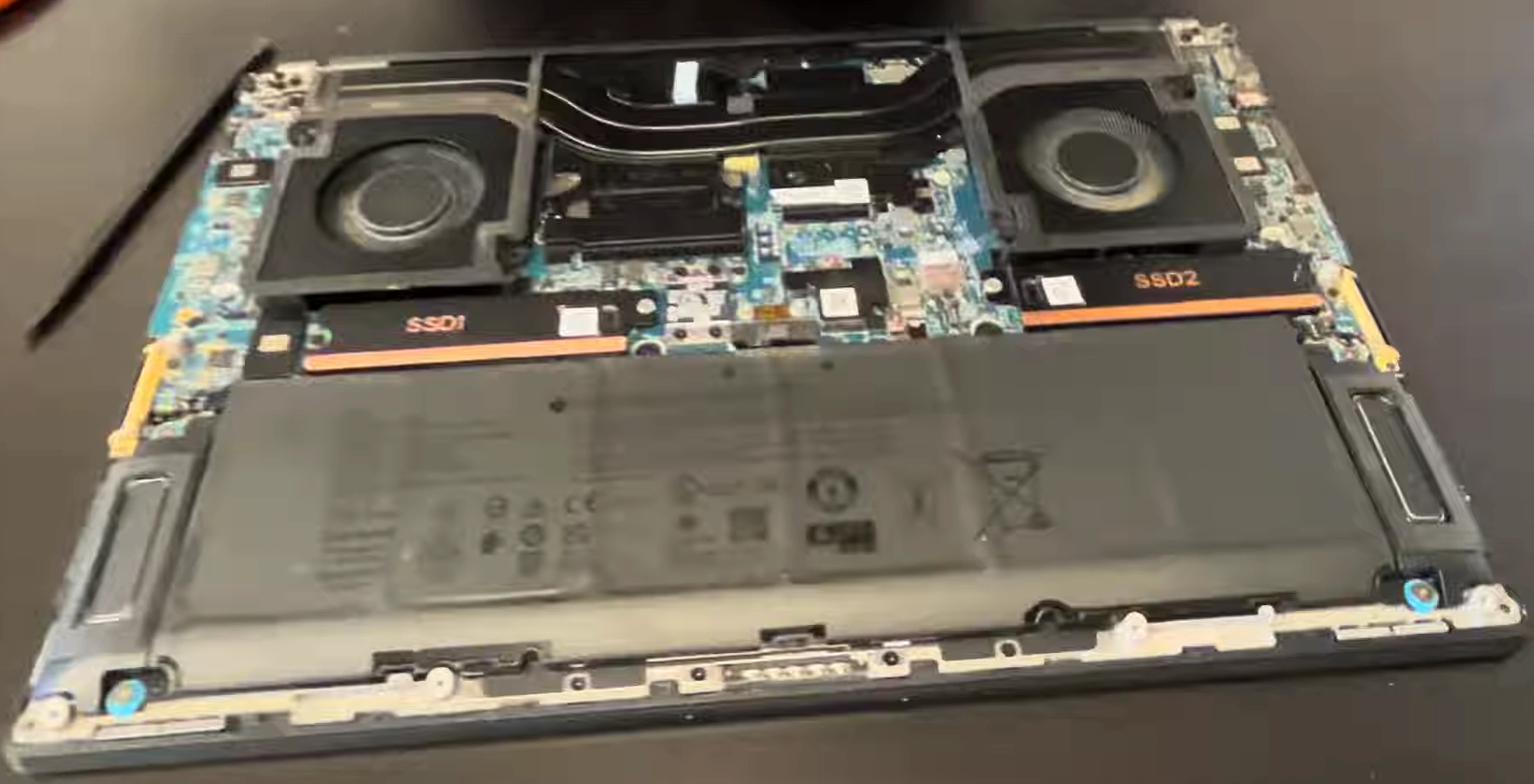
0:20 Bottom Case 1:18 Battery 1:44 2:21 SSD Storage 3:02 WiFi Card 4:27 Heatsink 5:17 Processor 5:30 Cooling Fans 6:07 Graphics Card GPU 7:15 Motherboard 9:45 Speakers 9:57 Hinges 10:37 Palmrest Assembly 10:50 Touchpad 12:59 Keyboard 13:15 Power Button 13:48 Display Assembly
4. Dell Precision 5690 Bottom Cover Removal: Professional Access Procedure
⚠️ Pre-Removal Professional Assessment
The Precision 5690 features multiple bottom cover configurations depending on exact model and enterprise customization. Professional identification of your specific model's access method is crucial to avoid damage to the precision-engineered chassis or internal components.
🔍 Cover Configuration Identification
| Cover Type | Identifying Features | Tool Requirements | Professional Notes |
|---|---|---|---|
| Standard Screw-Secured | Visible Torx T5 screws around perimeter | Torx T5 driver, plastic pry tools | Most common in enterprise deployments |
| Tool-less Quick Release | Release latches or sliding mechanisms | Finger pressure only (no tools) | Select configurations for easy field service |
| Security-Enhanced | Kensington lock slot, additional security screws | Torx T5, security bit set | Common in government/regulated industries |
| Enterprise Custom | Asset tags, custom markings | Refer to enterprise documentation | Contact enterprise IT for specific procedures |
🔩 Professional Screw Pattern Analysis
| Screw Location Zone | Screw Type | Quantity | Length/Thread | Professional Handling Notes |
|---|---|---|---|---|
| Perimeter Zone (Front) | Torx T5 | 4-6 | 4mm, fine thread | Shorter screws, easy to cross-thread if forced |
| Perimeter Zone (Rear) | Torx T5 | 4-6 | 6mm, standard thread | Longer screws near cooling vents |
| Central Reinforcement | Torx T5 | 3-4 | 5mm, standard thread | Structural support, do not omit during reassembly |
| Security/Retention | Torx Security T5 | 0-2 | Variable | Only present on security-enhanced models |
🔧 Professional Removal Sequence
- Initial Power Down Protocol:
- Complete shutdown through Windows (Start → Power → Shut Down)
- Disconnect all peripherals including Thunderbolt docks
- Remove AC adapter and any USB-C charging cables
- Ground yourself using ESD wrist strap
- Screw Removal Methodology:
- Use magnetic Torx T5 driver to prevent screw loss
- Remove screws in diagonal pattern (not sequential)
- Place screws in magnetic project mat in their relative positions
- Note any screws with different lengths or thread types
- Professional Clip Release Technique:
- Insert plastic pry tool at front-right corner seam
- Apply gentle upward pressure while slightly twisting
- Listen for subtle click indicating clip release
- Work around perimeter, releasing 2-3 clips at a time
- Use professional opening tools to avoid chassis damage
🚧 Professional Challenge Resolution
| Challenge | Professional Diagnosis | Resolution Strategy | Prevention Method |
|---|---|---|---|
| Stubborn Clips | Previous improper reassembly or debris accumulation | Apply gentle heat (hairdryer low setting, 10 seconds max) | Clean clip channels during each service |
| Stripped Screws | Previous over-torquing or incorrect driver use | Use rubber band method or screw extraction kit | Use proper torque (finger tight plus ¼ turn) |
| Won't Separate | Missed screws or internal cable interference | Verify all screws removed, check for internal obstructions | Follow systematic removal sequence |
| Plastic Tab Damage | Excessive force or incorrect tool angle | Note damaged location, consider adhesive during reassembly | Use proper 30-45 degree tool insertion angle |
🛡️ Enterprise Damage Prevention Protocol
- Chassis Protection:
- Always use plastic tools against aluminum/magnesium chassis
- Support bottom cover when removing to prevent bending
- Work on soft, non-abrasive surface
- Handle by edges only to prevent fingerprint marks
- Internal Component Protection:
- ESD protection mandatory throughout process
- Verify no cables are attached to bottom cover
- Check for thermal paste/pad transfer to cover
- Inspect for loose components before proceeding
📋 Professional Documentation Requirements
- Photograph screw pattern before removal
- Document any existing damage or wear
- Record Dell Service Tag and Express Service Code
- Note any non-standard configurations
- Document clip condition around perimeter
- Record thermal interface material condition
🔍 Internal Component Access Assessment
| Component Accessibility | Immediate Access | Additional Steps Required | Professional Service Time |
|---|---|---|---|
| RAM Modules | ✅ Direct access to all 4 slots | None - tool-less latches | 5-10 minutes per module |
| NVMe SSDs | ✅ Direct access to 2-4 slots | Possible heatsink removal | 15-30 minutes per drive |
| Wi-Fi/BT Card | ✅ Usually accessible | Antenna cable disconnection | 10-15 minutes |
| Battery | ⚠️ Partially accessible | Requires screw removal and cable disconnection | 20-30 minutes |
| Cooling System | ❌ Not accessible | Requires motherboard removal | 45-60 minutes |
🔬 Quality Control Inspection Points
- Chassis Inspection:
- Check for hairline cracks around screw holes
- Inspect clip channels for plastic fatigue
- Verify no metal burrs or sharp edges
- Check for proper EMI shielding integrity
- Internal Inspection:
- Verify all ribbon cables properly seated
- Check for loose screws or debris
- Inspect thermal interface material condition
- Verify component security and alignment
🔒 Enterprise Security Considerations
- Asset Protection:
- Maintain chain of custody documentation
- Secure work area to prevent unauthorized access
- Document all removed/replaced components
- Verify asset tags remain intact
- Data Security:
- Ensure no data-bearing components are exposed
- Maintain secure storage for removed components
- Document storage device handling procedures
- Comply with enterprise data protection policies
🔁 Professional Reassembly Preparation
- Clean chassis mating surfaces with isopropyl alcohol
- Verify all internal cables properly routed and secured
- Test fit cover before screw installation
- Ensure no tools or debris remain inside chassis
- Organize screws in correct installation sequence
5. Dell Precision 5690 Battery Disconnection & Enterprise ESD Protection Protocol
⚠️ Enterprise Safety Mandate
Proper battery disconnection and ESD protection are non-negotiable enterprise requirements for servicing Dell Precision 5690 workstations. These $3,000+ devices contain sensitive components that can be permanently damaged by improper handling, leading to catastrophic data loss, warranty voidance, and significant financial liability.
🔋 Precision 5690 Battery Specifications & Compliance
| Battery Specification | Technical Details | Safety Classification | Enterprise Compliance Requirements |
|---|---|---|---|
| Chemistry & Configuration | 6-cell/8-cell Li-ion, 97Wh (max air travel limit) | Class 9 Hazardous Material | UN38.3, IEC 62133 certification required |
| Voltage & Capacity | 11.4V nominal, 6000-8000mAh | High-energy density | MSDS documentation on-site |
| Management System | Dell Embedded Controller (EC) with SMBus | Smart battery system | Dell battery authentication required |
| Safety Features | Thermal protection, overcharge protection | Multiple redundant systems | Regular safety verification required |
⚡ Enterprise ESD Protection Protocol (ANSI/ESD S20.20)
- Personal Grounding Requirements:
- 1MΩ ESD wrist strap directly connected to ground
- ESD shoes or heel straps in standing work areas
- ESD smocks for high-sensitivity work
- Regular resistance testing (daily for wrist straps)
- Workspace Grounding System:
- ESD floor mats with 1MΩ resistance to ground
- Common point ground with single-point connection
- Regular ground continuity testing
- Humidity control (40-60% RH maintained)
🔌 Step-by-Step Professional Disconnection Procedure
- Pre-Disconnection Safety Verification:
- Verify workstation is powered off (no LED activity)
- Disconnect AC adapter and all peripherals
- Press and hold power button for 15 seconds to discharge
- Verify ESD protection equipment is functional
- Battery Connector Identification:
- Locate 4-pin white battery connector near center
- Identify locking mechanism (usually sliding tab)
- Note cable routing under and around battery
- Document connector orientation with photos
- Professional Disconnection Technique:
- Slide locking tab to unlocked position
- Grasp connector body (never pull by wires)
- Pull straight out with even pressure
- If resistance, use plastic spudger for assistance
🚨 Hazard Mitigation Strategies
| Potential Hazard | Risk Level | Mitigation Strategy | Emergency Response |
|---|---|---|---|
| Thermal Runaway | Critical (Fire Hazard) | Work in temperature-controlled environment | Class D fire extinguisher, sand bucket |
| Short Circuit | High (Component Damage) | Cover battery terminals immediately after removal | Power disconnect, isolate component |
| ESD Damage | High (Latent Failure) | Full ESD protection, verified grounding | Component testing, failure analysis |
| Chemical Exposure | Medium (Health Hazard) | Proper ventilation, PPE (gloves, safety glasses) | Eye wash station, ventilation activation |
🔬 Enterprise ESD Testing & Verification
- Daily Verification Procedures:
- Wrist strap resistance test (750kΩ-35MΩ acceptable)
- Worksurface resistance verification
- Ground continuity testing
- Humidity level monitoring and recording
- Monthly Compliance Testing:
- ESD field meter measurements
- Ground system impedance testing
- Personnel grounding system verification
- Documentation review and update
🔧 Battery Removal Protocol (If Required)
- Screw Removal Sequence:
- Remove 4-6 Torx T5 screws securing battery
- Note screw lengths and locations
- Check for adhesive strips (some configurations)
- Document screw pattern with photos
- Safe Removal Technique:
- Lift from connector end first (30° angle)
- If adhesive present, use isopropyl alcohol to release
- Place battery immediately in anti-static container
- Cover terminals with insulating tape
🎯 ESD-Sensitive Components in Precision 5690
| Component | ESD Sensitivity (HBM) | Protection Requirements | Failure Symptoms |
|---|---|---|---|
| Intel CPU | 50-100V (Extremely Sensitive) | Full ESD protection mandatory | Random crashes, performance degradation |
| NVIDIA GPU | 100-200V (Very Sensitive) | Full ESD protection mandatory | Artifacts, driver crashes, no display |
| DDR5 Memory | 200-500V (Sensitive) | Full ESD protection recommended | BSOD, memory errors, system instability |
| NVMe Controller | 100-250V (Very Sensitive) | Full ESD protection mandatory | Data corruption, slow performance, failure |
📋 Enterprise Documentation & Compliance Records
- Required Documentation:
- ESD equipment calibration certificates
- Daily ESD test logs
- Battery safety data sheets (SDS)
- Service procedure compliance records
- Asset Management Integration:
- Link ESD events to specific assets
- Track battery health and replacement history
- Document component failures and root causes
- Maintain warranty compliance evidence
🚨 Emergency Response Protocol
- Battery Thermal Event:
- Immediately disconnect power sources
- Use Class D fire extinguisher or sand
- Do NOT use water on lithium battery fires
- Evacuate area and call emergency services
- ESD Event:
- Document exact circumstances
- Isolate affected component
- Perform comprehensive testing
- Report to Dell ProSupport if under warranty
🛡️ Professional ESD Protection Equipment
| Equipment Type | Specification Requirement | Verification Frequency | Enterprise Compliance |
|---|---|---|---|
| ESD Wrist Straps | 1MΩ resistance, quick-release | Daily before use | ANSI/ESD S1.1 compliance |
| ESD Work Surfaces | Surface resistance 10^6-10^9 ohms | Monthly | ANSI/ESD S4.1 compliance |
| Flooring Systems | 10^6-10^9 ohms point-to-point | Quarterly | ANSI/ESD S7.1 compliance |
| Ionization Systems | Balance ±50V, decay < 1 second | Monthly | ANSI/ESD STM3.1 compliance |
🔁 Battery Reconnection Safety Protocol
- Verify battery terminals are clean and undamaged
- Connect battery before any other components
- Listen for audible click of locking mechanism
- Verify secure connection with gentle tug test
- Power on and check Dell SupportAssist battery status
🎓 Enterprise Training & Certification Requirements
- Mandatory Training:
- ESD awareness and control training (annual)
- Battery safety handling certification
- Emergency response procedures training
- Dell-specific component handling training
- Certification Programs:
- Dell TechDirect Certification
- ESD Association Certified Professional Program
- OSHA battery safety certification
- Enterprise-specific compliance training
6. Dell Precision 5690 NVMe SSD Installation & Professional Configuration Guide
💾 Enterprise Storage Architecture Overview
The Precision 5690 features Dell's most advanced storage architecture with support for up to four PCIe Gen4 NVMe SSDs, hardware RAID capabilities, and enterprise-grade data protection features. Professional installation requires understanding of both hardware installation and software configuration for optimal performance in professional workloads.
🔍 SSD Compatibility Verification Protocol
- Dell-Certified SSDs:
- Dell Ultra-Speed Drive (USD) Gen4 NVMe
- Samsung PM9A1/PM9A3 (OEM equivalents)
- Western Digital SN850/SN850X (certified)
- SK hynix Platinum P41 (Dell-tested)
- Compliance Requirements:
- M.2 2280 form factor (22mm width, 80mm length)
- PCIe Gen4 x4 interface (backward compatible)
- Single-sided components (for heatsink clearance)
- Dell BIOS whitelist verification recommended
🔧 Professional Installation Procedure
- Pre-Installation Preparation:
- Complete battery disconnection (previous section)
- Verify ESD protection is active and tested
- Gather appropriate tools (Torx T5, anti-static mat)
- Have thermal pads/heatsinks ready if required
- Slot Identification & Access:
- Locate M.2 slots (typically labeled M2P1, M2P2, etc.)
- Note heatsink requirements (some slots have integrated heatsinks)
- Identify retention mechanisms (screws, clips, or brackets)
- Document existing configuration with photos
- SSD Installation Technique:
- Insert SSD at 30-degree angle into M.2 slot
- Press down gently until screw hole aligns
- Secure with provided screw (do not overtighten)
- Install thermal pad/heatsink if included
⚡ Enterprise Performance Optimization
| Optimization Area | Configuration Method | Performance Impact | Professional Tools Required |
|---|---|---|---|
| BIOS Configuration | AHCI vs RAID mode selection | 20-30% performance difference | Dell BIOS access, Dell Command | Configure |
| Windows Optimization | Power settings, write caching | 15-25% improvement | Windows Admin Tools, Group Policy |
| Driver Optimization | Latest Intel RST/VMD drivers | 10-20% stability improvement | Dell Command | Update, Intel Driver Assistant |
| Thermal Management | Heatsink installation, airflow optimization | Prevents throttling, maintains performance | Thermal pads, quality heatsinks |
🔄 Hardware RAID Configuration Guide
- RAID Mode Selection (Ctrl+I at boot):
- RAID 0 (Striping): Maximum performance, no redundancy
- RAID 1 (Mirroring): Data protection, 50% capacity
- RAID 5 (Parity): Balance of performance and protection
- RAID 10 (Striped Mirror): Maximum performance + redundancy
- Professional Considerations:
- RAID configuration erases all data on drives
- Backup critical data before proceeding
- Use identical SSDs for optimal performance
- Document RAID configuration for disaster recovery
📦 Professional Driver Installation Sequence
- Chipset Drivers (Intel Management Engine)
- Storage Controller (Intel RST/VMD)
- NVMe Driver (Manufacturer specific)
- GPU Drivers (NVIDIA Studio/Quadro)
- Dell System Software (SupportAssist, Command Suite)
- Professional Application Drivers (ISV-certified)
Professional Tip: Use Dell Command | Update for automated driver management
📊 Enterprise Performance Validation
- Synthetic Benchmarking:
- CrystalDiskMark (sequential and random IO)
- AS SSD Benchmark (real-world simulation)
- ATTO Disk Benchmark (transfer size analysis)
- PCMark 10 Storage Test (application performance)
- Professional Workload Testing:
- SOLIDWORKS file load times
- Adobe Premiere Pro 8K timeline performance
- MATLAB dataset processing speed
- Virtual machine deployment and operation
📁 Enterprise Data Migration Strategies
| Migration Scenario | Recommended Tool | Time Estimate | Professional Considerations |
|---|---|---|---|
| Dell to Dell Upgrade | Dell Migration Assistant | 1-3 hours | Preserves Dell-specific configurations |
| Enterprise Clone | Macrium Reflect Enterprise | 30-90 minutes | Bit-for-bit copy, sector alignment |
| Selective Migration | Transwiz (Profwiz) for user profiles | 30-60 minutes | Preserves user settings and data |
| Cloud Migration | OneDrive/SharePoint sync | Variable (internet dependent) | Modern workplace strategy |
🔍 Troubleshooting Common SSD Issues
| Symptom | Potential Cause | Diagnostic Steps | Resolution |
|---|---|---|---|
| SSD Not Detected | Incompatible drive, BIOS setting | Check BIOS settings, try different slot | Update BIOS, verify compatibility |
| Poor Performance | Thermal throttling, driver issues | Monitor temperatures, check drivers | Install heatsink, update drivers |
| BSOD/System Crashes | Driver conflicts, hardware issues | Check Windows Event Viewer, run diagnostics | Clean driver install, firmware update |
| RAID Configuration Lost | BIOS reset, battery failure | Check BIOS battery, verify settings | Reconfigure RAID, backup configuration |
🔒 Enterprise Security Configuration
- BitLocker Configuration:
- Enable TPM 2.0 in BIOS
- Configure BitLocker with PIN + TPM
- Store recovery key in Active Directory
- Consider hardware encryption vs software
- Self-Encrypting Drives (SED):
- Configure OPAL 2.0 compliance
- Set encryption before data writing
- Manage encryption keys enterprise-wide
- Document encryption status for compliance
📋 Professional Documentation Requirements
- Record SSD model, capacity, and serial numbers
- Document RAID configuration (if applicable)
- Record BIOS settings (AHCI/RAID mode)
- Document driver versions and installation dates
- Record benchmark results before/after installation
- Document BitLocker/SED configuration details
📄 Enterprise Warranty Considerations
- Dell ProSupport Impact:
- User-installed SSDs covered if Dell-certified
- Maintain purchase receipts for warranty claims
- Document installation date and technician
- Consider Dell Keep Your Hard Drive service
- Enterprise Compliance:
- Maintain asset tracking for all components
- Document data sanitization of old drives
- Follow enterprise data retention policies
- Comply with environmental disposal regulations
7. Dell Precision 5690 DDR5 Memory Upgrade: Professional Capacity & Performance Optimization
🧠 Precision 5690 Memory Architecture Overview
The Precision 5690 features a groundbreaking memory architecture supporting up to 192GB of DDR5 memory across four SO-DIMM slots, delivering unprecedented bandwidth for professional workloads like engineering simulations, data science, and large-scale virtualization.
⚙️ DDR5 Memory Specifications & Compliance
| Specification | Precision 5690 Requirements | Enterprise Impact | Performance Benefit |
|---|---|---|---|
| Memory Type | DDR5 SO-DIMM (260-pin) | Not compatible with DDR4 | 2x bandwidth vs DDR4 |
| Speed Support | Up to 5600 MT/s (JEDEC) | XMP profiles may not be supported | 40% faster than DDR4 3200 |
| Capacity per Slot | Up to 48GB per SO-DIMM | 192GB maximum system capacity | Enables massive in-memory datasets |
| Voltage | 1.1V (standard), PMIC on module | Lower power consumption | Improved battery life |
| Error Correction | On-die ECC (not true ECC) | Improved reliability vs DDR4 | Reduced data corruption risk |
🔧 Enterprise Configuration Scenarios
| Professional Use Case | Recommended Configuration | Approximate Cost | Performance Impact | ROI Timeline |
|---|---|---|---|---|
| Engineering/CAD | 64GB (2x32GB) DDR5 4800 | $250-$350 | 30-40% faster renders | 3-4 months |
| Data Science/AI | 96GB (2x48GB) DDR5 5200 | $450-$600 | 2-3x larger dataset processing | 2-3 months |
| Virtualization/Containers | 128GB (4x32GB) DDR5 4800 | $500-$700 | 4-5x more concurrent VMs | 1-2 months |
| Media Production | 192GB (4x48GB) DDR5 5600 | $900-$1,200 | 8K real-time editing capability | 6-9 months |
🔍 Professional Compatibility Verification Protocol
- Dell-Certified Memory Modules:
- Dell Part Numbers: HYNVW, HYNVS, SKHYN series
- Manufacturer: SK hynix, Samsung, Micron (Crucial)
- Speed: 4800, 5200, 5600 MT/s (JEDEC standard)
- Capacity: 16GB, 32GB, 48GB per module
- Verification Tools:
- Dell Support Site compatibility checker
- CPU-Z for existing configuration analysis
- MemTest86 for compatibility validation
- Dell SupportAssist pre-purchase validation
🔧 Professional Installation Procedure
- Pre-Installation Safety Protocol:
- Complete battery disconnection (mandatory)
- ESD protection verified and active
- Workspace properly grounded and clean
- Document existing configuration with photos
- Slot Configuration Strategy:
- Identify slot numbering (typically marked on motherboard)
- For dual-channel: Use slots A2 and B2 (typically)
- For quad-channel: Fill all four slots with identical modules
- Consult Dell documentation for specific configuration
- Module Installation Technique:
- Release side latches (push outward simultaneously)
- Align notch in module with key in slot
- Insert at 30-degree angle, then press down until latches click
- Apply even pressure across entire module
- Verify both latches are fully engaged
⚡ Enterprise Performance Optimization
| Optimization Area | Configuration Method | Professional Impact | Verification Tools |
|---|---|---|---|
| Dual/Quad Channel | Proper slot population | 30-50% bandwidth increase | AIDA64 Memory Benchmark |
| Speed Optimization | BIOS memory settings | 10-20% performance gain | CPU-Z, HWiNFO64 |
| Timing Optimization | CAS latency adjustment | 5-15% latency reduction | LatencyMon, AIDA64 |
| Virtual Memory | Windows page file optimization | Reduced SSD wear | Resource Monitor, PerfMon |
⚙️ BIOS Configuration Guide
- Accessing BIOS (F2 during boot):
- Navigate to "Memory Configuration" section
- Enable XMP/EXPO if supported (check Dell documentation)
- Configure memory speed (Auto/Manual)
- Set memory timing if advanced optimization needed
- Professional Settings:
- Memory Remap: Enable for >4GB configurations
- Memory Test: Enable extended memory test
- Power Management: Adjust for performance vs efficiency
- Error Reporting: Enable memory error logging
🧪 Professional Validation Testing Protocol
| Test Type | Professional Tool | Duration | Acceptance Criteria | Enterprise Documentation |
|---|---|---|---|---|
| Stability Test | MemTest86 Pro | 4-8 hours | 0 errors after 4 passes | Test report, error logs |
| Performance Test | AIDA64 Extreme | 30 minutes | Within 5% of expected performance | Benchmark scores, comparison data |
| Application Test | Professional workload simulation | 1-2 hours | No crashes, acceptable performance | Application logs, performance metrics |
| Thermal Test | HWiNFO64 monitoring | 1 hour under load | Temperatures < 85°C under load | Temperature logs, thermal images |
🔍 Enterprise Troubleshooting Guide
| Symptom | Potential Cause | Diagnostic Steps | Professional Resolution |
|---|---|---|---|
| System Won't Boot | Incompatible memory, improper installation | Reset CMOS, test with single module | Verify compatibility, re-seat modules |
| Blue Screen Errors | Memory errors, timing issues | Check Windows Event Viewer, run diagnostics | Adjust BIOS settings, run MemTest86 |
| Limited Capacity Detected | 32-bit OS, BIOS limitation, bad module | Check OS version, test modules individually | Upgrade to 64-bit OS, replace faulty module |
| Performance Below Expected | Single-channel mode, speed mismatch | Verify slot population, check BIOS settings | Reconfigure for dual/quad channel |
📦 Enterprise Procurement Strategy
- Dell Direct Purchase:
- Genuine Dell memory with full warranty
- Guaranteed compatibility
- Enterprise pricing available
- Dell ProSupport coverage maintained
- Authorized Resellers:
- Crucial (Micron) enterprise program
- Kingston Enterprise Solutions
- SK hynix authorized distributors
- Samsung memory enterprise partners
- Enterprise Considerations:
- Bulk purchasing discounts
- Cross-shipping for critical replacements
- Warranty and support alignment
- Asset tracking and management integration
📋 Enterprise Documentation Requirements
- Pre-Installation Documentation:
- Original memory configuration (speeds, capacities)
- Purchase orders and warranty information
- Compatibility verification records
- Asset tagging information
- Post-Installation Documentation:
- New memory specifications (serial numbers, speeds)
- BIOS configuration settings
- Performance benchmark results
- Stability test reports
- Warranty registration confirmation
🎯 Professional Workload Optimization Guide
| Professional Application | Memory Optimization | Expected Improvement | Configuration Tips |
|---|---|---|---|
| SOLIDWORKS/CAD | Large assembly memory allocation | 40-60% faster load times | Enable large model mode, adjust cache settings |
| Adobe Creative Suite | RAM preview optimization | 2-3x larger preview cache | Adjust memory preferences in each application |
| Virtualization (VMware) | Memory overcommit optimization | 50% more concurrent VMs | Configure memory sharing, balloon driver |
| Data Science (Python/R) | In-memory dataframe operations | 10-100x faster processing | Use memory-mapped files, adjust garbage collection |
📄 Enterprise Warranty & Compliance
- Dell ProSupport Considerations:
- User-installed memory covered if Dell-certified
- Maintain purchase receipts for all modules
- Document installation date and technician
- Consider Dell Keep Your Hard Drive service for old memory
- Enterprise Security:
- Secure disposal of old memory modules
- Data sanitization procedures for used memory
- Asset tracking for all memory components
- Compliance with data protection regulations
🔮 Future-Proofing Strategy
- Capacity Planning:
- Start with 64GB for most professional users
- Leave expansion slots open for future upgrades
- Consider workload growth over 3-5 year lifecycle
- Plan for maximum capacity requirements
- Technology Evolution:
- DDR5 technology still evolving
- Future BIOS updates may enable higher speeds
- Consider upgrade path to future technologies
- Document compatibility for future expansions
8. Dell Precision 5690 Cooling System: Professional Maintenance & Thermal Optimization
❄️ Precision 5690 Thermal Architecture Overview
The Precision 5690 employs Dell's most advanced cooling system with dual vapor chamber technology, quad-heatpipe design, and enterprise-grade thermal management. Professional maintenance ensures sustained performance under demanding workloads while preventing thermal throttling that impacts productivity.
🔬 Thermal System Specifications & Design
| Component | Specifications | Innovation | Professional Impact |
|---|---|---|---|
| Vapor Chambers | Dual vapor chamber design | 20% better heat transfer vs heatpipes | Sustained CPU/GPU performance |
| Heatpipes | 4x copper heatpipes | Dual-path heat distribution | Balanced component temperatures |
| Fans | Dual 90mm fans, 77 blades each | Dell UltraThin fan technology | Increased airflow at lower noise |
| Heat Exchangers | 124 cooling fins per fan | Ultra-thin fin design (0.1mm) | Maximized surface area |
| Thermal Interface | Phase-change material + graphite pads | Multi-material interface system | Optimized thermal transfer |
📅 Enterprise Maintenance Schedule
| Maintenance Task | Frequency | Professional Tools Required | Estimated Time | Business Impact |
|---|---|---|---|---|
| External Vent Cleaning | Monthly | ESD-safe compressed air | 5 minutes | Prevents airflow restriction |
| Internal Dust Removal | Quarterly | Anti-static brush, compressed air | 15 minutes | Maintains cooling efficiency |
| Fan Bearing Inspection | Semi-annual | Stethoscope, thermal camera | 30 minutes | Prevents fan failure |
| Complete Thermal Service | Annual | Full disassembly tools, thermal materials | 2-3 hours | Restores factory performance |
| Professional Thermal Validation | Post-service | Thermal imaging, benchmark software | 1 hour | Ensures optimal performance |
🔧 Professional Cooling System Disassembly
- Pre-Disassembly Preparation:
- Complete battery disconnection (mandatory)
- Document thermal performance baseline
- Gather professional thermal materials
- Prepare clean, organized workspace
- Cooling System Access:
- Remove bottom cover (refer to earlier section)
- Disconnect fan power cables (note orientation)
- Remove heatsink retention screws in criss-cross pattern
- Carefully lift heatsink assembly (avoid bending heatpipes)
- Component Cleaning Protocol:
- Clean heatsink fins with soft brush and compressed air
- Remove old thermal material with isopropyl alcohol (99%)
- Clean CPU/GPU dies with lint-free wipes
- Inspect heatpipes for damage or separation
🧪 Enterprise-Grade Thermal Materials
| Material Type | Dell Specification | Professional Alternatives | Performance Characteristics | Application Method |
|---|---|---|---|---|
| CPU/GPU Thermal Paste | Dell phase-change material | Thermal Grizzly Kryonaut | 12.5 W/mK conductivity | Pea method (5mm dot) |
| VRM Thermal Pads | Graphite thermal pads | Fujipoly Extreme, Gelid Solutions | 15-35 W/mK conductivity | Pre-cut, exact thickness |
| Memory Thermal Pads | 0.5mm silicone pads | ARCTIC thermal pads | 6 W/mK conductivity | Cover entire memory chips |
| SSD Thermal Pads | 1.0mm thermal pads | Thermalright Odyssey | 12.8 W/mK conductivity | Controller + NAND coverage |
⚡ Professional Thermal Optimization Techniques
- Pressure Optimization:
- Torque screws to manufacturer specification (0.6-0.8 Nm)
- Use criss-cross tightening pattern
- Apply pressure gradually and evenly
- Verify even thermal paste spread post-assembly
- Airflow Management:
- Ensure intake and exhaust vents are unobstructed
- Use laptop stands with ventilation
- Maintain clean work environment
- Consider external cooling solutions for intensive workloads
📊 Enterprise Diagnostics & Monitoring
| Monitoring Tool | Metrics Tracked | Professional Thresholds | Enterprise Integration |
|---|---|---|---|
| Dell SupportAssist | Fan speed, component temperatures | CPU: 95°C max, GPU: 87°C max | Enterprise alerting systems |
| HWiNFO64 Enterprise | Thermal throttling, power limits | Throttling: <5% of runtime | Centralized monitoring dashboards |
| Intel XTU | CPU power, thermal velocity | Power limit sustained >45W | Performance optimization data |
| Thermal Imaging | Surface temperatures, hot spots | Keyboard: <45°C under load | Preventive maintenance planning |
💼 Professional Workload Thermal Profiles
| Workload Type | Typical Temperatures | Cooling Requirements | Performance Impact | Optimization Strategy |
|---|---|---|---|---|
| CAD/Engineering | CPU: 85-92°C, GPU: 75-82°C | High sustained cooling | Thermal throttling common | Undervolt CPU, optimize fan curves |
| Data Science | CPU: 90-95°C, GPU: 80-85°C | Maximum cooling capacity | Frequency reduction likely | Limit power, use performance modes |
| Media Production | CPU: 80-88°C, GPU: 70-78°C | Balanced cooling | Minimal throttling | Optimize render settings |
| Virtualization | CPU: 75-85°C, GPU: 65-75°C | Moderate sustained cooling | Stable performance | CPU affinity settings, power management |
🔍 Enterprise Troubleshooting Guide
| Symptom | Potential Cause | Diagnostic Procedure | Professional Resolution |
|---|---|---|---|
| Excessive Fan Noise | Dust accumulation, bearing wear | Thermal imaging, audio analysis | Clean cooling system, replace fans |
| Thermal Throttling | Poor thermal interface, dust | Benchmark monitoring, temperature logging | Reapply thermal materials, clean system |
| Hot Spots | Uneven pressure, dried paste | Thermal imaging, pressure testing | Reinstall heatsink with proper torque |
| Intermittent Shutdowns | Overheating, fan failure | Temperature logging, fan diagnostics | Replace failed components, improve cooling |
🛡️ Professional Preventive Maintenance Program
- Scheduled Maintenance Tasks:
- Quarterly: External vent cleaning, fan speed testing
- Semi-annual: Internal dust removal, thermal paste inspection
- Annual: Complete thermal system service
- Biannual: Professional thermal performance validation
- Enterprise Documentation:
- Maintenance logs with before/after temperatures
- Thermal material lot numbers and application dates
- Component replacement records
- Performance benchmark comparisons
🌬️ Enterprise Cooling Solutions
| Cooling Solution | Professional Application | Performance Benefit | Enterprise Implementation |
|---|---|---|---|
| Laptop Cooling Pads | Desktop replacement scenarios | 5-10°C temperature reduction | Standard issue for power users |
| External Exhaust Systems | Render farms, computational work | 8-15°C temperature reduction | Dedicated workstation areas |
| Climate-Controlled Environments | Data centers, server rooms | Optimal ambient conditions | Enterprise facility design |
| Advanced Thermal Materials | High-performance workstations | Improved thermal transfer | Professional service protocols |
📄 Enterprise Warranty Considerations
- Dell ProSupport Impact:
- Professional thermal maintenance doesn't void warranty
- Document all service procedures
- Use Dell-approved thermal materials when possible
- Maintain service records for warranty claims
- Professional Service Requirements:
- Certified technicians for complex disassembly
- Proper ESD protection throughout service
- Documentation of original configuration
- Performance validation post-service
✅ Performance Validation Protocol
- Pre-Service Baseline:
- Record idle and load temperatures
- Document benchmark scores (Cinebench, 3DMark)
- Note fan noise levels and patterns
- Capture thermal images if available
- Post-Service Validation:
- Verify temperature reductions (minimum 5-10°C improvement)
- Confirm benchmark score improvements
- Test fan operation across all speed ranges
- Validate system stability under sustained load
💰 Enterprise ROI Analysis
| Investment | Cost | Performance Improvement | Productivity Gain | ROI Period |
|---|---|---|---|---|
| Professional Thermal Service | $150-$300 | 15-25% sustained performance | 1-2 hours weekly per user | 3-6 months |
| Advanced Thermal Materials | $50-$100 | 5-10°C temperature reduction | Reduced thermal throttling | Immediate |
| Enterprise Monitoring | $500-$1,000 setup | Proactive issue detection | Preventive maintenance scheduling | 6-12 months |
| Staff Training | $2,000-$5,000 | Standardized service quality | Reduced external service costs | 12-18 months |
9. Dell Precision 5690 Keyboard & Touchpad: Professional Service & Replacement Guide
⌨️ Precision 5690 Input Device Architecture
The Precision 5690 features premium input components designed for professional use, including a full-size backlit keyboard with optional Cherry MX mechanical switches and a precision glass touchpad with Windows Precision drivers. Professional service requires understanding the complex integration between these components and the chassis.
🖱️ Touchpad Specifications & Technology
- Glass Surface Precision Touchpad:
- Dimensions: 115mm x 75mm (industry standard)
- Surface: Corning Gorilla Glass or equivalent
- Technology: Windows Precision Touchpad certified
- Features: Multi-touch gestures, palm rejection
- Integration Points:
- Separate touchpad and keyboard assemblies
- Dedicated touchpad controller board
- Multiple ribbon cable connections
- Complex chassis integration
🔍 Professional Diagnostic Procedure
| Symptom | Diagnostic Test | Professional Tools | Likely Cause | Resolution Complexity |
|---|---|---|---|---|
| Non-responsive Keys | Keyboard test utility, visual inspection | Dell SupportAssist, KeyTest | Damaged key switch, debris under key | Low to Medium |
| Backlight Failure | LED test, power measurement | Multimeter, LED tester | LED failure, controller issue | Medium |
| Touchpad Issues | Windows calibration, driver test | Device Manager, Precision settings | Driver issue, ribbon cable, touchpad failure | Medium to High |
| Mechanical Switch Failure | Switch test, audio/feel evaluation | Switch tester, audio analysis | Worn switch, debris, mechanical failure | High (requires full replacement) |
🔧 Professional Keyboard Replacement Procedure
- Pre-Replacement Preparation:
- Complete data backup and power down
- Disconnect battery (mandatory safety step)
- Document keyboard layout and backlight settings
- Verify replacement part compatibility
- Chassis Disassembly Sequence:
- Remove bottom cover (15+ Torx T5 screws)
- Disconnect battery and discharge system
- Remove palmrest assembly (additional 20+ screws)
- Carefully lift palmrest, noting cable connections
- Keyboard Removal Technique:
- Locate keyboard retention clips (typically 8-12)
- Release clips using plastic spudger (work from edges inward)
- Disconnect backlight and data ribbon cables
- Lift keyboard from chassis at 45-degree angle
🖱️ Professional Touchpad Replacement Procedure
- Touchpad Access:
- Follow keyboard removal procedure to access touchpad
- Touchpad is typically mounted under palmrest assembly
- Note: Some models have touchpad integrated into palmrest
- Document cable routing before disconnection
- Component Removal:
- Remove touchpad mounting screws (typically 4-6)
- Disconnect ribbon cable(s) using latch mechanism
- Lift touchpad assembly carefully (glass is fragile)
- Clean mounting area before installing replacement
📦 Enterprise Parts Procurement Guide
| Component Source | Advantages | Considerations | Enterprise Integration | Lead Time |
|---|---|---|---|---|
| Dell Direct | Guaranteed compatibility, full warranty | Highest cost, Dell ProSupport required | Enterprise account pricing available | 3-7 business days |
| Authorized Distributors | Moderate cost, good availability | Verify authenticity, limited warranty | Bulk purchasing options | 2-5 business days |
| Third-Party Quality | Lower cost, immediate availability | Compatibility risks, variable quality | Good for out-of-warranty units | Immediate to 3 days |
| Refurbished/OEM | Cost-effective, environmentally friendly | Cosmetic imperfections, limited testing | Suitable for secondary/backup systems | Variable |
🔁 Professional Reassembly Guide
- Keyboard Installation:
- Align keyboard with chassis mounting points
- Connect ribbon cables before final seating
- Engage retention clips (listen for audible clicks)
- Test key function before completing reassembly
- Cable Management:
- Route cables through designated channels
- Secure cables with original adhesive or clips
- Avoid sharp bends in ribbon cables
- Test all connections before final closure
🧪 Enterprise Testing Protocol
| Test Category | Testing Procedure | Professional Tools | Acceptance Criteria | Documentation Required |
|---|---|---|---|---|
| Keyboard Functional Test | All keys register, correct key codes | Keyboard test utility, KeyTest | 100% key functionality | Key test report, screenshot |
| Backlight Test | All LEDs functional, brightness control | Alienware Command Center, BIOS | Consistent illumination, no dead LEDs | Backlight settings, photos |
| Touchpad Test | All gestures, palm rejection, precision | Windows touchpad settings, drawing test | Smooth tracking, all gestures functional | Touchpad calibration report |
| Integration Test | Combined usage, heat distribution | Thermal imaging, extended use test | No overheating, stable performance | Thermal logs, performance data |
🎯 Enterprise User Experience Optimization
- Keyboard Customization:
- Configure backlight profiles for different environments
- Set up macro keys for professional applications
- Adjust key repeat rates for programming work
- Create enterprise-standard keyboard profiles
- Touchpad Optimization:
- Configure gesture settings for productivity
- Set palm rejection sensitivity for professional use
- Adjust scrolling and pointer speeds
- Create standard touchpad profiles for enterprise deployment
🛡️ Professional Preventive Maintenance
| Maintenance Task | Frequency | Professional Procedure | Tools Required | Business Impact |
|---|---|---|---|---|
| Keyboard Cleaning | Monthly | Compressed air, isopropyl wipes | Keyboard vacuum, cleaning gel | Prevents key sticking, maintains hygiene |
| Touchpad Calibration | Quarterly | Windows calibration, driver updates | Calibration software, driver tools | Maintains precision, prevents cursor drift |
| Backlight Inspection | Semi-annual | LED test, brightness uniformity check | Light meter, visual inspection | Ensures consistent illumination |
| Mechanical Inspection | Annual | Key switch test, travel measurement | Switch tester, calipers | Prevents switch failure, maintains feel |
📄 Enterprise Warranty & Compliance
- Dell ProSupport Considerations:
- User-performed keyboard replacement may void warranty
- Dell-certified technicians recommended
- Document all service procedures thoroughly
- Use Dell genuine parts to maintain coverage
- Enterprise Asset Management:
- Track keyboard and touchpad replacements in asset system
- Document part serial numbers for warranty claims
- Maintain service history for each workstation
- Implement enterprise-wide maintenance schedules
🔍 Professional Troubleshooting Flowchart
- Start: Identify symptom (key failure, backlight issue, touchpad problem)
- Software Diagnostics: Update drivers, run Dell SupportAssist
- Hardware Test: Test with external keyboard/mouse, check connections
- Physical Inspection: Check for physical damage, debris, loose connections
- Component Test: Test keyboard/touchpad in known-good system if possible
- Repair/Replace Decision: Determine if repair is feasible or replacement needed
- Documentation: Record findings, actions taken, and results
💰 Enterprise ROI Analysis
| Service Scenario | Cost (Parts + Labor) | Productivity Impact | Warranty Preservation | Total Value |
|---|---|---|---|---|
| Professional Keyboard Replacement | $200-$400 | Restores full productivity immediately | Maintains Dell ProSupport | $2,000-$4,000 (productivity saved) |
| Touchpad Replacement | $150-$300 | Eliminates external mouse dependency | Professional service documentation | $1,500-$3,000 (ergonomic benefits) |
| Preventive Maintenance | $50-$100 annually | Prevents unexpected downtime | Extends component lifespan | $500-$1,000 (downtime prevention) |
| User Training | $100-$200 per user | Improved efficiency, reduced wear | Reduces service frequency | $1,000-$2,000 (long-term savings) |
10. Maximizing Dell Precision 5690 Resale Value After Professional Service
💰 Professional Resale Value Optimization Strategy
The Dell Precision 5690 represents a significant enterprise investment, with new configurations ranging from $3,000 to $6,000+. Professional service and strategic upgrades can preserve and even enhance resale value, particularly when selling through specialized platforms like SellLaptopBack and SellLaptopBack. Proper documentation and certification are critical for maximizing returns.
🔄 Professional Resale Platform Comparison
| Platform | Best For | Precision 5690 Specialization | Professional Services Offered | Average Time to Sale |
|---|---|---|---|---|
| SellLaptopBack | Enterprise equipment, bulk sales | High-end workstation expertise | Bulk pricing, enterprise certification | 7-14 days |
| SellLaptopBack | Individual units, quick sales | Instant quotes, fast payment | Free shipping, data wiping | 2-5 days |
🏢 SellLaptopBack Optimization Guide
- Enterprise Documentation Requirements:
- Complete Dell service history with Service Tag verification
- Enterprise asset management records
- Bulk sale documentation for multiple units
- Dell ProSupport transfer documentation
- Pricing Strategy for SellLaptopBack:
- Request enterprise quote for 3+ units
- Highlight professional upgrades and certifications
- Provide benchmark comparisons vs. stock units
- Negotiate based on documented service history
⚡ SellLaptopBack Optimization Guide
- Quick-Sale Preparation:
- Use their instant quote system with accurate condition reporting
- Take high-quality photos of all angles and upgrades
- Document all professional service performed
- Include benchmark results in your listing
- Maximizing SellLaptopBack Quotes:
- Select "Excellent" condition with professional service documentation
- Specify all upgrades (RAM, SSD, thermal service)
- Include Dell ProSupport remaining time
- Use their free shipping labels for cost savings
📊 Platform-Specific Value Factors
| Value Factor | SellLaptopBack Weight | SellLaptopBack Weight | Documentation Type |
|---|---|---|---|
| Dell ProSupport Remaining | Very High (30-40% premium) | High (20-30% premium) | Contract documents, transfer verification |
| Professional RAM Upgrades | Extreme (40-50% premium for 128GB+) | High (25-35% premium) | Receipts, benchmark comparisons |
| SSD RAID Configurations | Very High (35-45% premium) | Medium (15-25% premium) | CrystalDiskMark results, configuration docs |
| Professional Thermal Service | High (25-35% premium) | Medium (10-20% premium) | Before/after thermal tests, service logs |
🔄 Selling Process Comparison
| Process Step | SellLaptopBack | SellLaptopBack | Professional Recommendation |
|---|---|---|---|
| Initial Quote | Custom enterprise quote (1-2 days) | Instant online quote | Get quotes from both, compare net proceeds |
| Shipping Process | Scheduled pickup for bulk orders | Free prepaid shipping labels | Both offer professional packaging guidance |
| Inspection Period | 3-5 business days | 1-2 business days | Document everything to avoid inspection issues |
| Payment Timeline | Net 30 for enterprises, quicker for individuals | 24-48 hours after inspection | SellLaptopBack for speed, SellLaptopBack for bulk |
📝 Professional Listing Optimization
- Platform-Specific Keywords:
- For SellLaptopBack: "Enterprise Workstation," "Dell ProSupport," "Bulk Available"
- For SellLaptopBack: "Like New," "Professionally Serviced," "Upgraded"
- Include specific Dell part numbers and configurations
- Mention professional applications (CAD, Data Science, etc.)
- Photography Requirements:
- SellLaptopBack: Professional lighting, multiple angles, close-ups of upgrades
- SellLaptopBack: Well-lit shots, condition documentation, serial number visible
- Include photos of documentation and benchmark results
- Video walkthroughs for premium configurations
🔒 Data Wiping Requirements by Platform
| Requirement | SellLaptopBack | SellLaptopBack | Professional Tools |
|---|---|---|---|
| Minimum Standard | NIST 800-88 compliant | Multi-pass secure erase | Parted Magic, DBAN, manufacturer tools |
| Certification Required | Data destruction certificate | Wiping confirmation preferred | Blanco, KillDisk professional versions |
| SSD Specific Requirements | ATA Secure Erase mandatory | NVMe format with secure option | Manufacturer SSD tools, Parted Magic |
| Enterprise Considerations | Chain of custody documentation | Basic wipe sufficient for most users | Professional ITAD services for enterprises |
🤝 Platform-Specific Negotiation Strategies
- SellLaptopBack Negotiation:
- Request enterprise account manager for bulk sales
- Provide competing quotes from other enterprise buyers
- Highlight Dell ProSupport transfer value
- Negotiate based on documented upgrade costs
- SellLaptopBack Negotiation:
- Use their "Make an Offer" feature for premium configurations
- Provide documentation justifying higher value
- Consider timing (end of quarter may yield better prices)
- Bundle accessories for better overall package value
📦 Professional Shipping & Packaging Guide
| Platform | Shipping Method | Packaging Requirements | Insurance Coverage | Professional Tips |
|---|---|---|---|---|
| SellLaptopBack | Scheduled pickup for bulk, prepaid labels for single | Original Dell box preferred, double-box required | Full value insurance included | Photograph packaging process for damage claims |
| SellLaptopBack | Free prepaid FedEx/UPS labels | Secure packaging, adequate padding | Includes insurance up to quoted value | Use their printable shipping labels for tracking |
📄 Post-Sale Documentation & Records
- Essential Records to Keep:
- Sale confirmation emails from the platform
- Shipping tracking numbers and delivery confirmation
- Payment receipts and transaction IDs
- Data destruction certificates (keep for compliance)
- Tax and Accounting Records:
- Original purchase documentation for depreciation
- Upgrade and service expense records
- Final sale documentation for capital gains/loss
- Platform fee documentation for expense tracking
🏆 Professional Platform Recommendations
| Selling Scenario | Recommended Platform | Why This Platform | Expected Premium | Time Investment |
|---|---|---|---|---|
| Single Unit, Quick Sale | SellLaptopBack | Fastest payment, simplest process | Market rate + 10-20% | 1-2 hours total |
| Multiple Units, Enterprise | SellLaptopBack | Bulk pricing, enterprise handling | Market rate + 25-35% | 3-5 hours negotiation |
| Premium Upgraded Config | Both (get quotes) | Compare offers, leverage competition | Market rate + 30-45% | 2-4 hours comparison |
| Time-Sensitive Sale | SellLaptopBack | Guaranteed quick payment | Market rate + 5-15% | Minimal (their process is streamlined) |
Need to Sell Your Dell Laptop? Get Instant Cash!
If your Dell Precision 5690 (or other Precision mobile workstation) has performance issues or you're upgrading to a newer model, we offer premium cash payouts for your device. We buy broken, used, and refurbished Dell Precision workstations—including all 5690 configurations—with free insured shipping and hassle-free evaluations.
Sell Popular Dell Models Now: