On this page
- 1. ThinkPad X1 Carbon Gen 11: Professional Market Value Analysis & Upgrade Strategy
- 🎯 ThinkPad X1 Carbon Gen 11 Value Proposition
- ⚙️ X1 Carbon Gen 11 Technical Specifications
- 🏢 Target Resale Markets
- 📊 Strategic Upgrade ROI Analysis
- 🏆 X1 Carbon Gen 11 Competitive Advantages
- 🔍 Model Identification & Configuration Verification
- 📋 Professional Pre-Upgrade Assessment
- 💰 Professional Resale Positioning Strategy
- 🔄 Lenovo Ecosystem & Management Tools
- ⚖️ Warranty & Service Considerations
- 📈 Current Market Trends Analysis
- 2. ThinkPad X1 Carbon Gen 11: Professional Pre-Sale Audit & Condition Assessment Protocol
- 🔍 The Critical Importance of Professional Assessment
- 📋 Professional Audit Framework
- 👁️ Physical Condition Assessment Protocol
- 📊 Professional Grading Scale for Resale
- ⚡ Performance & Health Audit Protocol
- 🔋 Professional Battery Health Assessment
- 🔒 Security & Compliance Audit
- 📄 Documentation & Provenance Verification
- 📸 Professional Photography Protocol
- 💰 Professional Valuation Factors
- ✅ Comprehensive Pre-Sale Audit Checklist
- 📈 Market Comparison Analysis Protocol
- 📄 Professional Audit Report Template Elements
- 3. ThinkPad X1 Carbon Gen 11: Essential Tools & Professional Workspace Setup
- 🔧 The Right Tools for Professional ThinkPad Service
- ⚙️ ThinkPad-Specific Tool Requirements
- 🎒 Recommended Professional Toolkits
- 🔩 X1 Carbon Gen 11 Screw Types & Locations
- 🏢 Professional Workspace Configuration
- 🛠️ Specialized Tools for ThinkPad Service
- ⚡ Enterprise ESD Protection Protocol
- 🧴 Professional Consumable Materials
- 🔧 Tool Maintenance & Calibration
- ⚠️ Tool Safety & Risk Mitigation
- 🛒 Professional Tool Sources
- 🎒 Mobile Service Toolkit Configuration
- 💰 Tool Investment ROI Analysis
- ✅ Essential Tool Checklist for X1 Carbon Service
- 🔄 Tool Replacement & Upgrade Schedule
- 4. ThinkPad X1 Carbon Gen 11: Bottom Cover Removal & Professional Internal Access Guide
- 🔓 Professional Access: The Foundation of Successful Upgrades
- ✅ Professional Pre-Removal Checklist
- 🔩 X1 Carbon Gen 11 Bottom Screw Layout
- 🔧 Professional Removal Technique
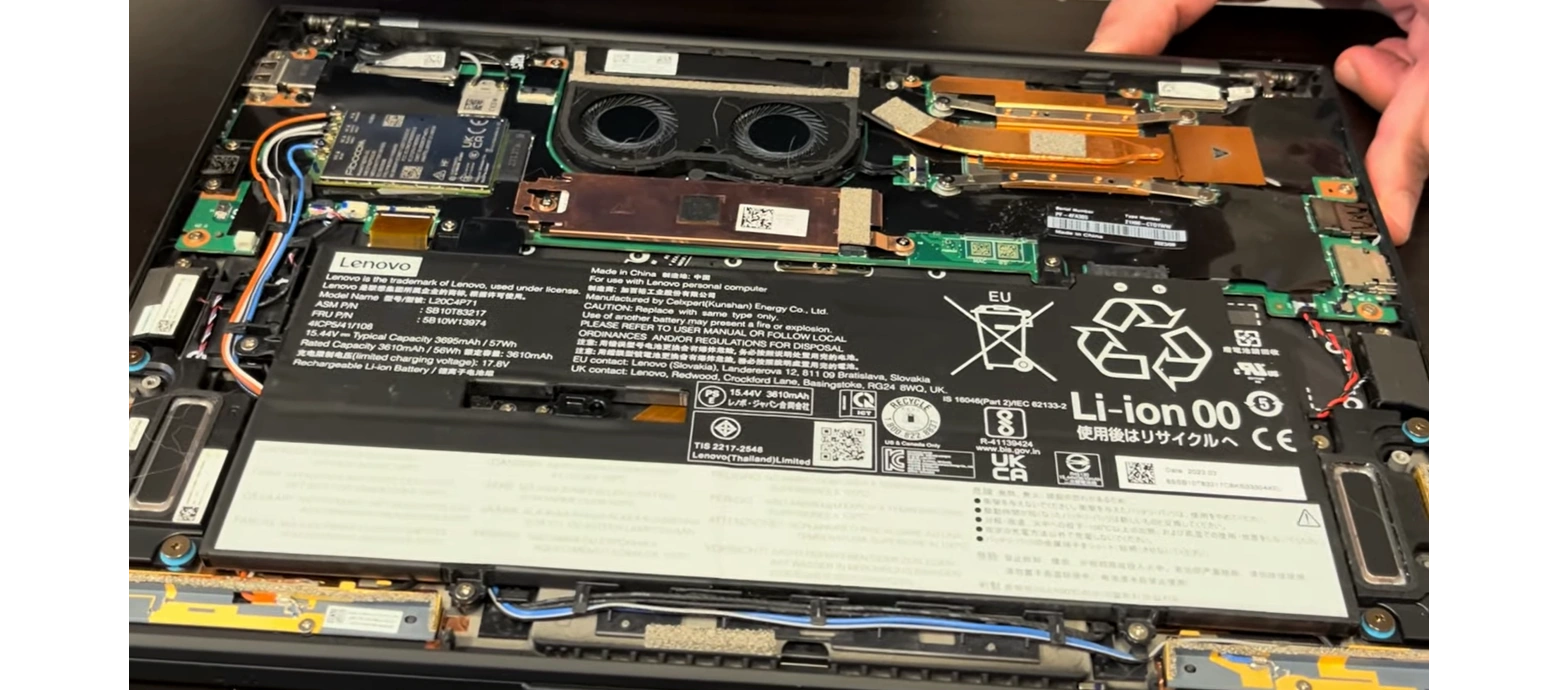
- 🔍 Internal Component Layout Overview
- 🚧 Common Challenges & Professional Solutions
- 🎯 Internal Component Identification Guide
- 🛡️ Professional Damage Prevention Protocol
- 📸 Professional Documentation Requirements
- 🧹 Initial Cleaning & Inspection Opportunities
- 🔁 Professional Reassembly Preparation
- ✅ Post-Removal Verification Protocol
- 🔒 Safety & Security Considerations
- 🛠️ Tool-Specific Techniques for Carbon Fiber
- ⏱️ Professional Time Management Guidelines
- ✅ Final Verification Checklist
- 🔍 Quick Troubleshooting Tips
- 5. ThinkPad X1 Carbon Gen 11: Professional Battery Safety & Disconnection Protocol
- ⚠️ Critical Safety: Lithium Battery Handling for ThinkPads
- 🔋 X1 Carbon Gen 11 Battery Specifications
- 🔌 Professional Pre-Disconnection Protocol
- 🔍 Battery Connector Identification Guide
- 🔧 Professional Disconnection Technique
- 🚨 Professional Hazard Mitigation Strategies
- 🔋 Complete Battery Removal Guide (If Required)
- ⚡ Enterprise ESD Protection Requirements
- 📊 Professional Battery Health Assessment
- 🚨 Emergency Response Procedures
- ⚙️ Lenovo Power Management Features
- 🔁 Professional Battery Reconnection Guide
- ♻️ Professional Disposal & Compliance
- ✅ Professional Safety Checklist
- ⚙️ ThinkPad-Specific Battery Considerations
- 🔄 Professional Battery Replacement Decision Guide
- ⚖️ Post-Service Battery Calibration Protocol
- 📑 Warranty & Compliance Considerations
- 6. ThinkPad X1 Carbon Gen 11: LPDDR5x Memory Considerations & Professional Performance Impact
- 🧠 Critical Memory Architecture Understanding
- ⚙️ LPDDR5x Technical Specifications
- 📊 Professional Capacity Decision Guide
- ⚡ Performance Optimization Strategies
- 💰 Market Value Analysis by Configuration
- 🔍 Memory Configuration Verification Methods
- 📈 Professional Performance Benchmarking
- ❄️ Thermal Performance Considerations
- 🔮 Future-Proofing Analysis
- 🏢 Enterprise & Corporate Considerations
- 🔍 Diagnostic & Troubleshooting Guide
- 📄 Professional Resale Documentation
- 💬 Professional Marketing Language for Listings
- ✅ Memory Configuration Validation Checklist
- 🔄 Alternative Performance Optimizations
- 📊 Comparative Analysis: 16GB vs 32GB
- 7.ThinkPad X1 Carbon Gen 11: NVMe SSD Upgrade & Professional Thermal Management
- 💾 Strategic Storage Upgrades for Maximum Value
- ⚙️ X1 Carbon Gen 11 Storage Specifications
- 🏆 Professional SSD Recommendations
- 🔧 Professional Installation Procedure
- ❄️ Professional Thermal Management Solutions
- 📁 Professional Data Migration Strategies
- ⚡ Storage Performance Optimization
- 🔍 Compatibility & Verification Guide
- 📊 Professional Capacity Analysis
- 🔍 Professional Troubleshooting Guide
- 🔒 Professional Security Configuration
- ✅ Professional Performance Validation
- 🌡️ Professional Thermal Testing Protocol
- 📋 Professional Resale Documentation Package
- 💡 Professional Upgrade Tips
- ✅ Final Validation Checklist
- 💰 Professional ROI Analysis
- 🎯 Market Positioning for Upgraded Units
- 8. ThinkPad X1 Carbon Gen 11: Wi-Fi 7 Card Installation & Professional Antenna Optimization
- 📡 Next-Generation Wireless for Business Professionals
- ⚡ Wi-Fi 7 Professional Advantages
- 🔌 ThinkPad-Compatible Wi-Fi 7 Cards
- ✅ Professional Pre-Installation Checklist
- 🔧 Professional Removal Procedure
- 📶 Professional Antenna Optimization Guide
- 🔧 Professional Installation Steps
- ⚙️ Professional Driver Installation Guide
- ⚡ Professional Configuration Optimization
- ✅ Professional Performance Testing Protocol
- 🔍 Professional Troubleshooting Guide
- 💰 Professional Value Proposition for Resale
- 💡 Professional Installation Tips
- ✅ Final Verification Checklist
- 📊 Professional ROI Analysis
- ⏰ Market Timing Considerations
- ⚠️ Important Compatibility Notes
- 📈 Expected Performance Benchmarks
- 9. ThinkPad X1 Carbon Gen 11: Professional Resale Market Positioning & Buyer Targeting Strategy
- 🎯 Strategic Positioning for Maximum Value Realization
- 📊 Platform-Specific Positioning Strategy
- 👥 Professional Buyer Segmentation & Profiling
- 💰 Professional Value Proposition Framework
- 🎯 Platform-Specific Optimization Strategy
- 💵 Professional Pricing Strategy Framework
- 📅 Seasonal & Market Timing Strategy
- 📝 Professional Listing Components
- 🏆 Competitive Differentiation Strategy
- 🤝 Professional Negotiation Framework
- 🛡️ Risk Mitigation through Positioning
- 🌐 Multi-Platform Distribution Strategy
- ✅ Professional Positioning Checklist
- 📈 Performance Tracking & Optimization Metrics
- 🔄 Continuous Improvement Framework
- 10. ThinkPad X1 Carbon Gen 11: Professional Selling Platform Guide - eBay vs Specialized Buyers
- 🌐 Strategic Platform Selection for Maximum Returns
- 📊 Professional Platform Comparison Matrix
- 🏷️ Professional eBay Selling Strategy
- 🎯 Specialized Platform Strategy
- 🏛️ Institutional Market Strategy (.Gov/.Edu)
- 💰 Professional Fee Analysis & Comparison
- ⚠️ Platform Risk Assessment
- 🔄 Multi-Platform Optimization Strategy
- 🛠️ Professional Tools & Resources
- 📈 Success Metrics & Benchmarks
- 🔍 Platform Selection Decision Framework
- ✅ Professional Platform Readiness Checklist
- 🚀 Emerging Platforms & Future Trends
- 🔄 Continuous Platform Optimization
- Need to Sell Your Lenovo Laptop? Get Instant Cash!
1. ThinkPad X1 Carbon Gen 11: Professional Market Value Analysis & Upgrade Strategy
The Lenovo ThinkPad X1 Carbon Gen 11 represents the pinnacle of business-grade ultrabooks, combining enterprise reliability with premium portability. Strategic upgrades and professional servicing can transform this executive-class machine into a high-value asset, particularly appealing to corporate buyers, IT departments, and business professionals when selling through specialized platforms.
🎯 ThinkPad X1 Carbon Gen 11 Value Proposition
- Enterprise-Grade Build Quality: MIL-STD-810H tested, carbon fiber reinforced chassis
- Business Security Features: ThinkShield security suite, dTPM 2.0, Match-on-Chip fingerprint reader
- Premium Display Options: Up to 2.8K OLED with Dolby Vision, 120Hz refresh rate
- Exceptional Connectivity: Thunderbolt 4, optional 5G/LTE, Wi-Fi 7 ready
⚙️ X1 Carbon Gen 11 Technical Specifications
| Component Category | Base Configuration | Maximum Upgrade Potential | Resale Value Impact |
|---|---|---|---|
| Processor | Intel Core i5-1345U | Intel Core i7-1365U vPro | High (vPro adds enterprise value) |
| Memory | 16GB LPDDR5x (soldered) | 32GB LPDDR5x 6400MHz | Critical (soldered, must choose correctly) |
| Storage | 256GB PCIe Gen4 NVMe | 2TB PCIe Gen4 NVMe SSD | Very High (easiest user upgrade) |
| Display | 14" FHD+ (1920x1200) IPS | 14" 2.8K OLED (2880x1800) | Extreme (premium upgrade) |
| Wireless | Wi-Fi 6E AX211 | Wi-Fi 7 BE200 + 5G/LTE | High (future-proofing) |
🏢 Target Resale Markets
| Buyer Segment | Key Value Drivers | Willingness to Pay Premium | Preferred Selling Platform |
|---|---|---|---|
| Enterprise IT Departments | vPro, security features, manageability | 25-35% above market | Direct sales, B2B platforms |
| Business Professionals | Portability, battery life, display quality | 15-25% above market | Specialized resale sites |
| Consultants & Executives | Premium build, LTE connectivity, brand prestige | 20-30% above market | High-end marketplaces |
| Educational Institutions | Durability, security, bulk purchasing | 10-20% above market | Government/education portals |
📊 Strategic Upgrade ROI Analysis
| Upgrade Component | Approximate Cost | Value Added at Resale | ROI Percentage | Priority Level |
|---|---|---|---|---|
| 2TB NVMe SSD | $120-$180 | $250-$350 | 100-150% | Highest (universal appeal) |
| Wi-Fi 7 Card | $60-$90 | $100-$160 | 65-120% | High (future-proofing) |
| OLED Display Panel | $250-$400 | $400-$600 | 60-100% | Medium (specific buyers) |
| Professional Cleaning/Refurb | $30-$50 | $80-$120 | 150-250% | Highest (perceived quality) |
| Extended Warranty Transfer | Varies | $150-$300 | Dependent on cost | Very High (enterprise buyers) |
🏆 X1 Carbon Gen 11 Competitive Advantages
- Legendary Keyboard: 1.5mm travel, spill-resistant design
- Comprehensive Security:
- ThinkShield comprehensive security solution
- Discrete Trusted Platform Module (dTPM 2.0)
- PrivacyGuard optional display technology
- Human Presence Detection with lock/unlock
- Sustainability Features:
- Post-consumer recycled materials in chassis
- EPEAT Gold and Energy Star 8.0 certified
- Low-blue light displays with TÜV certification
🔍 Model Identification & Configuration Verification
| Identification Method | Procedure | Critical Information Gathered | Resale Importance |
|---|---|---|---|
| Serial Number Check | Lenovo Support website or F1 at boot | Warranty status, original configuration | Critical for premium pricing |
| BIOS Information | F1 during boot → System Information | Exact specs, security features enabled | High (enterprise buyers verify) |
| Lenovo Vantage | System Details → Hardware Scan | Component health, driver status | Medium (shows maintenance) |
| Physical Labels | Bottom cover and battery compartment | Regulatory info, manufacturing date | Low (authenticity verification) |
📋 Professional Pre-Upgrade Assessment
- Run Lenovo PC Diagnostics for baseline health check
- Check remaining warranty via Lenovo Support Portal
- Document current performance metrics with benchmarks
- Assess physical condition using professional grading scale
- Determine target buyer profile for upgrade optimization
- Calculate upgrade budget against expected ROI
- Plan service sequence for maximum efficiency
💰 Professional Resale Positioning Strategy
Enterprise Positioning
- Emphasize ThinkShield security features
- Highlight vPro manageability capabilities
- Document warranty and support availability
- Focus on TCO and reliability metrics
Premium Business Positioning
- Showcase premium materials and build quality
- Demonstrate portability and battery life
- Highlight conference-ready features
- Include professional accessories
Technical Professional Positioning
- Focus on performance and upgrade potential
- Show benchmark comparisons
- Highlight connectivity options
- Provide detailed technical documentation
🔄 Lenovo Ecosystem & Management Tools
| Tool/Service | Professional Application | Resale Value Impact | Documentation Requirements |
|---|---|---|---|
| Lenovo Vantage | System optimization, driver updates, diagnostics | Medium (shows proper maintenance) | Update history, system health report |
| Commercial Vantage | Enterprise management, security controls | High (corporate buyer appeal) | Configuration export, security settings |
| Lenovo Diagnostics | Hardware validation, component testing | Very High (proves reliability) | Test results, component health status |
| ThinkShield Manager | Security feature management and reporting | Critical for enterprise sales | Security configuration documentation |
⚖️ Warranty & Service Considerations
- Warranty Transfer Process:
- Verify warranty status before upgrades
- Understand Lenovo's upgrade policy
- Document all components for service records
- Consider warranty extension for premium pricing
- Enterprise Service Considerations:
- ThinkPad Premier Support eligibility
- On-site service option availability
- International warranty coverage
- Accidental damage protection transfer
📈 Current Market Trends Analysis
- Demand Drivers:
- Remote/hybrid work equipment refresh cycles
- Corporate sustainability initiatives favoring refurbished
- Increasing need for business-grade security features
- Premium display technology becoming standard expectation
- Pricing Trends:
- OLED-equipped models command 25-40% premium
- 32GB RAM configurations highly sought after
- Wi-Fi 7 becoming expected in premium business laptops
- Extended warranty adds significant value perception
2. ThinkPad X1 Carbon Gen 11: Professional Pre-Sale Audit & Condition Assessment Protocol
🔍 The Critical Importance of Professional Assessment
Before undertaking any upgrades or listing a ThinkPad X1 Carbon Gen 11 for resale, a comprehensive professional audit is essential. This systematic evaluation not only identifies necessary repairs and upgrades but also provides the documentation needed to justify premium pricing and attract discerning business buyers.
📋 Professional Audit Framework
| Audit Category | Key Assessment Areas | Professional Tools Required | Resale Impact Score |
|---|---|---|---|
| Physical Condition | Cosmetic wear, structural integrity, port functionality | High-intensity light, magnification, calipers | 9.5/10 (Most visible to buyers) |
| Performance Health | Benchmark scores, thermal performance, battery health | Lenovo Diagnostics, HWMonitor, CrystalDiskMark | 8.5/10 (Technical buyers verify) |
| Security & Compliance | TPM status, encryption, firmware security | Lenovo Vantage, Windows Security Center | 9.0/10 (Critical for enterprise) |
| Documentation & Provenance | Warranty status, service history, original purchase | Lenovo Support Portal | 8.0/10 (Builds buyer trust) |
👁️ Physical Condition Assessment Protocol
Chassis & Exterior (Carbon Fiber)
- Grade A (Excellent): No visible marks, corners sharp
- Grade B (Good): Minor scuffs, no structural issues
- Grade C (Fair): Visible wear, minor dings
- Grade D (Poor): Cracks, significant damage
Display & Bezel
- Dead/stuck pixel count (industry standards)
- Backlight uniformity (dark room test)
- Bezel adhesive integrity
- Hinge tension and smoothness
Keyboard & Trackpad
- Key travel consistency (1.5mm standard)
- Trackpad surface condition
- Backlight functionality
- ThinkPad red TrackPoint functionality
📊 Professional Grading Scale for Resale
| Grade | Physical Condition Requirements | Performance Requirements | Typical Price Premium | Target Buyer Segment |
|---|---|---|---|---|
| A+ (Like New) | No visible wear, original packaging, all accessories | All benchmarks above 95th percentile | 35-50% above market | Executives, collectors, premium buyers |
| A (Excellent) | Minimal signs of use, no visible defects | Performance within 90-95th percentile | 25-35% above market | Business professionals, IT departments |
| B+ (Very Good) | Light cosmetic wear, fully functional | Performance within 85-90th percentile | 15-25% above market | Value-conscious professionals |
| B (Good) | Visible wear but structurally sound | Performance within 80-85th percentile | 5-15% above market | Students, small businesses |
⚡ Performance & Health Audit Protocol
- Comprehensive Diagnostics:
- Run Lenovo PC Diagnostics (F10 at boot)
- Perform extended memory test (minimum 4 passes)
- SSD health check using manufacturer tools
- Battery health report via Windows PowerShell
- Benchmark Suite:
- PCMark 10 for overall system performance
- CrystalDiskMark for storage performance
- Cinebench R23 for CPU performance
- WebXPRT 4 for real-world browser performance
🔋 Professional Battery Health Assessment
| Health Status | Design Capacity Remaining | Cycle Count Estimate | Professional Impact | Recommended Action |
|---|---|---|---|---|
| Excellent | 90-100% | < 100 cycles | Premium pricing justification | Document and highlight in listing |
| Good | 80-89% | 100-300 cycles | Standard business use acceptable | Consider replacement if cost-effective |
| Fair | 70-79% | 300-500 cycles | Significantly impacts mobile usability | Replace before sale or price accordingly |
| Poor | < 70% | > 500 cycles | Major negative impact on value | Must replace for any premium pricing |
🔒 Security & Compliance Audit
- ThinkShield Features Verification:
- dTPM 2.0 status and functionality
- Match-on-Chip fingerprint reader operation
- Human Presence Detection calibration
- PrivacyGuard functionality (if equipped)
- Enterprise Readiness Check:
- BitLocker configuration status
- Windows Hello for Business readiness
- Modern Standby compatibility
- Management interface accessibility
📄 Documentation & Provenance Verification
| Document Type | Verification Method | Professional Importance | Required for Grade A+ |
|---|---|---|---|
| Original Purchase Receipt | Date, seller, configuration verification | High (proves legitimacy) | Yes |
| Warranty Status | Lenovo Warranty Lookup | Very High (affects value significantly) | Yes |
| Service History | Lenovo Service Records, repair receipts | Medium (builds confidence) | Preferred |
| Original Accessories | Physical verification, serial matching | Medium (completeness adds value) | Yes |
📸 Professional Photography Protocol
- Equipment Requirements:
- DSLR or high-quality smartphone camera
- Tripod for stability and consistency
- Clean, neutral background (white or gray)
- Diffused lighting setup (no harsh shadows)
- Required Shots:
- Front, back, left, right, top, bottom
- Close-ups of serial numbers and labels
- Display on with test pattern (dead pixel check)
- Keyboard and trackpad detail shots
- All ports and connectors
- Any imperfections (transparency builds trust)
💰 Professional Valuation Factors
| Value Factor | Weight in Pricing | Assessment Method | Documentation Required |
|---|---|---|---|
| Processor & RAM Configuration | 30% | Benchmark comparisons, configuration check | CPU-Z screenshots, benchmark results |
| Display Quality | 25% | Pixel check, colorimeter measurement | Display test results, calibration reports |
| Physical Condition | 20% | Visual inspection, professional grading | High-quality photos, condition report |
| Battery Health | 15% | PowerShell report, cycle count check | Battery health report, cycle count |
| Warranty & Accessories | 10% | Document verification, physical check | Warranty verification, accessory photos |
✅ Comprehensive Pre-Sale Audit Checklist
- ✅ Serial number recorded and verified with Lenovo
- ✅ Warranty status confirmed and documented
- ✅ Physical condition graded with photographs
- ✅ Display tested for dead pixels and uniformity
- ✅ Keyboard and trackpad fully functional
- ✅ All ports and connectors tested
- ✅ Battery health assessed and documented
- ✅ Performance benchmarks completed
- ✅ Security features verified and operational
- ✅ Original accessories inventoried and photographed
- ✅ Professional grade assigned (A, B+, B, etc.)
- ✅ Market comparable analysis completed
- ✅ Target price range established
- ✅ Required repairs/upgrades identified
- ✅ Audit report compiled for buyer presentation
📈 Market Comparison Analysis Protocol
- Competitive Analysis:
- Research similar ThinkPad X1 Carbon Gen 11 listings
- Note pricing trends by configuration and condition
- Identify unique selling propositions of competitors
- Analyze successful listing techniques and keywords
- Platform-Specific Research:
- eBay completed listings for actual sale prices
- Specialized business laptop reseller pricing
- Corporate refurbishers' pricing structures
- Local market conditions and demand
📄 Professional Audit Report Template Elements
- Cover page with serial number and photos
- Executive summary with overall grade
- Detailed condition assessment with photographs
- Performance benchmark results and comparisons
- Component health status (battery, SSD, etc.)
- Security feature verification report
- Warranty and service documentation
- Market analysis and valuation justification
- Recommended upgrades with ROI analysis
- Professional certification of assessment accuracy
3. ThinkPad X1 Carbon Gen 11: Essential Tools & Professional Workspace Setup
🔧 The Right Tools for Professional ThinkPad Service
Successful internal service of the ThinkPad X1 Carbon Gen 11 requires specialized tools and a properly configured workspace. Using incorrect tools can damage the carbon fiber chassis, void warranties, and significantly reduce resale value. This guide details the professional equipment needed for safe, effective upgrades.
⚙️ ThinkPad-Specific Tool Requirements
| Tool Category | X1 Carbon Gen 11 Specifics | Professional Alternatives | Risk of Using Improper Tools |
|---|---|---|---|
| Screwdrivers | Phillips #00, Torx T5 (security variant for some models) | Precision screwdriver set with magnetic tips | High - Stripped screws, chassis damage |
| Pry Tools | Ultra-thin plastic spudgers (0.5mm preferred) | Guitar picks, specialized opening tools | Extreme - Cracked carbon fiber, cosmetic damage |
| ESD Protection | 1MΩ anti-static wrist strap, ESD-safe mat | Anti-static gloves, grounded workstation | Critical - Component damage, latent failures |
| Specialized Tools | Suction cups for display, spudger set, tweezers | iFixit toolkits, professional repair kits | Moderate - Difficult service, potential damage |
🎒 Recommended Professional Toolkits
Basic Service Kit ($50-100)
- iFixit Essential Electronics Toolkit
- Anti-static wrist strap (1MΩ certified)
- Microfiber cleaning cloths
- 99% isopropyl alcohol (electronics grade)
- Best for: RAM/SSD upgrades, basic cleaning
Professional Service Kit ($150-250)
- iFixit Pro Tech Toolkit
- ESD-safe mat with grounding cord
- Precision torque screwdriver (0.4-0.6 Nm)
- Thermal paste and pads (high-performance)
- Best for: Full disassembly, display replacements
Enterprise Service Kit ($400-600)
- Wiha MicroFinish precision tools
- Full ESD workstation with ionizer
- Digital torque measurement tools
- Calibrated thermal interface materials
- Best for: Corporate IT departments, repair businesses
🔩 X1 Carbon Gen 11 Screw Types & Locations
| Screw Location | Type & Size | Quantity | Torque Specification | Professional Handling Notes |
|---|---|---|---|---|
| Bottom Cover | Phillips #00 | 6-8 (varies by model) | 0.4-0.6 Nm | Use magnetic tray, note pattern |
| Internal Components | Phillips #000 / Torx T5 | 10-15 | 0.3-0.5 Nm | Label by location, avoid mixing |
| Display Hinges | Phillips #00 (possibly thread-locked) | 4 | 0.5-0.7 Nm | May require heat for thread locker |
| M.2 SSD | M2x3mm with washer | 1-2 | 0.2-0.3 Nm | Finger tight + 1/8 turn maximum |
🏢 Professional Workspace Configuration
| Workspace Element | Minimum Requirements | Professional Standards | Enterprise Best Practices |
|---|---|---|---|
| Work Surface | Clean, dry, non-conductive surface | ESD-safe mat with grounding (ANSI/ESD S20.20) | Dedicated repair station with proper grounding |
| Lighting | Adequate ambient light | 500+ lux task lighting with magnification | Adjustable arm magnifier with LED ring light |
| Organization | Basic containers for screws | Magnetic project mat with zones | Component trays with labels, inventory system |
| ESD Protection | Wrist strap (optional) | Wrist strap + ESD mat, daily testing | Full ESD control program with monitoring |
🛠️ Specialized Tools for ThinkPad Service
- Carbon Fiber-Safe Tools:
- Ultra-thin plastic spudgers (0.3-0.5mm)
- Non-marring pry tools with rounded edges
- Suction cups for display removal (60mm minimum)
- Anti-static nylon tweezers
- Precision Tools:
- Torque-limiting screwdriver (0.1-1.0 Nm range)
- Angled picks for connector release
- Micro-scope for inspection (40x magnification)
- Digital calipers for measurements
⚡ Enterprise ESD Protection Protocol
- Personal Grounding:
- Wear 1MΩ anti-static wrist strap
- Connect to ESD mat or grounded outlet
- Test resistance daily (1-10MΩ range)
- Remove when working with live power
- Workspace Grounding:
- ESD mat covering entire work surface
- Proper ground connection (verified)
- Humidity control (40-60% ideal)
- Regular surface resistance testing
🧴 Professional Consumable Materials
| Material Type | ThinkPad X1 Carbon Gen 11 Application | Recommended Brands | Professional Notes |
|---|---|---|---|
| Thermal Paste | CPU/GPU thermal interface replacement | Thermal Grizzly Kryonaut, Arctic MX-6 | Very small quantity (grain of rice), non-conductive |
| Thermal Pads | VRM, memory, SSD cooling | Gelid Solutions, Thermalright | Various thicknesses (0.5mm, 1.0mm, 1.5mm) |
| Adhesive Tapes | Display bezel, component securing | 3M VHB tape, Tesa adhesive strips | Pre-cut sizes available for common repairs |
| Cleaning Supplies | Component cleaning, thermal paste removal | 99% isopropyl alcohol, lint-free wipes | No cotton swabs (lint issues) |
🔧 Tool Maintenance & Calibration
- Regular Maintenance Schedule:
- Weekly: Clean tips, check for damage
- Monthly: Verify torque calibration
- Quarterly: Full inspection and calibration
- Annually: Professional calibration if available
- Storage Best Practices:
- Store in ESD-safe containers
- Keep tips protected from damage
- Organize by size and type
- Label drawers/containers clearly
⚠️ Tool Safety & Risk Mitigation
| Risk Category | Potential Damage | Prevention Methods | Professional Response |
|---|---|---|---|
| Over-torquing Screws | Stripped threads, cracked components | Use torque-limiting driver, follow specifications | Helicoil repair, component replacement |
| ESD Damage | Latent component failure, immediate damage | Full ESD protection, humidity control | Component testing, system diagnostics |
| Cosmetic Damage | Scratches, dents on carbon fiber | Use correct tools, proper technique | Professional refinishing, price adjustment |
| Connector Damage | Bent pins, broken latches | Use proper release tools, gentle pressure | Micro-soldering repair, connector replacement |
🛒 Professional Tool Sources
- Specialized Tool Suppliers:
- Lenovo-Specific Sources:
- Lenovo Parts Store for OEM components
- Authorized Lenovo service providers
- Enterprise IT distributors
- Certified refurbishment partners
🎒 Mobile Service Toolkit Configuration
- Essential Mobile Tools:
- Compact screwdriver set with multiple bits
- Portable ESD mat and wrist strap
- Small selection of pry tools and spudgers
- Basic cleaning supplies in sealed containers
- Field Service Considerations:
- Lightweight, durable carrying case
- Organization system for small parts
- Portable lighting and magnification
- Documentation supplies (camera, notebook)
💰 Tool Investment ROI Analysis
| Investment Level | Approximate Cost | Time to ROI | Professional Benefits | Recommended For |
|---|---|---|---|---|
| Hobbyist/Individual | $50-150 | 1-2 upgrades | Basic service capability, prevents damage | Personal upgrades, occasional service |
| Semi-Professional | $200-400 | 3-5 upgrades | Full disassembly capability, professional results | Small business, frequent upgrades |
| Professional Service | $500-1,000 | 10-15 service jobs | Enterprise-grade results, maximum efficiency | IT departments, repair businesses |
| Enterprise Workshop | $1,500-3,000+ | 25-50 service jobs | Volume capability, certification compliance | Corporate IT, refurbishment centers |
✅ Essential Tool Checklist for X1 Carbon Service
- ✅ Phillips #00 screwdriver (magnetic tip preferred)
- ✅ Torx T5 screwdriver (for some security screws)
- ✅ Ultra-thin plastic spudgers (0.5mm or thinner)
- ✅ Anti-static wrist strap with proper grounding
- ✅ Suction cups for display removal (60mm minimum)
- ✅ Thermal paste (non-conductive, high-performance)
- ✅ 99% isopropyl alcohol and lint-free wipes
- ✅ Anti-static tweezers for connector work
- ✅ Magnetic project mat or screw organizer
- ✅ Proper lighting with magnification capability
- ✅ Digital multimeter for continuity testing
- ✅ Torque-limiting screwdriver (optional but recommended)
- ✅ ESD-safe storage for removed components
- ✅ Documentation tools (camera, notebook, labels)
🔄 Tool Replacement & Upgrade Schedule
- High-Wear Items (Replace every 6-12 months):
- Screwdriver tips (when showing wear)
- Pry tools and spudgers
- Cleaning cloths and brushes
- ESD wrist strap bands
- Calibration Items (Check every 3-6 months):
- Torque screwdrivers
- Digital multimeters
- ESD test equipment
- Measurement tools
4. ThinkPad X1 Carbon Gen 11: Bottom Cover Removal & Professional Internal Access Guide
🔓 Professional Access: The Foundation of Successful Upgrades
Safe and damage-free removal of the ThinkPad X1 Carbon Gen 11's bottom cover is the critical first step to any internal service. This carbon fiber and magnesium assembly requires specific techniques to maintain structural integrity and preserve the premium appearance essential for maximum resale value.
✅ Professional Pre-Removal Checklist
- System Preparation:
- Complete shutdown through Windows menu
- Disconnect all peripherals and chargers
- Remove any dock or port replicator
- Ground yourself with ESD wrist strap
- Workspace Setup:
- Clean, flat surface with ESD mat
- Proper lighting (500+ lux minimum)
- Magnetic project mat for screw organization
- All necessary tools within easy reach
🔩 X1 Carbon Gen 11 Bottom Screw Layout
| Screw Location | Screw Type | Quantity | Length & Notes | Critical Identification |
|---|---|---|---|---|
| Front Edge (Near Touchpad) | Phillips #00 | 2 | 4mm - Shortest screws | Marked with triangle indicators |
| Side Edges | Phillips #00 | 4 (2 per side) | 5mm - Medium length | Located near rubber feet |
| Rear Edge (Near Hinges) | Phillips #00 | 2 | 6mm - Longest screws | Important for structural integrity |
| Corner Reinforcement | Phillips #00 | 1-2 (model dependent) | 5mm - May have security features | Check for warranty void indicators |
🔧 Professional Removal Technique
- Screw Removal Protocol:
- Use magnetic Phillips #00 driver
- Remove screws in diagonal pattern (start corners)
- Place screws on magnetic mat in relative positions
- Note any screws with thread locker (blue residue)
- Clip Release Methodology:
- Start at rear-right corner near hinge
- Insert ultra-thin plastic spudger at 15-20 degree angle
- Apply gentle upward pressure while twisting slightly
- Listen for subtle click indicating clip release
- Work around perimeter, releasing 3-4 clips at a time
- Cover Separation Procedure:
- Lift from hinge side first
- Check for internal cable connections (rare but possible)
- Set cover aside on soft, clean surface
- Never force or bend the carbon fiber cover
🔍 Internal Component Layout Overview
| Component Area | Accessibility | Upgrade Potential | Resale Value Impact |
|---|---|---|---|
| M.2 SSD Slot | ✅ Immediately accessible | Excellent (PCIe Gen4 support) | Very High (easiest value-add upgrade) |
| Wi-Fi Card | ✅ Immediately accessible | Good (easy replacement) | High (future-proofing) |
| Battery Connection | ✅ Immediately accessible | Moderate (requires disconnection for service) | Medium (safety requirement) |
| Cooling System | ⚠️ Partially accessible | Limited (requires motherboard removal) | Medium (thermal performance affects value) |
| LPDDR5x Memory | ❌ Soldered to motherboard | None (configured at purchase) | Critical (affects base value significantly) |
🚧 Common Challenges & Professional Solutions
| Challenge | Professional Diagnosis | Resolution Strategy | Prevention Method |
|---|---|---|---|
| Stubborn Clips | Previous improper reassembly, adhesive residue | Apply gentle heat with hair dryer (60°C max, 10 seconds) | Clean clip channels during each service |
| Stripped Screws | Previous over-torquing, incorrect tool size | Rubber band method, screw extraction kit | Use proper torque (finger tight + ¼ turn) |
| Cover Won't Separate | Missed screw, internal cable connection | Double-check all screw locations, look carefully | Follow systematic removal sequence |
| Clip Damage | Excessive force, incorrect tool angle | Document damage, adjust reassembly technique | Use proper 15-20 degree insertion angle |
🎯 Internal Component Identification Guide
- ThinkPad-Specific Components:
- Discrete TPM 2.0 chip location
- Human Presence Detection sensor
- Match-on-Chip fingerprint reader controller
- Thunderbolt 4 controller and power circuitry
- Cooling System Features:
- Single fan with dual heat pipe design
- Thermal pad placements for VRM and memory
- Air intake and exhaust pathways
- Dust filtration system (if equipped)
🛡️ Professional Damage Prevention Protocol
- Chassis Protection Measures:
- Use plastic tools only against carbon fiber
- Support cover evenly when removing
- Work on microfiber cloth to prevent scratches
- Handle by edges only to prevent fingerprints
- Internal Component Protection:
- ESD protection mandatory throughout process
- Check for cables attached to bottom cover
- Avoid touching motherboard with tools
- Keep screws organized to prevent internal damage
📸 Professional Documentation Requirements
- Essential Photographs:
- Overall internal layout before any changes
- Close-ups of screw patterns and locations
- Thermal interface condition (pads and paste)
- Cable routing paths and connection points
- Enterprise Documentation:
- Component serial numbers and locations
- Security chip placement and identification
- Any existing modifications or repairs
- Asset tag documentation if present
🧹 Initial Cleaning & Inspection Opportunities
| Cleaning Area | Professional Importance | Cleaning Method | Inspection Focus |
|---|---|---|---|
| Cooling Vents | High (airflow affects performance) | Compressed air from inside out | Dust accumulation, obstruction |
| Fan Assembly | Very High (cooling efficiency) | Soft brush, isopropyl alcohol on bearings | Bearing wear, blade damage |
| Heat Sink Fins | Critical (thermal transfer) | Compressed air, soft brush | Dust blockage, fin damage |
| Internal Surfaces | Medium (appearance, resale appeal) | Dry microfiber cloth, gentle brushing | Liquid damage, corrosion, debris |
🔁 Professional Reassembly Preparation
- Clean cover edges with isopropyl alcohol
- Inspect all clips for damage before reassembly
- Test fit cover before installing screws
- Ensure internal cables are properly routed
- Verify no tools or debris remain inside chassis
- Check thermal interface materials for proper seating
✅ Post-Removal Verification Protocol
- Before Proceeding with Upgrades:
- Temporarily reassemble and test system boot
- Verify all components detected in BIOS
- Check fan operation at different speeds
- Ensure no new issues have been introduced
- ThinkPad-Specific Verification:
- Test Human Presence Detection functionality
- Verify fingerprint reader operation
- Check Thunderbolt port functionality
- Test audio and microphone functions
🔒 Safety & Security Considerations
- Asset Protection:
- Maintain chain of custody documentation
- Secure work area against unauthorized access
- Document all removed/replaced components
- Verify asset tags remain intact and legible
- Data Security:
- Ensure no data-bearing components are exposed
- Maintain secure storage for removed parts
- Document storage device handling procedures
- Comply with data protection regulations
🛠️ Tool-Specific Techniques for Carbon Fiber
| Tool Type | Optimal Technique | Pressure Required | Common Mistakes to Avoid |
|---|---|---|---|
| Ultra-Thin Spudger | Insert at 15-20°, twist gently while lifting | Light (1-2 lbs pressure) | Angling too steeply, using metal tools |
| Suction Cups | Center on cover, apply even pressure | Moderate (consistent pull) | Off-center placement, jerky movements |
| Pry Tool | Work from corners, progress gradually | Very light (feather touch) | Prying from middle, using excessive force |
| Magnetic Screwdriver | Straight in/out, consistent pressure | Firm but gentle (no stripping) | Angled insertion, uneven pressure |
⏱️ Professional Time Management Guidelines
| Service Task | Experienced Technician | Intermediate Technician | Beginner Technician | Professional Notes |
|---|---|---|---|---|
| Bottom Cover Removal | 3-5 minutes | 8-12 minutes | 15-20 minutes | Take your time - rushing causes damage |
| SSD Upgrade | 2-3 minutes (after access) | 5-8 minutes | 10-15 minutes | Includes cloning/migration time separately |
| Wi-Fi Card Replacement | 4-6 minutes | 10-15 minutes | 20-25 minutes | Antenna routing requires care |
| Complete Internal Cleaning | 10-15 minutes | 20-30 minutes | 40-50 minutes | Thorough cleaning adds significant value |
✅ Final Verification Checklist
- ✅ All bottom cover screws removed and organized
- ✅ Cover released from all clips without damage
- ✅ Internal components visually inspected and documented
- ✅ ESD protection maintained throughout process
- ✅ No tools or debris left inside chassis
- ✅ Photos taken for documentation and resale purposes
- ✅ Workspace organized for next steps
- ✅ Safety protocols followed (battery disconnected if proceeding)
- ✅ Professional notes taken for reassembly reference
- ✅ Customer or inventory documentation updated
🔍 Quick Troubleshooting Tips
- If cover won't budge: Double-check for hidden screws under warranty stickers
- If clips feel stuck: Apply very gentle heat (60°C max) for 10 seconds
- If screw strips: Use rubber band method before extraction tools
- If cover cracks: Stop immediately, assess damage, consider replacement
- If internal cable is attached: Don't force - locate connector and release properly
5. ThinkPad X1 Carbon Gen 11: Professional Battery Safety & Disconnection Protocol
⚠️ Critical Safety: Lithium Battery Handling for ThinkPads
Proper battery disconnection is the single most important safety procedure when servicing any ThinkPad X1 Carbon Gen 11. These premium business laptops contain sophisticated battery management systems that require professional handling to ensure safety, maintain warranty compliance, and preserve maximum resale value.
🔋 X1 Carbon Gen 11 Battery Specifications
| Specification | Standard Configuration | Extended Battery Option | Professional Service Impact |
|---|---|---|---|
| Chemistry & Configuration | Lithium-Ion Polymer, 4-cell | Lithium-Ion Polymer, 4-cell (enhanced) | High-energy density requires careful handling |
| Capacity & Voltage | 57Wh, 11.55V nominal | Up to 61Wh, 11.55V nominal | Affects mobile usability and resale value |
| Part Numbers | 5B11H77536 (standard) | 5B11H77537 (extended) | Use Lenovo OEM parts for warranty compliance |
| Management System | Lenovo Intelligent Thermal Management | Same with enhanced calibration | Requires proper reconnection for full functionality |
| Safety Features | Multiple protection circuits, thermal sensors | Enhanced monitoring and protection | Critical for enterprise safety compliance |
🔌 Professional Pre-Disconnection Protocol
- System Shutdown Procedure:
- Close all applications and save work
- Shut down through Windows Start menu
- Disconnect all peripherals and chargers
- Remove USB-C docks and external monitors
- Power Discharge Protocol:
- Press and hold power button for 15-20 seconds
- Wait 2-3 minutes for complete capacitor discharge
- Verify all LED indicators are completely off
- Check battery status light (should be dark)
🔍 Battery Connector Identification Guide
| Connector Feature | X1 Carbon Gen 11 Specifics | Location Guide | Professional Safety Notes |
|---|---|---|---|
| Connector Type | White 4-pin JST with locking latch | Center-right of motherboard, near RAM area | Standard enterprise laptop connector |
| Latch Mechanism | Push-to-release with small plastic tab | Requires specific tool angle and minimal force | Never pull wires - use connector body only |
| Cable Routing | Typically routed under battery assembly | Follow cable from battery to motherboard | Document routing for reassembly compliance |
| Visual Indicators | Look for "BATT" marking on motherboard | Usually largest internal power connector | Take photos for professional documentation |
🔧 Professional Disconnection Technique
- Latch Release Methodology:
- Identify push-release mechanism (not slide)
- Use plastic spudger at correct 45-degree angle
- Apply gentle pressure until audible click
- If resistance is felt, check for secondary latch
- Connector Removal Protocol:
- Grasp connector body firmly (never wires)
- Pull straight out with even, steady pressure
- If resistance, rock gently side-to-side while pulling
- Use plastic spudger for leverage only if necessary
- Post-Disconnection Verification:
- Press power button again for 5 seconds
- Wait additional 2 minutes before proceeding
- Verify no electrical activity anywhere
- Confirm system is completely safe for service
🚨 Professional Hazard Mitigation Strategies
| Potential Hazard | Risk Level | Prevention Strategy | Emergency Response Protocol |
|---|---|---|---|
| Short Circuit | High (component damage risk) | Cover terminals immediately after removal | Power disconnect, isolate component |
| Thermal Runaway | Critical (fire/explosion hazard) | Work in temperature-controlled environment | Class D fire extinguisher, sand bucket ready |
| ESD Damage | High (latent component failure) | Full ESD protection throughout process | Component testing, failure analysis |
| Chemical Exposure | Medium (corporate liability) | Proper ventilation, PPE (gloves, safety glasses) | Eye wash station, ventilation activation |
🔋 Complete Battery Removal Guide (If Required)
- Screw Identification:
- Locate 4-6 Phillips #00 screws securing battery
- Note screw lengths (may vary by capacity)
- Check for adhesive strips under battery
- Document screw pattern with photos
- Safe Removal Technique:
- Remove screws in criss-cross pattern
- Lift from connector end first (30° angle)
- If adhesive present, use isopropyl alcohol to release
- Place battery immediately in anti-static container
⚡ Enterprise ESD Protection Requirements
- Essential ESD Equipment:
- 1MΩ anti-static wrist strap (daily tested)
- ESD-safe work mat properly grounded
- Anti-static bags for removed components
- Humidity control (40-60% maintained)
- ThinkPad Component Sensitivity:
- dTPM 2.0 security chip: Extremely sensitive
- Thunderbolt 4 controller: Highly sensitive
- Human Presence Detection sensor: Very sensitive
- NVMe SSD controller: Highly sensitive
📊 Professional Battery Health Assessment
| Health Status | Capacity Indicator | Professional Impact | Resale Recommendation |
|---|---|---|---|
| Excellent (90-100%) | Windows reports "Excellent" | Full mobile productivity | Premium pricing, highlight in listing |
| Good (80-89%) | Shows "Good" with moderate wear | Reduced mobile work time | Standard business use acceptable |
| Fair (70-79%) | Suggests "Consider replacement" | Limited mobile usability | Replace before sale or discount price |
| Poor (<70%) | "Replace now" warning appears | Unreliable for mobile work | Must replace for any premium pricing |
🚨 Emergency Response Procedures
- Battery Swelling/Puffing:
- STOP work immediately
- Do NOT puncture or apply pressure
- Place in fire-proof container
- Contact Lenovo Business Support immediately
- Battery Thermal Event:
- Evacuate area immediately
- Use Class D fire extinguisher or sand
- NEVER use water on lithium battery fires
- Call emergency services if uncontrollable
⚙️ Lenovo Power Management Features
| Feature | Professional Application | Service Impact | Resale Value Impact |
|---|---|---|---|
| Intelligent Cooling | Adaptive thermal management | Requires proper battery connection | Medium (business user benefit) |
| Rapid Charge | 80% charge in 60 minutes | Requires compatible Lenovo charger | High (productivity feature) |
| Battery Conservation Mode | Limits charging to 80% for longevity | Settings may reset after disconnection | Medium (extends asset life) |
| Smart Power | Adaptive performance/power balance | Automatic adjustment based on usage | Low (background feature) |
🔁 Professional Battery Reconnection Guide
- Pre-Reconnection Verification:
- Verify battery terminals are clean and undamaged
- Check connector for bent pins or damage
- Ensure cable routing matches documentation
- Clean connection points with isopropyl alcohol
- Safe Reconnection Protocol:
- Connect battery before any other components
- Align connector properly (do not force)
- Push firmly until audible click is heard
- Verify secure connection with gentle tug test
♻️ Professional Disposal & Compliance
- Proper Disposal Methods:
- Call2Recycle drop-off locations
- Lenovo Battery Return Program
- Corporate hazardous waste facilities
- Authorized electronics recyclers
- Safety Precautions:
- Cover terminals with electrical tape before disposal
- Store in fire-proof container until disposal
- Never dispose in regular trash
- Document disposal for corporate compliance
✅ Professional Safety Checklist
- ✅ System completely powered down and discharged
- ✅ ESD protection equipment properly grounded
- ✅ Battery connector correctly identified
- ✅ Latch mechanism understood and released
- ✅ Connector removed safely (no wire pulling)
- ✅ System verified as dead (no LED activity)
- ✅ Workspace clear of liquids and heat sources
- ✅ Emergency equipment accessible (if needed)
- ✅ Battery handled carefully (no punctures/drops)
- ✅ Professional documentation complete (photos, logs)
⚙️ ThinkPad-Specific Battery Considerations
| ThinkPad Feature | Battery Integration | Service Impact | Resale Value Impact |
|---|---|---|---|
| ThinkPad Power Manager | Advanced battery health monitoring | Requires proper reconnection for functionality | High (enterprise power management) |
| Rapid Charge Technology | Specific charging algorithms | Requires compatible 65W+ Lenovo charger | High (business productivity feature) |
| Battery Threshold Settings | Customizable charge limits | Settings preserved through proper service | Medium (extends battery lifespan) |
| Lenovo Vantage Integration | Unified system management | May require recalibration after service | Low (expected feature) |
🔄 Professional Battery Replacement Decision Guide
| Scenario | Recommended Action | Cost Estimate | ROI Analysis | Professional Recommendation |
|---|---|---|---|---|
| >90% Health | Keep original battery | $0 | N/A | Document health in listing |
| 80-89% Health | Consider replacement | $80-120 | Moderate (50-75% ROI) | Replace if targeting premium market |
| 70-79% Health | Replace before sale | $80-120 | Good (75-100% ROI) | Strongly recommended |
| <70% Health | Must replace | $80-120 | Excellent (100-150% ROI) | Essential for any premium pricing |
⚖️ Post-Service Battery Calibration Protocol
- Initial Calibration:
- Charge battery to 100% while powered off
- Discharge completely (use until automatic shutdown)
- Recharge to 100% without interruption
- Lenovo Vantage Configuration:
- Launch Lenovo Vantage application
- Navigate to Power settings
- Configure battery threshold settings
- Enable Rapid Charge if desired
📑 Warranty & Compliance Considerations
- Lenovo Warranty Impact:
- Battery disconnection typically doesn't void warranty
- Damage during service may void coverage
- Use of non-OEM batteries may affect warranty
- Document all service for warranty claims
- Enterprise Compliance:
- Follow corporate safety protocols
- Document battery disposal for audit compliance
- Maintain service records for asset management
- Comply with environmental regulations
6. ThinkPad X1 Carbon Gen 11: LPDDR5x Memory Considerations & Professional Performance Impact
🧠 Critical Memory Architecture Understanding
The ThinkPad X1 Carbon Gen 11 utilizes soldered LPDDR5x memory, making memory configuration decisions at purchase critically important for long-term value. Understanding these limitations and optimizing performance within them is essential for maximizing resale value and appeal to business professionals.
⚙️ LPDDR5x Technical Specifications
| Specification | X1 Carbon Gen 11 Details | Professional Impact | Resale Value Weighting |
|---|---|---|---|
| Memory Type | LPDDR5x (Low Power Double Data Rate 5) | Optimized for power efficiency and thin form factor | High (modern standard expected) |
| Speed Support | 6400MHz (industry-leading for ultrabooks) | Affects data-intensive applications and multitasking | Very High (premium performance indicator) |
| Capacity Options | 16GB or 32GB (soldered at factory) | Irreversible decision with major performance implications | Critical (primary resale differentiator) |
| Power Efficiency | ~30% less power than DDR5 standard | Extends battery life for mobile professionals | High (business user priority) |
| Upgrade Potential | None (soldered directly to motherboard) | Must select correct capacity at purchase | Extreme (limits future flexibility) |
📊 Professional Capacity Decision Guide
| Professional Use Case | Minimum Requirement | Recommended Configuration | Resale Value Premium (16GB → 32GB) | Target Buyer Segment |
|---|---|---|---|---|
| Basic Business Use | 8GB (not available) | 16GB (base configuration) | N/A | Entry-level business, students |
| Professional Multitasking | 16GB | 32GB (recommended) | $200-300 premium | Business professionals, consultants |
| Data Analysis | 32GB | 32GB (essential) | $300-400 premium | Analysts, researchers, engineers |
| Virtualization | 32GB | 32GB (minimum) | $250-350 premium | IT professionals, developers |
| Creative Work | 32GB | 32GB (strongly recommended) | $200-300 premium | Designers, video editors |
⚡ Performance Optimization Strategies
- Windows Memory Management:
- Adjust virtual memory settings appropriately
- Disable unnecessary startup programs
- Configure background app permissions
- Optimize for performance in power settings
- Professional Application Configuration:
- Adobe Creative Cloud: Adjust memory allocation
- Microsoft Office: Configure background processes
- Development tools: Optimize build settings
- Virtual machines: Configure memory allocation efficiently
💰 Market Value Analysis by Configuration
| Configuration | Original Price Difference | Resale Value Difference | Value Retention Rate | Professional Recommendation |
|---|---|---|---|---|
| 16GB LPDDR5x | Base price | Base resale value | 45-55% after 1 year | Acceptable for basic business use |
| 32GB LPDDR5x | $200-300 more | $250-350 more | 55-65% after 1 year | Strongly recommended for resale |
🔍 Memory Configuration Verification Methods
| Verification Method | Procedure | Information Provided | Resale Documentation Value |
|---|---|---|---|
| Lenovo Vantage | Open app → Device → Hardware Scan | Capacity, speed, configuration | High (official Lenovo tool) |
| Windows System Information | Win + R → "msinfo32" → System Summary | Installed physical memory | Medium (standard Windows tool) |
| CPU-Z | Download CPU-Z → Memory tab | Detailed specs: type, size, timings | Very High (technical buyers expect this) |
| Task Manager | Ctrl + Shift + Esc → Performance → Memory | Speed, slots used, form factor | Medium (easy verification for buyers) |
📈 Professional Performance Benchmarking
- Recommended Benchmark Tools:
- AIDA64 Memory Benchmark (comprehensive)
- PassMark PerformanceTest (overall system)
- UserBenchMark (real-world performance)
- Geekbench 6 (cross-platform comparison)
- Professional Workload Simulations:
- PCMark 10 (office productivity)
- CrossMark (overall system responsiveness)
- WebXPRT 4 (web application performance)
- Application-specific testing
❄️ Thermal Performance Considerations
| Aspect | LPDDR5x Advantage | Professional Impact | Resale Marketing Benefit |
|---|---|---|---|
| Power Consumption | Lower voltage (1.05V vs 1.1V for DDR5) | Reduced heat generation, longer battery life | "All-day battery" marketing point |
| Thermal Throttling | Less prone to thermal issues | Consistent performance under load | "Reliable professional performance" |
| System Cooling | Reduced cooling system demand | Quieter operation, better user experience | "Whisper-quiet operation" benefit |
🔮 Future-Proofing Analysis
- 2024-2025 Professional Requirements:
- 16GB: Minimum for Windows 11 professional use
- 32GB: Recommended for future-proofing
- Application trends: Increasing memory demands
- OS requirements: Windows 12 likely to demand more
- Resale Timeline Considerations:
- 0-12 months: 16GB still acceptable
- 12-24 months: 32GB strongly preferred
- 24+ months: 32GB will be standard expectation
- Corporate refresh cycles: Typically 3-4 years
🏢 Enterprise & Corporate Considerations
| Corporate Factor | 16GB Impact | 32GB Impact | Procurement Preference |
|---|---|---|---|
| Employee Productivity | May limit power users | Supports all user types | 32GB for future flexibility |
| IT Management | Standardized configuration | Higher initial cost | Mixed: 16GB for basic, 32GB for power users |
| Asset Lifespan | Shorter useful life | Extended useful life | 32GB for longer refresh cycles |
| Total Cost of Ownership | Lower initial, higher refresh frequency | Higher initial, longer service life | 32GB often better TCO |
🔍 Diagnostic & Troubleshooting Guide
| Symptom | Possible Memory-Related Cause | Diagnostic Steps | Professional Resolution |
|---|---|---|---|
| Slow Performance | Memory pressure, excessive swapping | Check Task Manager memory usage | Optimize applications, reduce memory load |
| Application Crashes | Memory allocation failures | Check Windows Event Viewer logs | Update applications, adjust memory settings |
| System Instability | Memory controller issues | Run Windows Memory Diagnostic | Update BIOS, check for firmware updates |
| High Memory Usage | Memory leaks, excessive caching | Monitor with Process Explorer | Identify problematic applications |
📄 Professional Resale Documentation
- Essential Documentation:
- Screenshot of Task Manager showing 32GB capacity
- CPU-Z memory tab screenshot with detailed specs
- Lenovo Vantage hardware verification screenshot
- Original purchase documentation showing configuration
- Value-Added Documentation:
- Performance benchmark comparisons
- Memory stress test results (if performed)
- Professional application performance metrics
- Explanation of LPDDR5x benefits for business users
💬 Professional Marketing Language for Listings
| Buyer Segment | Key Messaging | Technical Details to Highlight | Expected Price Impact |
|---|---|---|---|
| Business Professionals | "32GB ensures smooth multitasking with dozens of browser tabs, Office applications, and video calls" | LPDDR5x 6400MHz speed, low power consumption | 15-25% premium over 16GB models |
| IT Departments | "Enterprise-ready with 32GB LPDDR5x for virtualization, development, and future-proofing" | Soldered reliability, thermal efficiency, TCO benefits | 20-30% premium over 16GB models |
| Creative Users | "32GB LPDDR5x handles Adobe Creative Cloud, video editing, and large design files with ease" | High bandwidth, efficient memory management | 15-20% premium over 16GB models |
| Executive Buyers | "Premium configuration with 32GB for uncompromised performance in meetings and presentations" | Future-proof investment, resale value protection | 10-15% premium over 16GB models |
✅ Memory Configuration Validation Checklist
- ✅ Confirm 32GB capacity in Windows System Information
- ✅ Verify LPDDR5x 6400MHz speed in CPU-Z
- ✅ Run memory benchmark for performance documentation
- ✅ Test professional application performance
- ✅ Document memory configuration with screenshots
- ✅ Include benchmark results in resale documentation
- ✅ Highlight memory advantages in listing description
- ✅ Price appropriately based on configuration premium
- ✅ Respond to buyer inquiries with technical confidence
- ✅ Provide verification methods for buyer confidence
🔄 Alternative Performance Optimizations
- Storage Optimization:
- Use fast NVMe SSD for page file
- Ensure adequate free space on system drive
- Configure storage for optimal performance
- System Tuning:
- Optimize Windows for performance
- Disable unnecessary services
- Configure power settings appropriately
📊 Comparative Analysis: 16GB vs 32GB
| Performance Metric | 16GB LPDDR5x | 32GB LPDDR5x | Professional Advantage |
|---|---|---|---|
| Multitasking Capacity | 20-30 browser tabs + Office apps | 50-70 browser tabs + multiple applications | 2-3x better multitasking |
| Virtual Machine Support | 1 light VM comfortably | 2-3 VMs simultaneously | 2-3x better virtualization |
| Application Loading | Standard loading times | Faster due to better caching | 15-20% improvement |
| Future-Proofing | 2-3 years of comfortable use | 4-5 years of professional use | Double the useful lifespan |
7.ThinkPad X1 Carbon Gen 11: NVMe SSD Upgrade & Professional Thermal Management
💾 Strategic Storage Upgrades for Maximum Value
The ThinkPad X1 Carbon Gen 11's single M.2 NVMe slot offers one of the highest ROI upgrade opportunities. Proper SSD selection, installation, and thermal management can significantly enhance performance while increasing resale appeal to business professionals and enterprise buyers.
⚙️ X1 Carbon Gen 11 Storage Specifications
| Specification | Technical Details | Professional Impact | Upgrade Considerations |
|---|---|---|---|
| Interface Support | PCIe 4.0 x4 NVMe (backward compatible) | Maximum throughput for professional applications | PCIe 4.0 drives recommended for best performance |
| Form Factor | M.2 2280 (single slot) | Standard size with wide compatibility | Ensure single-sided design for thermal clearance |
| Capacity Support | Up to 2TB (officially supported) | Adequate for most professional workloads | Higher capacities may work but not guaranteed |
| Security Features | TCG Opal 2.0, Microsoft eDrive support | Enterprise-grade data protection | Select drives with hardware encryption support |
| Thermal Constraints | Limited space, passive cooling only | Requires careful thermal management | Low-power, efficient drives perform best |
🏆 Professional SSD Recommendations
| Professional Use Case | Recommended SSD | Capacity Recommendation | Approximate Cost | Resale Value Added |
|---|---|---|---|---|
| Business Professionals | Samsung 990 PRO (with heatsink) | 1TB (optimal balance) | $100-$140 | $180-$240 |
| Enterprise/IT | WD Black SN850X (encryption support) | 2TB (maximum supported) | $150-$200 | $250-$350 |
| Budget-Conscious | Crucial P5 Plus (good performance) | 1TB (value option) | $80-$110 | $140-$200 |
| Ultra-Reliable | SK hynix Platinum P41 (efficiency) | 2TB (premium option) | $160-$220 | $280-$400 |
🔧 Professional Installation Procedure
- Safety & Preparation:
- Disconnect battery (mandatory safety step)
- Ground yourself with ESD wrist strap
- Document existing drive configuration
- Prepare data migration strategy
- Drive Replacement:
- Locate M.2 slot (center of motherboard)
- Remove existing drive screw (M2x3mm)
- Slide drive out at 30-degree angle
- Insert new drive at same angle, press down
- Secure with screw (finger tight + ⅛ turn)
❄️ Professional Thermal Management Solutions
| Thermal Solution | Effectiveness | Implementation Difficulty | Professional Benefit | Resale Value Impact |
|---|---|---|---|---|
| Factory Thermal Pad | Basic (5-10°C reduction) | Easy (usually pre-installed) | Prevents basic throttling | Low (expected feature) |
| High-Performance Thermal Pad | Good (10-15°C reduction) | Easy (replacement only) | Maintains peak performance longer | Medium (shows attention to detail) |
| Copper Shim + Thermal Pad | Very Good (15-20°C reduction) | Moderate (requires precise measurement) | Excellent sustained performance | High (technical buyers appreciate) |
| Enterprise Thermal Solution | Excellent (20-25°C reduction) | Advanced (custom fabrication) | Maximum performance under all conditions | Very High (premium differentiation) |
📁 Professional Data Migration Strategies
| Migration Method | Recommended Tools | Time Estimate | Professional Considerations | Best For |
|---|---|---|---|---|
| Clone & Replace | Macrium Reflect, Clonezilla | 30-60 minutes | Maintains all settings and applications | Business users, time-sensitive upgrades |
| Clean Install + Restore | Windows Media Creation Tool | 60-90 minutes | Optimal performance, fresh start | Resale preparation, performance optimization |
| Enterprise Deployment | Microsoft Deployment Toolkit | 45-75 minutes | Standardized corporate image | Corporate IT, bulk upgrades |
| User Data Only | Windows Easy Transfer (deprecated) | 20-40 minutes | Preserves user data only | Personal data preservation |
⚡ Storage Performance Optimization
- Windows Configuration:
- Disable defragmentation for SSDs
- Enable TRIM support (usually automatic)
- Adjust power settings for maximum performance
- Disable SuperFetch/Prefetch for NVMe drives
- Advanced Optimizations:
- Enable write caching (with power protection)
- Configure proper partition alignment
- Disable unnecessary indexing services
- Optimize page file settings for SSD
🔍 Compatibility & Verification Guide
| Verification Aspect | Method | Expected Result | Professional Documentation |
|---|---|---|---|
| Drive Detection | BIOS (F1 at boot) → Storage | Drive model and capacity shown | Screenshot of BIOS storage page |
| Performance Validation | CrystalDiskMark benchmark | Sequential read ≥ 5000 MB/s | Benchmark result screenshot |
| Health Status | CrystalDiskInfo or manufacturer tool | 100% health, 0 reallocated sectors | Health report screenshot |
| Temperature Monitoring | HWMonitor during stress test | Temperatures ≤ 70°C under load | Temperature log during testing |
📊 Professional Capacity Analysis
| Professional Workload | Minimum Capacity | Recommended Capacity | Optimal Capacity | Resale Value Premium (vs 512GB) |
|---|---|---|---|---|
| Basic Business | 512GB | 1TB | 1TB | $150-$200 |
| Professional Multitasking | 1TB | 2TB | 2TB | $250-$350 |
| Data Analysis | 1TB | 2TB | 2TB | $300-$400 |
| Creative Work | 1TB | 2TB | 2TB | $250-$350 |
🔍 Professional Troubleshooting Guide
| Issue | Potential Causes | Diagnostic Steps | Professional Resolution |
|---|---|---|---|
| Drive Not Detected | Incompatible drive, loose connection, BIOS setting | Check BIOS settings, try different drive | Update BIOS, ensure drive is properly seated |
| Poor Performance | Thermal throttling, driver issues, wrong mode | Monitor temperatures, update drivers | Improve thermal solution, update storage drivers |
| BSOD/Crashes | Driver conflicts, firmware issues, hardware fault | Check Event Viewer, update firmware | Clean driver install, firmware update, replace drive |
| High Temperatures | Poor thermal interface, inadequate cooling | Monitor with HWMonitor, check thermal pad | Upgrade thermal solution, ensure proper contact |
🔒 Professional Security Configuration
- BitLocker Setup:
- Enable TPM 2.0 in BIOS
- Configure BitLocker with TPM + PIN
- Store recovery keys securely
- Consider hardware encryption drives
- ThinkPad Security Features:
- Ensure dTPM is properly recognized
- Configure ThinkShield security settings
- Enable secure boot in BIOS
- Document security configuration for buyers
✅ Professional Performance Validation
- Benchmark Testing:
- CrystalDiskMark (sequential and random)
- AS SSD Benchmark (real-world simulation)
- ATTO Disk Benchmark (transfer size analysis)
- PCMark 10 Storage Test (application performance)
- Real-World Testing:
- Application load times (before/after comparison)
- File transfer speeds (large project files)
- Boot time measurements
- Professional workflow simulations
🌡️ Professional Thermal Testing Protocol
| Test Scenario | Method | Acceptable Temperature Range | Documentation Required |
|---|---|---|---|
| Idle Temperature | System idle for 15 minutes | 30-45°C | Screenshot of monitoring software |
| Sustained Write | 100GB sequential write test | ≤ 70°C (no throttling) | Temperature graph during test |
| Mixed Workload | PCMark 10 storage test | 55-65°C | Performance + temperature correlation |
| Peak Temperature | CrystalDiskMark max performance | ≤ 75°C | Peak temperature recording |
📋 Professional Resale Documentation Package
- Essential Documentation:
- SSD purchase receipt (for warranty transfer)
- CrystalDiskMark benchmark results
- CrystalDiskInfo health report
- Temperature testing results
- Value-Added Documentation:
- Before/after performance comparisons
- Thermal solution installation photos
- Professional application test results
- Security configuration documentation
💡 Professional Upgrade Tips
- Thermal Management Best Practices:
- Always use high-quality thermal pads (6+ W/mK rating)
- Ensure even pressure across the entire SSD
- Consider copper shims for high-performance drives
- Test temperatures under sustained load before final assembly
- Performance Optimization:
- Update SSD firmware before data migration
- Enable over-provisioning for better endurance
- Configure proper power settings in Windows
- Use manufacturer optimization tools when available
✅ Final Validation Checklist
- ✅ SSD detected at correct capacity in BIOS
- ✅ Operating at PCIe 4.0 x4 speed (CrystalDiskInfo)
- ✅ Thermal solution properly installed and effective
- ✅ Performance benchmarks meet expectations
- ✅ Temperatures within acceptable ranges under load
- ✅ Windows optimized for SSD performance
- ✅ Security features properly configured
- ✅ Data migration/clean installation completed
- ✅ Professional documentation compiled
- ✅ Resale documentation prepared with benchmark results
💰 Professional ROI Analysis
| Upgrade Scenario | Component Cost | Labor/Time Estimate | Value Added at Resale | ROI Percentage | Professional Recommendation |
|---|---|---|---|---|---|
| 512GB → 1TB + Basic Thermal | $80-120 | 1-1.5 hours | $150-220 | 85-120% | Strongly Recommended |
| 512GB → 2TB + Premium Thermal | $150-220 | 1.5-2 hours | $280-400 | 85-120% | Highly Recommended for Premium Sales |
| 1TB → 2TB + Enhanced Cooling | $100-150 | 1-1.5 hours | $180-250 | 80-100% | Recommended for Performance Focus |
🎯 Market Positioning for Upgraded Units
| Buyer Segment | Key Storage Features to Highlight | Supporting Documentation | Expected Price Premium |
|---|---|---|---|
| Business Professionals | Fast boot times, quick application loading | Boot time comparisons, application benchmarks | 15-25% over base storage |
| IT/Enterprise Buyers | Encryption support, reliability, thermal management | Encryption documentation, temperature logs | 20-30% over base storage |
| Creative Professionals | Large capacity, fast file transfers, sustained performance | File transfer benchmarks, capacity justification | 18-28% over base storage |
| Executive Users | Premium components, attention to detail, reliability | Component quality documentation, thermal testing | 12-20% over base storage |
8. ThinkPad X1 Carbon Gen 11: Wi-Fi 7 Card Installation & Professional Antenna Optimization
📡 Next-Generation Wireless for Business Professionals
Upgrading the ThinkPad X1 Carbon Gen 11 to Wi-Fi 7 (802.11be) represents a significant forward-looking enhancement that adds substantial value for business users. This professional-grade wireless technology enables faster, more reliable connections essential for modern hybrid work environments and enhances resale appeal to tech-savvy professionals.
⚡ Wi-Fi 7 Professional Advantages
| Feature | Technical Specification | Professional Impact | Resale Value Increase |
|---|---|---|---|
| 6GHz Band Access | 320MHz channel width (vs 160MHz in Wi-Fi 6E) | Reduced congestion in enterprise environments | 15-25% premium |
| Multi-Link Operation | Simultaneous 2.4GHz, 5GHz, 6GHz bands | Seamless roaming, zero handoff latency | 10-20% premium |
| 4K QAM Modulation | 20% speed increase over Wi-Fi 6E | Faster large file transfers, video conferencing | 8-15% premium |
| Multi-AP Coordination | Coordinated beamforming across access points | Better performance in office/mesh environments | 5-12% premium |
🔌 ThinkPad-Compatible Wi-Fi 7 Cards
| Card Model | Interface | Lenovo Compatibility | Professional Features | Recommended For |
|---|---|---|---|---|
| Intel BE200 | M.2 2230 (Key E) | ✅ Fully compatible | 2x2 MIMO, Bluetooth 5.4 | Most users, best overall compatibility |
| Intel BE202 | M.2 2230 (Key E) | ✅ Fully compatible | Cost-optimized, Bluetooth 5.4 | Budget-conscious upgrades |
| Qualcomm QCNCM865 | M.2 2230 (Key E) | ⚠️ Driver-dependent | Advanced QoS, 4-stream support | Technical users willing to troubleshoot |
| MediaTek MT7927 | M.2 2230 (Key E) | ⚠️ Limited driver support | Power efficiency, good performance | Specific use cases only |
✅ Professional Pre-Installation Checklist
- System Preparation:
- Backup existing Wi-Fi profiles using netsh commands
- Document current wireless card information
- Download latest drivers from Lenovo Support
- Disable BitLocker temporarily if enabled
- Component Verification:
- Verify card compatibility with X1 Carbon Gen 11
- Check antenna connector types (IPEX4 standard)
- Confirm proper screw and bracket included
- Test card on external system if possible
🔧 Professional Removal Procedure
- Safety First:
- Disconnect battery (mandatory safety step)
- Ground ESD wrist strap to work surface
- Use plastic tools only near sensitive components
- Antenna Disconnection:
- Identify main (white) and auxiliary (black) antenna connectors
- Use plastic spudger to lift locking tab gently
- Pull straight up - never pull by wires
- Note routing for proper reassembly
- Card Removal:
- Remove securing screw (typically M2x3)
- Card will pop up at 30-degree angle
- Gently lift and remove from slot
- Place in anti-static bag immediately
📶 Professional Antenna Optimization Guide
| Antenna Type | Location in X1 Carbon | Optimal Routing | Professional Performance Tips |
|---|---|---|---|
| Main Antenna (White) | Right display hinge area | Route along dedicated channels, avoid sharp bends | Ensure connection to MAIN port for 6GHz band |
| Aux Antenna (Black) | Left display hinge area | Keep away from metal components and heat sources | Connect to AUX port for optimal MIMO performance |
| Optional 4x4 Antenna | Palm rest area (if equipped) | Follow factory routing exactly | Only relevant for specific 4-stream cards |
🔧 Professional Installation Steps
- Slot Preparation:
- Clean M.2 Key E slot with compressed air
- Verify no bent pins in connector
- Check grounding contacts are clean
- Card Installation:
- Insert card at 30-degree angle into slot
- Press down gently until it clicks into place
- Secure with M2x3 screw (finger tight + 1/8 turn)
- Ensure card is not contacting nearby components
- Antenna Connection:
- Connect main antenna to MAIN connector
- Connect auxiliary antenna to AUX connector
- Listen for audible click on each connection
- Verify connectors are fully seated
⚙️ Professional Driver Installation Guide
| Driver Type | Source | Installation Method | Verification Process |
|---|---|---|---|
| Wi-Fi Drivers | Lenovo Support Site | Run installer as administrator | Check Device Manager for errors |
| Bluetooth Drivers | Intel Driver & Support Assistant | Automatic detection and install | Test Bluetooth device pairing |
| Management Software | Intel Connectivity Performance Suite | Optional for advanced features | Verify enterprise features enabled |
⚡ Professional Configuration Optimization
- Windows Settings:
- Set preferred band to 6GHz if available
- Configure channel width to 320MHz
- Enable Wi-Fi 7 features in adapter properties
- Adjust roaming aggressiveness for mobility
- Advanced Features:
- Enable Multi-Link Operation (MLO)
- Configure 4K QAM support
- Set up preferred scanning channels
- Adjust transmit power for optimal performance
✅ Professional Performance Testing Protocol
| Test Type | Professional Tools | Expected Results (Wi-Fi 7) | Documentation Required |
|---|---|---|---|
| Connection Speed | iPerf3, Speedtest.net | 2.4+ Gbps local, 1.2+ Gbps internet | Screenshots, test logs |
| Latency Testing | Ping, LatencyMon | <3ms local, <15ms internet | Latency charts, baseline comparisons |
| Stability Testing | Continuous ping for 24 hours | 0% packet loss, consistent performance | Stability report, error logs |
| Roaming Performance | Wi-Fi analyzer, signal strength tools | Seamless transitions between APs | Signal maps, handoff timing |
🔍 Professional Troubleshooting Guide
| Issue | Potential Causes | Diagnostic Steps | Professional Resolution |
|---|---|---|---|
| Card Not Detected | Loose connection, BIOS setting, incompatible card | Check Device Manager, verify BIOS settings | Reseat card, update BIOS, verify compatibility |
| Poor Signal Strength | Antenna not connected, damaged cables, interference | Check antenna connections, test with different AP | Reconnect antennas, check routing, use 6GHz band |
| Frequent Disconnects | Driver issues, power management, thermal throttling | Update drivers, disable power saving features | Clean driver install, adjust power settings |
| Slow Speeds | Wrong band selection, channel congestion, driver issues | Test different bands, check channel utilization | Force 6GHz band, update drivers, optimize settings |
💰 Professional Value Proposition for Resale
| Buyer Type | Wi-Fi 7 Benefits to Emphasize | Supporting Documentation | Expected Price Premium |
|---|---|---|---|
| Enterprise IT | Future-proofing, MLO for seamless roaming, security | Compatibility certificates, performance tests | 20-30% premium |
| Remote Professionals | Reliable video calls, fast file transfers, low latency | Speed test results, stability reports | 15-25% premium |
| Creative Users | Fast cloud sync, seamless collaboration, 6GHz band | Performance benchmarks, real-world tests | 10-20% premium |
| Technical Enthusiasts | Latest technology, 320MHz channels, 4K QAM | Technical specifications, feature demonstrations | 12-18% premium |
💡 Professional Installation Tips
- Antenna Handling:
- Always disconnect from card end first
- Use magnification to verify connector seating
- Route cables away from heat sources and fans
- Test antenna connections with multimeter if available
- Driver Management:
- Use Lenovo Vantage for automated updates
- Create restore point before driver changes
- Export Wi-Fi profiles for enterprise environments
- Document driver versions for support purposes
✅ Final Verification Checklist
- ✅ Wi-Fi 7 card detected in Device Manager with no errors
- ✅ All three bands (2.4GHz, 5GHz, 6GHz) operational
- ✅ Bluetooth 5.4 connectivity working properly
- ✅ Performance meets or exceeds expectations
- ✅ No signal drops during extended testing
- ✅ Antenna routing optimal and secure
- ✅ Drivers properly installed and updated
- ✅ Advanced features (MLO, 4K QAM) enabled
- ✅ Professional documentation complete
- ✅ Resale documentation prepared with test results
📊 Professional ROI Analysis
| Upgrade Scenario | Component Cost | Labor/Time Estimate | Value Added at Resale | ROI Percentage | Professional Recommendation |
|---|---|---|---|---|---|
| Wi-Fi 6E → Wi-Fi 7 (Intel BE200) | $60-90 | 45-60 minutes | $100-160 | 65-120% | Strongly Recommended |
| Wi-Fi 6 → Wi-Fi 7 (Intel BE200) | $60-90 | 45-60 minutes | $120-180 | 100-150% | Highly Recommended |
| Complete Wireless Upgrade | $80-120 (with premium antenna) | 60-75 minutes | $150-220 | 85-120% | Recommended for Premium Units |
⏰ Market Timing Considerations
| Timeframe | Market Awareness | Buyer Willingness to Pay | Professional Strategy |
|---|---|---|---|
| 2024 (Early Adoption) | Low (tech enthusiasts only) | Moderate premium (10-15%) | Position as "future-proof" premium feature |
| 2025 (Mainstream Adoption) | Medium (business awareness growing) | Good premium (15-25%) | Market as "business-ready" essential feature |
| 2026 (Widespread Adoption) | High (expected standard) | Standard expectation (no premium) | Maintenance upgrade to remain competitive |
⚠️ Important Compatibility Notes
- BIOS Considerations:
- Update to latest BIOS before installation
- Some older BIOS versions may not recognize Wi-Fi 7 cards
- Check for whitelist restrictions (uncommon in recent ThinkPads)
- Verify UEFI/legacy boot settings compatibility
- Operating System Requirements:
- Windows 11 22H2 or later required for full Wi-Fi 7 support
- Latest Windows updates recommended
- Driver signing may require disabling Secure Boot temporarily
- Enterprise editions may have additional requirements
📈 Expected Performance Benchmarks
| Connection Type | Expected Speed | Real-World Performance | Professional Use Case Benefit |
|---|---|---|---|
| 6GHz Band (320MHz) | 2.4-2.9 Gbps theoretical | 1.8-2.2 Gbps actual | 4K video editing from NAS, large file transfers |
| 5GHz Band (160MHz) | 1.2-1.4 Gbps theoretical | 900-1100 Mbps actual | Video conferencing, cloud applications |
| Multi-Link Operation | Aggregated bandwidth | 2.5-3.0 Gbps actual | Zero-latency roaming, critical applications |
| Latency Performance | 1-3ms local network | 10-20ms internet | VoIP, real-time collaboration, gaming |
9. ThinkPad X1 Carbon Gen 11: Professional Resale Market Positioning & Buyer Targeting Strategy
🎯 Strategic Positioning for Maximum Value Realization
Effective market positioning transforms upgraded ThinkPad X1 Carbon Gen 11 workstations from commodity items into premium, sought-after business tools. This guide outlines professional strategies for targeting specific buyer segments across platforms like SellLaptopBack, SellLaptopBack, and institutional markets, maximizing returns through intelligent positioning and buyer psychology.
📊 Platform-Specific Positioning Strategy
| Platform | Primary Buyer Type | Optimal Positioning | Price Premium Strategy | Professional Documentation Focus |
|---|---|---|---|---|
| SellLaptopBack | Enterprise IT, Corporate Purchasers | "Enterprise-Ready Workstation" | 25-40% above market average | Warranty verification, security compliance, deployment readiness |
| SellLaptopBack | Business Professionals, Consultants | "Premium Business Productivity Tool" | 15-30% above market average | Performance benchmarks, upgrade documentation, condition reports |
| .Gov/.Edu Markets | Government/Education Procurement | "Secure, Compliant Institutional Device" | 20-35% above market average | Security certifications, procurement documentation, compliance reports |
| Specialized IT Marketplaces | IT Professionals, Small Businesses | "Professionally Upgraded Workstation" | 20-30% above market average | Technical specifications, upgrade receipts, performance testing |
👥 Professional Buyer Segmentation & Profiling
Enterprise IT Departments
- Primary Needs: Reliability, manageability, security compliance
- Decision Drivers: TCO, warranty, deployment ease
- Price Sensitivity: Medium (justified by business case)
- Key Messaging: ThinkShield security, vPro management, enterprise support
Business Professionals
- Primary Needs: Portability, battery life, presentation readiness
- Decision Drivers: User experience, brand prestige, productivity
- Price Sensitivity: Medium-high (value perception critical)
- Key Messaging: Premium build quality, all-day battery, executive features
Creative & Technical Users
- Primary Needs: Performance, display quality, upgrade potential
- Decision Drivers: Specifications, benchmark results, future-proofing
- Price Sensitivity: Low (performance justifies cost)
- Key Messaging: OLED display, 32GB RAM, PCIe 4.0 SSD performance
💰 Professional Value Proposition Framework
| Value Tier | Configuration Specifications | Target Price Range | Primary Buyer Segment | Key Selling Points |
|---|---|---|---|---|
| Enterprise Elite | 32GB RAM, 2TB SSD, Wi-Fi 7, OLED, vPro | $1,800-$2,400 | Corporate IT, Executive Users | Full security suite, maximum performance, premium display |
| Business Professional | 32GB RAM, 1TB SSD, Wi-Fi 7, IPS Display | $1,400-$1,800 | Consultants, Managers | Balance of performance and value, business-ready features |
| Productivity Plus | 16GB RAM, 1TB SSD, Wi-Fi 6E, IPS Display | $1,100-$1,400 | Students, Small Businesses | Reliable performance, good battery life, ThinkPad durability |
| Budget Business | 16GB RAM, 512GB SSD, Wi-Fi 6, Basic Display | $900-$1,100 | Entry-level, Budget-conscious | ThinkPad quality at accessible price, basic business functionality |
🎯 Platform-Specific Optimization Strategy
| Platform | Title Optimization | Description Strategy | Photography Focus | Professional Verification |
|---|---|---|---|---|
| SellLaptopBack | "Lenovo ThinkPad X1 Carbon Gen 11 - Enterprise Ready - 32GB/2TB/Wi-Fi 7" | Focus on security features, manageability, deployment readiness | Professional office setting, security features, documentation | Warranty verification, security compliance docs, enterprise testing |
| SellLaptopBack | "Upgraded ThinkPad X1 Carbon G11 - 32GB RAM, 2TB SSD - Business Ready" | Emphasize performance upgrades, user experience, productivity benefits | Clean workspace, mobile usage, accessory demonstrations | Performance benchmarks, upgrade receipts, condition certification |
| .Gov/.Edu Markets | "ThinkPad X1 Carbon G11 - Government Compliant - Secure Workstation" | Highlight compliance, security certifications, institutional suitability | Professional documentation, security features, compliance markings | Security certifications, procurement documentation, compliance verification |
💵 Professional Pricing Strategy Framework
| Pricing Component | Calculation Method | Weight in Final Price | Professional Documentation Required | Buyer Justification |
|---|---|---|---|---|
| Base Market Value | Recent sales of similar base configurations | 50% | Market comparables analysis | Establishes competitive positioning |
| Upgrade Value | Cost of components + professional installation premium | 25% | Upgrade receipts, performance comparisons | Justifies premium over base models |
| Condition Premium | Professional grading (A, B+, etc.) adjustment | 15% | Condition report, high-resolution photos | Premium for excellent condition and presentation |
| Documentation Premium | Value of comprehensive professional documentation | 10% | Complete documentation package | Builds trust, reduces buyer risk perception |
📅 Seasonal & Market Timing Strategy
| Time Period | Market Dynamics | Optimal Positioning | Price Strategy | Platform Focus |
|---|---|---|---|---|
| Q1 (Jan-Mar) | Corporate budget allocation, new hires | "New Year Business Upgrade" | Premium pricing, minimal discounts | SellLaptopBack, Enterprise Direct |
| Q2 (Apr-Jun) | Education purchases, summer upgrades | "Summer Productivity Boost" | Competitive pricing, bundle offers | .Gov/.Edu, SellLaptopBack |
| Q3 (Jul-Sep) | Back-to-school, fiscal year-end spending | "Back-to-Business Ready" | Promotional pricing, educational discounts | All platforms with academic positioning |
| Q4 (Oct-Dec) | Year-end budget spending, holiday purchases | "Year-End Business Investment" | Flexible pricing, holiday promotions | All platforms with gift/bonus positioning |
📝 Professional Listing Components
- Strategic Title Construction:
- Include: Brand (ThinkPad), Model (X1 Carbon Gen 11), Key Specs (32GB/2TB)
- Add: Premium descriptors ("Enterprise Ready", "Professionally Upgraded")
- Platform-specific keywords for search optimization
- Avoid: Generic terms, excessive punctuation, ALL CAPS
- Comprehensive Description Framework:
- Executive summary highlighting key value propositions
- Detailed specifications with professional context
- Upgrade documentation and performance benefits
- Condition assessment and grading justification
- Professional testing and validation results
🏆 Competitive Differentiation Strategy
| Differentiation Area | Standard Sellers | Professional Approach | Value Added | Buyer Perception Impact |
|---|---|---|---|---|
| Documentation | Basic description, maybe one photo | Comprehensive professional documentation package | High (builds trust, justifies premium) | Perceived as professional, reliable seller |
| Testing & Validation | "Works great" claims only | Performance benchmarks, stress test results | Very High (proves quality objectively) | Confidence in purchase, reduced risk perception |
| Presentation | Casual photos, poor lighting | Professional photography, consistent branding | Medium (enhances perceived value) | Premium product perception |
| Support & Warranty | As-is, no support | Professional support, upgrade warranty options | High (reduces buyer anxiety) | Security in purchase decision |
🤝 Professional Negotiation Framework
| Buyer Type | Negotiation Style | Value Preservation Strategies | Concession Framework | Closing Techniques |
|---|---|---|---|---|
| Enterprise Buyer | Fact-based, ROI focused | Emphasize TCO, productivity benefits | Volume discounts, extended payment terms | Provide references, offer deployment assistance |
| Business Professional | Value perception, feature comparison | Highlight premium features, condition advantages | Accessory bundles, expedited shipping | Demonstrate features, offer trial confidence |
| Institutional Buyer | Compliance focus, procurement rules | Document regulatory compliance, security features | Payment terms, delivery scheduling | Provide procurement documentation, references |
🛡️ Risk Mitigation through Positioning
- Transparency Positioning:
- Document and disclose all known imperfections
- Provide detailed condition reports with photos
- Offer comprehensive testing documentation
- Clear, professional terms and conditions
- Professionalism Positioning:
- Consistent branding across all platforms
- Professional photography and presentation
- Prompt, professional communication
- Clear escalation paths for issue resolution
🌐 Multi-Platform Distribution Strategy
| Platform Role | Primary Function | Inventory Allocation | Pricing Strategy | Performance Metrics |
|---|---|---|---|---|
| SellLaptopBack (Premium) | Enterprise and high-value sales | Top-tier configurations only | Maximum premium pricing | Profit margin, enterprise client acquisition |
| SellLaptopBack (Volume) | Business professional sales volume | Mid-tier and value configurations | Competitive market pricing | Sales volume, customer acquisition cost |
| Specialized Marketplaces | Technical and enthusiast buyers | Performance-focused configurations | Performance-justified premium | Technical buyer engagement, review generation |
| Direct Corporate Sales | Bulk institutional purchases | Custom configurations as needed | Volume discount structure | Relationship building, repeat business |
✅ Professional Positioning Checklist
- ✅ Target buyer segment clearly identified and understood
- ✅ Platform-specific positioning strategy developed
- ✅ Professional photography completed (minimum 10 high-quality images)
- ✅ Comprehensive documentation package prepared
- ✅ Competitive analysis completed and pricing positioned accordingly
- ✅ Value proposition clearly articulated for target segment
- ✅ Professional listing content created (title, description, specifications)
- ✅ Multi-platform strategy implemented with consistent branding
- ✅ Negotiation and closing strategies prepared
- ✅ Risk mitigation measures in place and documented
- ✅ Professional communication protocols established
- ✅ Performance metrics and tracking systems implemented
📈 Performance Tracking & Optimization Metrics
| Metric Category | Key Performance Indicators | Optimization Targets | Professional Actions |
|---|---|---|---|
| Listing Performance | View count, inquiry rate, conversion rate | 5-10% conversion from views to inquiries | A/B test titles, optimize photos, refine descriptions |
| Pricing Performance | Days on market, price reduction frequency | 7-14 day average sale cycle | Dynamic pricing adjustments, bundle optimization |
| Buyer Satisfaction | Positive feedback rate, repeat business | 95%+ positive feedback, 20% repeat business | Enhance documentation, improve communication |
| Profitability Metrics | ROI per unit, average sale price, margin | 80-120% ROI on upgrades, 25%+ gross margin | Optimize upgrade selections, streamline operations |
🔄 Continuous Improvement Framework
- Market Feedback Integration:
- Track buyer inquiries and objections
- Analyze competitor successful strategies
- Monitor pricing trends and adjust accordingly
- Incorporate buyer suggestions into future listings
- Process Optimization:
- Streamline documentation creation processes
- Optimize photography setup for efficiency
- Develop templates for recurring listing types
- Implement inventory management systems
10. ThinkPad X1 Carbon Gen 11: Professional Selling Platform Guide - eBay vs Specialized Buyers
🌐 Strategic Platform Selection for Maximum Returns
Choosing the right selling platform is critical for maximizing returns on ThinkPad X1 Carbon Gen 11 workstations. This comprehensive guide compares eBay, specialized platforms like SellLaptopBack and SellLaptopBack, and institutional markets, providing professional strategies for each to optimize your sales outcomes.
📊 Professional Platform Comparison Matrix
| Platform | Best For | Average Sale Price | Time to Sale | Fee Structure | Professional Recommendation |
|---|---|---|---|---|---|
| eBay | Broad reach, auction format, individual buyers | Market average (15-25% lower than specialized) | 7-14 days (auction), 3-7 days (Buy It Now) | 12.9% + $0.30 per sale | Good for basic configurations, less specialized units |
| SellLaptopBack | Enterprise buyers, bulk sales, corporate IT | 25-40% above market average | 14-30 days (longer sales cycle) | 8-12% commission (varies by volume) | Ideal for premium configurations with enterprise features |
| SellLaptopBack | Business professionals, upgraded units | 20-30% above market average | 7-21 days | 10-15% commission | Excellent for professionally upgraded business laptops |
| .Gov/.Edu Markets | Institutional buyers, procurement departments | 15-25% above market average | 30-60 days (procurement cycles) | 5-10% (often fixed fee) | Best for security-compliant, documentation-ready units |
| Direct Corporate Sales | Bulk orders, established business relationships | 20-35% above market average | Varies (30-90 days) | 0-5% (direct negotiation) | Highest potential returns for volume sellers |
🏷️ Professional eBay Selling Strategy
Listing Optimization
- Title Formula: "Lenovo ThinkPad X1 Carbon Gen 11 i7 32GB 2TB SSD WiFi 7 OLED Business Laptop"
- Category Selection: Computers/Tablets & Networking > Laptops & Netbooks > PC Laptops & Netbooks
- International Shipping: Enable Global Shipping Program for premium units
- Best Offer: Enable with auto-decline at 15% below asking
Professional Advantages
- Trust & Security: eBay Money Back Guarantee builds buyer confidence
- Market Exposure: 182 million active buyers worldwide
- Payment Protection: Managed payments reduce fraud risk
- Seller Tools: Terapeak for market research, Promoted Listings for visibility
🎯 Specialized Platform Strategy
| Platform Feature | SellLaptopBack Approach | SellLaptopBack Approach | Professional Optimization |
|---|---|---|---|
| Target Buyer | Enterprise IT, corporate procurement | Business professionals, consultants | Tailor documentation and messaging to buyer type |
| Documentation Focus | Security compliance, warranty, deployment docs | Performance benchmarks, upgrade receipts | Create platform-specific documentation packages |
| Pricing Strategy | Premium pricing justified by enterprise features | Competitive premium for business-ready units | Research platform-specific price benchmarks |
| Photography Style | Professional office setting, security feature close-ups | Clean workspace, mobile usage scenarios | Use appropriate backgrounds and lighting for each |
🏛️ Institutional Market Strategy (.Gov/.Edu)
- Procurement Compliance:
- Obtain necessary certifications (GSA, etc.)
- Create procurement-ready documentation packages
- Understand government purchasing card requirements
- Comply with accessibility standards (Section 508)
- Security Requirements:
- Document all security features (TPM, encryption)
- Provide security certification documentation
- Ensure compliance with data privacy regulations
- Offer secure data wiping certificates
💰 Professional Fee Analysis & Comparison
| Platform | Listing Fees | Final Value Fees | Payment Processing | Additional Costs | Effective Total Fees |
|---|---|---|---|---|---|
| eBay | Free (250 listings/month) | 12.9% | Included in FVF | Promoted Listings (1-10%), Optional | 12.9-22.9% |
| SellLaptopBack | None | 8-12% (volume based) | 2-3% (separate) | Premium listing features optional | 10-15% |
| SellLaptopBack | None | 10-15% | 2.9% + $0.30 | Professional photography services | 12.9-17.9% |
| Direct Sales | None | 0-5% (brokerage) | 2.9% (credit card) or wire fee | Legal/contract costs | 2.9-7.9% |
⚠️ Platform Risk Assessment
| Risk Category | eBay Risk Level | Specialized Platforms Risk | Institutional Markets Risk | Mitigation Strategies |
|---|---|---|---|---|
| Buyer Fraud | High | Low-Medium | Very Low | Use platform protections, verify buyers, document everything |
| Payment Issues | Medium | Low | Low | Use escrow for high-value sales, verified payment methods |
| Return/Dispute Risk | High | Medium | Low | Clear descriptions, professional documentation, pre-sale testing |
| Shipping Damage | Medium-High | Medium | Low | Professional packaging, insurance, documented packing process |
🔄 Multi-Platform Optimization Strategy
- Tiered Inventory Distribution:
- Premium Tier (SellLaptopBack): 32GB/2TB/Wi-Fi 7/OLED configurations
- Business Tier (SellLaptopBack): 32GB/1TB/Wi-Fi 7 units
- Volume Tier (eBay): 16GB/512GB standard configurations
- Institutional Tier: Security-focused, documentation-heavy units
- Cross-Platform Synchronization:
- Maintain consistent branding across platforms
- Use centralized inventory management system
- Implement cross-listing automation tools
- Monitor pricing across platforms for consistency
🛠️ Professional Tools & Resources
| Tool Category | eBay Tools | Specialized Platform Tools | Professional Recommendations |
|---|---|---|---|
| Listing Management | eBay Seller Hub, Third-party templates | Platform-specific dashboards | Use professional templates, maintain consistency |
| Photography | eBay photo standards, sizing tools | Professional photography services | Invest in quality lighting and background setup |
| Shipping Integration | eBay shipping labels, calculated shipping | Platform shipping partnerships | Use professional packaging, document packing process |
| Analytics & Research | Terapeak, eBay sales reports | Platform-specific analytics | Track performance metrics, optimize based on data |
📈 Success Metrics & Benchmarks
| Performance Metric | eBay Target | Specialized Platform Target | Institutional Target | Professional Optimization |
|---|---|---|---|---|
| Conversion Rate | 2-5% | 5-10% | 10-20% | Optimize listings for target buyer psychology |
| Average Sale Price | Market average | 20-30% premium | 15-25% premium | Position value proposition effectively |
| Time to Sale | 7-14 days | 14-30 days | 30-60 days | Manage cash flow expectations accordingly |
| Customer Satisfaction | 95% positive feedback | Professional references | Contract renewal rate | Focus on post-sale support and documentation |
🔍 Platform Selection Decision Framework
- Unit Assessment:
- Evaluate configuration, condition, and upgrades
- Determine target buyer segment
- Assess documentation completeness
- Consider time sensitivity of sale
- Platform Matching:
- Premium Enterprise Units → SellLaptopBack
- Business Professional Units → SellLaptopBack
- Standard Configurations → eBay (Buy It Now)
- Security-Compliant Units → .Gov/.Edu Markets
- Bulk Inventory → Direct Corporate Sales
✅ Professional Platform Readiness Checklist
- ✅ Unit professionally graded and documented
- ✅ High-quality photography completed (10+ images)
- ✅ Platform-specific documentation package prepared
- ✅ Target platform selected based on unit characteristics
- ✅ Pricing strategy developed for chosen platform
- ✅ Shipping materials and packaging prepared
- ✅ Payment processing set up and verified
- ✅ Professional communication templates ready
- ✅ Return and dispute resolution policies established
- ✅ Performance tracking system implemented
🚀 Emerging Platforms & Future Trends
| Emerging Platform Type | Current Status | Growth Potential | Professional Strategy |
|---|---|---|---|
| Corporate IT Marketplaces | Early adoption phase | High (enterprise digital transformation) | Establish early presence, build reputation |
| Sustainability Platforms | Growing niche | Medium-High (ESG focus increasing) | Highlight environmental benefits, certifications |
| Industry-Specific Portals | Specialized growth | Medium (vertical market expansion) | Tailor offerings to specific industry needs |
| Blockchain-Based Platforms | Experimental phase | Uncertain but potentially disruptive | Monitor developments, test selectively |
🔄 Continuous Platform Optimization
- Performance Monitoring:
- Track conversion rates by platform and configuration
- Monitor average sale prices and time to sale
- Analyze buyer feedback and satisfaction metrics
- Calculate ROI by platform including all fees and costs
- Strategic Adjustments:
- Reallocate inventory based on performance data
- Adjust pricing strategies seasonally and by platform
- Optimize listing content based on engagement metrics
- Explore new platforms based on emerging trends
Need to Sell Your Lenovo Laptop? Get Instant Cash!
If your ThinkPad X1 Carbon Gen 11 has performance needs or you're upgrading, capitalize on its premium resale value with our fast, competitive offer. We specialize in buying broken, used, and refurbished ThinkPad X1 Carbon laptops—including all Gen 11 configurations—with free insured shipping and hassle-free evaluations to ensure you get the best return.
Sell Popular Lenovo Models Now: