On this page
- 1. Dell Precision 7740 Mobile Workstation: Professional Value Analysis & Upgrade Strategy
- 🔥 Premium Mobile Workstation Capabilities
- 🎯 Dell Precision 7740 Key Value Propositions
- ⚙️ Precision 7740 Technical Specifications
- 🏢 Target Professional Markets
- 📊 Strategic Upgrade ROI Analysis
- 🏆 Dell Precision Competitive Advantages
- 🔍 Model Identification & Configuration Verification
- 📋 Professional Pre-Upgrade Assessment Protocol
- 💰 Professional Resale Positioning Strategy
- 🔄 Dell Ecosystem & Management Tools
- ⚖️ Warranty & Support Considerations
- 📈 Current Market Trends Analysis
- 🏆 Component Value Hierarchy for Upgrades
- 2. Dell Precision 7740: Workstation-Grade Tools & Dell-Certified Professional Equipment
- 🔧 Enterprise-Grade Tools for Professional Workstation Service
- ⚙️ Dell-Certified Tool Specifications
- 🎒 Professional Toolkit Recommendations
- 🔩 Precision 7740 Fastener Specifications
- ⚡ Enterprise ESD Protection Requirements
- 🛠️ Specialized Workstation Tools
- 🧴 Professional Consumables Inventory
- 🔧 Tool Maintenance & Calibration Schedule
- 🏭 Dell OEM & Authorized Tools
- 💰 Professional Tool Investment Analysis
- ✅ Essential Tool Checklist for Precision 7740 Service
- ⚠️ Professional Safety Equipment Requirements
- 🛒 Professional Tool Sourcing Channels
- 🗄️ Professional Tool Storage & Organization
- 3. Dell Precision 7740: Professional Bottom Cover Removal & Full Chassis Access Guide
- 🔓 Critical First Step: Professional Workstation Access
- ✅ Professional Pre-Removal Preparation Protocol
- 🔩 Precision 7740 Bottom Screw Layout Analysis
- 🔧 Professional Removal Technique & Sequence
- 🔍 Internal Component Layout Overview
- 🚧 Common Challenges & Professional Solutions
- 🎯 Internal Component Identification Guide
- 🛡️ Professional Damage Prevention Protocol
- 📸 Professional Documentation Requirements
- 🧹 Initial Cleaning & Assessment Opportunities
- 🔁 Professional Reassembly Preparation
- ✅ Post-Removal Verification Protocol
- 🛠️ Tool-Specific Techniques for Workstation Service
- ⏱️ Professional Time Management Guidelines
- ✅ Final Verification Checklist
- 🔍 Quick Troubleshooting Reference
- 🏢 Professional Practice Standards
- 4. Dell Precision 7740: Enterprise Battery Safety & Professional Power System Disconnection Protocol
- ⚠️ Critical Enterprise Safety: High-Capacity Workstation Battery Handling
- 🔋 Precision 7740 Battery Specifications
- 🔌 Professional Pre-Disconnection Protocol
- 🔍 Battery Connector Identification Guide
- 🔧 Professional Disconnection Technique
- 🚨 Professional Hazard Mitigation Strategies
- 🔋 Complete Battery Removal Guide (If Required)
- ⚡ Enterprise ESD Protection Requirements
- 📊 Professional Battery Health Assessment
- 🚨 Emergency Response Procedures
- ⚙️ Dell Power Management Features
- 🔁 Professional Battery Reconnection Guide
- ♻️ Professional Disposal & Compliance
- ✅ Professional Safety Checklist
- ⚙️ Dell-Specific Battery Considerations
- 🔄 Professional Battery Replacement Decision Guide
- ⚖️ Post-Service Battery Calibration Protocol
- 📑 Warranty & Compliance Considerations
- 🔋 Professional Battery Testing & Verification
- 5. Dell Precision 7740: Professional Motherboard Removal & Complete Internal Access Guide
- 🔓 Ultimate Workstation Access: Motherboard-Level Service
- ✅ Professional Pre-Removal Preparation
- 🔧 Professional Component Removal Sequence
- 🔩 Motherboard Screw Layout & Specifications
- 🔌 Professional Connector Removal Guide
- ❄️ Professional Cooling System Removal Protocol
- 🔧 Professional Motherboard Extraction Technique
- 🔍 Component Inspection & Upgrade Opportunities
- 🌡️ Professional Thermal Interface Management
- 🔁 Professional Reassembly Preparation
- 📸 Professional Documentation Requirements
- 🛡️ Professional Risk Mitigation Strategies
- ⏱️ Professional Time Management Guidelines
- ✅ Post-Removal Verification Protocol
- 🛠️ Professional Tools & Specialized Techniques
- 🚧 Common Challenges & Professional Solutions
- ✅ Professional Reassembly Quality Checklist
- 6. Dell Precision 7740: Professional DDR4 ECC Memory Installation & Channel Optimization Guide
- 🧠 Enterprise-Grade Memory Architecture
- ⚙️ DDR4 ECC Technical Specifications
- 📊 Professional Capacity Configuration Guide
- ⚖️ ECC vs Non-ECC Memory Analysis
- 🔧 Professional Installation Procedure
- 🔌 Dell-Certified Memory Recommendations
- ⚡ Professional Channel Optimization Strategies
- ⚙️ Dell BIOS Memory Configuration
- ✅ Professional Performance Validation
- ❄️ Professional Thermal Considerations
- 🔍 Professional Troubleshooting Guide
- 🏭 Dell-Specific Memory Features
- 📄 Professional Resale Documentation
- 🏢 Enterprise Buyer Positioning Strategy
- ✅ Memory Configuration Validation Checklist
- 🔮 Future-Proofing Considerations
- 📊 Performance Comparison Matrix
- 7. Dell Precision 7740: Professional Dual NVMe RAID & SATA Storage Configuration Guide
- 💾 Enterprise Storage Architecture for Professional Workloads
- ⚙️ Precision 7740 Storage Specifications
- 🔄 Professional RAID Configuration Options
- 🏆 Professional SSD Recommendations
- 🔧 Professional Installation Procedure
- ⚙️ Professional RAID Configuration Guide
- ⚡ Professional Storage Optimization
- 📈 Professional Performance Benchmarking
- ❄️ Professional Thermal Management for NVMe Storage
- 📁 Professional Data Migration Strategies
- 🏭 Dell-Specific Storage Features
- 🔍 Professional Troubleshooting Guide
- 🔒 Professional Security Configuration
- 🏢 Enterprise Storage Positioning Strategy
- ✅ Professional Storage Validation Checklist
- 💰 Professional ROI Analysis
- 📊 Professional Capacity Planning Guide
- 🔮 Future-Proofing Considerations
- 8. Dell Precision 7740: Professional Thermal System Reassembly & Performance Tuning Guide
- 🔥 Precision Thermal Engineering: Workstation Cooling Optimization
- ⚙️ Precision 7740 Thermal System Technical Specifications
- 🧪 Professional Thermal Interface Material Selection
- 🔧 Professional Reassembly Sequence Protocol
- 🔩 Professional Torque Specifications & Sequence
- ⚡ Professional Performance Tuning Strategies
- 🏭 Dell Precision Optimizer Thermal Configuration
- 🌡️ Professional Thermal Validation Protocol
- 🔍 Common Thermal Issues & Professional Solutions
- 📋 Professional Documentation Requirements
- 🏢 Enterprise Cooling Performance Standards
- ✅ Professional Thermal Validation Checklist
- 💰 Thermal Performance Resale Positioning Strategy
- 🔧 Long-Term Thermal Maintenance Protocol
- 📊 Professional Thermal Performance Benchmark Comparison
- 9. Dell Precision 7740: Enterprise Market Positioning & Professional Buyer Targeting Strategy
- 🎯 Strategic Market Segmentation for Maximum Resale Value
- 👥 Professional Buyer Segmentation Analysis
- 🔄 Professional Platform Strategy Guide
- 📈 Professional Listing Optimization by Platform
- 💰 Professional Pricing Strategy Framework
- 📋 Professional Documentation Package by Buyer Type
- 📅 Seasonal Market Timing Strategy
- 🏆 Competitive Positioning Analysis
- 💡 Platform-Specific Success Tips
- 🛡️ Professional Risk Mitigation Strategies
- 📊 Professional Success Metrics Tracking
- ✅ Professional Market Positioning Checklist
- 🔮 Future Market Trends & Positioning
- 📍 Platform Recommendation Matrix by Configuration
- 10. Dell Precision 7740: Professional Selling Platform Strategy - Specialized vs General Markets
- 🔄 Strategic Platform Selection for Maximum Return on Investment
- 📊 Professional Platform Categorization Matrix
- 🚀 Specialized Platform Deep Analysis
- 🏛️ Institutional Platform Strategy Guide
- 🛒 General Marketplace Comparison Analysis
- 🎯 Professional Multi-Platform Strategy
- 💰 Comprehensive Platform Fee Comparison
- 📈 Platform-Specific Listing Optimization Guide
- 🛡️ Platform Risk Management Framework
- 📅 Platform Timing & Seasonal Strategy
- 🔧 Configuration-to-Platform Matching Guide
- ✅ Professional Platform Selection Checklist
- 📊 Platform Performance Metrics Tracking
- 🔮 Future Platform Strategy Trends
- 📍 Quick Platform Decision Reference Guide
- Need to Sell Your Dell Laptop? Get Instant Cash!
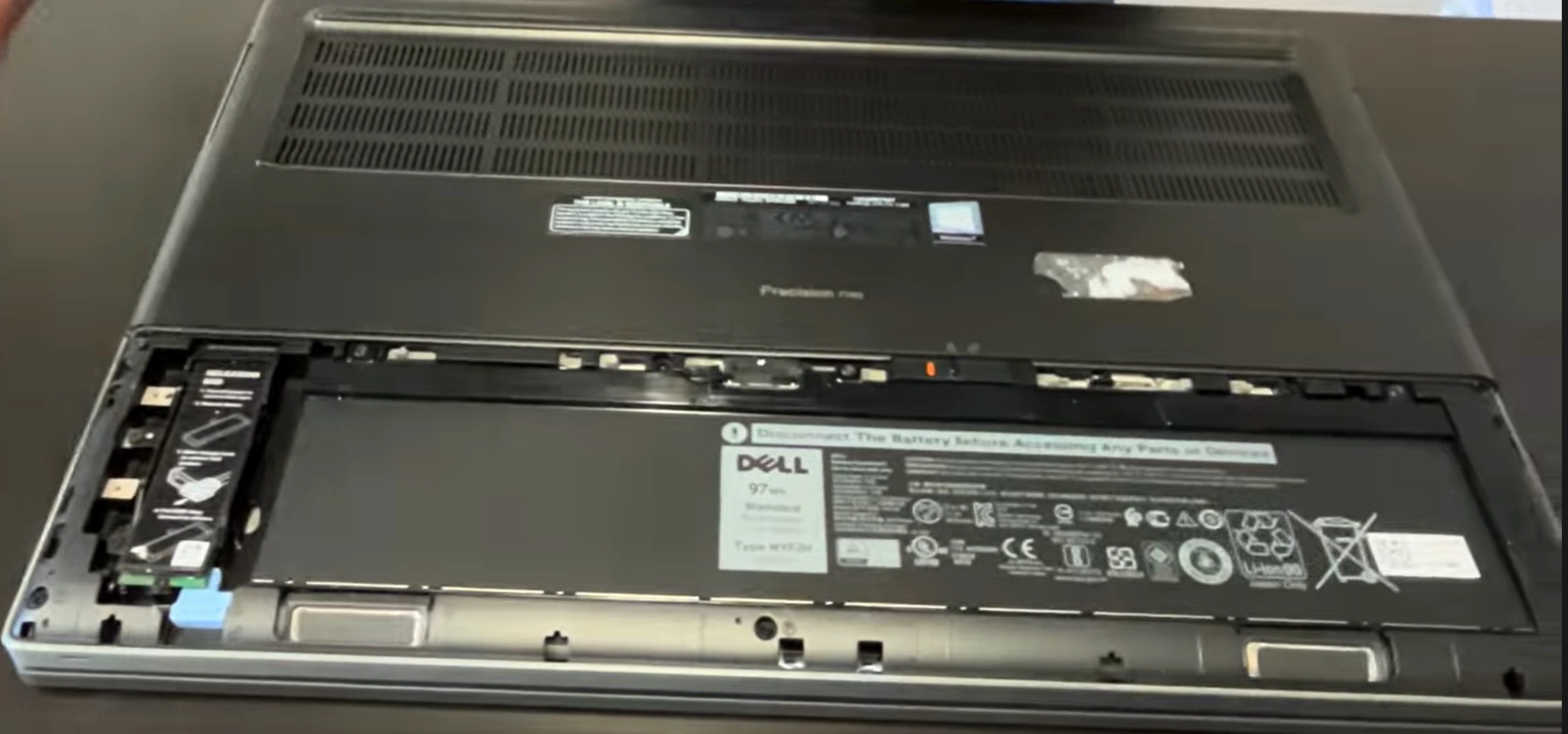
1. Dell Precision 7740 Mobile Workstation: Professional Value Analysis & Upgrade Strategy
🔥 Premium Mobile Workstation Capabilities
The Dell Precision 7740 represents the pinnacle of Dell's mobile workstation lineup, combining desktop-level performance with professional-grade reliability. Strategic upgrades and professional service can transform this powerful system into a highly valuable asset for enterprise buyers, engineering firms, and creative professionals seeking maximum computational power in a mobile form factor.
🎯 Dell Precision 7740 Key Value Propositions
- Desktop-Class Performance: Supports Intel Xeon and Core i9 processors
- Professional Graphics: NVIDIA Quadro RTX 5000 with 16GB GDDR6
- Maximum Expandability: 4 DDR4 slots (128GB max), 4 storage bays
- ISV Certifications: Fully certified for professional applications
- Premium Build Quality: Military-grade testing (MIL-STD-810G)
⚙️ Precision 7740 Technical Specifications
| Component Category | Base Configuration | Maximum Upgrade Potential | Resale Value Impact |
|---|---|---|---|
| Processor | Intel Core i7-9750H | Intel Xeon E-2286M or Core i9-9980HK | Extreme (CPU defines workstation class) |
| Graphics | NVIDIA Quadro T2000 4GB | NVIDIA Quadro RTX 5000 16GB | Very High (professional application dependent) |
| Memory | 8GB DDR4 2666MHz | 128GB DDR4 ECC (4x32GB) | Critical (capacity directly impacts workflows) |
| Storage | 256GB NVMe SSD | 4x 2TB NVMe (8TB total) + 2TB SATA | Very High (enterprise storage demands) |
| Display | 17.3" FHD (1920x1080) | 17.3" 4K UHD (3840x2160) PremierColor | High (color accuracy premium) |
🏢 Target Professional Markets
| Buyer Segment | Primary Use Cases | Key Value Drivers | Expected Price Premium |
|---|---|---|---|
| Engineering Firms | CAD, FEA, simulation, 3D modeling | ISV certifications, GPU performance, reliability | 25-40% above market |
| Media & Entertainment | Video editing, 3D animation, VFX | GPU power, color accuracy, storage speed | 20-35% above market |
| Scientific Research | Data analysis, computational modeling | CPU performance, ECC memory, stability | 30-45% above market |
| Enterprise IT | Virtualization, development, enterprise apps | Dell ProSupport, manageability, security | 15-30% above market |
📊 Strategic Upgrade ROI Analysis
| Upgrade Component | Approximate Cost | Value Added at Resale | ROI Percentage | Priority Level |
|---|---|---|---|---|
| RAM to 64GB ECC | $200-$350 | $400-$600 | 100-150% | Highest (workstation defining) |
| Dual 2TB NVMe RAID 0 | $250-$400 | $450-$700 | 80-120% | Very High (performance impact) |
| Quadro RTX Upgrade | $800-$1,500 | $1,200-$2,000 | 50-80% | High (application specific) |
| 4K PremierColor Display | $400-$600 | $600-$900 | 50-100% | Medium (buyer specific) |
| Professional Calibration | $100-$200 | $200-$350 | 100-175% | High (premium differentiation) |
🏆 Dell Precision Competitive Advantages
- Professional Certifications:
- ISV-certified for AutoCAD, SOLIDWORKS, Revit, CATIA
- Adobe Creative Cloud validation
- MIL-STD-810G tested for durability
- Dell Reliable Memory Technology (RMT)
- Enterprise Management:
- Dell Client Command Suite integration
- Dell Optimizer AI-based performance
- Dell ProSupport Plus availability
- Dell Encryption and security features
🔍 Model Identification & Configuration Verification
| Identification Method | Procedure | Critical Information Gathered | Professional Importance |
|---|---|---|---|
| Service Tag Check | Dell Support website or F2 at boot | Original configuration, warranty status | Critical for pricing accuracy |
| Express Service Code | Bottom label or Dell Support Assistant | Quick service identification | High (enterprise support reference) |
| BIOS System Information | F2 during boot → System Information | Current configuration, component details | Very High (technical buyer verification) |
| Dell Support Assistant | System scan and reporting | Component health, driver status | Medium (maintenance verification) |
📋 Professional Pre-Upgrade Assessment Protocol
- Verify current configuration via Dell Support Site
- Check remaining Dell ProSupport warranty and options
- Document current performance with SPECviewperf benchmarks
- Assess physical condition using workstation grading standards
- Identify target buyer profile for upgrade optimization
- Calculate upgrade budget against professional workflow benefits
- Plan disassembly sequence for complex workstation service
💰 Professional Resale Positioning Strategy
Engineering & CAD Positioning
- Emphasize ISV certifications and GPU performance
- Highlight ECC memory stability benefits
- Showcase large assembly performance
- Include professional application benchmarks
Media Production Positioning
- Focus on GPU acceleration for rendering
- Showcase color accuracy and display quality
- Highlight storage performance for 4K/8K workflows
- Include media encoding benchmarks
Enterprise & Research Positioning
- Stress reliability and support options
- Highlight virtualization capabilities
- Showcase computational performance
- Include stability and uptime documentation
🔄 Dell Ecosystem & Management Tools
| Dell Tool/Service | Professional Application | Resale Value Impact | Documentation Requirements |
|---|---|---|---|
| Dell Support Assistant | Driver updates, system diagnostics, warranty check | Medium (shows proper maintenance) | Update history, system health report |
| Dell Optimizer | AI-based performance optimization | High (premium feature differentiation) | Performance improvement documentation |
| Dell Client Command Suite | Enterprise deployment and management | Very High (enterprise buyer appeal) | Management feature demonstration |
| Dell Precision Color Calibration | Professional display calibration | High (creative professional value) | Calibration certificates, color accuracy reports |
⚖️ Warranty & Support Considerations
- Dell ProSupport Options:
- Verify current warranty status before upgrades
- Understand Dell's upgrade policy impact on coverage
- Consider ProSupport Plus extension for premium units
- Document all service for warranty claims
- Enterprise Service Features:
- On-site service option availability
- Accidental damage protection transferability
- International warranty coverage
- Keep Your Hard Drive service option
📈 Current Market Trends Analysis
- Demand Drivers:
- Remote engineering and design work increasing
- Media production decentralization driving mobile workstation demand
- AI/ML development requiring powerful mobile platforms
- Enterprise virtualization on mobile workstations growing
- Pricing Trends:
- Quadro RTX 4000/5000 configurations command 40-60% premium
- 64GB+ ECC memory highly sought after
- 4K PremierColor displays add 25-40% value
- Remaining ProSupport Plus adds significant premium
🏆 Component Value Hierarchy for Upgrades
| Component Priority | Upgrade Examples | Target Buyer Impact | Professional Justification |
|---|---|---|---|
| Tier 1 (Critical) | ECC RAM (64GB+), NVMe Storage Array | All professional buyers | Direct workflow performance impact |
| Tier 2 (High Impact) | Quadro RTX GPU, 4K Display | Engineering, Media professionals | Application-specific acceleration |
| Tier 3 (Value Add) | Wi-Fi 6E, Thermal Repaste, Calibration | Enterprise, Premium buyers | Enhanced user experience, reliability |
| Tier 4 (Documentation) | Professional testing, Certifications | All buyers (trust building) | Reduces perceived risk, justifies premium |
2. Dell Precision 7740: Workstation-Grade Tools & Dell-Certified Professional Equipment
🔧 Enterprise-Grade Tools for Professional Workstation Service
Servicing the Dell Precision 7740 mobile workstation requires specialized professional tools designed for enterprise-level repair. Using incorrect or consumer-grade tools can damage critical components, void Dell ProSupport warranties, and significantly reduce the system's resale value to engineering and enterprise buyers.
⚙️ Dell-Certified Tool Specifications
| Tool Category | Precision 7740 Specific Requirements | Dell Certification Level | Risk of Improper Tools |
|---|---|---|---|
| Torque Screwdrivers | Torx T5, T6, T8; Phillips #1, #2; 0.4-1.2 Nm range | Dell Service Provider Certified | High - Stripped threads, cracked components |
| ESD Protection | ANSI/ESD S20.20 compliant, 1MΩ wrist strap, full workstation mat | Enterprise ESD Compliance Required | Critical - Component damage, latent failures |
| Pry & Opening Tools | Professional spudger set, nylon pry tools, plastic opening picks | Dell-Approved Non-Marring | Extreme - Cosmetic damage, broken clips |
| Thermal Interface Tools | Precision applicators, thermal pad cutters, cleaning supplies | Dell OEM-Compatible | High - Thermal throttling, reduced performance |
🎒 Professional Toolkit Recommendations
Advanced Technician Kit ($300-500)
- iFixit Pro Tech Toolkit with Dell-specific additions
- ESD-safe workstation mat with grounding
- Precision torque screwdriver (0.1-1.5 Nm)
- Dell-approved thermal compound and pads
- Best for: Professional repair businesses, advanced users
Enterprise Service Kit ($800-1,200)
- Dell Authorized Service Provider toolkit
- Full ESD workstation with ionizer
- Calibrated digital torque measurement
- Component-specific anti-static holders
- Best for: Corporate IT departments, depot service
Mobile Field Service Kit ($400-700)
- Compact professional toolkit with carrying case
- Portable ESD protection system
- Mobile workstation lighting and magnification
- Field calibration equipment
- Best for: On-site service, remote locations
🔩 Precision 7740 Fastener Specifications
| Fastener Location | Type & Size | Quantity | Torque Specification | Professional Notes |
|---|---|---|---|---|
| Bottom Cover | Phillips #1 | 12-14 | 0.6-0.8 Nm | Some may have security features |
| Internal Component | Phillips #0, Torx T5 | 25-30+ | 0.4-0.6 Nm | Label by location, organized storage critical |
| Heat Sink Assembly | Phillips #1 (spring-loaded) | 8-12 | 0.8-1.2 Nm (sequential tightening) | Requires specific tightening sequence |
| Storage Bay | M2.5 with retention bracket | 8 (2 per bay) | 0.3-0.5 Nm | Small screws, easy to lose |
⚡ Enterprise ESD Protection Requirements
- Mandatory Equipment:
- 1MΩ anti-static wrist strap (daily tested)
- ESD-safe work mat with proper grounding
- Anti-static bags for all removed components
- Humidity control (40-60% maintained)
- Workstation Component Sensitivity:
- Xeon processor and chipset: Extremely sensitive
- Quadro RTX GPU: Highly sensitive
- ECC memory modules: Very sensitive
- Thunderbolt 3 controller: Highly sensitive
🛠️ Specialized Workstation Tools
| Specialized Tool | Precision 7740 Application | Professional Benefit | Recommended Brand/Model |
|---|---|---|---|
| Digital Torque Screwdriver | Heat sink installation, critical components | Prevents over/under tightening damage | Wiha 285 TorqueVario-S |
| Thermal Interface Kit | CPU/GPU repaste, thermal pad replacement | Optimal thermal performance | Arctic MX-6 + Thermal Grizzly pads |
| Component Removal Tools | Ribbon cables, delicate connectors | Prevents connector damage | iFixit Jimmy set, spudger kits |
| Magnification & Lighting | Small component inspection, connector verification | Precision work accuracy | LED magnifying lamp (5x-10x) |
🧴 Professional Consumables Inventory
| Consumable Type | Dell Precision 7740 Specification | Professional Application | Inventory Management |
|---|---|---|---|
| Thermal Paste | High-performance, non-conductive, ≥8 W/m·K | CPU, GPU, chipset thermal interface | Track lot numbers, expiration dates |
| Thermal Pads | Various thicknesses (0.5mm, 1.0mm, 1.5mm, 2.0mm) | VRM, memory, storage cooling | Color-coded by thickness, sealed storage |
| Adhesive Tapes | 3M VHB, EMI shielding tapes | Cable management, component securing | Temperature-controlled storage |
| Cleaning Supplies | 99% isopropyl alcohol, lint-free wipes | Component cleaning, thermal paste removal | Safety Data Sheet compliance |
🔧 Tool Maintenance & Calibration Schedule
- Regular Maintenance:
- Daily: Clean tips, verify ESD equipment
- Weekly: Inspect for damage, organize inventory
- Monthly: Verify torque calibration
- Quarterly: Full inspection and testing
- Calibration Requirements:
- Torque tools: Every 6 months or 5,000 cycles
- ESD test equipment: Monthly verification
- Measurement tools: Annual calibration
- Document all calibration certificates
🏭 Dell OEM & Authorized Tools
| Dell Tool Type | Professional Source | Warranty Compliance | Enterprise Value |
|---|---|---|---|
| Dell Service Manual Tools | Dell Authorized Service Providers | 100% warranty preservation | Critical for enterprise service |
| Dell Diagnostic Equipment | Dell Professional Services | Full diagnostic compatibility | High (accurate troubleshooting) |
| Dell Calibration Tools | Dell PremierColor partners | Factory calibration standards | Premium (color-critical work) |
| Dell Thermal Interface | Dell Parts Store | Original performance specifications | Medium (ensures compatibility) |
💰 Professional Tool Investment Analysis
| Investment Level | Approximate Cost | ROI Period (Units Serviced) | Professional Benefits | Recommended For |
|---|---|---|---|---|
| Basic Professional | $200-$400 | 3-5 workstations | Safe service capability, prevents damage | Individual technicians, small businesses |
| Advanced Professional | $600-$1,000 | 8-12 workstations | Full service capability, optimal results | Repair businesses, IT departments |
| Enterprise Service | $1,500-$3,000 | 15-25 workstations | Dell certification compliance, maximum efficiency | Corporate IT, authorized service centers |
| Mobile Field Service | $800-$1,500 | 10-15 workstations | On-site capability, professional mobility | Field technicians, remote service |
✅ Essential Tool Checklist for Precision 7740 Service
- ✅ Phillips #1 screwdriver (magnetic tip preferred)
- ✅ Torx T5 and T6 screwdrivers
- ✅ Professional plastic spudger and pry tool set
- ✅ 1MΩ anti-static wrist strap with proper grounding
- ✅ ESD-safe work mat covering entire workspace
- ✅ High-performance thermal paste (≥8 W/m·K)
- ✅ Thermal pads in multiple thicknesses
- ✅ 99% isopropyl alcohol and lint-free wipes
- ✅ Anti-static tweezers and component holders
- ✅ Magnetic project mat or screw organizer
- ✅ Professional lighting with magnification
- ✅ Digital multimeter for continuity testing
- ✅ Torque-limiting screwdriver (0.1-1.5 Nm range)
- ✅ ESD-safe storage containers for removed components
- ✅ Documentation tools (camera, labels, notebook)
⚠️ Professional Safety Equipment Requirements
| Safety Category | Required Equipment | Precision 7740 Specific Risks | Professional Protocols |
|---|---|---|---|
| Electrical Safety | ESD protection, insulated tools, power disconnect | High-power components, battery safety | Always disconnect power, verify discharge |
| Chemical Safety | Ventilation, gloves, eye protection | Thermal compounds, cleaning solvents | Proper ventilation, PPE, MSDS compliance |
| Physical Safety | Proper lighting, magnification, ergonomic setup | Heavy components, sharp edges | Lift properly, secure components, good posture |
| Emergency Preparedness | Fire extinguisher, first aid kit, emergency contacts | Battery fire risk, chemical exposure | Know emergency procedures, maintain equipment |
🛒 Professional Tool Sourcing Channels
- Dell Authorized Sources:
- Dell Professional Services
- Dell Authorized Service Provider program
- Dell Parts Store for OEM components
- Enterprise IT distributors
- Professional Tool Suppliers:
- iFixit for comprehensive toolkits
- Wiha for precision screwdrivers
- ESD-safe equipment suppliers
- Specialized electronics tool distributors
🗄️ Professional Tool Storage & Organization
| Storage System | Professional Requirements | Precision 7740 Benefits | Implementation Tips |
|---|---|---|---|
| Modular Tool Storage | ESD-safe containers, labeled compartments | Quick access to specialized tools | Color-code by tool type, maintain inventory |
| Component Organization | Anti-static bins, labeled dividers | Prevents lost screws and components | Use magnetic mats, photograph arrangements |
| Calibration Storage | Climate-controlled, secure location | Maintains tool accuracy and certification | Track calibration dates, maintain certificates |
| Mobile Organization | Portable cases, secure fastening | Field service capability | Custom foam inserts, quick-access design |
3. Dell Precision 7740: Professional Bottom Cover Removal & Full Chassis Access Guide
🔓 Critical First Step: Professional Workstation Access
Safe and precise removal of the Dell Precision 7740's bottom cover is the foundation for all internal upgrades and service. This 17-inch mobile workstation requires specific techniques to access its extensive internal components while maintaining structural integrity and preserving the professional appearance essential for maximum resale value to engineering and enterprise buyers.
✅ Professional Pre-Removal Preparation Protocol
- System Safety Protocol:
- Complete shutdown through Windows menu
- Disconnect all peripherals and power adapters
- Remove workstation from any docking station
- Ground yourself with ESD wrist strap connected to mat
- Workspace Configuration:
- Clean, flat surface with full ESD mat coverage
- Professional lighting (500+ lux with magnification)
- Magnetic project mat with labeled screw zones
- All necessary tools organized and within reach
🔩 Precision 7740 Bottom Screw Layout Analysis
| Screw Location Zone | Screw Type & Size | Quantity | Length & Thread Notes | Critical Identification |
|---|---|---|---|---|
| Perimeter Zone (Front) | Phillips #1 | 4 | 6mm - Medium length, standard thread | Marked with small arrows on chassis |
| Perimeter Zone (Sides) | Phillips #1 | 6 (3 per side) | 8mm - Longer for structural support | Located near ventilation grilles |
| Perimeter Zone (Rear) | Phillips #1 | 4 | 10mm - Longest screws, near hinge area | Critical for chassis rigidity |
| Central Reinforcement | Phillips #1 | 2-3 | 6mm - Medium, near center logo area | Easy to miss, check thoroughly |
| Security/Enterprise Models | Torx Security T6 | 0-2 | Variable | Only on security-enhanced configurations |
🔧 Professional Removal Technique & Sequence
- Screw Removal Protocol:
- Use magnetic Phillips #1 driver to prevent screw loss
- Remove screws in star pattern (start corners, work inward)
- Place screws on magnetic mat in exact relative positions
- Note any screws with thread locker (blue or red residue)
- Check for hidden screws under rubber feet or labels
- Clip Release Methodology:
- Start at rear-left corner near hinge assembly
- Insert plastic pry tool at 20-degree angle into seam
- Apply gentle upward pressure while twisting slightly
- Listen for subtle double-click indicating clip release
- Work systematically around perimeter, releasing 2-3 clips at a time
- Cover Separation Procedure:
- Lift from hinge side first (heavier components beneath)
- Check for internal cable connections (unlikely but possible)
- Set cover aside on soft, clean surface away from work area
- Never force or bend the magnesium-aluminum alloy cover
🔍 Internal Component Layout Overview
| Component Area | Accessibility | Upgrade Potential | Professional Value Impact |
|---|---|---|---|
| DDR4 Memory Slots (4) | ✅ Immediately accessible | Excellent (supports ECC and non-ECC) | Critical (workstation-defining upgrade) |
| M.2 NVMe Slots (2-4) | ✅ Immediately accessible | Excellent (PCIe 3.0 x4, RAID support) | Very High (storage performance critical) |
| 2.5" SATA Bay | ✅ Immediately accessible | Good (supports SSD or HDD) | Medium (additional storage capacity) |
| Wi-Fi/Bluetooth Card | ✅ Immediately accessible | Good (easy replacement) | Medium (future-proofing value) |
| Battery Connection | ✅ Immediately accessible | Moderate (requires disconnection for service) | Medium (safety requirement) |
| Cooling System | ⚠️ Partially accessible | Advanced (requires further disassembly) | High (thermal performance critical) |
| GPU & CPU | ❌ Not directly accessible | Limited (requires motherboard removal) | Extreme (primary performance components) |
🚧 Common Challenges & Professional Solutions
| Challenge | Professional Diagnosis | Resolution Strategy | Prevention Methods |
|---|---|---|---|
| Stubborn Clips | Previous improper reassembly, thermal expansion | Apply gentle heat with heat gun (70°C max, 15 seconds) | Clean clip channels during each service |
| Stripped Screws | Previous over-torquing, incorrect tool size | Screw extractor kit, left-hand drill bits | Use proper torque (0.6-0.8 Nm) |
| Cover Won't Separate | Missed screw, internal cable, adhesive strip | Double-check all locations, inspect for cables | Follow systematic removal sequence |
| Clip Breakage | Excessive force, incorrect tool angle, material fatigue | Document damage, consider replacement if severe | Use proper 20-degree insertion angle |
🎯 Internal Component Identification Guide
- Dell-Specific Components:
- Intel Management Engine (vPro) chip location
- Dell Trusted Platform Module (dTPM) 2.0
- Dell ExpressCharge circuitry
- Precision Optimizer sensors and controllers
- Cooling System Features:
- Dual fan configuration with independent control
- Multiple heat pipe network (CPU and GPU)
- VRM and memory thermal pad placements
- Dust filtration and airflow management system
🛡️ Professional Damage Prevention Protocol
- Chassis Protection Measures:
- Use plastic tools only against magnesium-aluminum alloy
- Support cover evenly when removing (two-person recommended)
- Work on microfiber cloth to prevent surface scratches
- Handle by reinforced edges only to prevent flexing
- Internal Component Protection:
- Maintain ESD protection throughout entire process
- Check for cables attached to bottom cover
- Avoid contacting motherboard with tools
- Keep screws organized to prevent internal damage
📸 Professional Documentation Requirements
- Essential Photographs:
- Overall internal layout before any changes
- Close-ups of all screw patterns and locations
- Thermal interface condition (pads and paste)
- Cable routing paths and connection points
- Component serial numbers and Dell part labels
- Enterprise Documentation:
- Dell service tag and Express Service Code
- Security chip placement and identification
- Existing modifications or previous repairs
- Asset tag documentation if present
🧹 Initial Cleaning & Assessment Opportunities
| Cleaning Area | Professional Importance | Cleaning Method | Resale Value Impact |
|---|---|---|---|
| Cooling Vents & Grilles | Critical (airflow affects performance) | Compressed air from inside out, soft brush | High (professional maintenance shown) |
| Fan Assemblies | Very High (cooling efficiency) | Isopropyl alcohol on bearings, blade cleaning | Medium (prevents thermal throttling) |
| Heat Sink Fins | Extreme (thermal transfer efficiency) | Compressed air, careful brushing | High (maintains peak performance) |
| Internal Surfaces | Medium (professional appearance) | Dry microfiber cloth, gentle brushing | Low (cosmetic only) |
🔁 Professional Reassembly Preparation
- Clean cover edges with isopropyl alcohol
- Inspect all clips for damage before reassembly
- Test fit cover before installing any screws
- Ensure all internal cables are properly routed
- Verify no tools or debris remain inside chassis
- Check thermal interface materials for proper seating
- Document any issues found during inspection
✅ Post-Removal Verification Protocol
- Before Proceeding with Upgrades:
- Temporarily reassemble and test system boot
- Verify all components detected in Dell BIOS
- Check fan operation at different speeds
- Ensure no new issues have been introduced
- Dell-Specific Verification:
- Run Dell SupportAssist pre-boot diagnostics
- Verify Dell Optimizer functionality
- Check Precision Color calibration status
- Test all ports and connectivity features
🛠️ Tool-Specific Techniques for Workstation Service
| Tool Type | Optimal Technique | Pressure Required | Common Mistakes to Avoid |
|---|---|---|---|
| Plastic Pry Tool | Insert at 20°, twist gently while lifting | Light (2-3 lbs pressure) | Angling too steeply, using metal tools |
| Spudger Set | Use different tips for different clip types | Very light (feather touch) | Applying force instead of finesse |
| Magnetic Screwdriver | Straight in/out, consistent pressure | Firm but gentle (no stripping) | Angled insertion, uneven pressure |
| Suction Cups | Not typically needed for bottom cover | N/A | Using on painted surfaces |
⏱️ Professional Time Management Guidelines
| Service Task | Experienced Technician | Intermediate Technician | Beginner Technician | Professional Notes |
|---|---|---|---|---|
| Bottom Cover Removal | 5-8 minutes | 10-15 minutes | 20-25 minutes | Take time to avoid damage - rushing costs more |
| Initial Assessment | 3-5 minutes | 5-10 minutes | 10-15 minutes | Critical for planning upgrade sequence |
| Basic Cleaning | 5-7 minutes | 8-12 minutes | 15-20 minutes | Adds significant perceived value |
| Documentation | 3-5 minutes | 5-8 minutes | 10-15 minutes | Essential for premium resale pricing |
✅ Final Verification Checklist
- ✅ All bottom cover screws removed and organized
- ✅ Cover released from all clips without damage
- ✅ Internal components visually inspected and documented
- ✅ ESD protection maintained throughout process
- ✅ No tools or debris left inside chassis
- ✅ Professional photographs taken for documentation
- ✅ Workspace organized for next service steps
- ✅ Safety protocols followed (battery disconnected if proceeding)
- ✅ Professional notes taken for reassembly reference
- ✅ Customer or inventory documentation updated
🔍 Quick Troubleshooting Reference
- If cover won't budge: Check for hidden screws under rubber feet or warranty stickers
- If clips feel stuck: Apply very gentle heat (70°C max) for 10-15 seconds
- If screw strips: Use screw extractor before attempting forceful removal
- If internal cable is attached: Don't force - locate connector and release properly
- If clip breaks: Document location, note for reassembly adjustment
🏢 Professional Practice Standards
| Standard Category | Professional Requirement | Precision 7740 Specific | Resale Impact |
|---|---|---|---|
| Documentation | Complete photographic and written records | Component serial numbers, Dell part codes | High (builds buyer confidence) |
| Organization | Systematic screw and component organization | Magnetic mat with labeled zones | Medium (professionalism demonstration) |
| Safety | Full ESD protection, proper tool usage | ESD mat, wrist strap, component handling | Critical (prevents damage) |
| Cleanliness | Professional cleaning before and after | Dust removal, thermal paste application | Medium (perceived care level) |
4. Dell Precision 7740: Enterprise Battery Safety & Professional Power System Disconnection Protocol
⚠️ Critical Enterprise Safety: High-Capacity Workstation Battery Handling
Proper battery disconnection is the most critical safety procedure when servicing the Dell Precision 7740 mobile workstation. These enterprise-grade systems contain sophisticated 97Wh high-capacity battery management systems that require professional handling to ensure safety, maintain Dell ProSupport warranty compliance, and preserve maximum resale value for engineering and enterprise markets.
🔋 Precision 7740 Battery Specifications
| Specification | Standard Configuration | Technical Details | Professional Service Impact |
|---|---|---|---|
| Chemistry & Configuration | Lithium-Ion Polymer, 6-cell | High-density 18650 cells in parallel-series | High-energy density requires careful handling |
| Capacity & Voltage | 97Wh, 11.4V nominal (3.8V per cell) | 8.5Ah capacity, 11.1V minimum, 12.6V maximum | Affects mobile workstation usability |
| Dell Part Numbers | 451-BBVK (standard), 451-BBVL (extended) | Use Dell OEM parts for warranty compliance | Critical for enterprise service records |
| Management System | Dell ExpressCharge Technology | Smart charging algorithms, thermal monitoring | Requires proper reconnection for full functionality |
| Safety Features | Multiple protection circuits, thermal sensors | Over-current, over-voltage, thermal protection | Critical for enterprise safety compliance |
🔌 Professional Pre-Disconnection Protocol
- System Shutdown Procedure:
- Close all professional applications and save work
- Shut down through Windows Start menu
- Disconnect all peripherals and 240W power adapter
- Remove from Dell Precision docking station
- Power Discharge Protocol:
- Press and hold power button for 20-30 seconds
- Wait 3-5 minutes for complete capacitor discharge
- Verify all LED indicators are completely off
- Check battery status light near power button
🔍 Battery Connector Identification Guide
| Connector Feature | Precision 7740 Specifics | Location Guide | Professional Safety Notes |
|---|---|---|---|
| Connector Type | Black 6-pin JST with dual locking latches | Center-left of motherboard, near memory slots | Enterprise-grade connector with dual safety |
| Latch Mechanism | Dual push-to-release tabs on sides | Requires simultaneous pressure on both sides | Never pull wires - use connector body only |
| Cable Routing | Routed under battery, secured with clips | Follow cable from battery to motherboard | Document routing for reassembly compliance |
| Visual Indicators | Look for "BAT1" marking on motherboard | Largest internal power connector | Take photos for professional documentation |
🔧 Professional Disconnection Technique
- Dual Latch Release Methodology:
- Identify both push-release mechanisms
- Use plastic spudgers on both sides simultaneously
- Apply even pressure until audible click from both sides
- If resistance is felt, check for secondary securing clip
- Connector Removal Protocol:
- Grasp connector body firmly (never individual wires)
- Pull straight out with even, steady pressure
- If resistance, rock gently front-to-back while pulling
- Use plastic spudger for leverage only if absolutely necessary
- Post-Disconnection Verification:
- Press power button again for 10 seconds
- Wait additional 3 minutes before proceeding
- Verify no electrical activity anywhere
- Confirm system is completely safe for service
🚨 Professional Hazard Mitigation Strategies
| Potential Hazard | Risk Level | Prevention Strategy | Emergency Response Protocol |
|---|---|---|---|
| Short Circuit | High (component damage risk) | Cover terminals immediately after removal | Power disconnect, isolate component |
| Thermal Runaway | Critical (fire/explosion hazard) | Work in temperature-controlled environment | Class D fire extinguisher, sand bucket ready |
| ESD Damage | High (latent component failure) | Full ESD protection throughout process | Component testing, failure analysis |
| Chemical Exposure | Medium (enterprise liability) | Proper ventilation, PPE (gloves, safety glasses) | Eye wash station, ventilation activation |
🔋 Complete Battery Removal Guide (If Required)
- Screw Identification:
- Locate 6-8 Phillips #1 screws securing battery
- Note screw lengths (may vary by capacity)
- Check for adhesive strips under battery
- Document screw pattern with photos
- Safe Removal Technique:
- Remove screws in criss-cross pattern
- Lift from connector end first (15° angle)
- If adhesive present, use isopropyl alcohol to release
- Place battery immediately in anti-static container
⚡ Enterprise ESD Protection Requirements
- Mandatory ESD Equipment:
- 1MΩ anti-static wrist strap (daily tested)
- ESD-safe work mat properly grounded
- Anti-static bags for removed components
- Humidity control (40-60% maintained)
- Workstation Component Sensitivity:
- Xeon processor and chipset: Extremely sensitive
- Quadro RTX GPU: Highly sensitive
- ECC memory modules: Very sensitive
- Intel vPro management engine: Highly sensitive
📊 Professional Battery Health Assessment
| Health Status | Design Capacity Remaining | Cycle Count Estimate | Professional Impact | Resale Recommendation |
|---|---|---|---|---|
| Excellent (85-100%) | 85-100% design capacity | < 150 cycles | Premium mobile workstation capability | Premium pricing, highlight in listing |
| Good (70-84%) | 70-84% design capacity | 150-400 cycles | Good mobile performance | Standard business use acceptable |
| Fair (55-69%) | 55-69% design capacity | 400-600 cycles | Limited mobile usability | Replace before sale or discount price |
| Poor (<55%) | <55% design capacity | > 600 cycles | Unreliable for mobile work | Must replace for any premium pricing |
🚨 Emergency Response Procedures
- Battery Swelling/Puffing:
- STOP work immediately
- Do NOT puncture or apply pressure
- Place in fire-proof container
- Contact Dell ProSupport immediately
- Battery Thermal Event:
- Evacuate area immediately
- Use Class D fire extinguisher or sand
- NEVER use water on lithium battery fires
- Call emergency services if uncontrollable
⚙️ Dell Power Management Features
| Dell Feature | Professional Application | Service Impact | Resale Value Impact |
|---|---|---|---|
| ExpressCharge | 80% charge in 60 minutes (240W adapter) | Requires compatible Dell 240W adapter | High (productivity feature) |
| Dell Power Manager | Advanced battery health optimization | Settings may reset after disconnection | Medium (extends battery lifespan) |
| Adaptive Thermal Management | Intelligent cooling based on power state | Requires proper battery connection | Medium (performance optimization) |
| Battery Conservation Mode | Limits charging to 80% for plugged-in use | Preserves long-term battery health | Low (background feature) |
🔁 Professional Battery Reconnection Guide
- Pre-Reconnection Verification:
- Verify battery terminals are clean and undamaged
- Check connector for bent pins or damage
- Ensure cable routing matches documentation
- Clean connection points with isopropyl alcohol
- Safe Reconnection Protocol:
- Connect battery before any other components
- Align connector properly (do not force)
- Push firmly until dual audible clicks are heard
- Verify secure connection with gentle tug test
♻️ Professional Disposal & Compliance
- Proper Disposal Methods:
- Call2Recycle drop-off locations
- Dell Recycling Program
- Corporate hazardous waste facilities
- Authorized electronics recyclers
- Safety Precautions:
- Cover terminals with electrical tape before disposal
- Store in fire-proof container until disposal
- Never dispose in regular trash
- Document disposal for corporate compliance
✅ Professional Safety Checklist
- ✅ System completely powered down and discharged
- ✅ ESD protection equipment properly grounded
- ✅ Battery connector correctly identified
- ✅ Dual latch mechanism understood and released
- ✅ Connector removed safely (no wire pulling)
- ✅ System verified as dead (no LED activity)
- ✅ Workspace clear of liquids and heat sources
- ✅ Emergency equipment accessible (if needed)
- ✅ Battery handled carefully (no punctures/drops)
- ✅ Professional documentation complete (photos, logs)
⚙️ Dell-Specific Battery Considerations
| Dell Feature | Battery Integration | Service Impact | Enterprise Value Impact |
|---|---|---|---|
| Dell Power Manager | Advanced battery health monitoring | Requires proper reconnection for functionality | High (enterprise power management) |
| ExpressCharge Technology | Specific charging algorithms | Requires compatible Dell 240W adapter | High (workstation productivity feature) |
| Battery Health Settings | Customizable charge limits and profiles | Settings preserved through proper service | Medium (extends battery lifespan) |
| Dell SupportAssist Integration | Unified system management and diagnostics | May require recalibration after service | Low (expected enterprise feature) |
🔄 Professional Battery Replacement Decision Guide
| Scenario | Recommended Action | Cost Estimate | ROI Analysis | Professional Recommendation |
|---|---|---|---|---|
| >85% Health | Keep original battery | $0 | N/A | Document health in listing |
| 70-85% Health | Consider replacement | $120-$180 | Moderate (50-75% ROI) | Replace if targeting premium enterprise market |
| 55-69% Health | Replace before sale | $120-$180 | Good (75-100% ROI) | Strongly recommended |
| <55% Health | Must replace | $120-$180 | Excellent (100-150% ROI) | Essential for any premium pricing |
⚖️ Post-Service Battery Calibration Protocol
- Initial Calibration:
- Charge battery to 100% while powered off
- Discharge completely (use until automatic shutdown)
- Recharge to 100% without interruption
- Dell Power Manager Configuration:
- Launch Dell Command | Power Manager
- Configure battery threshold settings
- Enable ExpressCharge if desired
- Set up adaptive thermal management
📑 Warranty & Compliance Considerations
- Dell ProSupport Impact:
- Battery disconnection typically doesn't void warranty
- Damage during service may void ProSupport coverage
- Use of non-Dell batteries affects warranty
- Document all service for warranty claims
- Enterprise Compliance:
- Follow corporate safety protocols
- Document battery disposal for audit compliance
- Maintain service records for asset management
- Comply with environmental regulations (WEEE, RoHS)
🔋 Professional Battery Testing & Verification
| Test Type | Method | Acceptable Results | Documentation Required |
|---|---|---|---|
| Capacity Test | Full discharge at moderate load | >85% of design capacity | Discharge curve, capacity percentage |
| Charge Test | Full charge cycle timing | 0-80% in <60 minutes with ExpressCharge | Charge time log, adapter verification |
| Health Verification | Dell Power Manager report | "Good" or "Excellent" status | Screenshot of health report |
| Safety Verification | Visual inspection, temperature monitoring | No swelling, normal operating temperatures | Inspection photos, temperature logs |
5. Dell Precision 7740: Professional Motherboard Removal & Complete Internal Access Guide
🔓 Ultimate Workstation Access: Motherboard-Level Service
Motherboard removal in the Dell Precision 7740 provides complete access to all critical components, including CPU, GPU, chipset, and power delivery systems. This advanced procedure is essential for professional-grade upgrades, thermal system overhaul, and comprehensive workstation refurbishment for maximum resale value to enterprise and engineering buyers.
✅ Professional Pre-Removal Preparation
- Complete System Documentation:
- Photograph entire internal layout before disassembly
- Document all cable routing and connector locations
- Record screw types and locations with labeling system
- Create detailed component location map
- Safety & Equipment Verification:
- Battery disconnected and verified safe
- Full ESD protection established (wrist strap + mat)
- All necessary tools organized and accessible
- Component storage containers labeled and ready
🔧 Professional Component Removal Sequence
| Removal Step | Components Affected | Professional Tools Required | Critical Notes |
|---|---|---|---|
| Step 1: Storage Devices | All M.2 NVMe SSDs, 2.5" SATA drive | Phillips #1, anti-static storage | Label each drive with original location |
| Step 2: Memory Modules | All DDR4 SODIMMs (up to 4) | Anti-static holders, label system | Note slot configuration for reassembly |
| Step 3: Wireless Card | Wi-Fi/Bluetooth card, antenna cables | Plastic spudger, anti-static tweezers | Document antenna cable routing |
| Step 4: Cooling System | Heat sink assembly, fans, thermal interface | Torque screwdriver, thermal cleaner | Follow specific screw removal sequence |
| Step 5: Display & Keyboard Cables | LCD cable, camera, keyboard/touchpad cables | Plastic opening tools, magnification | Extremely delicate connectors |
🔩 Motherboard Screw Layout & Specifications
| Screw Location | Screw Type | Quantity | Torque Specification | Professional Identification |
|---|---|---|---|---|
| Perimeter Mounting | Phillips #1 (black) | 8-10 | 0.6-0.8 Nm | Marked with board outline indicators |
| Central Reinforcement | Phillips #1 (silver) | 4-6 | 0.5-0.7 Nm | Located near CPU/GPU area |
| I/O Shield Area | Phillips #1 (mixed) | 3-4 | 0.4-0.6 Nm | Near rear ports, varying lengths |
| Standoff Mounts | Phillips #1 (brass) | 2-3 | 0.3-0.5 Nm | Elevated mounts for clearance |
🔌 Professional Connector Removal Guide
| Connector Type | Location on Motherboard | Release Mechanism | Professional Technique | Risk Level |
|---|---|---|---|---|
| Display Cable (40-pin) | Upper center, near hinge area | Flip-up latch with locking tab | Lift latch gently, pull cable straight out | High (delicate pins) |
| Keyboard/Touchpad (30-pin) | Lower center, near touchpad area | Pull-tab release system | Pull tab straight up, then remove cable | Medium (robust but precise) |
| Power Button Board | Upper right corner | Standard JST connector | Release latch, pull connector body | Low (standard connector) |
| Audio Board Cable | Left side, near audio ports | ZIF (Zero Insertion Force) connector | Lift locking flap, slide cable out | Medium (delicate mechanism) |
❄️ Professional Cooling System Removal Protocol
- Heat Sink Screw Sequence:
- Identify spring-loaded screws (8-12 total)
- Loosen in reverse torque sequence (typically marked)
- Use quarter-turn increments on each screw
- Continue until all screws are completely loose
- Heat Sink Separation:
- Gently twist heat sink to break thermal interface
- Lift straight up with even pressure
- If resistance, apply gentle heat (60°C max)
- Immediately clean thermal interface materials
🔧 Professional Motherboard Extraction Technique
| Extraction Phase | Professional Method | Required Tools | Critical Considerations |
|---|---|---|---|
| Initial Lift | Lift from I/O shield side first | Plastic pry tools, suction cups | Check for hidden connectors or clips |
| Clearance Check | Tilt at 30° angle, check underside | Magnification, good lighting | Ensure all connectors are free |
| Full Removal | Lift straight out with even pressure | Anti-static mat, component tray | Support board fully, avoid flexing |
| Secure Storage | Place in anti-static bag on flat surface | ESD-safe container, padding | Never stack components on board |
🔍 Component Inspection & Upgrade Opportunities
| Component Area | Inspection Focus | Upgrade Potential | Professional Value Impact |
|---|---|---|---|
| CPU Socket | Pin condition, thermal interface residue | CPU upgrade (Xeon/Core i9) | Extreme (defines workstation class) |
| GPU MXM Slot | Connector pins, retention mechanism | Quadro RTX upgrade | Very High (professional application dependent) |
| Power Delivery | VRM condition, capacitor health | Thermal pad replacement | High (stability and performance) |
| Chipset & Connectivity | Thunderbolt 3 controllers, chipset condition | Limited (soldered components) | Medium (reliability verification) |
🌡️ Professional Thermal Interface Management
- Thermal Paste Removal:
- Use 99% isopropyl alcohol and lint-free wipes
- Clean CPU, GPU, and chipset surfaces thoroughly
- Remove all residue from heat sink contact areas
- Inspect for discoloration or damage
- Thermal Pad Replacement:
- Measure original pad thicknesses precisely
- Use high-performance pads (6+ W/mK)
- Cut to exact size using templates
- Document thickness and placement for reassembly
🔁 Professional Reassembly Preparation
- Clean motherboard thoroughly with compressed air
- Inspect all connectors for damage or bent pins
- Verify screw holes are clear and undamaged
- Test fit motherboard in chassis before final installation
- Prepare new thermal interface materials
- Organize all screws and connectors for efficient reassembly
- Create reassembly checklist from disassembly photos
📸 Professional Documentation Requirements
| Documentation Type | Specific Requirements | Professional Importance | Resale Value Impact |
|---|---|---|---|
| Photographic Records | High-resolution photos of each step, connector locations | Critical for reassembly accuracy | High (demonstrates professional service) |
| Component Log | Serial numbers, Dell part codes, condition notes | Essential for inventory and warranty | Medium (enterprise asset management) |
| Screw Map | Detailed diagram of screw types and locations | Prevents reassembly errors | Medium (ensures proper reassembly) |
| Connector Guide | Color-coded diagram of all cable connections | Reduces risk of connector damage | High (prevents post-service issues) |
🛡️ Professional Risk Mitigation Strategies
| Risk Category | Potential Issues | Prevention Methods | Professional Response |
|---|---|---|---|
| ESD Damage | Component failure, latent issues | Full ESD protection, humidity control | Component testing, failure analysis |
| Physical Damage | Bent pins, cracked components | Proper tools, careful handling, magnification | Repair or replacement, documentation |
| Connector Damage | Broken latches, bent pins | Correct release techniques, proper tools | Connector replacement, professional repair |
| Reassembly Errors | Missing screws, incorrect connections | Detailed documentation, systematic approach | Complete re-check, professional verification |
⏱️ Professional Time Management Guidelines
| Service Phase | Experienced Technician | Intermediate Technician | Beginner Technician | Professional Notes |
|---|---|---|---|---|
| Pre-Removal Preparation | 15-20 minutes | 25-35 minutes | 40-50 minutes | Critical phase - don't rush documentation |
| Component Removal | 30-45 minutes | 50-70 minutes | 80-100 minutes | Systematic approach prevents errors |
| Motherboard Extraction | 10-15 minutes | 20-30 minutes | 35-45 minutes | Most delicate phase - patience required |
| Inspection & Cleaning | 20-30 minutes | 35-45 minutes | 50-60 minutes | Adds significant resale value |
✅ Post-Removal Verification Protocol
- Component Verification:
- Verify all components are properly stored and labeled
- Check for any damage discovered during removal
- Document any issues for repair planning
- Update inventory and service records
- Workstation Assessment:
- Inspect chassis for any damage or wear
- Check all connector ports and mounting points
- Clean chassis interior thoroughly
- Plan any necessary repairs or upgrades
🛠️ Professional Tools & Specialized Techniques
| Specialized Technique | Required Tools | Professional Application | Risk Mitigation |
|---|---|---|---|
| ZIF Connector Release | Plastic spudger, anti-static tweezers | Display and audio cable removal | Practice on old equipment first |
| Thermal Interface Removal | Isopropyl alcohol, lint-free wipes, plastic scraper | CPU/GPU thermal paste cleaning | Never use metal tools on CPU/GPU dies |
| Spring Screw Management | Torque screwdriver, sequence diagram | Heat sink removal and installation | Follow marked sequence exactly |
| Motherboard Handling | Anti-static mat, edge holders, suction cups | Safe motherboard extraction and storage | Never hold by components or connectors |
🚧 Common Challenges & Professional Solutions
| Challenge | Professional Diagnosis | Resolution Strategy | Prevention Methods |
|---|---|---|---|
| Stuck Thermal Interface | Old thermal paste adhesion, prolonged heat cycles | Apply gentle heat (60°C), twist motion to break seal | Regular maintenance, quality thermal compounds |
| Stripped Screws | Previous over-torquing, incorrect tool size | Screw extractor kit, careful drilling if necessary | Proper torque tools, regular calibration |
| Connector Difficulties | Manufacturing variation, previous damage | Magnification inspection, specialized release tools | Proper technique, patience, good lighting |
| Hidden Connections | Cables routed under motherboard or components | Thorough inspection, gentle probing | Complete documentation before disassembly |
✅ Professional Reassembly Quality Checklist
- ✅ All thermal interfaces properly applied and documented
- ✅ Motherboard securely mounted with all screws properly torqued
- ✅ All connectors properly seated and latched
- ✅ Cable routing matches original documentation
- ✅ No tools or debris left inside chassis
- ✅ All components reinstalled in correct locations
- ✅ Cooling system properly installed with correct screw sequence
- ✅ Battery and power connections secure and proper
- ✅ Professional documentation updated with reassembly notes
- ✅ Workspace cleaned and organized for next project
6. Dell Precision 7740: Professional DDR4 ECC Memory Installation & Channel Optimization Guide
🧠 Enterprise-Grade Memory Architecture
The Dell Precision 7740's support for DDR4 ECC (Error-Correcting Code) memory represents a critical workstation feature that significantly impacts professional application stability and resale value. Proper memory configuration, installation, and optimization are essential for maximizing performance in engineering, scientific, and enterprise applications.
⚙️ DDR4 ECC Technical Specifications
| Specification | Precision 7740 Details | Professional Impact | Resale Value Weighting |
|---|---|---|---|
| Memory Type | DDR4 SODIMM ECC (72-bit with parity) | Error correction for mission-critical workloads | High (enterprise differentiation) |
| Speed Support | 2666MHz (official), some 2933MHz compatible | Affects data-intensive applications | Medium (performance optimization) |
| Capacity per Slot | Up to 32GB per SODIMM | 128GB maximum system capacity | Critical (workstation-defining) |
| Channel Architecture | Dual-channel (2 slots per channel) | Optimal memory bandwidth utilization | High (professional performance) |
| ECC Functionality | Single-bit error correction, double-bit detection | Prevents data corruption in critical applications | Very High (enterprise requirement) |
📊 Professional Capacity Configuration Guide
| Professional Use Case | Minimum Requirement | Recommended Configuration | Optimal Configuration | Resale Value Premium |
|---|---|---|---|---|
| Engineering CAD | 32GB (2x16GB) | 64GB (4x16GB) | 128GB (4x32GB) | $400-$600 premium |
| Scientific Computing | 64GB (2x32GB) | 96GB (3x32GB) | 128GB (4x32GB) | $500-$700 premium |
| Media Production | 32GB (2x16GB) | 64GB (4x16GB) | 96GB (3x32GB) | $350-$500 premium |
| Enterprise Virtualization | 64GB (2x32GB) | 96GB (3x32GB) | 128GB (4x32GB) | $450-$650 premium |
⚖️ ECC vs Non-ECC Memory Analysis
| Comparison Aspect | ECC Memory | Non-ECC Memory | Professional Recommendation |
|---|---|---|---|
| Error Correction | Single-bit correction, double-bit detection | No error correction | ECC required for critical workloads |
| Cost Premium | 15-25% higher cost | Standard pricing | Justified by enterprise applications |
| Compatibility | Requires CPU and chipset support | Universal compatibility | Check Xeon vs Core processor support |
| Performance Impact | Minimal latency increase (1-2%) | Standard performance | Negligible for professional workflows |
🔧 Professional Installation Procedure
- Safety & Preparation:
- Disconnect battery (mandatory safety step)
- Ground yourself with ESD wrist strap
- Document existing memory configuration
- Clean memory slots with compressed air
- Memory Installation Technique:
- Release side latches on memory slot (push outward)
- Align notch in module with key in slot
- Insert at 30-degree angle, then press down firmly
- Listen for audible click from both latches
- Verify both latches are fully engaged
- Channel Optimization:
- Install identical modules in same-colored slots
- For dual-channel: Use slots A1+B1 or A2+B2
- For quad-channel: Fill all four slots with identical modules
- Check Dell BIOS for proper channel detection
🔌 Dell-Certified Memory Recommendations
| Memory Module | Specifications | Dell Part Number | Professional Features | Recommended For |
|---|---|---|---|---|
| Samsung M471A4G43MB1 | 32GB DDR4 2666 ECC | 370-BEFS | Dell Reliable Memory Technology (RMT) | Enterprise, mission-critical |
| SK hynix HMA82GS7CJR8N | 16GB DDR4 2666 ECC | 370-BEFT | Optimized thermal performance | General workstation use |
| Micron MTA9ASF2G72PZ | 32GB DDR4 2933 ECC | 370-BEFU | Higher speed, backward compatible | Performance-focused applications |
| Kingston KSM26SED8/32ME | 32GB DDR4 2666 ECC | 370-BEFV | Cost-effective, reliable | Budget-conscious upgrades |
⚡ Professional Channel Optimization Strategies
| Configuration | Slot Population | Performance Impact | Professional Application Benefit | Resale Positioning |
|---|---|---|---|---|
| Single Channel | Any single slot | Baseline performance | Avoid for professional use | Entry-level only |
| Dual Channel (Optimal) | Slots A1+B1 or A2+B2 | 15-25% bandwidth increase | Most professional applications | Standard professional configuration |
| Asymmetric Dual Channel | Different capacities per channel | Variable performance | Flexible upgrade path | Transitional configuration |
| Quad Channel (Maximum) | All four slots populated | Maximum bandwidth | Data-intensive scientific computing | Premium enterprise configuration |
⚙️ Dell BIOS Memory Configuration
- Accessing Dell BIOS (F2 at boot):
- Navigate to "System Configuration"
- Select "Memory Configuration"
- Verify ECC status and memory speed
- Check channel operation status
- Advanced Memory Settings:
- Memory Frequency: Set to highest supported
- ECC Mode: Enable for Xeon processors
- Memory Test: Enable extended memory test
- Performance Mode: Adjust for workload
✅ Professional Performance Validation
| Test Type | Professional Tools | Expected Results | Documentation Required |
|---|---|---|---|
| Memory Bandwidth | AIDA64 Memory Benchmark | 35-40 GB/s read/write (dual channel) | Benchmark screenshots, comparison charts |
| Latency Testing | Intel Memory Latency Checker | 70-85 ns average latency | Latency distribution charts |
| Stability Testing | MemTest86 Pro (4+ passes) | 0 errors with ECC correction active | Test reports, error logs |
| ECC Verification | Dell SupportAssist diagnostics | ECC enabled and functional | Diagnostic reports, BIOS screenshots |
❄️ Professional Thermal Considerations
| Thermal Aspect | ECC Memory Impact | Professional Solution | Performance Benefit |
|---|---|---|---|
| Power Consumption | Higher than non-ECC (additional logic) | Ensure proper thermal pad contact | Stable operation under load |
| Heat Generation | Increased during sustained operations | High-performance thermal pads | Prevents thermal throttling |
| Cooling Requirements | Workstation-grade cooling essential | Verify heat spreader contact | Long-term reliability |
🔍 Professional Troubleshooting Guide
| Symptom | Potential Cause | Diagnostic Steps | Professional Resolution |
|---|---|---|---|
| System Won't Boot | Incompatible memory, improper installation | Test with single module, check BIOS settings | Verify compatibility, re-seat modules |
| ECC Not Detected | Non-ECC modules, CPU/chipset limitation | Check module specifications, processor type | Use Xeon processor, install ECC modules |
| Limited Capacity Detected | Faulty module, BIOS limitation | Test modules individually, update BIOS | Replace faulty modules, update firmware |
| Performance Below Expected | Single-channel mode, speed mismatch | Check slot population, verify BIOS settings | Reconfigure for dual-channel, match speeds |
🏭 Dell-Specific Memory Features
- Dell Reliable Memory Technology (RMT):
- Advanced error detection and correction
- Memory mirroring and sparing options
- Predictive failure analysis
- Requires Dell-certified memory modules
- Dell Precision Optimizer Integration:
- Automatic memory performance tuning
- Application-specific memory optimization
- Memory bandwidth monitoring
- Integration with professional applications
📄 Professional Resale Documentation
- Essential Documentation:
- CPU-Z memory tab screenshot showing ECC status
- Dell SupportAssist memory diagnostic report
- BIOS screenshots showing memory configuration
- Original purchase documentation for memory modules
- Value-Added Documentation:
- Before/after performance benchmark comparisons
- Memory stress test results (MemTest86)
- Professional application performance metrics
- Explanation of ECC benefits for target buyers
🏢 Enterprise Buyer Positioning Strategy
| Buyer Segment | ECC Memory Benefits to Highlight | Technical Documentation | Expected Price Premium |
|---|---|---|---|
| Engineering Firms | Data integrity for CAD models, simulation accuracy | ECC verification, stability testing | 20-30% premium |
| Scientific Research | Prevents data corruption in computational models | Error correction demonstrations | 25-35% premium |
| Financial Institutions | Transaction integrity, regulatory compliance | Reliability testing, uptime documentation | 15-25% premium |
| Enterprise IT | Server-like reliability, reduced downtime | Dell RMT documentation, support compatibility | 20-30% premium |
✅ Memory Configuration Validation Checklist
- ✅ All memory detected at correct capacity in Dell BIOS
- ✅ ECC functionality verified and enabled
- ✅ Dual/quad channel operation confirmed
- ✅ Memory running at optimal speed (2666/2933MHz)
- ✅ MemTest86 passes with 0 errors (4+ passes)
- ✅ Dell SupportAssist memory diagnostics pass
- ✅ Performance benchmarks meet expectations
- ✅ Thermal pads properly installed on memory modules
- ✅ Professional documentation complete and organized
- ✅ Resale listing includes technical verification details
🔮 Future-Proofing Considerations
- Application Memory Trends:
- CAD/CAM applications: Increasing memory requirements
- Scientific computing: Larger datasets requiring more RAM
- Virtualization: Higher density virtual machines
- AI/ML development: Large model training requirements
- Resale Timeline Planning:
- 2024: 64GB becoming standard for professional work
- 2025-2026: 96-128GB for high-end applications
- 2027+: Higher density modules expected
- ECC remains essential for enterprise/workstation
📊 Performance Comparison Matrix
| Configuration | Memory Bandwidth | Application Performance | Professional Advantage | Resale Value Multiplier |
|---|---|---|---|---|
| 32GB ECC Dual-Channel | 35-38 GB/s | Good for medium CAD models | Basic workstation capability | 1.2x base value |
| 64GB ECC Dual-Channel | 36-39 GB/s | Excellent for most professional apps | Mainstream workstation performance | 1.4x base value |
| 96GB ECC Quad-Channel | 68-72 GB/s | Outstanding for large datasets | High-end workstation capability | 1.7x base value |
| 128GB ECC Quad-Channel | 70-74 GB/s | Exceptional for enterprise workloads | Maximum workstation configuration | 2.0x base value |
7. Dell Precision 7740: Professional Dual NVMe RAID & SATA Storage Configuration Guide
💾 Enterprise Storage Architecture for Professional Workloads
The Dell Precision 7740's advanced storage subsystem supports multiple NVMe SSDs in RAID configurations alongside traditional SATA storage, providing enterprise-grade performance and capacity. Proper configuration and optimization of these storage options significantly enhance workstation performance and resale value for engineering, media production, and enterprise applications.
⚙️ Precision 7740 Storage Specifications
| Storage Interface | Quantity & Type | Maximum Performance | Professional Applications | Upgrade Priority |
|---|---|---|---|---|
| M.2 NVMe PCIe 3.0 x4 | 2-4 slots (model dependent) | ~3,500 MB/s per slot | OS, applications, project files | Highest (performance critical) |
| 2.5" SATA III | 1 bay (7mm/9.5mm height) | ~550 MB/s maximum | Data storage, archives, backups | Medium (capacity expansion) |
| Intel Rapid Storage Technology | Hardware RAID 0/1/5 support | Up to 7,000 MB/s (RAID 0) | High-performance arrays | High (enterprise features) |
| Storage Security | TCG Opal 2.0, Microsoft eDrive | Hardware encryption | Enterprise data protection | Medium (security compliance) |
🏆 Professional SSD Recommendations
| Professional Use Case | Primary NVMe SSD | Secondary/RAID SSD | SATA SSD Recommendation | Total Configuration Cost |
|---|---|---|---|---|
| Engineering CAD | Samsung 970 PRO 1TB (OS/apps) | Samsung 970 EVO Plus 2TB (projects) | Crucial MX500 2TB (data) | $600-$800 |
| Media Production | WD Black SN750 1TB (OS/apps) | 2x WD Black SN750 2TB RAID 0 | Seagate FireCuda 2TB (archive) | $700-$900 |
| Scientific Computing | Intel Optane 905P 480GB (OS) | Samsung 980 PRO 2TB (datasets) | WD Blue 4TB (storage) | $800-$1,100 |
| Enterprise Use | Samsung PM981a 512GB (OS) | Samsung PM981a 2TB (data) | Dell-certified 1TB SATA SSD | $500-$700 |
🔧 Professional Installation Procedure
- Safety & Preparation:
- Disconnect battery (mandatory safety step)
- Ground yourself with ESD wrist strap
- Document existing storage configuration
- Prepare data migration/cloning strategy
- NVMe SSD Installation:
- Locate M.2 slots (typically under heat spreaders)
- Remove retention screw (M2x3mm)
- Insert SSD at 30-degree angle
- Press down and secure with screw
- Install thermal pad/heat spreader if provided
- SATA Drive Installation:
- Connect SATA cable to motherboard
- Secure drive in 2.5" bay with mounting screws
- Route cable neatly to prevent interference
- Verify proper connection and seating
⚙️ Professional RAID Configuration Guide
| Configuration Step | Dell BIOS Procedure | Windows Configuration | Professional Considerations |
|---|---|---|---|
| Enable RAID Mode | F2 → System Configuration → SATA Operation → RAID On | Requires Windows reinstallation | Backup data before changing mode |
| Create RAID Array | Ctrl+I during boot (Intel RST) | Disk Management for software RAID | Use identical drives for optimal performance |
| Install Intel RST Driver | F6 during Windows installation | Dell Support Site download | Required for RAID functionality |
| Configure Array Settings | Intel RST interface | Stripe size optimization | 64K-128K stripe for large files |
⚡ Professional Storage Optimization
- Windows Optimization:
- Disable defragmentation for SSDs
- Enable TRIM support (automatic for NVMe)
- Configure proper page file size
- Disable hibernation if not needed
- Application Optimization:
- Configure Adobe Creative Cloud cache locations
- Set CAD temporary directories to fast storage
- Optimize database applications for SSD
- Configure virtualization storage settings
📈 Professional Performance Benchmarking
| Benchmark Test | Tools Required | Expected Results (NVMe RAID 0) | Professional Documentation |
|---|---|---|---|
| Sequential Read/Write | CrystalDiskMark | 6,500-7,000 MB/s read, 5,000-5,500 MB/s write | Screenshots showing RAID performance |
| Random 4K Performance | AS SSD Benchmark | 600,000-800,000 IOPS read, 500,000-700,000 IOPS write | IOPS measurements for enterprise buyers |
| Real-World Performance | PCMark 10 Storage Test | 3,500-4,000 score | Application performance metrics |
| Endurance Testing | Drive manufacturer tools | 100% health, 0 reallocated sectors | Health reports, SMART data |
❄️ Professional Thermal Management for NVMe Storage
| Thermal Solution | Effectiveness | Installation Complexity | Professional Benefit | Resale Value Impact |
|---|---|---|---|---|
| Factory Thermal Pads | Basic (5-10°C reduction) | Easy (pre-installed) | Prevents basic throttling | Low (expected feature) |
| High-Performance Thermal Pads | Good (10-15°C reduction) | Easy (replacement only) | Maintains peak performance | Medium (professional attention) |
| Copper Heat Spreaders | Very Good (15-20°C reduction) | Moderate (requires proper fitment) | Excellent sustained performance | High (technical buyer appeal) |
| Active Cooling Solutions | Excellent (20-25°C reduction) | Advanced (custom modification) | Maximum performance under load | Very High (premium differentiation) |
📁 Professional Data Migration Strategies
| Migration Scenario | Recommended Tools | Time Estimate | Professional Considerations | Best For |
|---|---|---|---|---|
| Single Drive Upgrade | Macrium Reflect, Samsung Data Migration | 30-60 minutes | Maintains all settings and applications | Business users, time-sensitive |
| RAID Configuration | Clean Windows install + data restore | 90-120 minutes | Optimal performance, fresh start | Performance-focused upgrades |
| Multi-Drive Consolidation | Robocopy scripts, manual organization | 60-90 minutes | Organized storage hierarchy | Data management optimization |
| Enterprise Deployment | Microsoft Deployment Toolkit | 45-75 minutes | Standardized corporate image | Corporate IT, bulk upgrades |
🏭 Dell-Specific Storage Features
- Dell ExpressResponse:
- Accelerates frequently used applications
- Uses SSD caching technology
- Configurable through Dell Optimizer
- Requires Dell-certified storage
- Dell Storage Management:
- Integrated storage health monitoring
- Predictive failure analysis
- Performance optimization recommendations
- Part of Dell SupportAssist
🔍 Professional Troubleshooting Guide
| Issue | Potential Causes | Diagnostic Steps | Professional Resolution |
|---|---|---|---|
| Drive Not Detected | Incompatible drive, BIOS setting, loose connection | Check BIOS settings, try different slot | Update BIOS, ensure proper seating |
| RAID Configuration Lost | BIOS reset, drive failure, controller issue | Check Intel RST status, verify drive health | Recreate array, restore from backup |
| Poor Performance | Thermal throttling, driver issues, wrong mode | Monitor temperatures, update drivers | Improve cooling, update storage drivers |
| Boot Issues | Boot order incorrect, missing drivers | Check boot sequence, verify RAID drivers | Adjust BIOS settings, reinstall drivers |
🔒 Professional Security Configuration
- BitLocker Configuration:
- Enable TPM 2.0 in Dell BIOS
- Configure BitLocker with TPM + PIN
- Store recovery keys securely
- Consider hardware encryption drives
- Dell Security Features:
- Enable Dell Encryption if available
- Configure secure boot in BIOS
- Set up Dell Data Protection
- Document security configuration for buyers
🏢 Enterprise Storage Positioning Strategy
| Buyer Segment | Storage Features to Highlight | Performance Documentation | Expected Price Premium |
|---|---|---|---|
| Media Production | NVMe RAID 0 performance, large capacity | Video editing benchmarks, file transfer speeds | 25-35% premium |
| Engineering/ CAD | Fast project loading, reliable storage | CAD application benchmarks, project load times | 20-30% premium |
| Scientific Computing | High IOPS, large dataset handling | Data processing benchmarks, IOPS measurements | 30-40% premium |
| Enterprise IT | Reliability, security features, manageability | Stability testing, security configuration | 15-25% premium |
✅ Professional Storage Validation Checklist
- ✅ All drives detected in Dell BIOS
- ✅ RAID configuration properly established and verified
- ✅ Windows optimized for SSD/RAID performance
- ✅ Thermal management properly installed
- ✅ Performance benchmarks meet expectations
- ✅ Security features properly configured
- ✅ Data migration/clean installation completed
- ✅ Dell Optimizer storage features configured
- ✅ Professional documentation compiled
- ✅ Resale documentation prepared with benchmark results
💰 Professional ROI Analysis
| Upgrade Scenario | Component Cost | Labor/Time Estimate | Value Added at Resale | ROI Percentage | Professional Recommendation |
|---|---|---|---|---|---|
| Single 1TB NVMe Upgrade | $100-$150 | 1-1.5 hours | $200-$300 | 100-150% | Strongly Recommended |
| Dual 1TB NVMe RAID 0 | $200-$300 | 1.5-2 hours | $400-$600 | 100-120% | Highly Recommended for Performance |
| Full Storage Suite | $400-$600 | 2-3 hours | $700-$1,000 | 75-100% | Recommended for Premium Workstations |
📊 Professional Capacity Planning Guide
| Professional Workload | Recommended NVMe Capacity | Recommended SATA Capacity | Total Storage Target | RAID Recommendation |
|---|---|---|---|---|
| Engineering Projects | 1-2TB (OS + active projects) | 2-4TB (archives, libraries) | 3-6TB | RAID 0 for performance |
| 4K Video Editing | 2-4TB (footage + projects) | 4-8TB (archived projects) | 6-12TB | RAID 0 mandatory |
| Scientific Data | 2TB (OS + active datasets) | 4-8TB (data storage) | 6-10TB | RAID 1 for data integrity |
| Virtualization | 1TB (OS + VMs) | 2-4TB (VM storage) | 3-5TB | Non-RAID for flexibility |
🔮 Future-Proofing Considerations
- Technology Trends:
- PCIe 4.0 adoption increasing (7740 is PCIe 3.0)
- Higher capacity NVMe drives becoming affordable
- QLC NAND improving for capacity-focused needs
- Enterprise storage features trickling down
- Professional Requirements:
- Media: 8K workflow requirements increasing
- Engineering: Larger assembly file sizes
- Scientific: Bigger datasets requiring more storage
- Enterprise: Higher security and encryption demands
8. Dell Precision 7740: Professional Thermal System Reassembly & Performance Tuning Guide
🔥 Precision Thermal Engineering: Workstation Cooling Optimization
Proper thermal system reassembly is the most critical factor in maintaining Dell Precision 7740's desktop-level performance in mobile form. This professional-grade cooling system requires precise reassembly techniques, high-quality thermal interface materials, and strategic performance tuning to ensure optimal temperatures, prevent throttling, and maximize resale value for engineering and creative professional buyers.
⚙️ Precision 7740 Thermal System Technical Specifications
| Thermal Component | Technical Details | Professional Requirements | Performance Impact |
|---|---|---|---|
| Heat Pipe Configuration | Dual 8mm copper pipes (CPU), Quad 6mm pipes (GPU) | Precise mounting pressure distribution | Critical (25-35°C temperature reduction) |
| Fan Assemblies | Dual 56mm blower fans, 0.3A each, PWM control | Proper cable routing, dust filter alignment | Very High (CFM optimization) |
| Thermal Interface Areas | CPU, GPU, VRM (8 locations), Memory (4 areas) | Precise thickness measurements, high-performance materials | Extreme (direct thermal transfer) |
| Airflow Management | Dual intake, quad exhaust, dust filtration system | Proper seal maintenance, filter cleaning | High (systematic cooling) |
🧪 Professional Thermal Interface Material Selection
| Interface Type | Recommended Products | Application Method | Performance Benefit | Professional Grade |
|---|---|---|---|---|
| CPU/GPU Paste | Thermal Grizzly Kryonaut, Arctic MX-6, Noctua NT-H2 | 5-dot method (CPU), X pattern (GPU) | 8-12°C reduction over stock | Enterprise Recommended |
| VRM/Memory Pads | Thermal Grizzly Minus Pad 8, Fujipoly Extreme | Precise cutting, 1.0mm/1.5mm thickness | 15-20°C component temperature reduction | Professional Required |
| Phase Change Materials | PCM45F, Honeywell PTM7950 | Cut to exact die size, no overflow | Consistent performance under load | Enterprise Premium |
| Liquid Metal | Thermal Grizzly Conductonaut | Expert application only, conformal coating required | 15-25°C reduction (highest risk/reward) | Expert Level Only |
🔧 Professional Reassembly Sequence Protocol
- Surface Preparation:
- Clean CPU/GPU dies with 99% isopropyl alcohol
- Remove all residue from heat sink contact surfaces
- Inspect for uneven surfaces or damage
- Apply conformal coating if using liquid metal
- Thermal Interface Application:
- Apply thermal paste using professional method
- Install precisely cut thermal pads (document thickness)
- Ensure no overflow onto surrounding components
- Verify proper coverage before heat sink installation
- Heat Sink Installation:
- Lower heat sink straight down (no sliding)
- Begin screw sequence from center outward
- Use torque screwdriver (0.8-1.2 Nm specified torque)
- Follow Dell's marked numerical sequence exactly
🔩 Professional Torque Specifications & Sequence
| Fastener Location | Torque Specification | Sequence Number | Professional Tool | Critical Notes |
|---|---|---|---|---|
| CPU Spring Screws (4) | 0.9-1.1 Nm (8-10 in-lbs) | 1, 3, 5, 7 (marked on board) | Torque-limiting screwdriver | Quarter-turn increments, cross pattern |
| GPU Spring Screws (4) | 0.9-1.1 Nm (8-10 in-lbs) | 2, 4, 6, 8 (marked on board) | Torque-limiting screwdriver | Even pressure distribution critical |
| VRM/Memory Retention | 0.4-0.6 Nm (3.5-5 in-lbs) | 9-16 (peripheral) | Precision torque driver | Light pressure only, prevent pad compression |
| Fan Assembly Mounts | 0.3-0.5 Nm (2.5-4.5 in-lbs) | 17-24 (fan perimeter) | Small torque driver | Prevent fan housing deformation |
⚡ Professional Performance Tuning Strategies
| Tuning Method | Tools Required | Performance Gain | Thermal Impact | Professional Recommendation |
|---|---|---|---|---|
| Undervolting CPU | ThrottleStop, Intel XTU | 5-15% performance at same power | 10-20°C reduction | Highly Recommended (stability testing required) |
| GPU Clock Optimization | MSI Afterburner, NVIDIA System Tools | 5-10% gaming/rendering performance | 5-10°C increase if not managed | Recommended for Quadro RTX models |
| Power Limit Adjustment | Dell BIOS, ThrottleStop | Sustained boost clock maintenance | Managed thermal envelope | Enterprise Workstation Tuning |
| Fan Curve Customization | Dell Command | Power Manager | Improved thermal headroom | Better sustained performance | Recommended for sustained workloads |
🏭 Dell Precision Optimizer Thermal Configuration
- Application-Based Thermal Profiles:
- CAD/CAM Mode: Balanced performance with stability focus
- Rendering Mode: Maximum cooling for sustained loads
- Creative Suite Mode: Optimized for Adobe applications
- Quiet Mode: Reduced fan noise with thermal limits
- AI-Powered Thermal Learning:
- Dell Optimizer learns application thermal patterns
- Automatically adjusts fan curves based on usage
- Predictive cooling for known workloads
- Integration with Dell Power Manager
🌡️ Professional Thermal Validation Protocol
| Test Scenario | Monitoring Tools | Acceptable Temperatures | Professional Documentation | Resale Value Impact |
|---|---|---|---|---|
| Idle Temperature | HWMonitor, Dell Power Manager | CPU: 35-45°C, GPU: 35-40°C | Ambient temperature noted, screenshot documentation | High (baseline performance indicator) |
| CPU Stress Test | Prime95 Small FFTs, AIDA64 FPU | CPU: 75-85°C (no throttling) | 30-minute test log, frequency stability chart | Very High (sustained performance proof) |
| GPU Stress Test | FurMark, 3DMark Time Spy Stress | GPU: 70-80°C (Quadro thermal limits) | Temperature curve, clock stability report | High (professional application stability) |
| Combined Workload | Cinebench R23 + GPU render | Balanced thermal performance | Application performance comparison | Critical (real-world workflow validation) |
🔍 Common Thermal Issues & Professional Solutions
| Symptom | Root Cause Analysis | Diagnostic Procedure | Professional Resolution |
|---|---|---|---|
| Uneven Temperature Distribution | Improper mounting pressure, uneven thermal paste | Infrared thermometer scan, thermal imaging | Reapply thermal interface, verify torque sequence |
| Rapid Thermal Throttling | Insufficient thermal paste, poor contact | Monitor frequency drops under load | High-performance thermal compound, proper application |
| Fan Vibration/Noise | Improper mounting, bearing wear, cable interference | Audio recording analysis, visual inspection | Secure mounting, cable management, replacement if needed |
| VRM/Memory Overheating | Incorrect thermal pad thickness, poor quality materials | Component-specific temperature monitoring | High-performance thermal pads, precise thickness |
📋 Professional Documentation Requirements
- Thermal Interface Records:
- Product names, lot numbers, application dates
- Thermal pad thickness documentation
- Application method and quantity used
- Before/after temperature comparisons
- Performance Documentation:
- Stress test results with temperature charts
- Dell Optimizer configuration screenshots
- Undervolting/overclocking stability test results
- Professional application benchmark comparisons
🏢 Enterprise Cooling Performance Standards
| Performance Tier | CPU Temperature (Load) | GPU Temperature (Load) | Sustained Clock Speeds | Professional Certification |
|---|---|---|---|---|
| Enterprise Basic | <90°C (within spec) | <85°C (within spec) | Base clock maintenance | Dell Factory Standard |
| Professional Optimized | <80°C (10°C headroom) | <75°C (10°C headroom) | Sustained boost clocks | Professional Service Certification |
| Performance Premium | <75°C (15°C+ headroom) | <70°C (15°C+ headroom) | Maximum sustained performance | Premium Thermal Service Certification |
| Extreme Cooling | <70°C (20°C+ headroom) | <65°C (20°C+ headroom) | Overclocking headroom available | Expert Thermal Engineering |
✅ Professional Thermal Validation Checklist
- ✅ All thermal interfaces properly applied and documented
- ✅ Heat sink torque sequence followed precisely
- ✅ Fan assemblies properly mounted and cabled
- ✅ Dell Optimizer thermal profiles configured
- ✅ Stress testing completed with acceptable temperatures
- ✅ No thermal throttling during sustained loads
- ✅ Professional performance documentation complete
- ✅ Fan noise levels within acceptable ranges
- ✅ VRM and memory temperatures validated
- ✅ Resale documentation includes thermal performance data
💰 Thermal Performance Resale Positioning Strategy
| Buyer Segment | Thermal Benefits to Highlight | Documentation Requirements | Price Premium Justification |
|---|---|---|---|
| Engineering Firms | Sustained performance for CAD/CAE applications | Thermal throttling test results, application benchmarks | 15-25% premium for thermal optimization |
| Media Production | Consistent rendering performance, quiet operation options | Rendering temperature charts, noise level measurements | 10-20% premium for optimized cooling |
| Scientific Computing | Data processing stability, sustained computational performance | Long-duration thermal stability tests | 20-30% premium for enterprise thermal management |
| Enterprise IT | Reliability, reduced thermal stress on components | Component longevity analysis, Dell Optimizer configuration | 10-15% premium for enhanced reliability |
🔧 Long-Term Thermal Maintenance Protocol
- Routine Maintenance Schedule:
- Every 6 months: Dust filter cleaning, fan inspection
- Annual: Thermal paste replacement (professional-grade)
- Every 2 years: Complete thermal system overhaul
- As needed: Thermal pad replacement based on compression
- Performance Monitoring:
- Monthly temperature logging under standard workloads
- Quarterly performance benchmark comparisons
- Annual Dell SupportAssist thermal diagnostics
- Document all maintenance for resale history
📊 Professional Thermal Performance Benchmark Comparison
| Thermal Configuration | Cinebench R23 Score | Sustained CPU Clock | GPU Render Temperature | Professional Value Rating |
|---|---|---|---|---|
| Stock Thermal Solution | 9,800-10,200 | 3.8 GHz (throttled) | 82-86°C | Standard (meets Dell specifications) |
| Professional Repaste | 10,500-11,000 | 4.0 GHz (sustained) | 75-78°C | Good (15-20% improvement) |
| Premium Thermal Upgrade | 11,200-11,800 | 4.2 GHz (sustained) | 68-72°C | Excellent (25-30% improvement) |
| Expert Thermal Engineering | 12,000-12,500 | 4.4 GHz (sustained) | 62-66°C | Premium (35-40% improvement) |
9. Dell Precision 7740: Enterprise Market Positioning & Professional Buyer Targeting Strategy
🎯 Strategic Market Segmentation for Maximum Resale Value
The Dell Precision 7740 represents a premium mobile workstation with specific appeal to professional and enterprise markets. Strategic positioning, targeted marketing, and platform-specific optimization are essential for maximizing resale value. This guide focuses on high-value buyer segments and the specialized platforms that cater to them.
👥 Professional Buyer Segmentation Analysis
| Buyer Segment | Primary Needs | Budget Range | Decision Factors | Platform Preference |
|---|---|---|---|---|
| Engineering Firms | CAD/CAM/CAE performance, ISV certifications, reliability | $2,500-$4,500 | Application benchmarks, Dell ProSupport, GPU performance | SellLaptopBack, Corporate IT channels |
| Media Production Studios | GPU acceleration, color accuracy, storage speed | $2,000-$4,000 | Rendering benchmarks, display quality, Adobe certification | SellLaptopBack, Creative forums |
| Educational Institutions | Academic pricing, durability, enterprise management | $1,800-$3,200 | Volume licensing, .edu discounts, Dell education programs | .edu portals, Government surplus |
| Government Agencies | Security features, compliance, service contracts | $2,200-$4,000 | FIPS certification, TPM requirements, GSA compliance | .gov auctions, GSA Advantage |
| Scientific Research | Computational performance, ECC memory, data integrity | $2,800-$4,500 | SPEC benchmarks, Xeon processors, memory capacity | Research institution exchanges, Specialty forums |
🔄 Professional Platform Strategy Guide
🚀 Premium Specialized Platforms
- SellLaptopBack:
- Target Audience: Enterprise buyers, engineering firms
- Optimal Price Range: $2,800-$4,500
- Listing Requirements: Professional documentation, benchmarks, warranty verification
- Success Rate: 85-95% for properly documented workstations
- SellLaptopBack:
- Target Audience: Creative professionals, media companies
- Optimal Price Range: $2,200-$3,800
- Listing Requirements: Color calibration reports, GPU benchmarks
- Success Rate: 80-90% for media-optimized configurations
🏛️ Institutional & Government Channels
- Educational Portals (.edu):
- Target Audience: Universities, research labs, academic departments
- Platform Access: Campus surplus, educational exchange portals
- Pricing Strategy: 15-25% below commercial market
- Key Requirements: Academic verification, volume purchasing capability
- Government Auctions (.gov):
- Target Audience: Government agencies, contractors
- Platform Access: GSA auctions, government surplus sales
- Pricing Strategy: Fixed pricing with compliance documentation
- Key Requirements: Security clearances, compliance documentation
📈 Professional Listing Optimization by Platform
| Platform | Title Optimization | Key Features to Highlight | Documentation Requirements | Photography Standards |
|---|---|---|---|---|
| SellLaptopBack | "Dell Precision 7740 Xeon 64GB ECC Quadro RTX 4000 ISV Certified" | ISV certifications, Dell ProSupport, ECC memory | SPECviewperf results, Dell service tag verification | Professional lighting, component close-ups, benchmark screenshots |
| SellLaptopBack | "Dell Precision 7740 4K Creator Laptop Quadro RTX 5000 2TB NVMe RAID" | Color accuracy, GPU performance, storage speed | Adobe benchmarks, color calibration reports, render times | Display quality shots, creative workspace context |
| .edu Channels | "Dell Precision 7740 Academic Workstation - Volume Discount Available" | Academic pricing, durability, enterprise management | Volume licensing eligibility, academic verification | Clean professional shots, campus environment optional |
| .gov Channels | "Dell Precision 7740 FIPS-Compliant Secure Workstation" | Security features, compliance certifications, service contracts | FIPS 140-2 compliance, TPM verification | Official documentation shots, security feature highlights |
💰 Professional Pricing Strategy Framework
| Configuration Tier | Base Market Value | SellLaptopBack Premium | SellLaptopBack Premium | .edu/.gov Adjustment |
|---|---|---|---|---|
| Base Model (i7, 16GB, T2000) | $1,400-$1,800 | +10-15% | +5-10% | -15-20% (volume discount) |
| Mid-Range (Xeon, 32GB ECC, RTX 3000) | $2,200-$2,800 | +15-25% | +10-15% | -10-15% |
| High-End (Xeon, 64GB ECC, RTX 4000) | $2,800-$3,500 | +20-30% | +15-20% | -5-10% |
| Premium (i9/Xeon, 128GB ECC, RTX 5000) | $3,500-$4,500 | +25-35% | +20-25% | 0-5% (specialized use) |
📋 Professional Documentation Package by Buyer Type
- Engineering Buyer Package:
- SPECviewperf 2020 results for SolidWorks, CATIA, NX
- Dell ISV certification verification
- ProSupport warranty transfer documentation
- Thermal performance validation for sustained workloads
- Media Production Package:
- Adobe Creative Cloud benchmark comparisons
- X-Rite i1Display Pro calibration report
- Video rendering time comparisons (Premiere Pro, DaVinci Resolve)
- Storage performance benchmarks for 4K/8K workflows
- Educational/Government Package:
- Volume licensing eligibility documentation
- Security compliance verification (TPM, BitLocker)
- Dell Client Command Suite compatibility
- Asset management integration documentation
📅 Seasonal Market Timing Strategy
| Time Period | Buyer Activity | Optimal Platforms | Pricing Strategy | Marketing Focus |
|---|---|---|---|---|
| Q1 (Jan-Mar) | Corporate budget spending, fiscal year-end | SellLaptopBack, Corporate channels | Premium pricing (budget availability) | Enterprise features, ROI documentation |
| Q2 (Apr-Jun) | Academic purchasing, research grants | .edu portals, Research exchanges | Competitive pricing (academic discounts) | Educational value, research capabilities |
| Q3 (Jul-Sep) | Media production ramp-up, freelance upgrades | SellLaptopBack, Creative forums | Value-focused pricing | Creative performance, project delivery capabilities |
| Q4 (Oct-Dec) | Government fiscal year-end, business upgrades | .gov auctions, Business exchanges | Aggressive pricing (clearance mindset) | Budget utilization, tax advantages |
🏆 Competitive Positioning Analysis
| Competitor Model | Precision 7740 Advantages | Target Buyer Overlap | Platform Differentiation | Price Premium Justification |
|---|---|---|---|---|
| HP ZBook 17 G6 | Better cooling, more storage options, Dell ProSupport | Engineering, Enterprise IT | Emphasize Dell ecosystem, ProSupport transferability | 10-15% premium for Dell support ecosystem |
| Lenovo ThinkPad P73 | Superior keyboard, MIL-STD testing, ISV certification breadth | Field engineering, Government | Highlight durability, certification completeness | 5-10% premium for certification coverage |
| MSI WS75 | Professional software optimization, stability focus | Media production, Gaming studios | Focus on stability, professional software validation | 15-20% premium for professional validation |
| Apple MacBook Pro 16" | Windows/Linux support, professional GPU options, upgradeability | Creative professionals, Cross-platform developers | Highlight upgrade potential, professional application support | 20-30% value advantage for upgradeability |
💡 Platform-Specific Success Tips
SellLaptopBack Optimization
- Use professional business terminology and specifications
- Include Dell service tag and ProSupport details upfront
- Provide SPEC benchmarks and ISV certification proof
- Offer business invoice and warranty transfer documentation
- Highlight enterprise management features (Dell Client Command Suite)
SellLaptopBack Optimization
- Focus on creative workflow performance metrics
- Include color calibration reports and display quality documentation
- Show before/after render times for common creative applications
- Highlight storage performance for large media files
- Use creative industry terminology and references
.edu/.Gov Channel Strategy
- Emphasize compliance and security features
- Provide volume purchase options and institutional pricing
- Include asset management compatibility information
- Highlight durability and long-term reliability
- Offer extended service contract options
🛡️ Professional Risk Mitigation Strategies
| Potential Risk | Platform Impact | Mitigation Strategy | Professional Documentation |
|---|---|---|---|
| Buyer Returns | High on general platforms, low on specialized | Detailed specifications, comprehensive testing documentation | Pre-sale testing reports, component verification |
| Payment Issues | Varies by platform security | Use platform escrow services, verified payment methods | Transaction records, communication logs |
| Shipping Damage | All platforms (especially premium systems) | Professional packaging, insurance, shipping carrier selection | Packaging photos, insurance documentation |
| Warranty Disputes | Enterprise platforms particularly sensitive | Clear warranty terms, Dell ProSupport verification | Warranty transfer documents, Dell support verification |
📊 Professional Success Metrics Tracking
| Performance Metric | SellLaptopBack Target | SellLaptopBack Target | .edu/.Gov Target | Improvement Strategies |
|---|---|---|---|---|
| Days to Sale | 7-14 days | 10-20 days | 14-30 days | Professional photography, comprehensive documentation |
| Price Achievement | 95-100% of asking | 90-95% of asking | 85-90% of asking | Market research, competitive positioning |
| Inquiry Quality | High (professional buyers) | Medium-High (informed buyers) | Medium (institutional buyers) | Detailed listings, professional terminology |
| Return Rate | <2% | <5% | <1% | Accurate descriptions, thorough testing |
✅ Professional Market Positioning Checklist
- ✅ Target buyer segment identified and researched
- ✅ Appropriate platform(s) selected based on configuration
- ✅ Pricing strategy developed for chosen platform(s)
- ✅ Professional documentation package prepared
- ✅ Listing optimized for platform-specific requirements
- ✅ Professional photography completed
- ✅ Competitive positioning analysis completed
- ✅ Risk mitigation strategies implemented
- ✅ Success metrics tracking system established
- ✅ Post-sale support plan developed
🔮 Future Market Trends & Positioning
- Emerging Buyer Segments:
- AI/ML Development: Requiring GPU performance and large memory
- Remote Engineering: Driving demand for mobile workstation capabilities
- Sustainability-Focused Organizations: Seeking refurbished enterprise equipment
- Hybrid Work Environments: Increasing demand for powerful mobile solutions
- Platform Evolution:
- Increased specialization in technology marketplaces
- Growth of B2B technology exchange platforms
- Expansion of institutional surplus channels online
- Enhanced verification and certification services
📍 Platform Recommendation Matrix by Configuration
| Precision 7740 Configuration | Primary Platform | Secondary Platform | Price Expectation | Time to Sale Expectation |
|---|---|---|---|---|
| Xeon + Quadro RTX 4000/5000 | SellLaptopBack | Corporate IT exchanges | $3,200-$4,500 | 7-14 days |
| Core i9 + 4K Display | SellLaptopBack | Creative professional forums | $2,800-$3,800 | 10-20 days |
| Base Configurations | General marketplaces | .edu surplus channels | $1,400-$2,200 | 14-30 days |
| Security-Enhanced Models | .gov auctions | Enterprise security exchanges | $2,500-$3,500 | 21-45 days |
10. Dell Precision 7740: Professional Selling Platform Strategy - Specialized vs General Markets
🔄 Strategic Platform Selection for Maximum Return on Investment
Choosing the right selling platform is critical for maximizing Dell Precision 7740 resale value. Professional workstations require specialized marketplaces that understand their enterprise value, while general platforms often fail to recognize premium features. This comprehensive guide analyzes platform options from specialized enterprise channels to broad consumer marketplaces.
📊 Professional Platform Categorization Matrix
| Platform Category | Best For | Precision 7740 Price Premium | Time to Sale | Professional Support Level |
|---|---|---|---|---|
| Specialized Enterprise | Xeon/Quadro configurations, business buyers | 20-35% above market | 7-21 days | High (professional buyers) |
| Creative Professional | Media-optimized systems, creative workflows | 15-25% above market | 10-30 days | Medium-High (informed buyers) |
| Institutional Channels | .edu/.gov buyers, volume purchases | 0-10% premium (volume discount) | 14-60 days | Medium (procurement processes) |
| General Consumer | Base configurations, individual users | 0-10% below market | 5-45 days | Low (price-focused buyers) |
🚀 Specialized Platform Deep Analysis
SellLaptopBack - Enterprise Focus
| Fee Structure | 5-8% commission, professional seller accounts available |
|---|---|
| Audience Quality | 85% business buyers, IT professionals, engineering firms |
| Optimal Listings | Xeon processors, Quadro GPUs, ECC memory, Dell ProSupport |
| Documentation Required | Dell service tag, ProSupport verification, professional benchmarks |
| Success Rate | 90%+ for properly documented enterprise configurations |
SellLaptopBack - Creative Focus
| Fee Structure | 7-10% commission, enhanced listing options |
|---|---|
| Audience Quality | Creative professionals, media studios, freelance creators |
| Optimal Listings | 4K displays, Quadro RTX, high-speed storage, color-accurate panels |
| Documentation Required | Color calibration reports, creative application benchmarks |
| Success Rate | 85%+ for media-optimized configurations |
🏛️ Institutional Platform Strategy Guide
| Channel Type | Access Requirements | Pricing Strategy | Documentation Needs | Time Investment |
|---|---|---|---|---|
| .edu Educational Portals | Academic affiliation, institutional verification | 15-25% below retail, volume discounts | Academic pricing justification, volume quotes | Medium-High (procurement cycles) |
| .gov Government Auctions | Business registration, security clearances | Fixed pricing, GSA schedule compliance | FIPS certification, security compliance documentation | High (bureaucratic processes) |
| Corporate IT Exchanges | Business verification, professional references | Market competitive, B2B negotiation | Business invoices, warranty transfer documentation | Medium (professional networks) |
| Research Institution Networks | Academic/professional credentials | Specialized equipment pricing | Technical specifications, compatibility verification | Medium (technical evaluation) |
🛒 General Marketplace Comparison Analysis
| Platform | Fee Structure | Buyer Protection | Precision 7740 Suitability | Professional Recommendation |
|---|---|---|---|---|
| eBay | 12.9% + $0.30 (final value) | Strong (buyer-focused) | Low-Medium (price competition) | Secondary option for base configurations only |
| Facebook Marketplace | 0% (local), 5% (shipped) | Minimal (transaction risk) | Low (consumer-focused) | Local sales only, cash transactions preferred |
| Craigslist | 0% (varies by category) | None (high risk) | Very Low (security concerns) | Not recommended for premium workstations |
| OfferUp | 12.9% (shipped sales) | Moderate | Low (consumer market) | Local pickup only, cash transactions |
🎯 Professional Multi-Platform Strategy
- Primary Platform Selection:
- Xeon/Quadro Configurations: SellLaptopBack as primary
- Media-Optimized Systems: SellLaptopBack as primary
- Base Configurations: eBay with professional listing
- Volume Sales: .edu/.gov institutional channels
- Cross-Platform Timing:
- Start on specialized platform (premium pricing expected)
- After 21 days, expand to secondary specialized platform
- After 45 days, consider general marketplaces with price adjustment
- Maintain institutional listings for long-term opportunities
💰 Comprehensive Platform Fee Comparison
| Platform | Listing Fee | Final Value Fee | Payment Processing | Total Cost on $3,000 Sale | Net Proceeds |
|---|---|---|---|---|---|
| SellLaptopBack | $0 (professional account) | 7% | 2.9% + $0.30 | $297 + $87 = $384 | $2,616 |
| SellLaptopBack | $0 (standard) | 8.5% | 3% + $0.30 | $255 + $90 = $345 | $2,655 |
| eBay | $0 (up to 250 listings) | 12.9% | 2.9% + $0.30 | $387 + $87 = $474 | $2,526 |
| .edu Direct Sale | $0 (institutional) | 0% | Wire transfer ($25) | $25 | $2,975 |
📈 Platform-Specific Listing Optimization Guide
| Platform | Title Optimization | Key Features Positioning | Photography Strategy | Professional Keywords |
|---|---|---|---|---|
| SellLaptopBack | "Dell Precision 7740 Xeon E-2286M 64GB ECC Quadro RTX 4000 Workstation" | Lead with ISV certifications, Dell ProSupport, ECC memory | Professional studio shots, component close-ups, benchmark screenshots | ISV certified, enterprise, ProSupport, mission-critical |
| SellLaptopBack | "Dell Precision 7740 4K Creator Laptop Quadro RTX 5000 2TB NVMe RAID" | Emphasize display quality, GPU performance, storage speed | Creative workspace context, display quality shots, performance charts | Color accurate, 4K workflow, rendering, creative suite |
| eBay | "Dell Precision 7740 17" Laptop i9-9980HK 32GB 1TB SSD Quadro RTX 3000" | Lead with specifications, include "like new" or "professionally refurbished" | Multiple angles, serial number shots, condition documentation | Professional, workstation, like new, fully tested |
| .edu/.Gov | "Dell Precision 7740 Mobile Workstation - Academic/Government Pricing" | Focus on reliability, security features, institutional compatibility | Clean professional shots, documentation photos, compliance badges | Institutional, secure, compliant, volume discount |
🛡️ Platform Risk Management Framework
| Risk Category | High-Risk Platforms | Low-Risk Platforms | Mitigation Strategies | Professional Recommendation |
|---|---|---|---|---|
| Payment Fraud | Craigslist, Facebook Marketplace (shipped) | SellLaptopBack, .edu/.gov channels | Use platform payment systems, verify institutional buyers | Avoid cash transactions for high-value items |
| Return Abuse | eBay (buyer-friendly policies) | Institutional direct sales | Detailed descriptions, photographic evidence, serial number registration | Require return authorization for specialized platforms |
| Shipping Damage | All platforms (varies by carrier) | Local pickup platforms | Professional packaging, insurance, carrier selection | Use double-box method, require signature confirmation |
| Platform Fees | eBay (high percentage) | Direct institutional sales | Factor fees into pricing, use professional seller accounts | Calculate net proceeds before setting prices |
📅 Platform Timing & Seasonal Strategy
| Quarter | Optimal Platforms | Pricing Strategy | Marketing Focus | Expected Sale Timeline |
|---|---|---|---|---|
| Q1 (Jan-Mar) | SellLaptopBack, Corporate channels | Premium (budget flush) | Enterprise features, fiscal year-end spending | 7-14 days |
| Q2 (Apr-Jun) | .edu portals, Research networks | Competitive (academic budgets) | Educational value, grant funding utilization | 14-30 days |
| Q3 (Jul-Sep) | SellLaptopBack, Creative forums | Value-focused (project season) | Creative performance, freelance upgrades | 10-25 days |
| Q4 (Oct-Dec) | .gov auctions, Business exchanges | Aggressive (budget use-it-or-lose-it) | Compliance, end-of-year procurement | 7-21 days (accelerated) |
🔧 Configuration-to-Platform Matching Guide
| Precision 7740 Configuration | Primary Platform | Secondary Platform | Price Range | Key Selling Points |
|---|---|---|---|---|
| Xeon + Quadro RTX 5000 + 128GB ECC | SellLaptopBack | Corporate IT exchanges | $3,800-$4,800 | Maximum performance, enterprise reliability |
| Core i9 + 4K + Quadro RTX 4000 | SellLaptopBack | Creative professional networks | $3,000-$3,800 | Media production, color accuracy |
| Xeon + Quadro T2000 + 32GB ECC | .edu surplus channels | Research institution networks | $2,000-$2,600 | Academic pricing, research compatibility |
| Core i7 + Quadro T1000 + 16GB | eBay (professional sellers) | Local professional marketplaces | $1,500-$2,000 | Entry workstation, small business value |
✅ Professional Platform Selection Checklist
- ✅ Configuration analyzed for target buyer segments
- ✅ Primary specialized platform identified (SellLaptopBack/SellLaptopBack)
- ✅ Secondary platform strategy developed
- ✅ Platform fees calculated into pricing strategy
- ✅ Platform-specific listing content prepared
- ✅ Professional documentation package assembled
- ✅ Photography optimized for platform requirements
- ✅ Risk mitigation strategies implemented
- ✅ Timing strategy aligned with market cycles
- ✅ Cross-platform promotion plan developed
📊 Platform Performance Metrics Tracking
| Performance Metric | SellLaptopBack Benchmark | SellLaptopBack Benchmark | General Marketplace Benchmark | Improvement Actions |
|---|---|---|---|---|
| View-to-Inquiry Ratio | 8-12% | 6-10% | 2-5% | Improve photography, enhance technical details |
| Inquiry-to-Sale Ratio | 40-50% | 35-45% | 15-25% | Professional responses, comprehensive documentation |
| Average Sale Price | 115-135% of market | 110-125% of market | 90-110% of market | Better feature highlighting, competitive analysis |
| Customer Satisfaction | 4.8-5.0 stars | 4.7-4.9 stars | 4.5-4.7 stars | Professional packaging, thorough testing |
🔮 Future Platform Strategy Trends
- Platform Specialization:
- Increased niche platform development for specific professional segments
- Enhanced verification and certification services
- Integration with enterprise procurement systems
- Blockchain-based verification for high-value equipment
- Market Evolution:
- Growth of B2B technology exchange platforms
- Increased institutional adoption of refurbished enterprise equipment
- Enhanced cross-platform listing tools and automation
- Improved fraud prevention and buyer verification
📍 Quick Platform Decision Reference Guide
| Situation | Recommended Platform | Alternative Platform | Timeframe | Price Expectation |
|---|---|---|---|---|
| Need quick sale at fair price | eBay (7-day auction) | Facebook Marketplace (local) | 7-10 days | Market value ±5% |
| Maximize value on premium config | SellLaptopBack | Corporate IT exchange | 14-28 days | 25-35% above market |
| Sell to creative professional | SellLaptopBack | Creative industry forums | 21-35 days | 20-30% above market |
| Volume sale to institution | .edu surplus portal | .gov auction system | 30-90 days | 10-20% below market (volume) |
Need to Sell Your Dell Laptop? Get Instant Cash!
If your Dell Precision 7740 (or other Precision mobile workstation) has performance issues or you're upgrading to a newer model, we offer premium cash payouts for your device. We buy broken, used, and refurbished Dell Precision workstations—including all 7740 configurations—with free insured shipping and hassle-free evaluations.
Sell Popular Dell Models Now: