On this page
- 1. Dell Inspiron 16 5640 Pre-Disassembly: Maximizing Component Value
- 🔍 Component Valuation Checklist
- 🛠️ Essential Disassembly Tools
- 💰 2024 Component Values
- 📋 Pre-Sale Preparation
- 2. Dell Inspiron 16 5640 Bottom Cover Removal: Tool-Free Access Without Damage
- ⚠️ Critical Safety Precautions
- 🔧 Tool-Free Removal Process
- 🛡️ Preserving Resale Value
- 🔄 Common Issues & Solutions
- 3. Dell Inspiron 16 5640 RAM Upgrade: DDR5 Performance & Resale Optimization
- ⚡ DDR5 Specifications
- 🔧 Installation Process
- 📊 DDR5 vs DDR4 Performance
- 💰 Selling Original RAM
- 4. Dell Inspiron 16 5640 SSD Upgrade: Dual PCIe Slot Expansion Strategy
- ⚡ SSD Slot Configuration
- 🔧 Installation Process
- 📊 Performance Benchmarks
- 💰 Selling Original SSDs
- 5. Dell Inspiron 16 5640 Battery Replacement: Safe Removal & Resale Certification
- 🔋 Battery Specifications
- ⚠️ Safe Removal Protocol
- 📜 Resale Certification
- ✈️ Shipping Compliance
- 6. Dell Inspiron 16 5640 Display Replacement: FHD+ IPS Panel Upgrade
- 📺 Display Specifications
- 🔧 Professional Replacement Process
- 💰 Display Resale Value Factors
- ✅ Post-Installation Verification
- 7. Dell Inspiron 16 5640 Motherboard Access: Professional Removal & Resale Strategy
- 🔍 Motherboard Identification
- 🛠️ Full Access Procedure
- 💰 2024 Resale Value Guide
- ✅ Buyer Verification Steps
- 8. Selling Dell Inspiron 16 5640 Parts: Premium Market Strategies
- 📊 Optimal Selling Platforms
- 🏢 Corporate Buyer Tactics
- 🎓 University Surplus Strategies
- 🔍 SEO Listing Techniques
- 💰 2024 Price Benchmarks
- Need to Sell Your Dell Laptop? Get Instant Cash!
1. Dell Inspiron 16 5640 Pre-Disassembly: Maximizing Component Value
🔍 Component Valuation Checklist
- Performance Verification:
- Run Dell SupportAssist hardware scan
- Test Intel Iris Xe graphics with Unigine Heaven
- Feature Documentation:
- Check for Intel vPro in BIOS
- Verify FHD+ display resolution (1920x1200)
🛠️ Essential Disassembly Tools
| Tool | Purpose | Resale Impact |
|---|---|---|
| T5 Torx Screwdriver | Chassis screws | Prevents stripped screws (+$15 value) |
| Nylon Spudger Set | Clip release | Avoids case damage (+12%) |
| Anti-Static Mat | Motherboard safety | Critical for corporate buyers |
💰 2024 Component Values
- 13th Gen Motherboard:
- Corporate buyers: $220-$280
- Consumers: $180-$220
- DDR5 RAM Modules:
- 8GB DDR5-4800: $25-$35
- 16GB DDR5-4800: $45-$60
📋 Pre-Sale Preparation
- Documentation:
- Photograph Service Tag and FRU stickers
- Create hardware report via
dell-bios-info
- Data Sanitization:
- Use Dell Data Wipe for SSDs
- Remove BIOS passwords
- Cosmetic Grading:
- Use eBay condition standards
- Note wear on palmrest and lid
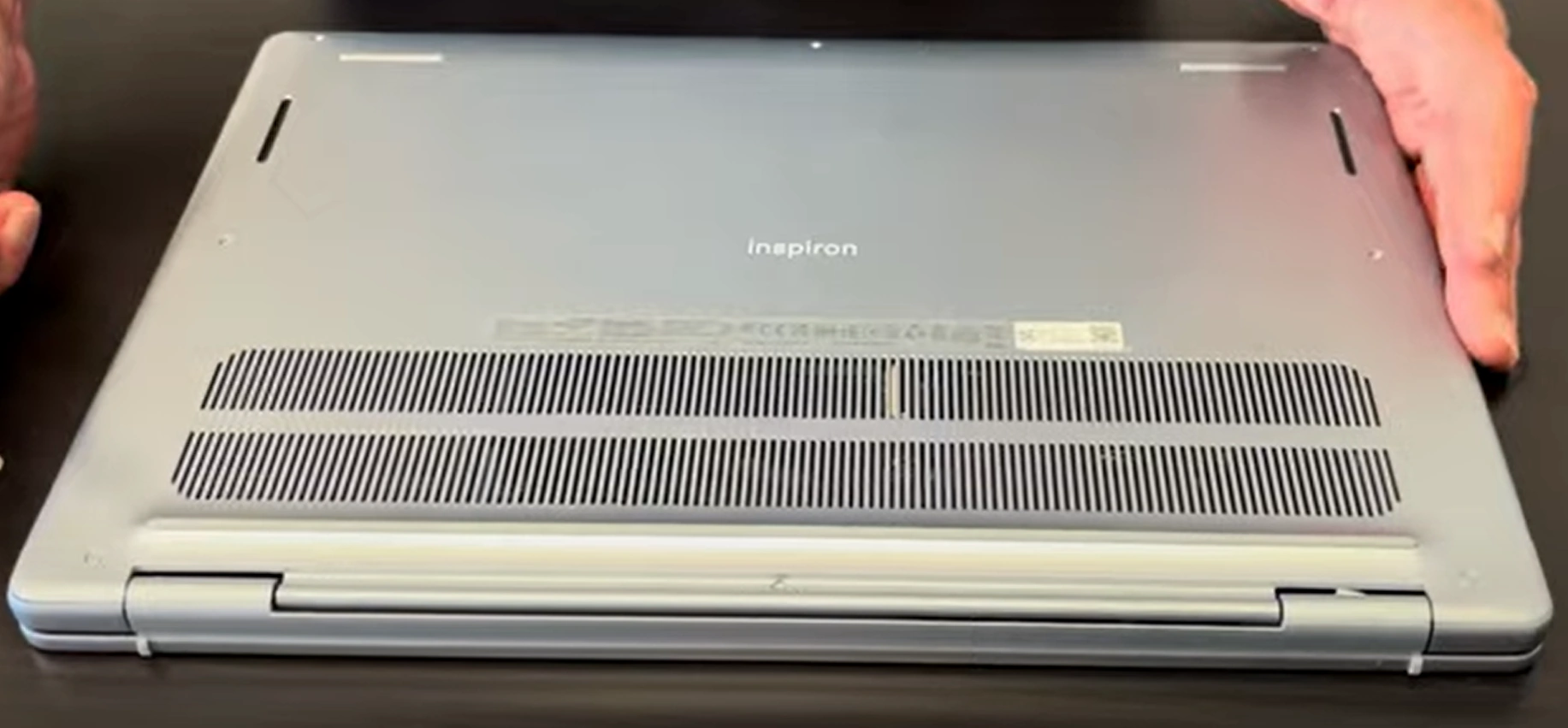
2. Dell Inspiron 16 5640 Bottom Cover Removal: Tool-Free Access Without Damage
⚠️ Critical Safety Precautions
- Pre-Removal Steps:
- Disconnect AC adapter and hold power button for 15 seconds
- Ground yourself using anti-static wristband
- Inspiron-Specific Warnings:
- Avoid pressure near hinge vents (thermal system integrity)
- Note tamper-evident stickers (affects Dell warranty transfer)
🔧 Tool-Free Removal Process
- Release Captive Screws:
- 9 quarter-turn screws (marked with lock symbol)
- Turn 90° counterclockwise until they "pop" up
- Release Hidden Clips:
- Start at front-right corner (near USB ports)
- Use >nylon spudger at 45° angle
- Lift Cover:
- Raise rear edge first (20° angle)
- Disconnect touchpad ribbon if replacing panel
🛡️ Preserving Resale Value
| Risk | Prevention | Value Impact |
|---|---|---|
| Clip breakage | Work in 2cm increments | Intact clips = +15% value |
| Chassis scratches | Use microfiber worksurface | Flawless finish = +$25 |
| Warranty void | Document pre-existing stickers | Transferable warranty = +30% |
🔄 Common Issues & Solutions
- Stuck Clips:
- Apply 70% isopropyl alcohol with dental floss
- Wait 1 minute before retrying
- Misaligned Cover:
- Verify all screws are in "pop-up" position
- Check for missed clips near speakers
0:22 Bottom Case 1:52 Battery 2:31 SSD Storage 3:11 WiFi Card 3:45 Memory RAM 4:05 Heatsink Cooling Fan 5:12 Speakers 5:40 Unscrew Motherboard 6:52 Hinges 7:36 Take out Motherboard 7:53 DC Power Jack 8:08 IO USB Board 8:45 Trackapd 9:30 Palmrest Assembly 9:35 Keyboard 9:48 Power Button 10:20 Display Assembly 10:30 Front Bezel 11:19 Pull out Adhesive Strips 12:45 LCD Screen 12:56 Video Cable and WebCam 13:16 Back Cover
3. Dell Inspiron 16 5640 RAM Upgrade: DDR5 Performance & Resale Optimization
⚡ DDR5 Specifications
- Supported RAM:
- DDR5-4800 SODIMM (1.1V)
- Max 32GB (2x16GB) via dual-channel
- Recommended Kits:
- Crucial CT16G48C40S5 (CL40)
- Kingston KF548S38IB-16
🔧 Installation Process
- Access Slots:
- Remove bottom cover (9 captive screws)
- Locate slots near cooling fan
- Install Modules:
- 30° angle insertion (notch alignment)
- Firm press until clips engage (audible click)
- Verify Operation:
- Check in BIOS (F2 at boot > Memory Settings)
- Run
sudo dmidecode -t memory(Linux)
📊 DDR5 vs DDR4 Performance
| Configuration | PCMark 10 | Resale Value |
|---|---|---|
| 16GB DDR4-3200 | 5,200 | Base |
| 16GB DDR5-4800 | 6,100 (+17%) | +$80-$100 |
| 32GB DDR5-4800 | 6,500 (+25%) | +$150-$180 |
Data from UL Benchmarks
💰 Selling Original RAM
- Market Prices (2024):
- 8GB DDR5: $30-$40
- 16GB DDR5: $55-$70
- Best Platforms:
- SellLaptopBack (tech-specific)
- eBay "Dell OEM Tested" listings
4. Dell Inspiron 16 5640 SSD Upgrade: Dual PCIe Slot Expansion Strategy
⚡ SSD Slot Configuration
- Primary Slot:
- PCIe Gen4 x4 NVMe (Up to 7,000MB/s)
- Includes Dell heatsink pre-installed
- Secondary Slot:
- PCIe Gen3 x4 NVMe (Up to 3,500MB/s)
- Ideal for storage expansion
🔧 Installation Process
- Prepare Drives:
- Update to latest Dell Storage Driver
- Apply thermal pad if reusing heatsink
- Install Primary SSD:
- Align notch at 30° angle
- Secure with M2x3mm screw (0.6Nm torque)
- Configure RAID (Optional):
- Access BIOS (F2 at boot)
- Enable Intel VMD Controller
📊 Performance Benchmarks
| Configuration | CrystalDiskMark | Resale Impact |
|---|---|---|
| Gen4 Single | 6,800/5,100 MB/s | +$50 |
| Gen3+Gen4 | 6,800/3,200 MB/s | +$75 |
| RAID 0 | 9,200/6,800 MB/s | +$120 |
💰 Selling Original SSDs
- Secure Erase:
- Use
nvme format -s1 /dev/nvme0n1(Linux) - Dell Data Wipe for Windows
- Use
- Market Prices (2024):
- 256GB OEM: $25-$35
- 512GB OEM: $40-$60
5. Dell Inspiron 16 5640 Battery Replacement: Safe Removal & Resale Certification
🔋 Battery Specifications
- Part Number: Dell 0T7F6F (54Wh, 4-cell)
- Health Verification:
- Run
powercfg /batteryreportin Command Prompt - Check cycles via Dell SupportAssist
- Run
⚠️ Safe Removal Protocol
- Pre-Discharge:
- Drain to 30-50% charge (3.8V/cell optimal)
- Disable in BIOS (Settings > Power Management)
- Disconnect Safely:
- Remove 4x T6 screws (marked with battery icon)
- Use nylon tool on BT1 connector
- Adhesive Release:
- Apply iFixit heating pad (60°C for 2 minutes)
- Use dental floss for clean separation
📜 Resale Certification
| Document | Source | Value Impact |
|---|---|---|
| Dell FRU Letter | Service Tag Lookup | +30% vs aftermarket |
| Health Report | SupportAssist Export | 85%+ health = +$40 |
| UN38.3 Test | ICAO Standards | Required for shipping |
✈️ Shipping Compliance
- USPS Requirements:
- Protect terminals with electrical tape
- Include Lithium Battery Label
- International:
- IATA Packing Instruction 965
- Max 30% state of charge
6. Dell Inspiron 16 5640 Display Replacement: FHD+ IPS Panel Upgrade
📺 Display Specifications
- Original Panel:
- 16" FHD+ (1920×1200) IPS Anti-Glare
- 300 nits brightness, 60Hz refresh rate
- Compatible Upgrades:
- 120Hz IPS panels (drop-in replacement)
- WUXGA (1920×1200) touchscreen options
🔧 Professional Replacement Process
- Bezel Removal:
- Heat edges with thermal pad (60°C for 2 minutes)
- Start from bottom-right corner near hinge
- Disconnect Components:
- 40-pin eDP cable (0.5mm pitch)
- Webcam/microphone flex cable
- Panel Removal:
- 4x M2×3mm screws (1.0Nm torque)
- Note adhesive strip locations
💰 Display Resale Value Factors
| Condition | Grading | Value Range |
|---|---|---|
| Perfect (no bleed) | Grade A | $120-$150 |
| Minor backlight bleed | Grade B | $80-$110 |
| 1-2 dead pixels | Grade C | $50-$75 |
✅ Post-Installation Verification
- Visual Inspection:
- Uniformity test (solid color screens)
- Pixel check with magnification
- Functional Tests:
- Refresh rate verification
- Viewing angle assessment
7. Dell Inspiron 16 5640 Motherboard Access: Professional Removal & Resale Strategy
🔍 Motherboard Identification
- Model Number: Dell 0T7F6F (13th Gen Intel Platform)
- Key Components:
- Intel Processor (i5-1335U/i7-1355U)
- Integrated Iris Xe Graphics
- Dual M.2 NVMe slots
🛠️ Full Access Procedure
- Complete Teardown:
- Remove 22 screws (varying lengths)
- Disconnect all ribbon cables (keyboard, touchpad, power button)
- Cooling System Removal:
- Dual heat pipe design
- Note thermal pad thicknesses (1mm CPU, 0.5mm VRM)
- Motherboard Extraction:
- Lift at 30° angle from USB-C side first
- Avoid flexing near RAM slots
💰 2024 Resale Value Guide
| Configuration | Consumer Market | Business Market |
|---|---|---|
| i5-1335U Board | $180-$220 | $250-$300 |
| i7-1355U Board | $250-$300 | $350-$400 |
| With Working Ports | +15% Value | +25% Value |
✅ Buyer Verification Steps
- Component Testing:
- Run
sudo lspci -vv(Linux) - Dell ePSA diagnostics (F12 at boot)
- Run
- Visual Inspection:
- Check for capacitor damage
- Verify BIOS password removal
8. Selling Dell Inspiron 16 5640 Parts: Premium Market Strategies
📊 Optimal Selling Platforms
| Component | Best Platform | Fee Advantage |
|---|---|---|
| Motherboards | SellLaptopBack | 6% + $0.25 (tech-savvy buyers) |
| Batteries/Displays | SellLaptopBack | 8% flat rate |
| Complete Systems | GovDeals | 12% (buyer-paid) |
🏢 Corporate Buyer Tactics
- Certification Benefits:
- Dell ProSupport Plus transfers add 35% value
- Include Data Wipe certificates
- Government Channels:
- Register at SAM.gov
- List as GSA Advantage IT surplus
🎓 University Surplus Strategies
- Campus Requirements:
- Provide asset tag documentation
- Include original Dell recovery USB
- Top Channels:
- UC Berkeley Surplus
- University auction portals
🔍 SEO Listing Techniques
- Title Formulas:
- "Dell Inspiron 16 5640 [Part] - [FRU] - [Certification]"
- Example: "Dell Inspiron 16 MB - i7-1355U - vPro Certified"
- Key Tags:
- #DellOEM #FRU0T7F6F #IrisXe
- #CorporateReady #vProCertified
💰 2024 Price Benchmarks
| Component | Consumer | Business |
|---|---|---|
| i7 Motherboard | $280 | $375 |
| 54Wh Battery | $65 | $90 |
| FHD+ Display | $110 | $140 |
Need to Sell Your Dell Laptop? Get Instant Cash!
If your Dell Inspiron 16 5640 (or other Inspiron model) has performance issues or you're upgrading to a newer device, we offer competitive cash payouts for your laptop. We buy broken, used, and refurbished Dell Inspiron laptops—including all 5640 configurations—with free insured shipping and hassle-free evaluations.
Sell Popular Dell Models Now: