On this page
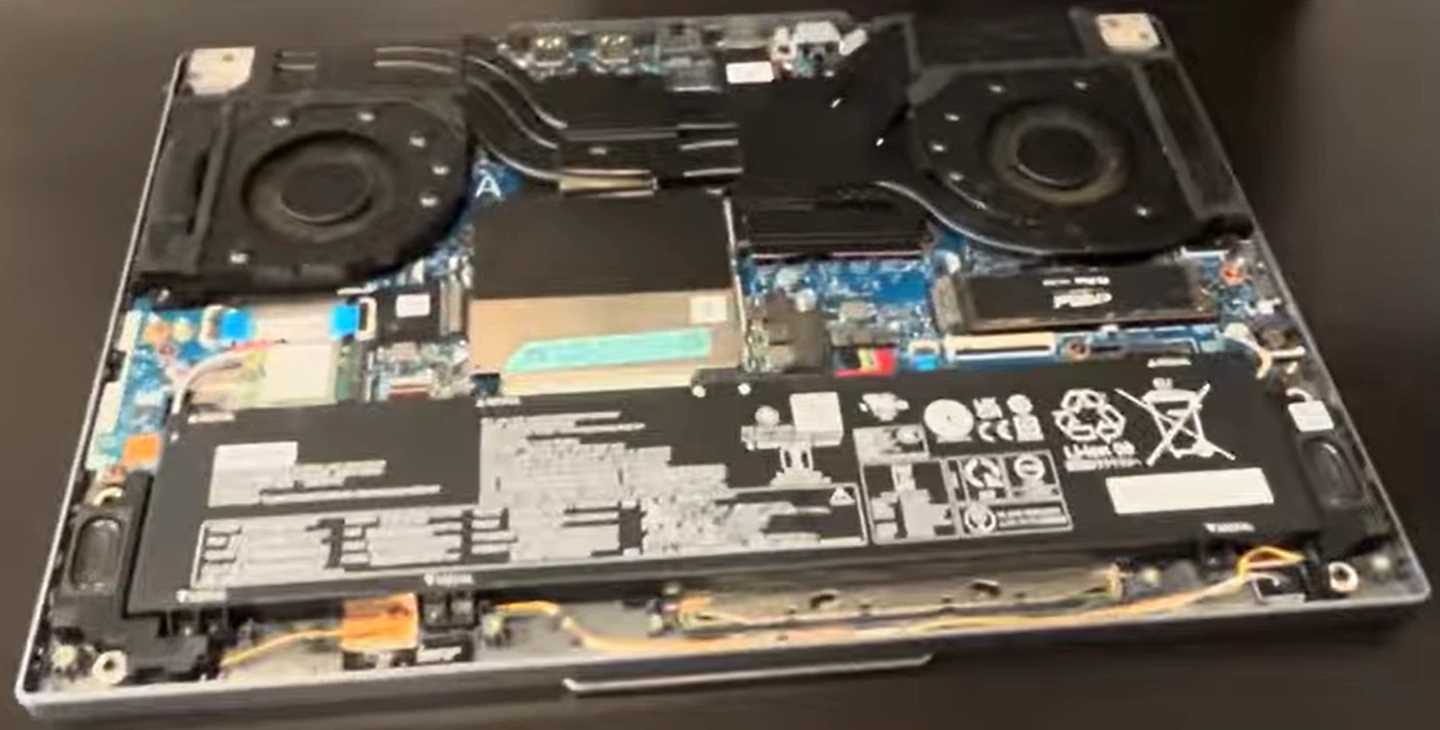
Planning to sell used laptop, get cash for old laptop or do a laptop trade-in? The Lenovo Legion Slim 5 16ARP9 (slim gaming beast with AMD Ryzen 7, RTX 4070 & 165Hz display) is highly upgradeable. Adding more RAM, extra/fast SSD storage, and basic maintenance can dramatically increase resale value!
This guide covers full teardown, key upgrades, and tips to prep your Legion Slim 5 16ARP9 for the highest offers.
Why Upgrade Before Selling Your Lenovo Legion Slim 5 16ARP9?
- Upgrade RAM to 32GB–64GB DDR5 → smoother multitasking & gaming
- Add/upgrade SSD (dual M.2 slots) = massive storage boost (up to several TB!)
- Upgraded configs sell 30–70% higher on marketplaces
- Buyers love modern, high-spec gaming laptops → faster sell used laptop & better cash for old laptop
Video Tutorial: Disassembly, RAM & SSD Upgrade
Watch this detailed YouTube teardown showing how to open the case, upgrade components, and reassemble – perfect for the Legion Slim 5 16ARP9!
0:28 Bottom Case 0:57 Battery 1:41 SSD Storage 1:56 RAM Memory 2:19 WiFi Card 2:48 Speakers 3:06 Heatsink and Cooling Fans 4:27 IO Board with CMOS Battery 5:10 Processor and GPU 6:05 Motherboard 6:20 Hinges 6:57 Hinge Cover 8:10 Display Assembly 8:42 Palmrest Assembly 8:47 Touchpad 9:16 Keyboard
Main Upgrade Options – Lenovo Legion Slim 5 16ARP9
- RAM: 2× SODIMM slots – upgrade to 64GB DDR5-5600MHz (dual-channel for peak performance; thermal pads included for cooling)
- Storage: 2× M.2 2280 PCIe 4.0 NVMe slots – add/replace with 1TB–4TB+ high-speed SSDs (easy expansion!)
- Access: Remove bottom screws → lift cover → RAM & SSDs are right there (battery is also replaceable if needed)
- Pro tip: Clean fans/heatsink during teardown → cooler, quieter operation (big plus for buyers!)
Quick Teardown & Upgrade Steps
- Power off, unplug, remove all bottom screws (Phillips screwdriver)
- Carefully pry off the bottom panel (clips are gentle)
- Disconnect battery connector for safety
- Upgrade RAM: Remove metal shield if present → insert new DDR5 modules at 45° → press until clips lock
- Upgrade/Add SSD: Unscrew M.2 drives → swap/insert new NVMe → secure screws
- Optional: Clean dust from fans + check thermal paste
- Reassemble, power on, verify upgrades – ready to sell used laptop!
Get Maximum Cash for Your Upgraded Lenovo Legion Slim 5 16ARP9
List with upgrades highlighted: "Upgraded 32GB+ RAM + 2TB SSD – Excellent Gaming Condition!" This slim RTX 40-series machine attracts serious buyers fast.
Use terms like "cash for old laptop Legion Slim 5 upgraded", "sell used laptop Lenovo gaming" or "laptop trade-in" – expect much higher offers!
Good luck with your DIY upgrades and successful sale! 💻🚀
Sell Popular Lenovo Laptop Models Now: