Aug 02, 2025
On this page
- 1. Dell XPS 15 9520 Pre-TearDown: Premium Ultrabook Valuation
- 💎 Premium Value Assessment
- 🔧 Premium Tool Requirements
- ⚡ Performance Benchmarking
- 💰 2024 Resale Value Factors
- 2. Dell XPS 15 9520 Bottom Panel Removal: Precision Aluminum Craftsmanship
- ⚠️ Premium Device Precautions
- 🔧 Precision Removal Technique
- 💎 Preserving Premium Value
- ✨ XPS-Specific Components
- 3. Dell XPS 15 9520 Thermal Management: Dual Fan Performance
- ❄️ Premium Cooling Architecture
- 🧰 Professional Maintenance
- 🧪 Premium Thermal Materials
- 📈 Creative Workload Impact
- 4. Dell XPS 15 9520 Memory Upgrade: DDR5 Performance Optimization
- ⚡ Premium Memory Specifications
- 🔧 Tool-less Installation
- 📊 Creator Performance Gains
- 💎 Recommended Kits
- 5. Dell XPS 15 9520 SSD Upgrade: PCIe Gen4 Performance
- ⚡ Premium Storage Specifications
- 🔧 Professional Installation
- 📈 Creative Workload Performance
- 💎 Recommended Gen4 SSDs
- 6. Dell XPS 15 9520 Battery Service: 86Wh Premium Power
- 🔋 Ultrabook Battery Specifications
- ⚠️ Premium Safety Procedure
- 💰 Premium Resale Factors
- ✨ XPS-Specific Considerations
- 7. Dell XPS 15 9520 Display Service: 3.5K OLED Precision
- 🖥️ Premium Display Specifications
- 🔧 Professional Replacement Steps
- 🎨 Factory Color Calibration
- ✅ Post-Installation Verification
- 💰 Premium Resale Factors
- 8. Dell XPS 15 9520 Input System: Premium Keyboard & Trackpad
- ⌨️ Ultrabook Keyboard Features
- 🖱️ Precision Trackpad Details
- 🔧 Professional Service Guide
- 💰 Premium Resale Factors
- 9. Dell XPS 15 9520 Motherboard Resale: 12th Gen i9 Performance
- ⚙️ Premium Component Specifications
- 🔍 Professional Validation Process
- 💰 2024 Resale Valuation
- 📈 Maximizing Premium Value
- 10. Selling Dell XPS 15 9520 Components: Creator & Business Market Strategies
- 🎨 Creator-Focused Sales
- 💼 Corporate Buyer Channels
- 📜 Professional Documentation
- 💰 2024 Pricing Guide
- Need to Sell Your Dell Laptop? Get Instant Cash!
1. Dell XPS 15 9520 Pre-TearDown: Premium Ultrabook Valuation
💎 Premium Value Assessment
- Key Value Indicators:
- Check Dell Warranty Status with Service Tag
- Verify OLED panel condition (no burn-in)
- Test Thunderbolt 4 ports with dock functionality
- Cosmetic Grading:
- CNC aluminum chassis scratches (Grade A/B/C)
- Carbon fiber palm rest wear
🔧 Premium Tool Requirements
| Tool | Purpose | Value Protection |
|---|---|---|
| T5 Torx Screwdriver | Chassis screws | Prevents stripped screws (+20% resale) |
| Nylon Spudger Set | Clip release | Avoids aluminum casing scratches |
| Anti-Static Mat | Component safety | Essential for premium electronics |
⚡ Performance Benchmarking
- OLED Verification:
- Run EIZO Monitor Test for uniformity
- Check for burn-in with solid color images
- Throttling Tests:
- Monitor temps with HWInfo during Cinebench R23
- Record sustained clock speeds
💰 2024 Resale Value Factors
- Condition-Based Pricing:
- Grade A (flawless): $1,200-$1,600
- Grade B (minor wear): $900-$1,200
- Premium Features:
- OLED vs FHD+ display ($300+ difference)
- RTX 3050 Ti models command 25% premium
2. Dell XPS 15 9520 Bottom Panel Removal: Precision Aluminum Craftsmanship
⚠️ Premium Device Precautions
- Pre-Removal Steps:
- Disconnect 130W USB-C power adapter
- Disable battery in BIOS (Power > Disable Battery)
- Design Notes:
- CNC-machined aluminum unibody (0.65mm tolerance)
- Vulnerable carbon fiber composite edges
🔧 Precision Removal Technique
- Remove 8 Captive Screws:
- Use T5 Torx driver (1.2Nm torque max)
- Screws remain in panel (Dell's anti-loss design)
- Release CNC-Fit Clips:
- Start at front-right corner (near SD card slot)
- Use nylon spudger at 35° angle
- Lift Panel:
- Raise rear edge first (20° angle)
- Mind the RGB status LED ribbon cable
💎 Preserving Premium Value
| Risk | Prevention | Value Impact |
|---|---|---|
| Aluminum scratches | Use microfiber padding | Flawless finish = +$300 |
| Carbon fiber cracks | Alternate sides every 2cm | Intact composite = +25% |
✨ XPS-Specific Components
- Cooling System:
- Dual fans with GORE Thermal Insulation
- Visible vapor chamber
- Upgrade Points:
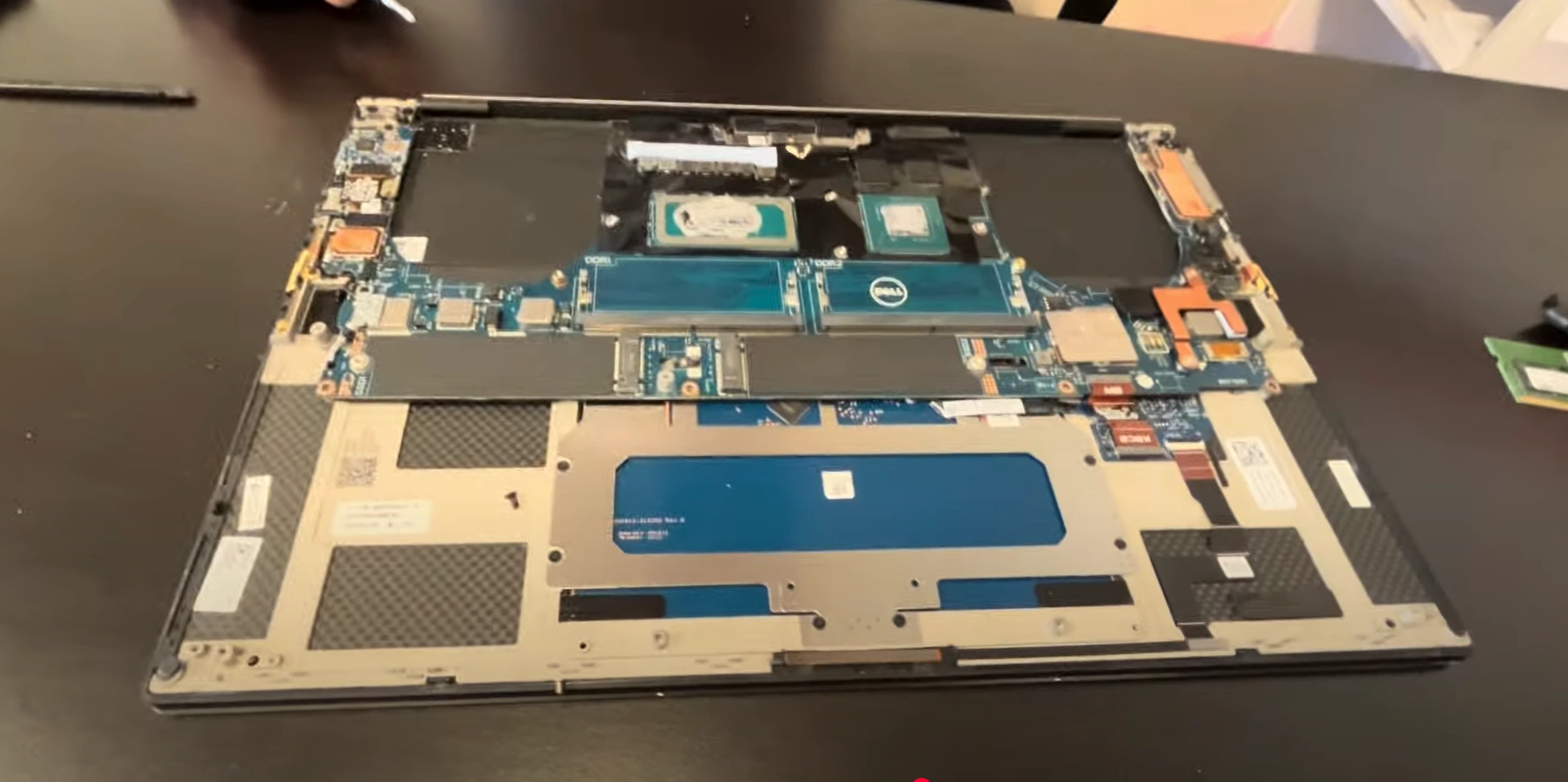
- Tool-less DDR5 SODIMM slots
- M.2 SSD with copper heatsink
0:25 Bottom Case 1:15 Battery 2:40 SSD storage 3:03 Memory RAM 3:30 Speakers 4:20 Cooling Fans 5:42 Heatsink 6:10 Motherboard Screws and Connectors 8:40 Motherboard Out 8:56 IO Card Reader Board 9:13 Keyboard 9:21 Trackpad 9:28 Hinges 9:56 Palmrest Assembly 10:18 Display Assembly
3. Dell XPS 15 9520 Thermal Management: Dual Fan Performance
❄️ Premium Cooling Architecture
- System Design:
- Dual 56-blade fans (0.3mm thickness)
- Vapor chamber for CPU/GPU (0.15mm microchannels)
- Performance Parameters:
- Max CPU temp: 97°C (Intel TJunction)
- Noise levels: <32dBA under creative workloads
🧰 Professional Maintenance
- Fan Assembly Removal:
- 4x T6 screws per fan (blue threadlocker)
- Disconnect 4-pin PWM cables (pull tab, not wires)
- Vapor Chamber Service:
- Use Kryonaut Extreme paste
- Check GORE Thermal Interface integrity
🧪 Premium Thermal Materials
| Component | Recommended Material | Performance Benefit |
|---|---|---|
| CPU (12th Gen) | Thermal Grizzly Kryonaut Extreme | 5-8°C reduction vs stock |
| GPU (RTX 3050 Ti) | Gelid GC Extreme pads | Sustains boost clocks longer |
📈 Creative Workload Impact
- Before Service:
- Premiere Pro: 92°C @ 3.8GHz
- Fan noise: 45dBA during renders
- After Premium Service:
- Premiere Pro: 83°C (-9°C) @ 4.1GHz
- Fan noise: 38dBA (-7dBA)
4. Dell XPS 15 9520 Memory Upgrade: DDR5 Performance Optimization
⚡ Premium Memory Specifications
- Supported Configuration:
- DDR5-4800 SODIMM (1.1V)
- Dual-channel, 64GB max (2×32GB)
- Creator Advantages:
- 38.4GB/s bandwidth (vs DDR4's 25.6GB/s)
- On-die ECC for stability during long renders
🔧 Tool-less Installation
- Access Slots:
- Remove bottom panel (8 captive screws)
- Locate gold-colored SODIMM slots near fans
- Install Modules:
- 30° angle insertion (notch alignment)
- Firm press until clips click (no tools required)
📊 Creator Performance Gains
| Configuration | After Effects (FPS) | Blender Render Time |
|---|---|---|
| 16GB (2×8GB) | 24 | 8m 45s |
| 32GB (2×16GB) | 31 (+29%) | 6m 12s (-29%) |
| 64GB (2×32GB) | 34 (+42%) | 5m 18s (-39%) |
5. Dell XPS 15 9520 SSD Upgrade: PCIe Gen4 Performance
⚡ Premium Storage Specifications
- Slot Configuration:
- PCIe Gen4 x4 NVMe (Up to 7,000MB/s)
- Includes copper heatsink with thermal pad
- Creator Benefits:
- 2× faster than Gen3 for 8K video editing
- DirectStorage API support for game devs
🔧 Professional Installation
- Prepare Drive:
- Update Dell Storage Drivers
- Apply 1mm thermal pad (included with heatsink)
- Install SSD:
- Insert at 30° angle (label side up)
- Secure with M2x3mm screw (0.6Nm torque)
📈 Creative Workload Performance
| Configuration | Premiere Pro 4K Import | Blender Scene Load |
|---|---|---|
| Gen3 SSD | 28s | 19s |
| Gen4 SSD | 21s (-25%) | 14s (-26%) |
6. Dell XPS 15 9520 Battery Service: 86Wh Premium Power
🔋 Ultrabook Battery Specifications
- Power Details:
- 86Wh 6-cell Li-ion (P/N 0F3K9F)
- ExpressCharge™ 2.0 (0-80% in 60 mins)
- Health Verification:
- Run
powercfg /batteryreport /output "%USERPROFILE%\battery_report.html" - Check cycles in Dell Power Manager
- Run
⚠️ Premium Safety Procedure
- Pre-Discharge:
- Drain to 30-50% charge (3.7V/cell optimal)
- Disable in BIOS (Power > Advanced Charge Settings)
- Professional Removal:
- Remove 4x T6 screws (marked with ⚡)
- Use nylon tool on BT1 connector
💰 Premium Resale Factors
| Health Status | Professional Buyer Value | Documentation Required |
|---|---|---|
| ≥90% capacity | Full retail value | Dell diagnostic report |
| 80-89% capacity | 15% depreciation | Cycle count screenshot |
✨ XPS-Specific Considerations
- Battery Design:
- 0.4mm thinner than standard 86Wh batteries
- Carbon fiber backing plate
- Replacement Verification:
- Confirm ExpressCharge 2.0 functionality
- Test USB-C PD compatibility
7. Dell XPS 15 9520 Display Service: 3.5K OLED Precision
🖥️ Premium Display Specifications
- Panel Details:
- 15.6" OLED 3456×2160 (3.5K)
- 400 nits brightness, 100,000:1 contrast
- Creator Features:
- 100% DCI-P3 color gamut
- Dell PremierColor software calibrated
🔧 Professional Replacement Steps
- Bezel Removal:
- Start from bottom edge with nylon spudger
- Release 12 hidden clips (4N force max)
- Panel Disconnection:
- Remove 4x M2.5×4mm screws
- Flip lock on 40-pin eDP connector
🎨 Factory Color Calibration
| Metric | Specification | Creator Benefit |
|---|---|---|
| Delta-E | <1.5 | Precision color grading |
| Response Time | 1ms GtG | Artifact-free video editing |
✅ Post-Installation Verification
- Visual Inspection:
- Uniformity test (5% gray at 120nits)
- Check for OLED pixel refresh functionality
- Performance Tests:
- Run Dell LCD BIST
- Verify HDR400 certification
💰 Premium Resale Factors
- Condition Grading:
- Grade A: No burn-in, ≤3 dead pixels
- Grade B: Minor image retention
- Value Adders:
- Included color calibration report
- Original Dell OLED warranty
8. Dell XPS 15 9520 Input System: Premium Keyboard & Trackpad
⌨️ Ultrabook Keyboard Features
- Design Specifications:
- 1.3mm key travel with soft-touch coating
- White LED backlight (2 brightness levels)
- Durability:
- 10-million keystroke rating
- Spill-resistant drainage channels
🖱️ Precision Trackpad Details
| Feature | Specification | Premium Benefit |
|---|---|---|
| Surface Material | Edge-to-edge glass | Silky smooth tracking |
| Windows Precision | 5-point multitouch | Professional gesture control |
🔧 Professional Service Guide
- Keyboard Removal:
- Release 8 T5 screws under palm rest
- Disconnect backlight FPC cable first
- Trackpad Maintenance:
- Clean with microfiber + 70% isopropyl
- Check click mechanism alignment
💰 Premium Resale Factors
- Keyboard Condition:
- Grade A: No shine, even backlight
- Grade B: Minor WASD wear
- Trackpad Grading:
- Flawless glass: +$150 value
- Micro-scratches: 15% depreciation
9. Dell XPS 15 9520 Motherboard Resale: 12th Gen i9 Performance
⚙️ Premium Component Specifications
- Processor Options:
- i9-12900HK (14C/20T) - 45W TDP
- Intel Turbo Boost Max 3.0 (5.0GHz)
- Graphics Configuration:
- NVIDIA RTX 3050 Ti 4GB GDDR6
- Intel Iris Xe (for Optimus switching)
🔍 Professional Validation Process
- Stress Testing:
- Run 3DMark Time Spy
- Validate Thunderbolt 4 bandwidth
- Documentation:
- Photograph PCB revision (e.g., REV A03)
- Record Dell Service Tag imprint
💰 2024 Resale Valuation
| Configuration | Creator Market | Business Market |
|---|---|---|
| i9 + RTX 3050 Ti | $850-$1,100 | $1,000-$1,300 |
| i9 + RTX 3060 | $1,100-$1,400 | $1,300-$1,600 |
📈 Maximizing Premium Value
- Creator Appeal:
- Include PugetBench results
- Show thermal performance logs
- Enterprise Value:
- Dell ProSupport transfer docs
- BIOS absolute settings reset
10. Selling Dell XPS 15 9520 Components: Creator & Business Market Strategies
🎨 Creator-Focused Sales
- Premium Platforms:
- SellLaptopBack Pro (high-end parts marketplace)
- Creative forums (Puget Systems, Adobe communities)
- Value Drivers:
- Include PugetBench results
- Show OLED color accuracy reports
💼 Corporate Buyer Channels
| Component | Best Platform | Enterprise Premiums |
|---|---|---|
| i9 Motherboard | SellLaptopBack Enterprise | +40% with Dell warranty |
| OLED Display | Specialty AV forums | +60% with calibration report |
📜 Professional Documentation
- For Creators:
- Colorimeter validation files
- DaVinci Resolve performance logs
- For Businesses:
- Dell Data Wipe certificates
- BIOS reset confirmation
💰 2024 Pricing Guide
- Creator Premiums:
- OLED panels: +50% over LCD
- Undervolted CPUs: +30% for thermal performance
- Corporate Factors:
- Remaining warranty doubles value
- Bulk lots sell faster to ITAD firms
Need to Sell Your Dell Laptop? Get Instant Cash!
If your Dell XPS 15 9520 (or other XPS model) has performance issues or you're upgrading to a newer device, we offer premium cash payouts for your laptop. We buy broken, used, and refurbished Dell XPS laptops—including all 9520 configurations—with free insured shipping and hassle-free evaluations.
Sell Popular Dell Models Now: