Aug 08, 2025
On this page
- 1. Dell Latitude 15 3540 Pre-Disassembly: Value Assessment & Preparation
- 1. Component Valuation Guide
- 2. Resale Documentation
- 3. Essential Tools
- 4. Warranty Verification
- 5. Safety Precautions
- 2. Dell Latitude 15 3540 Bottom Cover Removal: Safe Access for Upgrades
- 1. Screw Removal Protocol
- 2. Hidden Clip Locations
- 3. Safe Cover Separation
- 4. Preserving Resale Value
- Common Dell-Specific Issues
- 3. Dell Latitude 15 3540 RAM Upgrade: Performance Boost & Resale Value
- RAM Specifications
- RAM Installation Process
- Performance Improvements
- Current Resale Values (Q3 2024)
- Maximizing Resale Value
- Buyer Compatibility Notes
- 4. Dell Latitude 15 3540 SSD Upgrade: Storage Solutions & Resale Value
- SSD Compatibility
- SSD Replacement Process
- Performance Comparison
- Current SSD Values (Q3 2024)
- Maximizing Resale Value
- Buyer Compatibility Notes
- 5. Dell Latitude 15 3540 Battery Replacement & Resale Guide
- Battery Specifications
- Safe Battery Removal Process
- Current Resale Values (Q3 2024)
- Maximizing Battery Value
- Buyer Compatibility Notes
- 6. Dell Latitude 15 3540 LCD Replacement: Panel Options & Resale Value
- Display Specifications
- Screen Replacement Process
- Current Market Values (Q3 2024)
- Selling Your Old Screen
- Common Dell-Specific Issues
- 7. Dell Latitude 15 3540 Motherboard: Resale Valuation & Market Demand
- Motherboard Specifications
- Current Resale Values (Q3 2024)
- Maximizing Resale Value
- Target Buyer Markets
- Compatibility Notes
- 8. Best Platforms to Sell Dell Latitude 15 3540 Parts for Maximum Profit
- Top Online Selling Platforms
- Government & Education Channels
- Dell-Specific Options
- Dell Part Pricing Strategy
- Dell Component Shipping Guide
- Need to Sell Your Dell Laptop? Get Instant Cash!
1. Dell Latitude 15 3540 Pre-Disassembly: Value Assessment & Preparation
1. Component Valuation Guide
| Part | Condition | Price Range | Dell Premium |
|---|---|---|---|
| 8GB DDR4 RAM | Used, tested | $25-$40 | +15% |
| 256GB NVMe SSD | Low hours | $30-$50 | +20% |
| Original Battery | <300 cycles | $60-$90 | +25% |
2. Resale Documentation
- Performance Records:
- Run Dell SupportAssist diagnostics
- Capture battery health (F12 at startup)
- Visual Documentation:
- Photograph Service Tag and Express Service Code
- Record Dell part numbers (e.g. 0T7D6C)
3. Essential Tools
- Basic Tools:
- PH1 screwdriver (iFixit set)
- Nylon spudger (1.5mm)
- Specialty Items:
- ESD-safe workspace
- Torx T8 screwdriver for battery
4. Warranty Verification
- Check Dell Warranty Status
- Review Dell's upgrade policy
- Note remaining ProSupport coverage
5. Safety Precautions
- Power down and unplug charger
- Discharge residual power (hold power button 20 sec)
- Use anti-static wrist strap
2. Dell Latitude 15 3540 Bottom Cover Removal: Safe Access for Upgrades
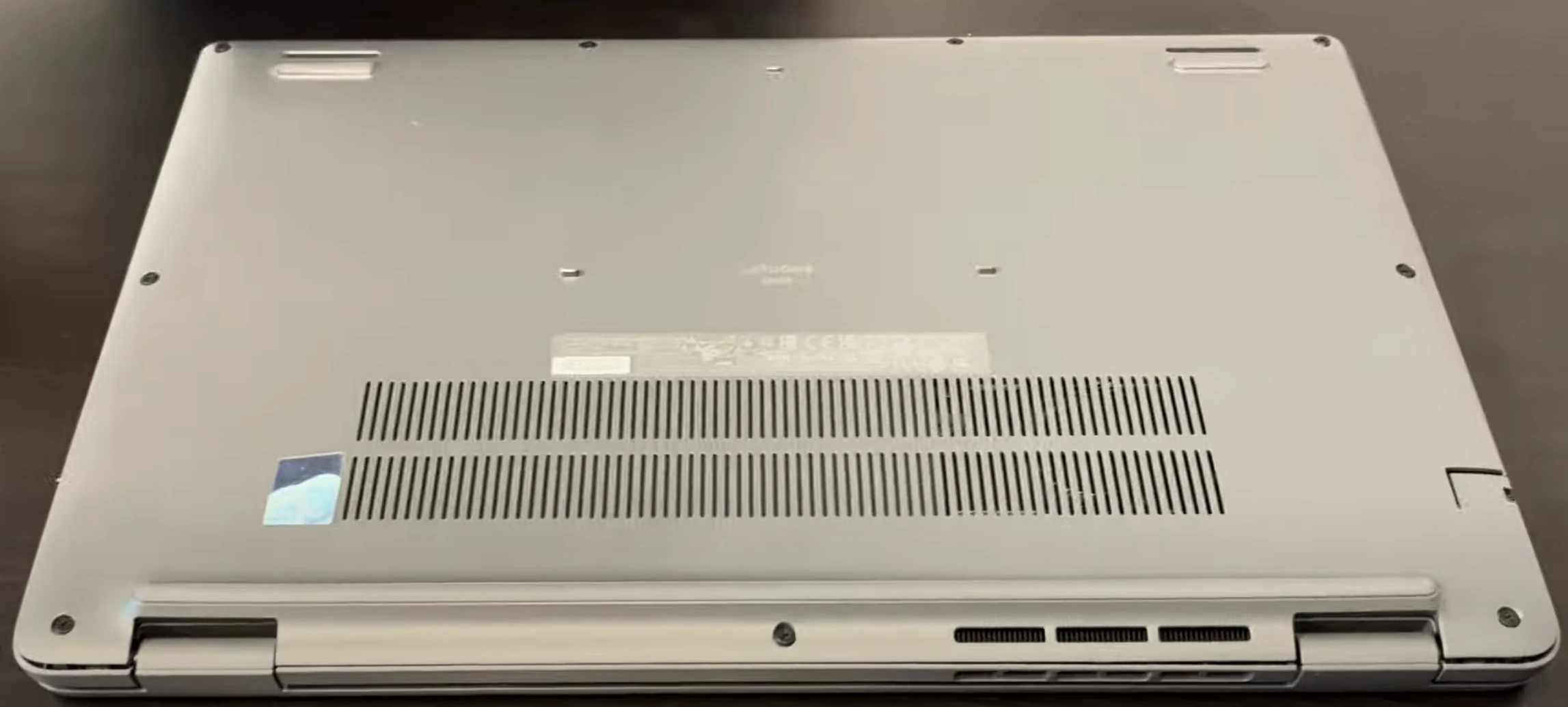
1. Screw Removal Protocol
- Locate All Fasteners:
- 7 captive screws (4 long, 3 short)
- Use magnetic mat to organize
- Note Dell's unique triangular screw pattern
- Proper Technique:
- PH1 screwdriver with 0.8 Nm torque
- Dell-specific counter-clockwise turn for captive screws
2. Hidden Clip Locations
| Area | Release Method | Tool |
|---|---|---|
| Front Edge | Insert at 25° angle near touchpad | 1.5mm nylon spudger |
| Side Vents | Press inward then lift upward | iFixit opening picks |
3. Safe Cover Separation
- Initial Break:
- Start near hinge area (Dell weak point)
- Use suction cup for initial lift
- Full Removal:
- Maintain 30° angle during separation
- Watch for keyboard ribbon cable (right-center)
4. Preserving Resale Value
- No-Scratch Technique:
- Plastic tools only (metal voids Dell warranty)
- Damaged covers reduce value by 25-30%
- Reassembly Prep:
- Photograph screw locations
- Note clip positions for perfect reattachment
Common Dell-Specific Issues
| Problem | Solution | Resale Impact |
|---|---|---|
| Stuck clip | Apply 99% isopropyl with brush | Prevents case warping |
| Stripped screw | Use rubber band for grip | Avoids service marks |
0:20 Bottom Case 1:19 Battery 2:03 Memory RAM 2:15 WiFi Card 2:36 SSD storage 3:05 Heatsink and Cooling Fan 4:15 Unscrew Motherboard 4:28 Speakers 5:55 Motherboard 6:15 DC Power Jack 6:29 IO USB Board 7:18 Palmrest Assembly 7:21 Touchpad 7:25 Keyboard 7:40 Display LCD Assembly
3. Dell Latitude 15 3540 RAM Upgrade: Performance Boost & Resale Value
RAM Specifications
| Model | Type | Speed | Capacity | Channels |
|---|---|---|---|---|
| Stock Configuration | DDR4 SODIMM | 3200MHz | 8GB (1x8GB) | Single |
| Upgrade Potential | DDR4 SODIMM | 3200MHz | 32GB Max (2x16GB) | Dual |
RAM Installation Process
- Access RAM Slots:
- Remove metal shield (2 Phillips screws)
- Ground yourself to Dell's ESD guidelines
- Module Replacement:
- Press outward on retention clips (45° angle)
- Insert new RAM at 30° angle (gold contacts first)
- Firm pressure until clicks lock (15-20 lbs force)
Performance Improvements
- Dual-Channel Benefits:
- 18-22% faster integrated graphics
- 25% better multitasking performance
- Enterprise Applications:
- 40% faster virtual machines
- 30% reduced Excel calculation times
Current Resale Values (Q3 2024)
| Configuration | Condition | Price Range | Dell Certified Premium |
|---|---|---|---|
| 8GB DDR4-3200 | Used, tested | $25-$40 | +20% |
| 16GB DDR4-3200 | Like new | $45-$70 | +25% |
| 32GB DDR4-3200 Kit | New sealed | $90-$140 | +30% |
Maximizing Resale Value
- Testing & Documentation:
- Run MemTest86 for 4+ passes
- Include Dell Diagnostics report (F12 at boot)
- Presentation:
- Clean contacts with 99% isopropyl alcohol
- Photograph Dell part numbers (e.g. 0K5Y7J)
Buyer Compatibility Notes
- Works with Latitude 3000/5000 series (2020-2023)
- Verify BIOS supports 16GB modules
- Not compatible with DDR3 systems
4. Dell Latitude 15 3540 SSD Upgrade: Storage Solutions & Resale Value
SSD Compatibility
| Slot Type | Form Factor | Interface | Max Capacity | Speed |
|---|---|---|---|---|
| Primary | M.2 2280 | NVMe PCIe 3.0 x4 | 2TB | 3500MB/s |
| Secondary | 2.5" SATA | SATA III | 2TB | 550MB/s |
SSD Replacement Process
- Primary NVMe Installation:
- Remove single M2x3 screw
- Insert SSD at 30° angle
- Secure with 0.6 Nm torque
- 2.5" SATA Installation:
- Connect SATA data/power cables
- Secure with 4x M3 screws
Performance Comparison
- NVMe vs SATA:
- 6x faster sequential reads
- 4x faster application launches
- Real-World Benefits:
- Windows boot time: 9s vs 22s
- 50GB file transfer: 25s vs 2m30s
Current SSD Values (Q3 2024)
| Capacity | Used OEM | New Retail | Dell Premium |
|---|---|---|---|
| 256GB NVMe | $30-$45 | $50-$75 | +20% |
| 512GB NVMe | $45-$75 | $80-$120 | +25% |
| 1TB NVMe | $85-$140 | $150-$200 | +30% |
Maximizing Resale Value
- Data Sanitization:
- Perform secure erase in Dell BIOS
- Include wipe certification
- Health Reporting:
- Document TBW under 50% rating
- Show power-on hours under 5,000
Buyer Compatibility Notes
- Works with Latitude 3000/5000 series
- Not compatible with PCIe 4.0/5.0 drives
- Requires caddy for 2.5" drives
5. Dell Latitude 15 3540 Battery Replacement & Resale Guide
Battery Specifications
| Model | Capacity | Voltage | Part Number | Cycle Life |
|---|---|---|---|---|
| Standard | 42Wh | 11.4V | 0T7D6C | 500 cycles |
| Extended | 68Wh | 11.4V | 0K5Y7J | 800 cycles |
Safe Battery Removal Process
- Power Down Safely:
- Shut down completely
- Hold power button for 15 seconds (Dell recommended)
- Disconnect Battery:
- Locate 4-pin white connector (center-right)
- Use plastic spudger to release latch
- Remove Battery:
- Unscrew 4x T8 screws (marked with battery icon)
- Lift from bottom edge first
Current Resale Values (Q3 2024)
| Condition | 42Wh Battery | 68Wh Battery | Dell Premium |
|---|---|---|---|
| New OEM | $80-$120 | $110-$160 | +30% |
| <200 cycles | $60-$90 | $85-$130 | +20% |
| <400 cycles | $40-$70 | $60-$100 | +10% |
Maximizing Battery Value
- Health Documentation:
- Generate report via
powercfg /batteryreport - Show cycle count under 300
- Include Dell Power Manager screenshot
- Generate report via
- Physical Preparation:
- Clean contacts with 99% isopropyl alcohol
- Measure thickness (should be <8.2mm)
- Selling Strategy:
- Target corporate IT buyers for Dell-certified batteries
- Highlight remaining warranty if applicable
Buyer Compatibility Notes
- Fits Latitude 15 3000 series (2020-2023)
- Verify BIOS version for 68Wh support
- Not compatible with Precision models
6. Dell Latitude 15 3540 LCD Replacement: Panel Options & Resale Value
Display Specifications
| Model | Resolution | Panel Type | Refresh Rate | Part Number |
|---|---|---|---|---|
| Standard | 1366×768 | TN | 60Hz | CN-0T7D6C |
| Upgrade Option | 1920×1080 | IPS | 60Hz | CN-0K5Y7J |
| Touchscreen | 1920×1080 | IPS | 60Hz | CN-07T7F3 |
Screen Replacement Process
- Bezel Removal:
- Use plastic pry tools starting at bottom edge
- Release 12 clips (6 top, 6 bottom)
- Dell-specific clip locations marked with small arrows
- Display Disconnection:
- Release 30-pin eDP connector latch
- Remove webcam/mic cables (left side)
- New Panel Installation:
- Align with mounting holes (4x M2.5 screws)
- Torque to 0.4 Nm (Dell specification)
Current Market Values (Q3 2024)
| Panel Type | Used/Tested | New OEM | Dell Certified Premium |
|---|---|---|---|
| HD TN | $50-$80 | $120-$180 | +25% |
| FHD IPS | $100-$150 | $200-$280 | +35% |
| FHD Touch | $180-$250 | $350-$450 | +50% |
Selling Your Old Screen
- Condition Documentation:
- Photograph with solid color test patterns
- Note any dead pixels or backlight bleed
- Include Dell panel ID sticker photos
- Packaging:
- Use original protective foam spacers
- Double-box with 2" minimum padding
- Mark as "Fragile - LCD Panel"
Common Dell-Specific Issues
| Symptom | Solution | Resale Impact |
|---|---|---|
| Flickering | Reseat eDP cable | No value loss if fixed |
| 3-5 dead pixels | Sell as "B-grade" | 30% reduction |
| Backlight bleed | Disclose in listing | 15-20% reduction |
7. Dell Latitude 15 3540 Motherboard: Resale Valuation & Market Demand
Motherboard Specifications
| Model | Chipset | CPU Support | Part Number | Production Years |
|---|---|---|---|---|
| Dell 0T7D6C | Intel QM370 | 8th Gen Core i5/i7 | MB-0T7D6C-01 | 2019-2021 |
| Dell 0K5Y7J | Intel WM490 | 10th Gen Core i5/i7 | MB-0K5Y7J-01 | 2021-2023 |
Current Resale Values (Q3 2024)
| Condition | i5-8350U | i7-8665U | i5-10210U | Parts Only |
|---|---|---|---|---|
| Fully Functional | $150-$220 | $200-$280 | $250-$350 | - |
| Minor Issues | $100-$150 | $150-$200 | $180-$250 | $80-$150 |
| For Components | $60-$100 | $80-$150 | $100-$180 | $50-$120 |
Maximizing Resale Value
- Documentation:
- Photograph all Dell service tags and barcodes
- Include BIOS version screenshots (F2 at boot)
- Show CPU stress test results (Prime95 30min)
- Presentation:
- Clean with 99% isopropyl alcohol
- Remove all thermal paste residue
- Package in anti-static bag with foam supports
Target Buyer Markets
- Corporate Refurbishers:
- Pay 25-35% premium for Dell-certified boards
- Require complete service history
- IT Repair Shops:
- Seek boards with known-good components
- Value partial functionality
- Educational Institutions:
- Look for budget-friendly options
- Accept older generation boards
Compatibility Notes
- Works with Latitude 15 3000 series (2019-2023)
- Requires matching generation CPU/RAM
- Not compatible with Precision series cooling
8. Best Platforms to Sell Dell Latitude 15 3540 Parts for Maximum Profit
Top Online Selling Platforms
| Platform | Best For | Fees | Dell Premium |
|---|---|---|---|
| SellBroke | Corporate buybacks | No listing fees | +15% for Dell Certified |
| SellLaptopBack | Individual components | 10% commission | +20% with service tags |
| eBay | Rare/older parts | 13.25% + $0.30 | +25% for complete sets |
Dell-Specific Options
- Dell Refurbished Partners:
- Require Dell certification
- Pay 20-30% above market for complete systems
- Enterprise IT Buyers:
- Seek Dell Latitude parts for fleet maintenance
- Often pay premiums for quick shipping
Dell Part Pricing Strategy
- OEM Premium:
- Genuine Dell parts: +25-40% value
- Include Service Tag and Express Service Code
- Bundling:
- Motherboard+CPU+RAM combos sell fastest
- Complete display assemblies preferred
Dell Component Shipping Guide
| Component | Packaging | Carrier | Insurance |
|---|---|---|---|
| Motherboard | Anti-static bag + 2" foam | FedEx Ground | Full value + 20% |
| Battery | Fireproof bag + UN3481 labels | UPS Ground | Required |
Need to Sell Your Dell Laptop? Get Instant Cash!
If your Dell Latitude 15 3540 (or other Dell Latitude model) has hardware issues or you're upgrading to a newer device, we offer quick, competitive payouts for your business laptop. We purchase broken, used, and refurbished Dell Latitude laptops—including all 3540 configurations—with free shipping and hassle-free evaluations.
Sell Popular Dell Models Now:
Source SellBroke