On this page
- 1. Asus Zephyrus G14 GA401 Pre-Disassembly: Maximizing Your Laptop's Resale Value
- 💰 Laptop Resale Valuation Guide
- 🛠️ Essential Tools for Maximum Value Preservation
- 🔍 Model Verification for Accurate Valuation
- ⚡ Preparation Steps for Maximum Resale Value
- 📈 Market Preparation Tips
- ⚠️ Safety Precautions for Value Preservation
- 🔍 Market Value Research
- 2. Asus Zephyrus G14 GA401 Bottom Removal: Safe Internal Access Guide
- ⚠️ Essential Safety Precautions
- 🔧 Step-by-Step Removal Process
- 🛡️ Preventing Damage for Maximum Resale Value
- 🔍 Internal Layout Overview
- ⚙️ GA401 Specific Features
- 📸 Documentation for Resale
- ❌ Common Mistakes to Avoid
- 3. Asus Zephyrus G14 GA401 RAM Upgrade: Boost Performance & Increase Resale Value
- 💾 Memory Specifications
- 🔄 Upgrade Configuration Options
- 🔧 Installation Process
- 🏆 Recommended Memory Modules
- ⚡ Performance Optimization Tips
- 🎮 Performance Benefits
- 💰 Maximizing Resale Value
- 📝 Important Compatibility Notes
- 4. Asus Zephyrus G14 GA401 SSD Upgrade: Boost Storage & Maximize Resale Value
- 💽 Storage Specifications
- ⚡ Performance Comparison
- 🔧 Installation Process
- 🏆 Recommended SSD Options
- 🔄 Data Migration Options
- ⚙️ Performance Optimization
- 🎮 Performance Benefits
- 💰 Maximizing Resale Value
- 💎 Value Proposition
- 5. Asus Zephyrus G14 GA401 Battery Replacement: Extend Life & Maximize Resale Value
- 🔋 Battery Specifications
- ⚠️ Safety Precautions
- 🛠️ Replacement Process
- ⚡ Battery Calibration
- 📊 Health Reporting
- 🎯 Power Optimization
- 💰 Maximizing Resale Value
- 🎯 Target Buyer Benefits
- 📈 Resale Value Impact
- 6. Asus Zephyrus G14 GA401 LCD Replacement: Premium Display Upgrade & Quality Verification
- 🖥️ Display Specifications
- ⚠️ Safety Precautions
- 🔧 Replacement Process
- 🔄 Display Upgrade Options
- 🎨 Display Calibration
- 🔍 Quality Testing
- 💰 Maximizing Resale Value
- 🎯 Target Buyer Benefits
- 7. Asus Zephyrus G14 GA401 Motherboard Access: Advanced Repairs & Component Replacement
- ⚠️ Advanced Procedure Warning
- 🔧 Motherboard Specifications
- 🛠️ Motherboard Access Process
- 🔄 Replaceable Components
- ⚡ Safety Protocol
- 🔍 Post-Repair Testing
- 💰 Resale Value Impact
- 🏢 When to Use Professional Services
- 8. Asus Zephyrus G14 GA401 Professional Reassembly & Performance Testing
- 🛠️ Reassembly Preparation
- 🔧 Step-by-Step Reassembly Process
- ❄️ Thermal Management
- 🔍 Initial Power-On Testing
- ⚡ Comprehensive Performance Testing
- 🎮 Gaming Performance Validation
- ✅ Quality Assurance Checklist
- 💰 Resale Value Enhancement
- 9. Preparing Your Upgraded Asus Zephyrus G14 for Maximum Cash Value
- 📊 Market Analysis & Pricing Strategy
- 💰 Competitive Pricing Strategy
- 📋 Professional Documentation Package
- ✨ Presentation & Quality Enhancement
- 🌐 Optimal Sales Platforms
- 📈 Listing Optimization Strategies
- 🎯 Crafting Your Value Proposition
- ⏰ Optimal Selling Timing
- 🏢 Professional Service Options
- 10. Where to Get the Best Cash for Your Upgraded Asus Zephyrus G14
- 📊 Marketplace Comparison Guide
- 🏆 Specialized Electronics Buyback Services
- 🌐 Private Marketplaces
- 👥 Specialized Communities
- 🔄 Manufacturer & Retailer Trade-In
- 💡 Maximizing Your Cash Return
- 🛡️ Safety & Security
- 🚀 Success Tips for Maximum Cash
- Need to Sell Your Asus Laptop? Get Instant Cash!
1. Asus Zephyrus G14 GA401 Pre-Disassembly: Maximizing Your Laptop's Resale Value
💰 Laptop Resale Valuation Guide
| Component | Upgrade Impact | Value Increase |
|---|---|---|
| RAM (8GB → 16GB) | Enhanced multitasking and performance | +$80-$120 |
| SSD (512GB → 1TB) | More storage and faster load times | +$100-$150 |
| New Battery | Longer battery life and reliability | +$70-$110 |
| LCD Replacement | Perfect display with no issues | +$150-$200 |
| Professional Cleaning | Optimal thermals and quiet operation | +$40-$60 |
🛠️ Essential Tools for Maximum Value Preservation
- Basic Toolkit:
- PH0 and PH00 Phillips screwdrivers
- Plastic spudger set and opening tools
- Anti-static wrist strap
- Thermal paste
- Documentation Gear:
- Smartphone or camera for photos
- Notebook for tracking screw locations
- Small containers for organizing components
🔍 Model Verification for Accurate Valuation
- Locate model number on bottom casing (GA401I, GA401Q, etc.)
- Verify specifications on Asus official support page
- Confirm CPU/GPU combination (Ryzen 7/9, GTX/RTX)
- Check current market value on resale platforms
⚡ Preparation Steps for Maximum Resale Value
- Data Management:
- Backup important files to cloud or external drive
- Deauthorize software licenses (Adobe, etc.)
- Sign out of all accounts and applications
- Perform factory reset if selling with OS
- Documentation:
- Photograph laptop from all angles in current condition
- Record serial numbers and specifications
- Create list of included accessories
- Note any existing wear or imperfections
📈 Market Preparation Tips
- For Quick Sale:
- Price competitively based on recent sold listings
- Highlight gaming performance capabilities
- Emphasize portability and battery life
- For Maximum Value:
- Consider targeted upgrades before selling
- Document all maintenance and improvements
- Time your sale with market demand peaks
⚠️ Safety Precautions for Value Preservation
- Disconnect power and remove all peripherals
- Work on clean, static-free surface
- Handle components by edges to prevent damage
- Keep screws organized by component and location
- Take photos at each disassembly stage
🔍 Market Value Research
- Check sold listings for similar models on eBay
- Research local market prices on Facebook Marketplace
- Compare buyback offers from reputable services
- Note premium prices for specific configurations
2. Asus Zephyrus G14 GA401 Bottom Removal: Safe Internal Access Guide
⚠️ Essential Safety Precautions
- Complete Power Down:
- Shut down completely (not sleep or hibernate)
- Disconnect power adapter and all peripherals
- Remove all external devices and dongles
- Hold power button for 10 seconds to discharge
- Workspace Setup:
- Use clean, static-free surface
- Organize screws by type and location
- Ensure adequate lighting for small components
- Keep magnetic tools away from sensitive electronics
🔧 Step-by-Step Removal Process
- Remove All Screws:
- 11 screws total (varies by model year)
- 8x short silver screws around perimeter
- 3x longer black screws near hinge area
- Check for hidden screws under rubber feet
- Use magnetic PH0 screwdriver
- Release Clips Carefully:
- Start near the front edge (weakest point)
- Insert plastic spudger at 30° angle
- Work methodically around all edges
- Listen for distinct "click" release sounds
- Lift Cover Gently:
- Lift from front edge near touchpad area
- Watch for stubborn clips near ventilation areas
- Check for any missed screws or connections
- Set cover aside on soft, clean surface
🛡️ Preventing Damage for Maximum Resale Value
| Risk Area | Prevention Technique | Value Impact |
|---|---|---|
| Plastic Clips | Alternate sides, apply even pressure | Intact clips = +$50-80 value |
| Finish & Paint | Microfiber cloth under tools | Flawless finish = +$40-60 |
| Screw Threads | Apply downward pressure, correct size | Undamaged = +$20-30 |
| Internal Components | Check clearance, mind ribbon cables | No damage = +$80-120 |
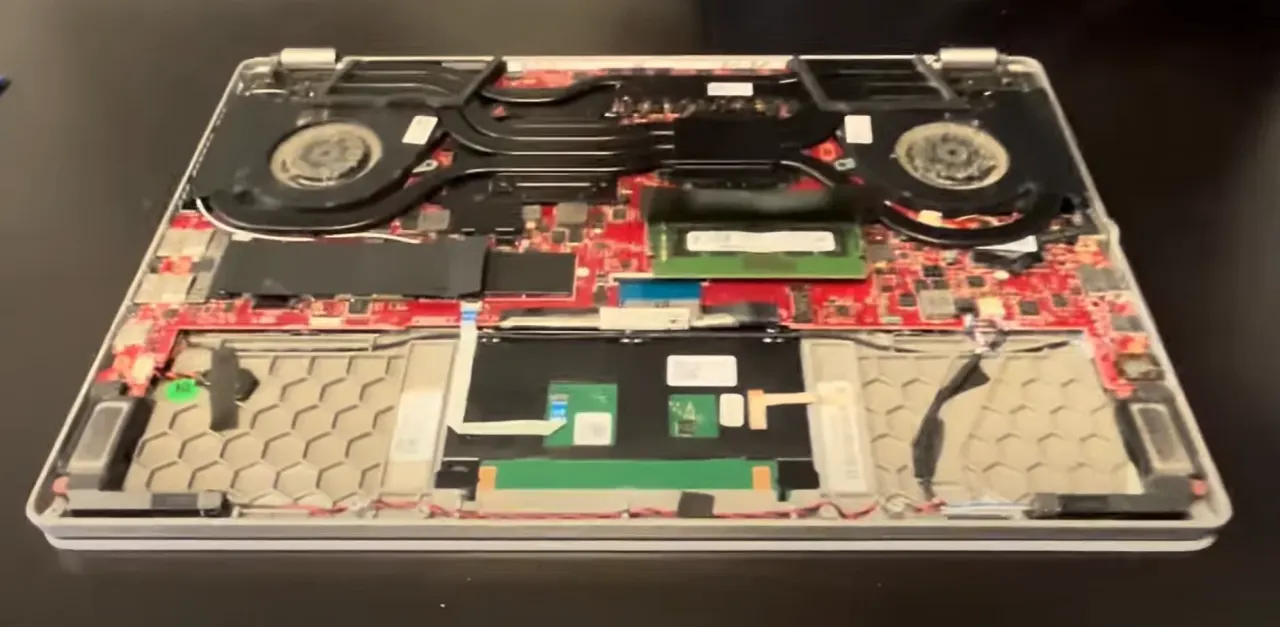
🔍 Internal Layout Overview
- Upgrade Points Visible:
- Single DDR4 RAM slot (soldered + one SODIMM)
- M.2 2280 PCIe 3.0 SSD slot
- Wi-Fi card (M.2 2230)
- Cooling system access
- Battery Access:
- 76Wh 4-cell battery
- Professional-grade connector
- Multiple mounting points
- Cooling System:
- Heat pipes with dual fans
- Thermal paste areas
- Dust accumulation areas to clean
⚙️ GA401 Specific Features
- ErgoLift hinge design
- AniMe Matrix display (on some models)
- Premium build materials
- Efficient cooling design
📸 Documentation for Resale
- Photograph screw locations before removal
- Record factory condition and any existing damage
- Document internal component layout
- Note upgrade potential for marketing
❌ Common Mistakes to Avoid
- Forcing the cover when clips aren't released
- Using metal tools that can scratch surfaces
- Missing hidden screws under rubber feet
- Not disconnecting battery before internal work
- Mixing up screw lengths during reassembly
0:29 Bottom Case 2:01 Battery 2:41 RAM Memory 2:54 Speakers 3:19 WIFi Card 3:56 SSD Storage 4:13 Heatsink Cooling Fans 7:25 Motherboard 7:58 Hinges 8:33 Palmrest Assembly 8:83 Touchpad 9:18 Keyboard 9:35 Display Assembly
3. Asus Zephyrus G14 GA401 RAM Upgrade: Boost Performance & Increase Resale Value
💾 Memory Specifications
- Supported Types:
- DDR4 SODIMM (260-pin)
- 3200MHz (soldered RAM speed determines maximum)
- Single upgradable slot + soldered memory
- Maximum 40GB (8GB soldered + 32GB module) configuration
- Compatibility Verification:
- Check Asus official specifications
- Verify CPU generation (Ryzen 7/9 4000/5000 series)
- 1.2V operating voltage
- Confirm maximum supported speed in BIOS
🔧 Installation Process
- Access RAM Slot (after bottom cover removal)
- Release Existing Module:
- Push outward on side clips simultaneously
- Module will pop up at 30° angle
- Remove by pulling straight out gently
- Handle by edges only to prevent ESD damage
- Install New RAM:
- Align notch with slot key
- Insert at 30° angle with gentle pressure
- Press down firmly until clips engage audibly
- Verify both ends are equally seated
- Performance Verification:
- Boot to BIOS (F2 during startup)
- Check recognized capacity and speed
- Run Asus diagnostic memory test
- Verify operation in CPU-Z or HWInfo
🏆 Recommended Memory Modules
- Performance Option:
- Crucial CT32G4SFD832A (32GB DDR4-3200)
- Optimized for gaming and multitasking
- Value Option:
- Corsair Vengeance 16GB DDR4-3200
- Great balance of performance and affordability
- Premium Option:
- HyperX Impact 32GB DDR4-3200
- Excellent for content creation and heavy workloads
⚡ Performance Optimization Tips
- Run MemTest86 for stability verification
- Update BIOS to latest version for best compatibility
- Check Asus Armoury Crate for performance profiles
- Monitor temperatures during extended sessions
🎮 Performance Benefits
- Reduced Stuttering: Smoother gameplay in demanding titles
- Better Multitasking: Game + Discord + browser without slowdowns
- Future-Proofing: Ready for next-gen game requirements
- Content Creation: Faster rendering and video editing
💰 Maximizing Resale Value
- Documentation:
- Save original purchase receipts for RAM
- Include benchmark comparisons
- Provide MemTest86 results for stability proof
- Document before/after performance metrics
- Marketing Advantages:
- "40GB RAM for ultimate multitasking"
- "Eliminates stuttering in demanding games"
- "Perfect for streaming and content creation"
- "Future-proofed for next-gen applications"
- Target Buyers:
- Gamers: Emphasize FPS stability and performance
- Content Creators: Highlight rendering capabilities
- Students: Focus on multitasking for schoolwork
📝 Important Compatibility Notes
- RAM runs at speed of soldered memory (typically 3200MHz)
- Mixed configurations use flex mode operation
- Verify compatibility with Asus QVL list
- Higher capacity modules may require BIOS updates
4. Asus Zephyrus G14 GA401 SSD Upgrade: Boost Storage & Maximize Resale Value
⚡ Performance Comparison
| SSD Type | Read Speed | Write Speed | Performance Benefit | Resale Value Impact |
|---|---|---|---|---|
| SATA SSD | 550 MB/s | 500 MB/s | Basic performance | +$50-$80 |
| Gen3 NVMe | 3,500 MB/s | 3,000 MB/s | Excellent for gaming | +$100-$150 |
| Premium Gen3 | 3,400 MB/s | 3,000 MB/s | Ideal for content creation | +$120-$180 |
🔧 Installation Process
- M.2 NVMe Installation:
- Locate M.2 slot near RAM module
- Insert SSD at 30° angle (keyed design)
- Secure with M2x3mm screw (included with SSDs)
- Ensure proper alignment with standoff
- Thermal Considerations:
- Check clearance under bottom cover
- Use included thermal pads if provided
- Ensure no pressure on components
- Monitor temperatures after installation
- Configuration:
- Enable PCIe 3.0 in BIOS if available
- Set up game library partitions
- Optimize virtual memory settings
🏆 Recommended SSD Options
- Performance Choice:
- Crucial P5 1TB
- Excellent balance of speed and reliability
- Premium Option:
- Samsung 970 Evo Plus 1TB
- Top-tier performance for demanding tasks
- Value Option:
- WD Blue SN570 1TB
- Great performance at mid-range price
- Capacity Focused:
- Sabrent Rocket Q 2TB
- Massive storage for game libraries
🔄 Data Migration Options
- Clean Installation:
- Download Windows from Microsoft
- Install Asus drivers from Asus Support
- Best for performance, removes bloatware
- Fresh game installations recommended
- Data Migration:
- Use Macrium Reflect for system cloning
- Steam Library backup and restore
- Game save cloud synchronization
- Manual file transfer for important data
⚙️ Performance Optimization
- Enable TRIM:
fsutil behavior set DisableDeleteNotify 0 - Update SSD firmware through manufacturer tools
- Disable defragmentation for SSDs
- Configure write caching in Device Manager
- Set power management to maximum performance
- Run CrystalDiskMark for performance validation
🎮 Performance Benefits
- Faster Load Times: Games load in seconds instead of minutes
- Quick System Boot: Windows starts in under 10 seconds
- Responsive Performance: Applications launch instantly
- Better Multitasking: Smooth operation with multiple programs
💰 Maximizing Resale Value
- Documentation:
- CrystalDiskMark benchmark screenshots
- Drive health report (CrystalDiskInfo)
- Original purchase receipt for SSD
- Performance comparison notes
- Marketing Advantages:
- "High-speed NVMe for instant loading"
- "Ample storage for entire game library"
- "Fresh Windows installation for optimal performance"
- "Perfect for gaming and content creation"
- Buyer Appeal:
- Gamers appreciate faster load times
- Content creators value large storage capacity
- Students benefit from quick application launches
- Professionals prefer reliability and speed
💎 Value Proposition
- For Quick Sale: 1TB SSD provides ideal balance of cost and capacity
- For Premium Price: 2TB SSD appeals to serious gamers and creators
- For Budget Upgrade: 512GB to 1TB upgrade offers best value increase
- For Maximum Appeal: Name-brand SSDs with warranty remaining
5. Asus Zephyrus G14 GA401 Battery Replacement: Extend Life & Maximize Resale Value
🔋 Battery Specifications
| Battery Model | Capacity | Voltage | Compatibility | Typical Runtime |
|---|---|---|---|---|
| Asus 0B200-02930100 (OEM) | 76Wh | 15.4V | All GA401 models | 8-10 hours productivity |
| Asus 0B200-02930200 | 76Wh | 15.4V | 2020-2021 models | 8-10 hours productivity |
| Premium Aftermarket | 78-80Wh | 15.4V | Verify fitment | 8.5-10.5 hours productivity |
Always verify compatibility using your Asus model number before purchase.
⚠️ Safety Precautions
- Complete Power Down:
- Shut down completely (not sleep/hibernate)
- Disconnect 180W power adapter
- Remove all peripherals and dongles
- Follow ESD protection procedures
- Workspace Setup:
- Use anti-static wrist strap
- Work on static-safe surface
- Organize components in labeled containers
- Maintain clean work environment
🛠️ Replacement Process
- Access Battery Compartment (after bottom cover removal):
- Locate battery positioned toward front edge
- Identify connector and mounting screw locations
- Note cable routing for proper reassembly
- Document screw locations with photography
- Disconnect Battery Safely:
- Gently lift locking mechanism on power connector
- Pull connector straight out (avoid angled pressure)
- Do not pull on wires directly
- Inspect connector for any signs of damage
- Remove Existing Battery:
- Remove 4x M2x4mm retention screws
- Note screw lengths and precise locations
- Lift battery at 30° angle from front edge
- Observe orientation markings for replacement
- Install New Battery:
- Align new battery with screw holes and connector
- Secure with original screws
- Reconnect power connector until audible click
- Verify secure connection and proper seating
⚡ Battery Calibration
- Charge to 100% without interruption (overnight recommended)
- Discharge completely (use until automatic shutdown)
- Recharge to 100% again without interruption
- Repeat calibration cycle 2-3 times for optimal accuracy
- Use Asus Armoury Crate for battery health settings
📊 Health Reporting
- Open Command Prompt as Administrator
- Run:
powercfg /batteryreport - Report saves as battery-report.html in current directory
- Critical metrics to document:
- DESIGN CAPACITY vs FULL CHARGE CAPACITY
- Battery cycle count and age
- Recent usage history and wear level
- Runtime estimates for different activities
🎯 Power Optimization
- Armoury Crate Settings:
- Silent mode for maximum battery life
- Performance mode for balanced use
- Turbo mode for plugged-in performance only
- Windows Power Plans:
- Asus recommended power plans
- Custom power profiles for different uses
- GPU power management settings
- Usage Optimization:
- Screen brightness adjustment
- Background application management
- Keyboard backlight control
💰 Maximizing Resale Value
- Documentation:
- Photograph OEM battery labels and part numbers
- Include comprehensive battery health reports
- Save purchase receipts for genuine components
- Record calibration process and results
- Marketing Advantages:
- "Genuine Asus replacement battery"
- "95%+ health capacity with professional calibration"
- "8-10 hours of real-world battery life"
- "Perfect for students and mobile professionals"
- Buyer Assurance:
- Offer 90-day performance guarantee
- Provide calibration documentation
- Include power management tips
- Share battery maintenance best practices
🎯 Target Buyer Benefits
- Students:
- All-day battery life for classes
- Reliability for all-day use
- Portability around campus
- Professionals:
- Meeting-long battery reliability
- Business trip endurance
- Client presentation confidence
- Mobile Users:
- Coffee shop work sessions
- Travel without power anxiety
- Outdoor usage capability
📈 Resale Value Impact
| Battery Condition | Health Percentage | Practical Runtime | Value Impact |
|---|---|---|---|
| New OEM Replacement | 100% | 8-10 hours | +$120-$180 |
| Excellent (90%+) | 90-99% | 7-9 hours | +$80-$130 |
| Good (80-89%) | 80-89% | 6-8 hours | +$40-$80 |
| Poor (<80%) | Below 80% | Under 5 hours | -$80-$150 |
6. Asus Zephyrus G14 GA401 LCD Replacement: Premium Display Upgrade & Quality Verification
🖥️ Display Specifications
| Display Type | Resolution | Refresh Rate | Response Time | Color Coverage |
|---|---|---|---|---|
| IPS-Level | 1920x1080 (FHD) | 120Hz | 5ms | 100% sRGB |
| IPS Pantone | 1920x1080 (FHD) | 144Hz | 3ms | 100% sRGB |
| WQHD IPS | 2560x1440 (QHD) | 120Hz | 3ms | 100% DCI-P3 |
Verify compatibility using your Asus model number before purchase.
⚠️ Safety Precautions
- ESD Protection:
- Use anti-static wrist strap
- Work on ESD-safe surface
- Handle display by edges only
- Avoid pressure on LCD surface
- Workspace Preparation:
- Clean, well-lit workspace
- Soft microfiber cloth surface
- Magnetic tray for screw organization
- Proper lighting for delicate connectors
🔧 Replacement Process
- Initial Preparation:
- Power down completely and disconnect all cables
- Remove bottom cover (refer to previous section)
- Disconnect battery to prevent power issues
- Ground yourself to prevent static discharge
- Bezel Removal:
- Use plastic spudger to gently release clips
- Start from bottom edge and work around perimeter
- Apply even pressure to avoid cracking bezel
- Note adhesive tape locations for reassembly
- Display Assembly Removal:
- Remove 4-6 display bracket screws
- Carefully disconnect display cable and antenna wires
- Note cable routing for proper reassembly
- Lift display assembly out carefully
- LCD Separation:
- Remove display hinge covers if present
- Detach LCD panel from metal backing plate
- Use isopropyl alcohol to soften adhesive if needed
- Handle with care to avoid damaging new display
- New Display Installation:
- Transfer mounting brackets to new display
- Apply new adhesive tape around edges
- Connect display cable before final placement
- Test display before final assembly
🎨 Display Calibration
- Software Calibration:
- Use Windows built-in color calibration tool
- Adjust gamma and color temperature settings
- Create custom profiles for different uses
- Visual Verification:
- Test with various color backgrounds
- Check for consistent brightness
- Verify viewing angles
- Gaming Optimization:
- Set optimal refresh rate in display settings
- Configure game-specific visual settings
- Adjust overdrive settings if available
🔍 Quality Testing
- Dead Pixel Check:
- Use online pixel test tools
- Check for stuck or dead pixels
- Test multiple color backgrounds
- Document any issues immediately
- Backlight Uniformity:
- Test with solid gray backgrounds
- Check for backlight bleeding
- Test at different brightness levels
- Note any clouding or uneven illumination
- Color Accuracy:
- Test color gradients for banding
- Verify color representation
- Check white point consistency
💰 Maximizing Resale Value
- Documentation:
- Photograph display model numbers
- Include quality verification results
- Save purchase receipts for premium displays
- Document pixel perfection test results
- Marketing Advantages:
- "Perfect display with no dead pixels"
- "High refresh rate for smooth gaming"
- "Excellent color accuracy"
- "Professional calibration"
- Buyer Assurance:
- Offer display performance guarantee
- Provide quality verification documentation
- Include optimization settings
🎯 Target Buyer Benefits
- Gamers:
- High refresh rate for smooth gameplay
- Fast response time for competitive advantage
- Excellent motion clarity
- Content Creators:
- Color accuracy for photo/video work
- Sharp resolution for detail work
- Consistent color representation
- General Users:
- Crisp text for reading comfort
- Good viewing angles for sharing screen
- Reduced eye strain with quality display
7. Asus Zephyrus G14 GA401 Motherboard Access: Advanced Repairs & Component Replacement
⚠️ Advanced Procedure Warning
Motherboard-level repairs require professional expertise:
- Voiding warranty considerations
- ESD sensitivity of components
- BGA component replacement risks
- Potential for irreversible damage
Consider Asus Professional Services for complex repairs.
🔧 Motherboard Specifications
| Component | Specification | Upgrade Potential | Replacement Complexity |
|---|---|---|---|
| CPU (Soldered) | AMD Ryzen 7/9 4000/5000 series | Not Upgradeable | Professional BGA Only |
| GPU (Soldered) | NVIDIA GTX/RTX Graphics | Not Upgradeable | Professional BGA Only |
| Wi-Fi Card | M.2 2230 (Intel AX200) | Easy Upgrade | Beginner |
| BIOS Chip | Soldered SPI Flash | Professional Reprogramming | Expert |
🛠️ Motherboard Access Process
- Complete Disassembly:
- Remove bottom cover
- Disconnect battery and all power sources
- Remove cooling system
- Detach all connected peripherals
- Document all connector locations with photos
- Cooling System Removal:
- Remove spring-loaded screws in correct order
- Lift heat pipes carefully to avoid damage
- Clean thermal paste carefully
- Protect exposed components
- Motherboard Extraction:
- Remove motherboard screws
- Detach display cable and antenna connections
- Disconnect keyboard/touchpad ribbon cables
- Lift motherboard carefully
- Note standoff locations and screw types
🔄 Replaceable Components
⚡ Safety Protocol
- ESD Protection:
- Use anti-static wrist strap
- Work on static-safe surface
- Handle components by edges only
- Use ESD-safe tools
- Component Handling:
- Avoid touching gold contacts
- Store components in anti-static bags
- Keep work area clean and organized
- Use proper tools for each task
🔍 Post-Repair Testing
- Basic Functionality Test:
- Power on without battery (adapter only)
- Check POST and BIOS access
- Verify fan operation
- Test basic input/output functionality
- Stress Testing:
- Run system stability tests
- Monitor temperatures
- Check for thermal issues
- Verify performance levels
- Performance Validation:
- Run benchmark software
- Test actual performance
- Monitor system stability
- Check for any issues
💰 Resale Value Impact
| Repair Type | Professional Documentation | Value Impact | Market Perception |
|---|---|---|---|
| Wi-Fi Card Upgrade | Receipts + performance tests | +$30-$50 | Positive (easy upgrade) |
| Professional Repair | Repair invoices + testing results | Varies (+$80-$200) | Neutral (depends on quality) |
| Board Replacement | Asus service documentation | Original value restored | Positive (like-new condition) |
🏢 When to Use Professional Services
- BGA Component Replacement:
- CPU/GPU reballing or replacement
- VRM component repairs
- Board-level trace repairs
- Warranty Considerations:
- Check remaining warranty status
- Consider Asus official repair services
- Evaluate cost vs. replacement value
- Complex Repairs:
- Water damage restoration
- Major component failure
- Complex electrical issues
8. Asus Zephyrus G14 GA401 Professional Reassembly & Performance Testing
🛠️ Reassembly Preparation
- Workspace Organization:
- Clean all components with compressed air
- Organize screws according to original locations
- Verify all connectors are accessible
- Check for any leftover tools or components
- Component Inspection:
- Verify all upgrades are properly installed
- Check for any damaged connectors or cables
- Ensure thermal paste application is adequate
- Confirm all screws and fasteners are accounted for
🔧 Step-by-Step Reassembly Process
- Motherboard Installation:
- Carefully lower motherboard into chassis
- Reconnect all ribbon cables and connectors
- Secure with original screws in correct locations
- Verify all connections are firm and properly seated
- Cooling System Reinstallation:
- Apply fresh thermal paste to CPU and GPU
- Carefully position heat pipes and cooling assembly
- Tighten screws in correct sequence (typically criss-cross pattern)
- Ensure even pressure distribution
- Component Reconnection:
- Reconnect battery connector
- Attach all remaining cables and connectors
- Verify Wi-Fi antenna connections
- Check speaker and microphone connections
- Bottom Cover Installation:
- Align cover properly with chassis
- Press gently to engage all clips
- Install screws in correct locations
- Verify even gap around entire perimeter
❄️ Thermal Management
| Component | Thermal Material | Application Method | Performance Impact |
|---|---|---|---|
| CPU | High-quality thermal paste | Pea-sized dot method | 5-10°C improvement |
| GPU | High-quality thermal paste | X pattern method | 5-8°C improvement |
| VRMs | Thermal pads | Proper thickness selection | 10-15°C improvement |
🔍 Initial Power-On Testing
- Pre-Power Checks:
- Verify battery is disconnected
- Connect power adapter only
- Check for any signs of shorts
- Listen for abnormal sounds
- First Boot:
- Press power button briefly
- Observe POST behavior
- Listen for boot chimes
- Check for display output
- BIOS Verification:
- Enter BIOS (F2 during boot)
- Verify all components recognized
- Check temperatures and fan operation
- Save settings and exit
⚡ Comprehensive Performance Testing
- Stress Testing:
- Run Prime95 for CPU stability
- Use FurMark for GPU testing
- Perform combined stress tests
- Monitor temperatures for 30+ minutes
- Memory Testing:
- Run MemTest86 for 4+ passes
- Check for any memory errors
- Verify RAM running at correct speed
- Test stability under load
- Storage Testing:
- Use CrystalDiskMark for speed tests
- Check SSD health with CrystalDiskInfo
- Verify TRIM operation
- Test read/write consistency
🎮 Gaming Performance Validation
- Benchmark Software:
- 3DMark Time Spy and Fire Strike
- Unigine Heaven and Superposition
- Cinebench R23 for CPU performance
- PCMark 10 for system performance
- Real Game Testing:
- Test with 3+ different game engines
- Monitor frame rates and stability
- Check for thermal throttling
- Verify consistent performance
- Thermal Performance:
- Monitor CPU/GPU temperatures
- Check fan curves and noise levels
- Verify cooling efficiency
- Ensure no thermal throttling occurs
✅ Quality Assurance Checklist
- Physical Inspection:
- No loose screws or components
- All covers properly seated
- No gaps or misalignments
- All ports and connectors functional
- Performance Verification:
- All upgrades functioning properly
- Temperature levels within spec
- No abnormal noises or behaviors
- Stable under extended load
- Documentation:
- Performance test results saved
- Temperature logs documented
- Benchmark scores recorded
- Before/after comparisons prepared
💰 Resale Value Enhancement
- Performance Documentation:
- Benchmark score screenshots
- Temperature monitoring logs
- Stability test results
- Gaming performance metrics
- Professional Presentation:
- Clean exterior appearance
- Complete accessory set
- Professional documentation package
- Quality assurance certificate
- Market Advantages:
- Verified performance metrics
- Professional reassembly quality
- Comprehensive testing documentation
- Quality assurance guarantee
9. Preparing Your Upgraded Asus Zephyrus G14 for Maximum Cash Value
📊 Market Analysis & Pricing Strategy
| Market Segment | Target Price Premium | Key Selling Points | Best Platforms |
|---|---|---|---|
| College Students | 20-30% | Portability, battery life, performance | Facebook Marketplace, campus forums |
| Gamers | 25-35% | High refresh rate, GPU performance, cooling | eBay, Reddit, gaming forums |
| Content Creators | 30-40% | Color accuracy, RAM, storage, rendering | Creative forums, specialty marketplaces |
| Professionals | 15-25% | Reliability, build quality, warranty | LinkedIn, professional networks |
💰 Competitive Pricing Strategy
- Market Research:
- Check sold listings for similar upgraded G14 models
- Research local market prices on various platforms
- Compare with buyback offers from reputable services
- Note premium prices for specific configurations
- Value Calculation:
- Base laptop value (check recent sold prices)
- Add 60-70% of upgrade component costs
- Factor in professional installation premium
- Include documentation and warranty value
📋 Professional Documentation Package
- Performance Proof:
- Before/after benchmark comparisons (3DMark, Cinebench)
- Gaming FPS tests in popular titles
- Temperature and cooling performance data
- Battery health reports and calibration results
- Component Documentation:
- Original purchase receipts for upgrade components
- Professional installation photos and notes
- Warranty information for all components
- Specification sheets for upgraded parts
- Verification Materials:
- High-quality photos from all angles
- Video demonstration of key features
- Third-party verification if possible
- Professional appraisal documentation
✨ Presentation & Quality Enhancement
- Physical Presentation:
- Thorough cleaning of exterior and keyboard
- Screen cleaning for streak-free display
- Port cleaning and verification
- Overall aesthetic enhancement
- Accessory Preparation:
- Original power adapter and cable
- Original packaging if available
- All original documentation
- Additional accessories if included
- Software Preparation:
- Fresh Windows installation
- Latest drivers and updates
- Essential software pre-installed
- Proper deauthorization of accounts
🌐 Optimal Sales Platforms
- Premium Marketplaces:
- eBay - Large audience, international reach
- Swappa - Tech-savvy buyer community
- Facebook Marketplace - Local buyers
- OfferUp - Quick local sales
- Specialized Communities:
- Reddit r/hardwareswap - Tech enthusiasts
- Discord gaming communities - Targeted audience
- Professional forums - Content creators
- University forums - Student buyers
📈 Listing Optimization Strategies
- Title Optimization:
- "Professionally Upgraded Asus Zephyrus G14 GA401"
- Include key specs: "40GB RAM, 2TB SSD, 144Hz"
- Add performance claims: "Gaming Ready"
- Mention condition: "Like New, Fully Documented"
- Description Best Practices:
- Start with 3-5 key benefits in bullet points
- Detailed upgrade documentation section
- Performance metrics and benchmark results
- Professional installation story and care
- Visual Presentation:
- High-quality photos from all angles
- Benchmark screenshots and performance charts
- Upgrade component close-ups
- Video demonstration of key features
🎯 Crafting Your Value Proposition
- For Gamers:
- "Ready for AAA gaming at max settings"
- "40GB RAM eliminates stuttering and lag"
- "2TB SSD for instant game loading"
- "144Hz display for competitive advantage"
- For Content Creators:
- "Professional color-accurate display"
- "Fast rendering and export performance"
- "Ample storage for large projects"
- "Reliable for professional work"
- For Students:
- "All-day battery life for classes"
- "Powerful for engineering/design software"
- "Portable for campus use"
- "Gaming capable for relaxation"
⏰ Optimal Selling Timing
| Time Period | Market Conditions | Price Premium | Target Audience |
|---|---|---|---|
| Back-to-School (Aug-Sept) | High demand from students | 20-30% | College students, parents |
| Holiday Season (Nov-Dec) | Gift shopping demand | 15-25% | Gift buyers, parents |
| Tax Return Season (Feb-Apr) | Extra buyer funds available | 10-20% | All market segments |
| Summer (Jun-Jul) | Graduation gifts, summer jobs | 10-15% | Recent graduates, summer workers |
🏢 Professional Service Options
- Trade-In Programs:
- Manufacturer trade-in programs
- Retailer trade-in options
- Online trade-in services for convenience
- Compare multiple offers for best value
- Consignment Services:
- Professional photography services
- Listing optimization experts
- Sales management services
- Escrow and transaction management
10. Where to Get the Best Cash for Your Upgraded Asus Zephyrus G14
📊 Marketplace Comparison Guide
| Platform Type | Average Price | Speed of Sale | Effort Required | Best For |
|---|---|---|---|---|
| Specialized Buyback | $$$ (Highest) | 1-3 days | Low | Quick, guaranteed sales |
| Private Marketplaces | $$$$ (Premium) | 1-4 weeks | High | Maximum value seekers |
| Trade-In Programs | $$ (Good) | 2-7 days | Low | Convenience, store credit |
| Auction Sites | $$$ (Variable) | 3-10 days | Medium | Market price discovery |
🏆 Specialized Electronics Buyback Services
- SellLaptopBack:
- Specializes in gaming laptops and premium devices
- Offers competitive quotes for upgraded systems
- Free shipping and quick payment processing
- Professional grading system for components
- SellLaptopBack:
- Focuses on recent model laptops with upgrades
- Provides detailed upgrade value assessment
- Fast turnaround time (24-48 hour payments)
- Good customer service for premium devices
- Other Reputable Services:
- Gazelle (established reputation)
- BuyBackWorld (comprehensive offers)
- Decluttr (quick process)
- ItsWorthMore (premium device specialist)
🌐 Private Marketplaces
- eBay:
- Largest audience reach
- Premium prices for documented upgrades
- International buyer potential
- Seller protection programs available
- Facebook Marketplace:
- No selling fees
- Local cash transactions
- Quick local sales
- Good for higher-priced items
- OfferUp:
- Local and shipping options
- User-friendly interface
- Rating system for trust
- Growing user base
👥 Specialized Communities
- Reddit Communities:
- r/hardwareswap - Tech enthusiasts
- r/GamingLaptops - Targeted audience
- r/buildapcsales - Value-conscious buyers
- High appreciation for upgrades
- Educational Channels:
- .edu classifieds
- University surplus sales
- Student buy/sell groups
- Faculty/staff marketplace
- Professional Networks:
- LinkedIn professional groups
- Industry-specific forums
- Creative professional networks
- IT professional communities
🔄 Manufacturer & Retailer Trade-In
- Asus Official Program:
- Direct manufacturer buyback
- Often includes upgrade bonuses
- Brand-specific value recognition
- Warranty transfer options
- Retail Programs:
- Best Buy Trade-In
- Amazon Trade-In
- Micro Center (premium values)
- Staples/Office Depot
- Carrier Programs:
- Verizon Trade-In
- AT&T Trade-In
- T-Mobile Trade-In
- Often includes bonus credits
💡 Maximizing Your Cash Return
- Multiple Quotes:
- Get quotes from 3-5 different services
- Compare cash offers vs. trade-in values
- Consider local vs. shipping options
- Factor in fees and shipping costs
- Timing Strategies:
- Sell during back-to-school season
- Time with new model releases
- Consider holiday shopping periods
- Watch for special promotion periods
- Presentation Matters:
- Professional photos increase value
- Detailed documentation justifies premium
- Complete accessories boost appeal
- Cleanliness affects perceived value
🛡️ Safety & Security
- Payment Methods:
- Escrow services for high-value items
- Platform-protected payments
- Cash for local meetups
- Bank transfers with verification
- Transaction Safety:
- Meet in police station parking lots
- Use platform messaging for records
- Verify buyer profiles and history
- Provide clear return policies
- Data Security:
- Complete data wipe before sale
- Remove all accounts and licenses
- Provide factory reset documentation
- Offer data security guarantee
🚀 Success Tips for Maximum Cash
- Document Everything:
- Photograph upgrade process
- Save component receipts
- Record performance benchmarks
- Provide warranty information
- Price Strategically:
- Start 10-15% above target price
- Include "or best offer" option
- Price competitively based on research
- Consider bundle pricing with accessories
- Marketing Approach:
- Highlight gaming performance
- Emphasize upgrade benefits
- Use professional photography
- Create compelling description
Need to Sell Your Asus Laptop? Get Instant Cash!
If your ASUS ROG Zephyrus G14 GA401 (or other ROG model) has performance issues or you're upgrading to a newer gaming laptop, we offer premium cash payouts for your device. We buy broken, used, and refurbished ASUS ROG laptops—including all GA401 configurations—with free insured shipping and no-hassle evaluations.
Sell Popular Asus Models Now: