Aug 14, 2025
On this page
- 1. Asus VivoBook F512JA Pre-Disassembly: Valuation & Tools
- 💰 Resale Valuation Factors
- 🛠️ Essential Tools
- 🔍 Model Verification
- ⚡ Preparation Steps
- 📈 Resale Preparation
- 2. Asus VivoBook F512JA Bottom Cover Removal: Safe Access Guide
- ⚠️ Safety Precautions
- 🔧 Step-by-Step Removal
- 🛡️ Preventing Common Damage
- 🔍 Internal Components Revealed
- 📸 Documentation Tips
- 3. Asus VivoBook F512JA RAM Upgrade: Performance Optimization
- 💾 Memory Specifications
- 🔄 Configuration Options
- 🔧 Installation Guide
- 🏆 Recommended Modules
- ⚡ Optimization Tips
- 💰 Selling With Upgraded RAM
- 4. Asus VivoBook F512JA SSD Upgrade: SATA vs NVMe
- 💽 Storage Options
- ⚡ Speed Comparison
- 🔧 Installation Steps
- 🏆 Recommended SSDs
- 🛠️ Post-Installation
- 💰 Selling With Upgraded SSD
- 5. Asus VivoBook F512JA Battery Replacement: Safe Installation Guide
- 🔋 Battery Specifications
- ⚠️ Safety Precautions
- 🛠️ Replacement Steps
- ⚡ Battery Calibration
- 📊 Generating Health Report
- 💰 Maximizing Resale Value
- 6. Asus VivoBook F512JA LCD Screen Replacement: Professional Guide
- 🖥️ Display Specifications
- 🔧 Step-by-Step Replacement
- ✅ Post-Installation Tests
- 💰 Selling After Replacement
- 7. Asus VivoBook F512JA Reassembly & Quality Testing
- 🔄 Step-by-Step Reassembly
- ✅ Comprehensive Quality Checks
- ⚡ Performance Validation
- 📄 Resale Documentation
- 8. Selling Your Upgraded Asus VivoBook F512JA: Maximum Profit Guide
- 📊 Best Selling Platforms
- 📈 Listing Optimization
- 🎓 Targeting Educational Buyers
- 🏛️ Government & Institutional Sales
- 💰 Dynamic Pricing Strategy
- Need to Sell Your Asus Laptop? Get Instant Cash!
1. Asus VivoBook F512JA Pre-Disassembly: Valuation & Tools
💰 Resale Valuation Factors
| Component | Upgrade Impact | Value Increase |
|---|---|---|
| RAM (4GB → 8GB) | Multitasking improvement | +$60-$80 |
| SSD (SATA → NVMe) | Faster boot/load times | +$50-$70 |
| New Battery | Longer battery life | +$40-$60 |
🛠️ Essential Tools
- Basic Kit:
- PH0 Phillips screwdriver
- Plastic pry tools
- Recommended:
- ESD-safe mat
- Magnifying glass for small connectors
🔍 Model Verification
- Check label under battery
- Confirm Asus support page for exact specs
- Note processor generation (10th/11th Gen Intel)
⚡ Preparation Steps
- Data Backup:
- Use Asus Backupper or Macrium Reflect
- Documentation:
- Photograph original condition
- Run
powercfg /batteryreport
📈 Resale Preparation
- Student Market:
- Highlight lightweight design (1.6kg)
- Emphasize battery life
- Business Buyers:
- Focus on portability
- Show upgrade potential
2. Asus VivoBook F512JA Bottom Cover Removal: Safe Access Guide
⚠️ Safety Precautions
- Power Down:
- Shut down completely (no sleep mode)
- Disconnect all peripherals and charger
- Workspace Setup:
- Use ESD-safe mat
- Organize screws by length/location
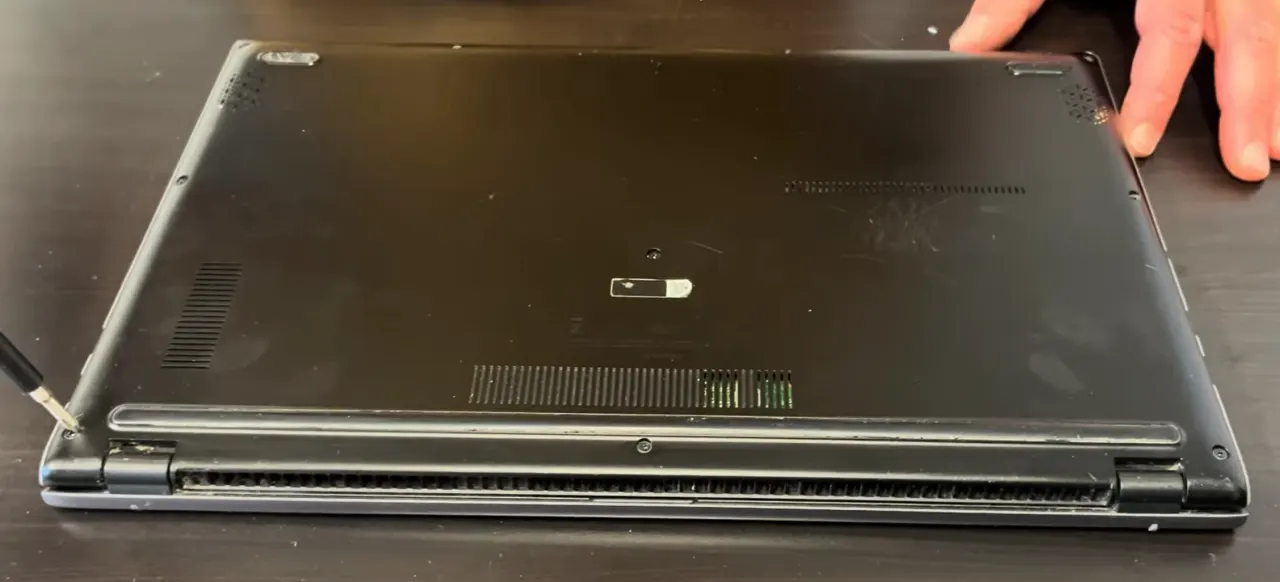
🔧 Step-by-Step Removal
- Remove 11 Screws:
- 7x short silver screws (M2x4mm)
- 4x long black screws near hinges (M2x6mm)
- Use magnetic PH0 driver
- Release Plastic Clips:
- Start near touchpad (weakest point)
- Insert plastic card at 25° angle
- Work clockwise around perimeter
- Lift Cover:
- Raise from front edge first
- Watch for stubborn clips near vents
🛡️ Preventing Common Damage
| Risk Area | Solution | Resale Impact |
|---|---|---|
| Plastic Clips | Alternate sides every 2cm | Intact clips = +$50 value |
| Paint Scratches | Microfiber cloth under tools | Flawless finish = +$30 |
| Screw Threads | Straight-angle removal | Undamaged = +$20 |
🔍 Internal Components Revealed
- Upgrade Points:
- Single RAM slot (supports up to 20GB)
- M.2 2280 SSD slot (SATA/NVMe)
- Battery Access:
- 3-cell 42Wh battery
- Easy-release connector
📸 Documentation Tips
- Photograph screw locations before removal
- Note factory seal condition
- Video clip release process
0:19 Bottom Case 2:01 Battery 3:31 Speakers 3:54 WiFi Card 4:09 Memory RAM 4:22 SSD Storage 4:38 Cooling Fan 5:00 Heatsink 5:45 Motherboard 7:37 IO USB Board 8:20 Palmrest Assembly 8:25 Touchpad 8:40 Keyboard 8:53 Display Assembly
3. Asus VivoBook F512JA RAM Upgrade: Performance Optimization
💾 Memory Specifications
- Supported Types:
- DDR4-2400/2666MHz (1.2V)
- 4GB soldered + 1 SODIMM slot
- Max 12GB (4+8GB) configuration
- Compatibility Note:
- Verify specs on Asus official page
- Non-ECC, unbuffered modules only
🔧 Installation Guide
- Access RAM Slot (after bottom cover removal)
- Insert Module:
- Align notch at 30° angle
- Press down firmly until clicks
- Verify Installation:
- Boot to BIOS (F2)
- Check recognized capacity
🏆 Recommended Modules
- Budget Option:
- Crucial CT8G4SFS824A (8GB DDR4-2666)
- Performance Option:
- Samsung M471A1K43DB1-CWE
⚡ Optimization Tips
- Run MemTest86 for stability
- Adjust virtual memory settings
- Update BIOS for best compatibility
💰 Selling With Upgraded RAM
- Documentation:
- Save RAM purchase receipt
- Include Task Manager screenshot
- Marketing Points:
- "Smooth multitasking performance"
- "Upgrade room to 12GB"
4. Asus VivoBook F512JA SSD Upgrade: SATA vs NVMe
⚡ Speed Comparison
| Type | Read Speed | Write Speed | Resale Value |
|---|---|---|---|
| SATA III | 550MB/s | 500MB/s | +$40 |
| NVMe | 1800MB/s | 1200MB/s | +$80 |
🔧 Installation Steps
- M.2 Installation:
- Insert at 30° angle
- Secure with M2x3mm screw
- Apply thermal pad if high-performance
- 2.5" Installation:
- Mount in caddy with rubber grommets
- Connect SATA data/power cables
🏆 Recommended SSDs
- Budget SATA:
- Crucial MX500
- Performance NVMe:
- WD Blue SN570
🛠️ Post-Installation
- Clone using Macrium Reflect
- Enable TRIM:
fsutil behavior set DisableDeleteNotify 0 - Run disk optimization
💰 Selling With Upgraded SSD
- Documentation:
- CrystalDiskMark screenshots
- Drive health report
- Marketing Points:
- "Blazing fast boot times"
- "Ample storage for work/study"
5. Asus VivoBook F512JA Battery Replacement: Safe Installation Guide
🔋 Battery Specifications
| Model | Capacity | Compatibility | Resale Value Impact |
|---|---|---|---|
| Asus C41N1905 | 42Wh (3-cell) | All F512JA models | +$50-$70 |
| Aftermarket High-Capacity | 48Wh | Check fitment | +$30-$50 |
⚠️ Safety Precautions
- Power Down:
- Shut down completely (no sleep mode)
- Disconnect AC adapter
- Discharge Residual Power:
- Hold power button for 15 seconds
- Wait 5 minutes before proceeding
🛠️ Replacement Steps
- Locate Battery Connector:
- White 4-pin JST connector near center
- Gently lift black locking tab
- Remove Old Battery:
- Unscrew 4x M2x3mm retention screws
- Lift battery at 30° angle
- Install New Battery:
- Align with screw holes
- Secure with original screws (0.5Nm torque)
- Reconnect power connector
⚡ Battery Calibration
- Charge to 100% without interruption
- Discharge completely (until shutdown)
- Recharge to 100% again
📊 Generating Health Report
- Open Command Prompt as Admin
- Run:
powercfg /batteryreport - Check "DESIGN CAPACITY" vs "FULL CHARGE CAPACITY"
💰 Maximizing Resale Value
- Documentation:
- Photograph OEM battery label
- Include health report PDF
- Marketing Points:
- "Genuine Asus battery"
- "95%+ health capacity"
- "7+ hours typical usage"
6. Asus VivoBook F512JA LCD Screen Replacement: Professional Guide
🖥️ Display Specifications
- Original Panel:
- 15.6" IPS LCD
- 1920x1080 Full HD
- 250 nits brightness
- 45% NTSC color gamut
- Compatible Replacements:
- 30-pin eDP 1.2 connector
- Matte or glossy finish options
- Ensure bezel compatibility
🔧 Step-by-Step Replacement
- Remove Bottom Cover (refer to Section 2)
- Disconnect Battery (critical safety step)
- Release Display Assembly:
- Remove 4 hinge screws (M2.5x6mm)
- Carefully lift display from chassis
- Replace LCD Panel:
- Peel back bezel adhesive slowly
- Disconnect eDP cable (flip latch upward)
- Transfer webcam/mic module to new panel
✅ Post-Installation Tests
| Test | Acceptable Standard | Resale Impact |
|---|---|---|
| Dead Pixels | 0 allowed | +$80-100 value |
| Backlight Uniformity | No dark spots | +$50 value |
| Color Accuracy | Match original specs | +$30 value |
💰 Selling After Replacement
- Documentation:
- Photograph panel model number
- Record color test results
- Marketing Advantages:
- "Like-new display condition"
- "Perfect viewing angles"
- "No screen defects"
7. Asus VivoBook F512JA Reassembly & Quality Testing
🔄 Step-by-Step Reassembly
- Reconnect All Components:
- Verify Asus connector guide
- Ensure ribbon cables are fully seated
- Secure Bottom Cover:
- Align all clips before screws
- Tighten in X-pattern sequence (0.6Nm torque)
✅ Comprehensive Quality Checks
| Test | Tool | Passing Standard |
|---|---|---|
| Structural Integrity | Visual inspection | 0.5mm max case gap |
| Thermal Performance | HWInfo | <75°C under load |
| Keyboard Function | KeyboardTester | 100% key functionality |
⚡ Performance Validation
- Storage Test:
- Run CrystalDiskMark
- Compare to upgrade claims
- RAM Verification:
- Confirm capacity in Task Manager
- Test with MemTest86
📄 Resale Documentation
- Essential Records:
- Before/after benchmark comparisons
- OEM parts receipts
- Thermal performance screenshots
- Market-Specific Additions:
- Students: Battery life test results
- Business: 3M cleaning certification
8. Selling Your Upgraded Asus VivoBook F512JA: Maximum Profit Guide
📊 Best Selling Platforms
| Platform | Avg. Price Premium | Ideal For |
|---|---|---|
| SellLaptopBack | 15-20% higher | Quick, hassle-free sales |
| SellLaptopBack | 10-15% higher | Specialized laptop buyers |
| Swappa | Market rates | Tech-savvy buyers |
📈 Listing Optimization
- Title Formulas:
- "Asus VivoBook F512JA (Upgraded) - [RAM]RAM/[SSD]SSD"
- Example: "Asus VivoBook F512JA (12GB RAM/1TB NVMe) - Like New"
- Key Features:
- Highlight upgrades first
- Include benchmark scores
- Mention remaining warranty
🎓 Targeting Educational Buyers
🏛️ Government & Institutional Sales
💰 Dynamic Pricing Strategy
- Base Price Calculation:
- Start with PC BlueBook value
- Add upgrade costs + 20% premium
- Seasonal Adjustments:
- +15% during back-to-school (July-Sept)
- +10% during tax return season
Need to Sell Your Asus Laptop? Get Instant Cash!
If your ASUS VivoBook (any model) has performance issues or you're upgrading to a newer laptop, we offer competitive cash payouts for your device. We buy broken, used, and refurbished ASUS VivoBooks—including all configurations—with free insured shipping and no-hassle evaluations.
Sell Popular Asus Models Now: