On this page
Thinking about ** sell my old laptop**, or **get cash for broken laptop** offers or **trade laptop for new one**? The Asus Vivobook 17 F1704 (17.3" big-screen laptop with Intel Core i3/i5/i7 12th/13th Gen, lightweight for daily use) is very user-serviceable. A quick RAM/SSD upgrade, cleaning, or basic fix can revive it and boost resale value significantly!
This guide shows full teardown, upgrades, and tips to prepare your Vivobook 17 F1704 for better local/online offers.
Why Upgrade Before Selling Your Asus Vivobook 17 F1704?
- Upgrade RAM (soldered + 1× SODIMM) to 16–24GB total → smoother multitasking & browsing
- Fast SSD upgrade = quicker boot & app loading (replace with 512GB–2TB NVMe)
- Fixes like cleaning or battery check turn "broken" into sellable – higher prices!
- Upgraded 17" laptops sell faster for **sell my old laptop** or **trade laptop for new one**
Video Tutorial: Disassembly, RAM & SSD Upgrade
Watch this detailed YouTube teardown for the Asus Vivobook 17 F1704 (X1704) – shows how to open, upgrade RAM/SSD, battery access, and repairs!
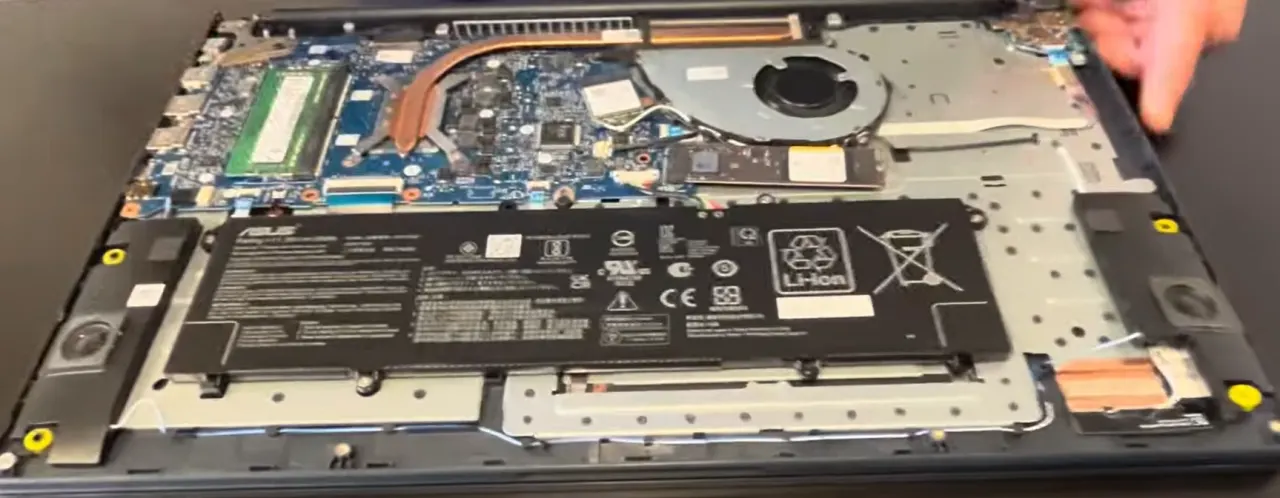
0:22 Bottom Case 1:57 Battery 2:38 RAM Memory 2:50 SSD Storage 3:10 WiFi Card 3:36 Heatsink 4:12 Processor 4:19 Cooling Fan 4:59 Speakers 5:32 Motherboard 5:40 Hinges 6:10 USB Board 7:57 Palmrest Assembly 8:06 Touchpad 9:00 Keyboard 9:15 Display Assembly
Main Upgrade & Repair Options – Asus Vivobook 17 F1704
- RAM: 4/8GB soldered DDR4 + 1× SODIMM slot – add up to 16GB DDR4-3200MHz (total 20–24GB; dual-channel boost!)
- Storage: 1× M.2 2280 PCIe NVMe slot (Gen4/Gen3 compatible) – upgrade/replace with high-capacity SSD
- Access: Remove 11 bottom Phillips screws → pry off cover → RAM, SSD & battery reachable
- Bonus: Clean fan/heatsink during teardown → fixes overheating/noise (great for buyers!)
Quick Teardown & Upgrade Steps
- Power off, unplug, remove 11 Phillips screws from bottom
- Gently pry off bottom cover starting from corners (plastic clips)
- Disconnect battery connector (safety!)
- Upgrade RAM: Insert new DDR4 SODIMM at 45° → press until clips snap
- Upgrade SSD: Unscrew M.2 drive → swap with new NVMe → secure screw
- Optional: Clean dust from fan + check thermal paste
- Reassemble, power on, test – ready to **sell my old laptop**!
Get Cash for Broken Laptop – Upgraded Asus Vivobook 17 F1704
List it with details: "Upgraded RAM/SSD + Cleaned – Big 17.3" Screen Excellent Condition!" Attracts buyers fast locally or online.
Use terms like "**get cash for broken laptop** Asus Vivobook 17 repaired", "**sell my old laptop** F1704 upgraded" or "** trade laptop for new one**" – expect better deals!
Good luck with your DIY upgrades and successful sale! 💻💰
Sell Popular Asus Laptop Models Now: