Jul 11, 2025
On this page
- 1. HP 17 Laptop Pre-Disassembly: Maximize Your Part-Out Profit
- 1. Component Valuation Guide (Q3 2024)
- 2. Essential Documentation
- 3. Required Tools
- 4. Safety Precautions
- 5. Pre-Sale Optimization
- 2. HP 17 Laptop Bottom Cover Removal: Safe Access for Upgrades
- 1. Screw Removal Process
- 2. Cover Release Points
- 3. Preserving Resale Value
- 4. Common HP-Specific Issues
- 5. Model-Specific Notes
- Video Tutorial: Full Teardown & Upgrades
- Step-by-Step Video Timestamps
- 3. HP 17 Laptop RAM Upgrade: Performance Boost & Resale Value
- 1. RAM Specifications
- 2. RAM Replacement Process
- 3. Current Resale Values (Q3 2024)
- 4. Pre-Sale Testing
- 5. Maximizing Resale Value
- 4. HP 17 Laptop SSD Upgrade: Storage Solutions & Resale Profits
- 1. SSD Specifications
- 2. SSD Replacement Process
- 3. Current Resale Values (Q3 2024)
- 4. Pre-Sale Data Sanitization
- 5. Maximizing SSD Value
- 5. HP 17 Laptop Battery Removal: Safe Extraction & Resale Guide
- 1. Battery Specifications
- 2. Safe Removal Process
- 3. Current Resale Values (Q3 2024)
- 4. Battery Health Documentation
- 5. Safe Shipping & Compliance
- 6. Maximizing Resale Value
- 6. HP 17 Laptop LCD Replacement: Display Options & Resale Strategy
- 1. Compatible Display Panels
- 2. Safe Screen Replacement
- 3. Current Resale Values (Q3 2024)
- 4. Selling Your Old Screen
- 5. Common HP-Specific Issues
- 6. HP 17-Specific Notes
- 7. HP 17 Laptop Motherboard Resale: Maximizing Your Return
- 1. Motherboard Specifications
- 2. Current Resale Values (Q3 2024)
- 3. Pre-Sale Preparation
- 4. Target Buyer Markets
- 5. Safe Shipping Practices
- 6. Compatibility Notes
- 8. Selling HP 17 Laptop Parts: Best Marketplaces & Strategies
- 1. Top Platforms for HP Components
- 2. Selling to Institutions
- 3. SEO-Optimized Listing Strategies
- 4. Best Selling Times
- 5. Common Value Killers
- Need to Sell Your HP Laptop? Get Instant Cash!
1. HP 17 Laptop Pre-Disassembly: Maximize Your Part-Out Profit
1. Component Valuation Guide (Q3 2024)
| Part | Condition | Price Range | HP Premium |
|---|---|---|---|
| 8GB DDR4 RAM | Working, tested | $18-$28 | +10% |
| 256GB NVMe SSD | Health >85% | $22-$38 | +15% |
| 41Wh Battery | <300 cycles | $35-$55 | +20% |
2. Essential Documentation
- Performance Records:
- Run HP Hardware Diagnostics
- Capture battery health (F2 at boot)
- Visual Evidence:
- Photograph Product ID and Serial Number
- Record HP part numbers (e.g., L05757-005)
- Show no physical damage
3. Required Tools
- Basic Tools:
- Phillips #1 screwdriver (iFixit kit)
- Plastic spudger (1.0mm)
- Specialty Items:
- ESD-safe workspace
- Anti-static wrist strap
4. Safety Precautions
- Disconnect AC adapter
- Hold power button 10 seconds to discharge
- Remove all peripherals
5. Pre-Sale Optimization
- Data Security:
- Perform HP Secure Erase
- Remove BIOS passwords
- For Refurbishers:
- Check remaining warranty
- Document original configuration
2. HP 17 Laptop Bottom Cover Removal: Safe Access for Upgrades
1. Screw Removal Process
- Locate All Fasteners:
- 12 captive Phillips screws (marked with keyboard icons)
- Use magnetic mat to prevent loss
- Proper Technique:
- Apply firm downward pressure (0.5 Nm torque)
- HP-specific: Screws remain in cover when loosened
2. Cover Release Points
| Area | Release Method | Tool |
|---|---|---|
| Front Edge | Start near touchpad corners | Plastic spudger |
| Rear Edge | Lift upward at 20° angle | iFixit opening picks |
3. Preserving Resale Value
- No-Scratch Technique:
- Plastic tools only (metal voids HP warranty)
- Damaged clips reduce value by 15-25%
- Reassembly Prep:
- Note screw positions (different lengths)
- Check rubber foot alignment
4. Common HP-Specific Issues
| Problem | Solution | Resale Impact |
|---|---|---|
| Stuck clips | Guitar pick method | None if done properly |
| Stripped screw | Rubber band grip trick | 5-10% value loss |
5. Model-Specific Notes
- 17-cn0000 series has stronger clips than 17-cp0000
- No hidden screws under rubber feet
- Ventilation grilles are fragile – handle carefully
Video Tutorial: Full Teardown & Upgrades
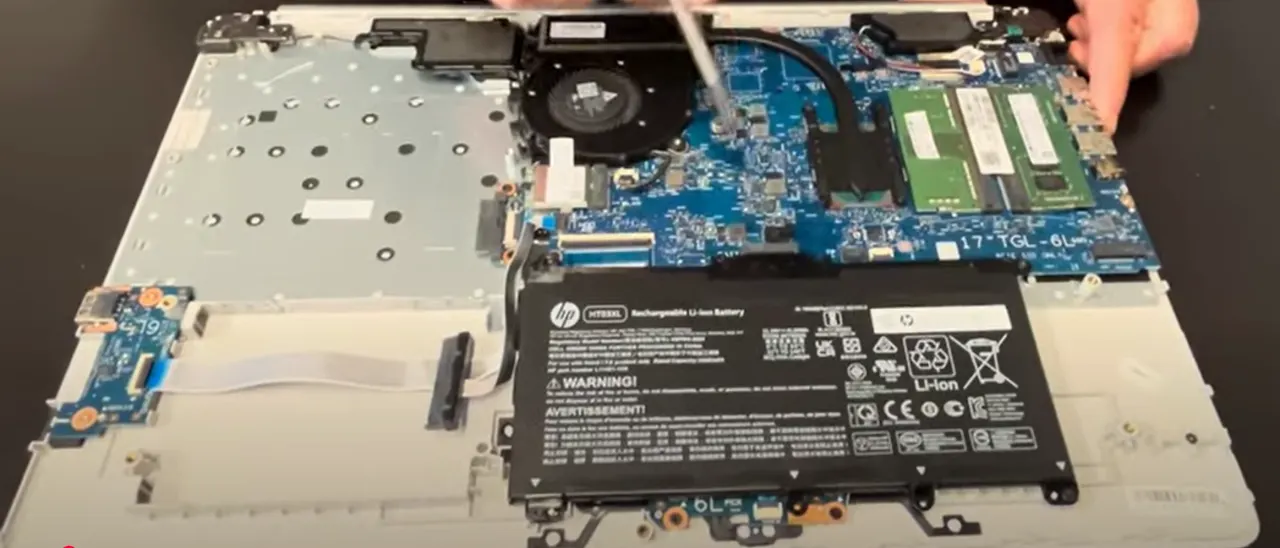
Watch this detailed YouTube guide showing HP 17 Laptop complete teardown – RAM/SSD upgrade, LCD replacement & more!
Step-by-Step Video Timestamps
| Step | Description | Timestamp |
|---|---|---|
| 1 | Bottom case removal | 0:21 |
| 2 | DVD optical drive removal | 0:36 |
| 3 | Battery disconnection | 1:42 |
| 4 | Memory (RAM) replacement | 2:23 |
| 5 | Heatsink removal | 2:48 |
| 6 | Cooling fan removal | 3:18 |
| 7 | WiFi card removal | 3:43 |
| 8 | Unscrew all motherboard screws | 4:10 |
| 9 | Motherboard extraction | 5:43 |
| 10 | IO USB board removal | 6:18 |
| 11 | Speakers removal | 6:42 |
| 12 | Hinges removal | 7:08 |
| 13 | DC power jack removal | 7:38 |
| 14 | Palmrest assembly removal | 7:52 |
| 15 | Keyboard removal | 7:56 |
| 16 | Touchpad removal | 8:02 |
| 17 | Display assembly removal | 8:16 |
For a complete guide on selling your upgraded HP laptop, visit our HP laptop selling page.
3. HP 17 Laptop RAM Upgrade: Performance Boost & Resale Value
1. RAM Specifications
| Slots | Type | Max Capacity | Speed | Part Number |
|---|---|---|---|---|
| 2x SODIMM | DDR4 | 32GB (16GBx2) | 3200MHz | L05757-005 |
2. RAM Replacement Process
- Access Slots:
- Remove bottom cover (see Section 2)
- Locate RAM slots near cooling fan
- Installation:
- Release side clips simultaneously
- Insert at 30° angle (gold contacts first)
- Press down until audible click
3. Current Resale Values (Q3 2024)
| Capacity | Used OEM | New Retail | HP Premium |
|---|---|---|---|
| 4GB DDR4 | $12-$20 | $25-$40 | +5% |
| 8GB DDR4 | $20-$35 | $45-$70 | +10% |
| 16GB DDR4 | $40-$65 | $80-$120 | +15% |
4. Pre-Sale Testing
- Diagnostics:
- Run MemTest86 for 2+ passes
- Verify in Windows Task Manager
- Documentation:
- Photograph HP part numbers
- Include CPU-Z validation
5. Maximizing Resale Value
- For Individual Buyers:
- Clean contacts with isopropyl alcohol
- Include original capacity stickers
- For Refurbishers:
- Keep matched pairs together
- Provide HP service tag compatibility
4. HP 17 Laptop SSD Upgrade: Storage Solutions & Resale Profits
1. SSD Specifications
| Slot Type | Form Factor | Interface | Max Capacity | Part Number |
|---|---|---|---|---|
| Primary | M.2 2280 | PCIe Gen3 x4 NVMe | 2TB | L05757-005 |
2. SSD Replacement Process
- Locate SSD Bay:
- Remove single M2x3 screw (marked with storage icon)
- Note thermal pad orientation (if present)
- Install New SSD:
- Insert at 30° angle (gold contacts first)
- Apply 0.6 Nm torque to retention screw
- Reattach any thermal shielding
3. Current Resale Values (Q3 2024)
| Capacity | Used OEM | New Retail | HP Premium |
|---|---|---|---|
| 256GB NVMe | $25-$40 | $50-$80 | +10% |
| 512GB NVMe | $40-$65 | $85-$130 | +15% |
| 1TB NVMe | $70-$110 | $140-$200 | +20% |
4. Pre-Sale Data Sanitization
- Secure Erase:
- Use HP Secure Erase in BIOS
- Or boot to DBAN for advanced wiping
- Health Verification:
- Check with CrystalDiskInfo
- Document TBW under 60% of rating
5. Maximizing SSD Value
- For Individual Buyers:
- Include original mounting hardware
- Show power-on hours under 8,000
- For Refurbishers:
- Provide certificate of data destruction
- Note HP service tag compatibility
5. HP 17 Laptop Battery Removal: Safe Extraction & Resale Guide
1. Battery Specifications
| Type | Capacity | Voltage | Part Number | Cycle Life |
|---|---|---|---|---|
| Li-ion | 41Wh/55Wh | 11.4V | L05757-005 | 500 cycles |
2. Safe Removal Process
- Power Down:
- Shut down completely
- Hold power button for 15 seconds
- Disconnect Battery:
- Locate 4-pin connector (center-right)
- Use plastic spudger to release latch
- Remove Battery:
- Unscrew 4x Phillips #00 screws
- Lift from bottom edge at 25° angle
3. Current Resale Values (Q3 2024)
| Condition | 41Wh Battery | 55Wh Battery |
|---|---|---|
| New OEM | $50-$75 | $70-$95 |
| <200 cycles | $35-$55 | $50-$75 |
| <400 cycles | $25-$40 | $35-$55 |
4. Battery Health Documentation
- Generate Reports:
- Run
powercfg /batteryreportin Command Prompt - Capture HP Battery Check results
- Run
- Key Metrics:
- Cycle count under 300
- Design capacity above 80%
- No swelling or damage
5. Safe Shipping & Compliance
- Preparation:
- Discharge to 30-50% capacity
- Protect terminals with non-conductive tape
- Regulations:
- Include UN3481 lithium battery labels
- Follow FAA packaging guidelines
6. Maximizing Resale Value
- For Individual Buyers:
- Include original capacity sticker
- Show charge cycles in listing
- For Refurbishers:
- Provide HP service tag compatibility
- Include remaining warranty documentation
6. HP 17 Laptop LCD Replacement: Display Options & Resale Strategy
2. Safe Screen Replacement
- Bezel Removal:
- Use plastic pry tool starting at bottom edge
- Release 8 clips (4 top, 4 bottom)
- Note adhesive strip locations
- Display Disconnection:
- Release 40-pin eDP connector latch
- Remove webcam cable carefully
- New Panel Installation:
- Align with mounting holes (4x M2.5 screws)
- Torque to 0.4 Nm (HP specification)
3. Current Resale Values (Q3 2024)
| Panel Type | Used/Tested | New OEM | HP Premium |
|---|---|---|---|
| HD+ TN | $40-$70 | $90-$140 | +10% |
| FHD IPS | $80-$120 | $150-$220 | +20% |
4. Selling Your Old Screen
- Condition Documentation:
- Photograph with HP Display Test
- Note dead pixels (under 3 is Grade A)
- Show backlight uniformity
- Packaging:
- Use original protective foam
- Double-box with 2" padding
5. Common HP-Specific Issues
| Problem | Solution | Resale Impact |
|---|---|---|
| Minor backlight bleed | Market as "B-Stock" | 15% reduction |
| 1-2 dead pixels | Disclose clearly | 10% reduction |
6. HP 17-Specific Notes
- No touchscreen option available
- Bezel adhesive is reusable 2-3 times
- Webcam cable is fragile – handle with care
7. HP 17 Laptop Motherboard Resale: Maximizing Your Return
1. Motherboard Specifications
| Chipset | CPU Support | Part Number | Warranty Status |
|---|---|---|---|
| Intel H-series/AMD Promontory | 10th/11th Gen Intel or Ryzen 5000 | L05757-005 | Transferable |
2. Current Resale Values (Q3 2024)
| Configuration | Fully Functional | For Parts/Repair |
|---|---|---|
| Intel i5-1035G1 | $150-$220 | $80-$120 |
| Ryzen 5 5500U | $180-$250 | $100-$150 |
| Intel i7-1165G7 | $220-$300 | $130-$180 |
3. Pre-Sale Preparation
- BIOS Reset:
- Clear all passwords
- Disable Computrace
- Restore factory settings
- Documentation:
- Photograph all HP service tags
- Include HP Diagnostics results
- Show CPU stress test (Prime95)
4. Target Buyer Markets
- Repair Shops:
- Seek donor boards for specific components
- Value partial functionality
- Refurbishers:
- Require complete service history
- Pay premium for tested boards
5. Safe Shipping Practices
- Use anti-static bag + 2" foam padding
- Remove CMOS battery
- Include screw inventory list
6. Compatibility Notes
- Only works with HP 17 chassis
- Requires matching generation CPU/RAM
- Not compatible with 17t models
8. Selling HP 17 Laptop Parts: Best Marketplaces & Strategies
1. Top Platforms for HP Components
| Platform | Best For | Fees | HP Premium |
|---|---|---|---|
| Sell Broken HP | Complete part-outs | 10-12% | +15% |
| SellLaptopBack | Quick bulk sales | Flat 15% | +10% |
| GSA Advantage | Government buyers | 5% GSA fee | +25% |
| E&I Cooperative | Educational institutions | 3-7% | +20% |
2. Selling to Institutions
- .gov Requirements:
- SAM.gov registration
- ITAR compliance documentation
- HP service tag verification
- .edu Preferences:
- Complete asset tags
- 5+ unit lots preferred
- Classroom-ready configurations
3. SEO-Optimized Listing Strategies
| Platform | Title Formula | Keywords |
|---|---|---|
| SellLaptopBack | "HP 17 [Part] [PN] – Tested Working" | OEM, Pulled, Grade A |
| .gov | "HP 17 Laptop [NSN] [Part#] – GSA Eligible" | FSC, TAA Compliant |
| .edu | "HP 17 [Part] – EDU Discount Available" | Campus, Lab Ready |
4. Best Selling Times
- Government: August-September (FY end)
- Education: May-July (summer upgrades)
- Consumer: November-December (holiday demand)
5. Common Value Killers
| Mistake | Solution | Value Impact |
|---|---|---|
| Missing service tags | Photograph before disassembly | 40% reduction |
| No test reports | Include HP Diagnostics results | 30% lower offers |
Need to Sell Your HP Laptop? Get Instant Cash!
If your HP 17 (or other HP 17 series model) has performance issues or you're upgrading to a newer device, we offer quick, competitive payouts for your laptop. We buy broken, used, and refurbished HP 17 laptops—including all configurations—with free shipping and no-hassle quotes.
Sell Popular HP Models Now: