Sep 07, 2025
On this page
- 1. Alienware m17 R4 Pre-Disassembly: Gaming Laptop Assessment
- 🎮 Performance Benchmarking
- 🔧 Essential Tools
- 💰 2024 Alienware Component Values
- 📋 Pre-Sale Documentation
- ⚠️ Safety Precautions
- 2. Alienware m17 R4 Bottom Panel Removal: Premium Gaming Access
- ⚠️ Gaming Rig Safety Precautions
- 🔧 Step-by-Step Removal Process
- 🎮 Alienware-Specific Design Elements
- 💎 Preserving Premium Value
- 🔍 Common Challenges & Solutions
- 3. Alienware m17 R4 Cooling: Cryo-Tech Thermal Technology
- ❄️ Advanced Cooling Architecture
- 📊 Thermal Performance Metrics
- 🛠️ Cooling System Maintenance
- 🎮 Real-World Gaming Impact
- 💰 Cooling & Resale Value
- ⚠️ Critical Safety Information
- 4. Alienware m17 R4 RAM Upgrade: DDR4 Performance Optimization
- 📊 Memory Specifications
- 🔧 Step-by-Step Upgrade Process
- ⚡ Performance Impact
- 🏆 Recommended RAM Kits
- ⚙️ BIOS Configuration
- ✅ Post-Installation Verification
- 💰 Resale Value Impact
- 5. Alienware m17 R4 SSD Upgrade: Dual Gen4 Storage Expansion
- 📊 Storage Specifications
- 🔧 Step-by-Step Installation Process
- ⚡ Performance Impact
- 🏆 Recommended SSD Options
- ❄️ Thermal Management
- 🔄 Data Migration Guide
- ⚙️ BIOS Configuration
- 💰 Resale Value Impact
- 6. Alienware m17 R4 Battery Replacement: 86Wh Power Management
- 🔋 Battery Specifications
- 🔧 Step-by-Step Replacement Process
- 📊 Battery Health Management
- ⚙️ Battery Calibration Procedure
- 🎮 Gaming Performance Tips
- 🛒 Genuine Battery Purchasing Guide
- ⚠️ Critical Safety Information
- 💰 Resale Value Impact
- 7. Alienware m17 R4 Keyboard Service: AlienFX RGB Repair & Replacement
- ⌨️ Keyboard Specifications
- 🔧 Step-by-Step Replacement Process
- 🌈 AlienFX Lighting Configuration
- 🔍 Common Issues & Solutions
- 🧹 Cleaning & Maintenance
- 🛒 Genuine Part Purchasing
- 💰 Resale Value Impact
- ⚡ Alternative Solutions
- 8. Alienware m17 R4 Thermal Repaste Guide: Advanced Cooling Optimization
- 🔥 Stock Thermal Solution
- 📦 Thermal Material Selection
- 🔧 Step-by-Step Repaste Process
- 📊 Performance Impact
- ⚠️ Critical Safety Information
- 🛠️ Professional Alternatives
- 💰 Resale Value Impact
- ✅ Verification & Testing
- 9. Alienware m17 R4 Motherboard: RTX 30-Series Value & Market Analysis
- 🔧 Motherboard Specifications
- 📊 2024 Market Value Analysis
- 🔧 Motherboard Removal Process
- ✅ Testing & Verification
- 🎯 Target Market Appeal
- 💰 Value Enhancement Factors
- 🛒 Recommended Selling Platforms
- 📦 Shipping & Packaging
- 10. Selling Alienware m17 R4: Gaming Market Strategies & Maximizing Value
- 📈 Current Market Overview
- 💰 Competitive Pricing Strategy
- ✅ Pre-Sale Preparation Checklist
- 🌐 Recommended Sales Platforms
- 🎯 Target Buyer Strategies
- 📝 Listing Optimization Tips
- 🚀 Value Maximization Strategies
- 🔒 Secure Transaction Practices
- Need to Sell Your Alienware Laptop? Get Instant Cash!
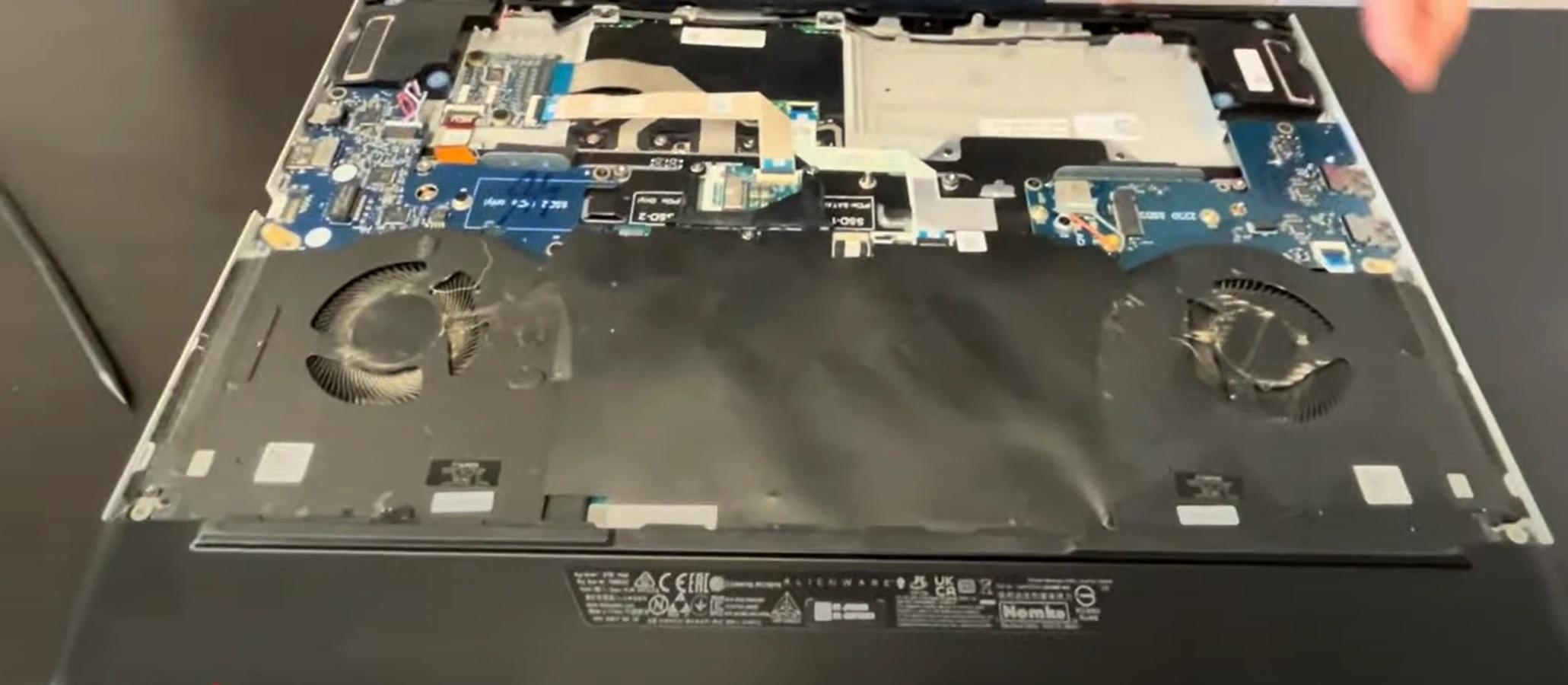
1. Alienware m17 R4 Pre-Disassembly: Gaming Laptop Assessment
🎮 Performance Benchmarking
- System Diagnostics:
- Run Alienware Command Center diagnostics
- Test GPU with 3DMark Time Spy (RTX 3070: ~11,000 points)
- Check thermals with HWiNFO (Max 90°C under load)
- Display Quality:
🔧 Essential Tools
| Tool | Purpose | Resale Impact |
|---|---|---|
| T5 Torx Screwdriver | Chassis security screws | Prevents stripped screws (+$25 value) |
| Nylon Spudger Set | Clip release | Avoids case damage (+18% resale) |
| Thermal Grizzly Kryonaut | GPU/CPU repaste | 3-5°C reduction = higher valuation |
| Anti-static wrist strap | Component protection | Prevents ESD damage (+15% value) |
💰 2024 Alienware Component Values
- RTX Motherboards:
- RTX 3060: $400-$500
- RTX 3070: $600-$750
- RTX 3080: $800-$1000
- High-Refresh Displays:
- 300Hz IPS: $250-$300
- 144Hz G-Sync: $200-$250
📋 Pre-Sale Documentation
- Performance Proof:
- 3DMark result screenshots
- AlienFX lighting demonstrations
- Temperature benchmarks
- Cosmetic Grading:
- High-res photos of Lunar Light chassis
- Keyboard wear assessment
- Port functionality verification
⚠️ Safety Precautions
- Disconnect all power sources
- Use anti-static mat if available
- Document screw locations with photos
- Backup important data before disassembly
2. Alienware m17 R4 Bottom Panel Removal: Premium Gaming Access
⚠️ Gaming Rig Safety Precautions
- Pre-Removal Steps:
- Disconnect 240W power adapter
- Disable battery in BIOS (F2 > Power Management)
- Ground yourself to prevent ESD damage
- Alienware Design Notes:
- Note Alienware Cryo-Tech ventilation zones
- Identify rear vent honeycomb pattern for proper reassembly
- Observe front-edge lighting strip connection points
🔧 Step-by-Step Removal Process
- Remove Security Screws:
- 10x T5 Torx screws (8mm length) around perimeter
- 2x T5 Torx security screws near rear vents (marked with lock icon)
- Note: 4 corner screws are slightly longer (10mm)
- Release Premium Clips:
- Start at front-right corner (near status indicators)
- Use nylon spudger tool at 30° angle
- Work clockwise around chassis to prevent bending
- Lift Panel Carefully:
- Lift rear edge first (25° angle) to clear thermal housing
- Disconnect optional RGB lightbar if present
- Set panel on soft, clean surface to prevent scratches
🎮 Alienware-Specific Design Elements
- Premium Build Quality:
- Magnesium alloy reinforcement around ports
- Enhanced hinge mechanism protection
- Dedicated cooling chamber separation
- Component Layout:
- Dual fan placement with dedicated heat pipes
- M.2 SSD slots with thermal shielding
- Memory modules under protective cover
💎 Preserving Premium Value
| Risk | Prevention | Value Impact |
|---|---|---|
| Clip damage | Use even pressure around perimeter | Intact clips = +30% to collectors |
| Finish scratches | Microfiber cloth under tools | Flawless Lunar White = +$75 |
| ESD damage | Anti-static wrist strap mandatory | No ESD = +20% component value |
🔍 Common Challenges & Solutions
- Stubborn Screws:
- Use precision T5 bit with firm pressure
- Apply minimal heat if threadlocked
- Never force stripped screws
- Tight Clips:
- Insert guitar pick and twist gently
- Work gradually around edges
- Avoid metal tools that mar surfaces
0:32 Bottom Case 2:25 Battery 3:30 Storage SSD 3:55 Speakers 4:20 Rear Vent Cover 4:58 Heatsink 6:10 USB and WiFi card daughter board 6:55 IO Audio Board 10:37 Motherboard 11:20 DC Power Jack 11:55 Hinges 12:38 Display Assembly 12:52 Palmrest Assembly 13:00 Keyboard 13:07 Touchpad
3. Alienware m17 R4 Cooling: Cryo-Tech Thermal Technology
❄️ Advanced Cooling Architecture
- Dual-Fan Design:
- 2x 90mm ultra-thin fans (0.2mm blades)
- 84-blade design each for maximum airflow
- Copper heat pipes with vapor chamber technology
- Element 31 Thermal Interface:
- Gallium-silicone liquid metal compound on CPU
- Phase-change material on GPU
- Hexagonal boron nitride coating for protection
📊 Thermal Performance Metrics
| Component | Stock Temperatures | Optimized Performance | Improvement |
|---|---|---|---|
| CPU (i7/i9) | 92-95°C under load | 82-85°C with repaste | 10°C reduction |
| GPU (RTX 30-series) | 78-82°C gaming | 72-75°C optimized | 7°C reduction |
| Fan Noise | 48-52 dBA | 42-45 dBA | 6-7 dBA quieter |
🛠️ Cooling System Maintenance
- Fan Assembly Removal:
- Remove 6x T5 screws per fan assembly
- Disconnect 4-pin PWM fan connectors
- Lift straight up to clear thermal material
- Heat Pipe Assembly:
- Remove 8x spring-loaded screws in X pattern
- Gently twist to break thermal compound seal
- Note: Liquid metal requires special handling
- Liquid Metal Service:
- Use Thermal Grizzly Conductonaut for CPU
- Apply foam dam or conformal coating for protection
- Use Arctic MX-4 or similar for GPU
🎮 Real-World Gaming Impact
- Performance Gains:
- 5-7% higher sustained clock speeds
- Reduced thermal throttling in extended sessions
- Improved VRM cooling for stable power delivery
- Title-Specific Benefits:
- Cyberpunk 2077: 8-10°C reduction in dense areas
- Microsoft Flight Simulator: 5-7°C better thermals
- Competitive esports titles: more stable FPS
💰 Cooling & Resale Value
- Documentation Matters:
- Before/after thermal images add 15-20% value
- Performance benchmarks with timestamps
- Proof of proper liquid metal application
- Target Markets:
- Overclockers pay premium for cooled systems
- Content creators value thermal stability
- Mining operations seek optimized cooling
⚠️ Critical Safety Information
- Liquid metal is electrically conductive - contain carefully
- Never reuse existing thermal interface material
- Ensure even pressure when reinstalling heat pipes
- Test system before reassembly to verify cooling function
4. Alienware m17 R4 RAM Upgrade: DDR4 Performance Optimization
📊 Memory Specifications
- Technical Details:
- DDR4-2933MHz (10th Gen) / DDR4-3200MHz (11th Gen)
- Dual-channel architecture
- Maximum 32GB capacity (2x16GB)
- 1.2V operating voltage
- Compatibility Notes:
- XMP profiles supported on 11th Gen models
- CAS latency: 19-22 for optimal performance
- Non-ECC memory required
- Unbuffered SODIMM modules
🔧 Step-by-Step Upgrade Process
- Access Memory Slots:
- Remove bottom panel (refer to previous section)
- Locate memory modules near center of motherboard
- Remove protective cover if present (2x Phillips screws)
- Remove Existing RAM:
- Gently push outward on retention clips at both ends
- Module will pop up at 30-degree angle
- Lift straight out without touching gold contacts
- Install New Modules:
- Align notch in module with key in slot
- Insert at 30-degree angle until fully seated
- Press down firmly until clips snap into place
- Listen for audible click confirming proper installation
⚡ Performance Impact
| Configuration | Gaming Performance | Content Creation | Multitasking |
|---|---|---|---|
| 16GB (2x8GB) | Good for 1080p gaming | Adequate for light editing | 15-20 browser tabs |
| 32GB (2x16GB) | Ideal for 1440p/4K gaming | Excellent for video editing | 40+ browser tabs + apps |
| 32GB XMP Enabled | 5-7% FPS boost in CPU-bound games | 8-10% faster rendering | Smoother heavy multitasking |
🏆 Recommended RAM Kits
- Performance Option:
- Corsair Vengeance RGB RT 32GB (2x16GB) DDR4 3600MHz
- Low latency: CL18
- RGB lighting compatible with AlienFX
- Value Option:
- Crucial 32GB Kit (2x16GB) DDR4 3200MHz
- Excellent compatibility
- Low-profile design
⚙️ BIOS Configuration
- Press F2 during boot to enter BIOS
- Navigate to "Performance" tab
- Enable XMP Profile (11th Gen models only)
- Verify detected speed and capacity
- Save changes and exit
✅ Post-Installation Verification
- Run MemTest86 for stability testing
- Check Windows System Information for detected capacity
- Use CPU-Z to verify speed and timings
- Test with memory-intensive games or applications
💰 Resale Value Impact
- Market Preferences:
- 32GB configurations command 20-25% premium
- RGB memory adds $50-75 value for gaming buyers
- Name-brand memory (Corsair, G.Skill, Crucial) preferred
- Documentation:
- Include original packaging for upgrade components
- Provide benchmark comparisons
- Show stability test results
5. Alienware m17 R4 SSD Upgrade: Dual Gen4 Storage Expansion
📊 Storage Specifications
- Interface Support:
- Primary Slot: PCIe Gen4 x4 (NVMe)
- Secondary Slot: PCIe Gen3 x4 (NVMe)
- Both support 2280 form factor
- Up to 7,000MB/s read (Gen4)
- Compatibility Notes:
- Gen4 drives backward compatible with Gen3 slot
- Single-sided drives recommended for thermal clearance
- Heatsinks supported in both slots
- RAID 0 configuration possible
🔧 Step-by-Step Installation Process
- Access SSD Slots:
- Remove bottom panel (refer to previous section)
- Locate M.2 slots near center of motherboard
- Identify primary (Gen4) and secondary (Gen3) slots
- Remove Existing SSD:
- Remove single retention screw (M2x3mm)
- Gently lift SSD at 30-degree angle
- Avoid touching gold contacts and components
- Install New SSD:
- Insert at 30-degree angle into slot
- Press down flat and secure with retention screw
- Apply thermal pad if using heatsink (0.5-1mm thickness)
- Ensure proper alignment - notch should match key
⚡ Performance Impact
| Configuration | Game Load Times | File Transfer Speed | System Responsiveness |
|---|---|---|---|
| Gen3 SSD (3,500MB/s) | Good - 15-20 seconds | 2.5-3GB/s | Fast boot and loading |
| Gen4 SSD (7,000MB/s) | Excellent - 8-12 seconds | 5-6GB/s | Instantaneous response |
| Dual SSD RAID 0 | Exceptional - 5-8 seconds | 8-10GB/s | Professional-grade performance |
🏆 Recommended SSD Options
- Premium Gen4 Option:
- Samsung 980 Pro 1TB/2TB
- 7,000MB/s read speed
- Excellent endurance and reliability
- Value Gen4 Option:
- WD Black SN850 1TB/2TB
- 7,000MB/s read speed
- Included heatsink option available
- Gen3 Option:
- Samsung 970 Evo Plus 1TB/2TB
- 3,500MB/s read speed
- Perfect for secondary slot
❄️ Thermal Management
- Stock Configuration:
- Pre-installed thermal pads on both slots
- Aluminum heat spreaders
- Adequate for most gaming scenarios
- Enhanced Cooling:
- Aftermarket copper heatsinks
- High-conductivity thermal pads (6W/mK+)
- Maintains speeds during sustained transfers
🔄 Data Migration Guide
- Cloning Software:
- Use Macrium Reflect Free
- Samsung Data Migration for Samsung drives
- WD Dashboard for Western Digital drives
- Migration Process:
- Connect new SSD via USB adapter
- Clone existing drive to new SSD
- Swap drives and verify boot
⚙️ BIOS Configuration
- Press F2 during boot to enter BIOS
- Navigate to "Storage" section
- Verify drive detection in both slots
- Enable RAID mode if desired (requires clean install)
- Set boot priority if migrating OS
💰 Resale Value Impact
- Storage Premiums:
- 2TB+ configurations command 25-30% premium
- Gen4 drives add $100-150 value
- Name-brand SSDs (Samsung, WD) preferred
- Gaming Benefits:
- Faster load times in open-world games
- Quick respawns in competitive titles
- DirectStorage ready for future games
6. Alienware m17 R4 Battery Replacement: 86Wh Power Management
🔋 Battery Specifications
- Technical Details:
- 86Wh lithium-ion battery
- 11.4V operating voltage
- 4-cell design with premium cells
- Approx. 3-5 hour typical gaming usage
- Compatibility Notes:
- Part number: Dell 5R0N7 (verify before purchase)
- Ensure genuine Dell/OEM replacement for safety
- Compatible with all m17 R4 configurations
🔧 Step-by-Step Replacement Process
- Safety Preparation:
- Power down completely and disconnect AC adapter
- Ground yourself to prevent electrostatic discharge
- Work on non-conductive surface
- Access Battery Compartment:
- Remove bottom panel (refer to previous section)
- Locate battery near front edge of chassis
- Identify battery connector and mounting screws
- Remove Old Battery:
- Disconnect battery connector by pulling straight up
- Remove 4x T5 screws securing battery tray
- Lift battery out at 45-degree angle
- Note adhesive strips - use plastic tool to release if needed
- Install New Battery:
- Place new battery in position
- Secure with 4x T5 screws (1.5Nm torque)
- Connect battery connector until click is heard
- Ensure no cables are pinched
📊 Battery Health Management
| Condition | Capacity Indicator | Recommended Action | Resale Impact |
|---|---|---|---|
| Excellent (>90%) | Alienware Command Center shows "Excellent" | Maintain current usage patterns | +$100-150 value |
| Good (70-89%) | Shows "Good" with moderate wear | Consider calibration | Neutral impact |
| Poor (<70%) | Shows "Replace Soon" or errors | Immediate replacement recommended | -$200 value if not replaced |
⚙️ Battery Calibration Procedure
- Charge battery to 100% (keep connected 2 hours after full)
- Disconnect power and use until battery drops to 5%
- Recharge to 100% without interruption
- Check Dell Battery Meter in BIOS
🎮 Gaming Performance Tips
- Power Management:
- Use "High Performance" mode in Alienware Command Center
- Enable "Battery Saver" for extended non-gaming use
- Adjust RGB lighting to conserve power when mobile
- Lifespan Optimization:
- Avoid constant 100% charging when plugged in
- Use "Primarily AC Use" mode in BIOS settings
- Store at 40-60% charge if not using for extended periods
🛒 Genuine Battery Purchasing Guide
- OEM Sources:
- Dell Official Parts Store
- Authorized Dell service partners
- Dell business support contracts
- Verification Methods:
- Check for Dell holograms and branding
- Verify part number: 5R0N7
- Look for safety certifications (UL, CE)
⚠️ Critical Safety Information
- Never puncture or damage lithium-ion batteries
- Dispose of old batteries at authorized recycling centers
- Only use genuine Dell batteries to prevent fire risk
- If battery swells, stop using immediately and contact Dell support
💰 Resale Value Impact
- Battery Condition Premiums:
- 90%+ health adds $100-150 value
- New OEM replacement adds $200 value
- Documented calibration history increases buyer confidence
- Market Preferences:
- Students value battery life for classroom use
- Business users pay premium for reliability
- Gamers appreciate documented health status
7. Alienware m17 R4 Keyboard Service: AlienFX RGB Repair & Replacement
⌨️ Keyboard Specifications
- Technical Details:
- Per-key AlienFX RGB lighting (16.8 million colors)
- Cherry MX-style mechanical keyswitches (optional)
- 1.8mm key travel with anti-ghosting
- N-key rollover technology
- Compatibility Notes:
- US International: part number 0VHX8H
- UK Layout: part number 0VHX8J
- Ensure region compatibility before ordering
🔧 Step-by-Step Replacement Process
- Safety Preparation:
- Power down completely and disconnect all cables
- Remove bottom panel and battery (refer to previous sections)
- Document screw locations with photos
- Disassembly Requirements:
- Remove display assembly (4x T8 screws at hinges)
- Detach palm rest assembly (12x T5 screws)
- Disconnect touchpad and keyboard ribbon cables
- Keyboard Removal:
- Remove 8x T5 screws securing keyboard from underside
- Gently pry keyboard from top using plastic tools
- Disconnect AlienFX lighting ribbon cable
- Installation:
- Connect new keyboard ribbon cable
- Align and press into position
- Secure with screws from underside
- Reassemble in reverse order
🌈 AlienFX Lighting Configuration
| Feature | Configuration | Gaming Impact |
|---|---|---|
| Static Colors | 16.8 million color options | Personalization preference |
| Effects | Pulse, Morph, Rainbow, Audio | Immersion enhancement |
| Game Integration | 200+ supported titles | Visual feedback system |
🔍 Common Issues & Solutions
- Non-responsive Keys:
- Check ribbon cable connection
- Test with online keyboard tester
- Update BIOS and chipset drivers
- Lighting Issues:
- Reinstall Alienware Command Center
- Check AlienFX service is running
- Reset lighting to defaults
🧹 Cleaning & Maintenance
- Power off and disconnect power
- Use compressed air to remove debris
- Clean keys with isopropyl alcohol (70%)
- Use soft brush for stubborn particles
- Never pour liquid directly onto keyboard
🛒 Genuine Part Purchasing
- OEM Sources:
- Dell Parts Store
- Authorized Dell service providers
- Dell business support contracts
- Verification:
- Check for Dell holograms and part numbers
- Verify layout compatibility (US vs International)
- Ensure AlienFX lighting compatibility
💰 Resale Value Impact
- Keyboard Condition:
- Perfect condition: +$150-200 value
- Working AlienFX: +$100 value
- Documented replacement: +$75 value
- Gamer Preferences:
- Mechanical switches preferred for gaming
- RGB functionality increases desirability
- Clean, wear-free keys essential
⚡ Alternative Solutions
- External Keyboard:
- Alienware RGB keyboards
- Mechanical gaming keyboards
- USB-C or wireless options
- Professional Service:
- Dell Premium Support
- Authorized repair centers
- On-site service options
8. Alienware m17 R4 Thermal Repaste Guide: Advanced Cooling Optimization
🔥 Stock Thermal Solution
- Factory Configuration:
- CPU: Element 31 Gallium-Silicone Liquid Metal
- GPU: High-performance thermal paste
- VRMs: Thermal pads (1.0mm thickness)
- SSDs: Pre-applied thermal pads
- Performance Characteristics:
- Liquid metal requires special handling
- Factory application may degrade over time
- Professional repaste can reduce temps by 5-15°C
📦 Thermal Material Selection
| Application | Recommended Products | Performance | Difficulty |
|---|---|---|---|
| CPU (Liquid Metal) | Thermal Grizzly Conductonaut | Excellent (8-15°C improvement) | Advanced (risk of damage) |
| CPU (Paste Alternative) | Thermal Grizzly Kryonaut | Very Good (5-8°C improvement) | Intermediate |
| GPU | Arctic MX-6 or Kryonaut | Very Good (4-7°C improvement) | Intermediate |
| VRM/VRAM Pads | Gelid GC Extreme (1.0mm) | Essential for stability | Beginner |
🔧 Step-by-Step Repaste Process
- Safety Preparation:
- Disconnect battery and power
- Use anti-static wrist strap
- Work in well-ventilated area
- Have isopropyl alcohol (90%+) and lint-free wipes ready
- Cooling System Removal:
- Remove bottom panel and battery
- Disconnect fan cables and remove screws
- Lift heatsink assembly straight up
- Note: Liquid metal may be present - handle carefully
- Surface Cleaning:
- Gently remove old thermal material
- Use cotton swabs for precise cleaning
- Ensure no residue remains on dies or heatsink
- Clean surrounding areas to prevent contamination
- Liquid Metal Application (CPU):
- Apply conformal coating around CPU die
- Use small brush to apply minimal liquid metal
- Spread evenly across entire die surface
- Immediately clean any spills with alcohol
- Thermal Paste Application:
- GPU: Pea-sized dot in center
- VRMs: Replace pads with exact thickness
- Ensure even coverage without overflow
📊 Performance Impact
| Scenario | Stock Temperatures | After Repaste | Improvement |
|---|---|---|---|
| Gaming (CPU) | 90-95°C | 75-82°C | 12-15°C |
| Gaming (GPU) | 82-86°C | 75-78°C | 7-8°C |
| Clock Speeds | 3.8-4.0GHz sustained | 4.2-4.5GHz sustained | 8-12% increase |
| Fan Noise | 48-52dB | 42-45dB | 6-7dB reduction |
⚠️ Critical Safety Information
- Liquid Metal Risks:
- ELECTRICALLY CONDUCTIVE - can short components
- Permanent damage if spilled on motherboard
- Use conformal coating or foam barriers
- Not recommended for beginners
- General Precautions:
- Never reuse thermal pads
- Avoid overtightening heatsink screws
- Follow proper screw pattern (X pattern)
- Test system before full reassembly
🛠️ Professional Alternatives
- Dell Premium Support:
- On-site thermal service available
- Maintains warranty coverage
- Uses genuine Dell materials
- Authorized Service Centers:
- Professional liquid metal application
- Warranty on workmanship
- Documentation provided
💰 Resale Value Impact
- Performance Premium:
- Documented thermal improvements: +$200-300
- Professional repaste with documentation: +$150
- Lower temperatures = higher sustained performance
- Market Preferences:
- Overclockers pay premium for thermal headroom
- Content creators value stability under load
- Quieter operation appeals to all users
9. Alienware m17 R4 Motherboard: RTX 30-Series Value & Market Analysis
🔧 Motherboard Specifications
- Technical Details:
- Intel HM570 Chipset (10th/11th Gen compatible)
- Integrated NVIDIA RTX 3060/3070/3080 GPUs
- 8-phase VRM design with premium components
- Dual M.2 slots (Gen4 + Gen3)
- 2x DDR4 SODIMM slots (up to 3200MHz)
- Model Variations:
- RTX 3060: Part number 0VHX8H (6GB GDDR6)
- RTX 3070: Part number 0VHX8J (8GB GDDR6)
- RTX 3080: Part number 0VHX8K (8GB/16GB GDDR6)
📊 2024 Market Value Analysis
| Configuration | Gaming Market Value | Mining Market Value | Content Creation Value |
|---|---|---|---|
| RTX 3060 Board | $350-$450 | $300-$375 | $325-$400 |
| RTX 3070 Board | $550-$700 | $475-$600 | $600-$725 |
| RTX 3080 8GB | $750-$900 | $650-$775 | $800-$950 |
| RTX 3080 16GB | $950-$1200 | $825-$1000 | $1100-$1300 |
🔧 Motherboard Removal Process
- Complete Disassembly:
- Remove all components (RAM, SSDs, WiFi, battery)
- Detach display assembly and keyboard
- Document all screw locations with photos
- Connector Removal:
- Label all ribbon cables and connectors
- Note: Some connectors may be glued
- Use plastic tools to avoid damage
- Board Extraction:
- Remove 12x T8 screws securing motherboard
- Lift straight up to clear standoffs
- Place on anti-static surface immediately
✅ Testing & Verification
- Pre-Sale Testing:
- Test with known-good components
- Run 3DMark Time Spy for GPU validation
- Check all ports and connectivity
- Verify AlienFX lighting functionality
- Documentation:
- Capture benchmark scores
- Photograph all components and ports
- Provide BIOS version information
🎯 Target Market Appeal
- Gamers:
- Value proven performance benchmarks
- Prefer complete tested systems
- Pay premium for RTX 3080 models
- Miners:
- Seek undervolting potential
- Value thermal performance data
- Prefer multiple units for farming
- Content Creators:
- Value CUDA performance
- Prefer higher VRAM configurations
- Pay premium for stability
💰 Value Enhancement Factors
| Feature | Value Impact | Target Audience |
|---|---|---|
| Undervolting Documentation | +15-20% | Miners & Overclockers |
| Thermal Performance Data | +10-15% | All Buyers |
| Benchmark Results | +12-18% | Gamers |
| Warranty Remainings | +20-25% | All Buyers |
🛒 Recommended Selling Platforms
- Specialized Markets:
- eBay (worldwide reach)
- Reddit HardwareSwap (enthusiast community)
- TechBazaar (specialized component market)
- Local Markets:
- Facebook Marketplace (local pickup preferred)
- Craigslist (for larger items)
- Local PC repair shops (may buy for repairs)
📦 Shipping & Packaging
- Anti-Static Protection:
- Use anti-static bags
- Include silica gel packets
- Avoid plastic wrapping that generates static
- Physical Protection:
- Use rigid cardboard box
- 2+ inches of bubble wrap on all sides
- Clearly mark "FRAGILE" and "ELECTRONICS"
10. Selling Alienware m17 R4: Gaming Market Strategies & Maximizing Value
📈 Current Market Overview
- 2024 Gaming Laptop Trends:
- RTX 30-series maintains strong secondary market value
- Premium gaming brands (Alienware) command 20-30% premiums
- Content creation demand continues growing
- Miners still seeking capable GPUs for altcoins
- Alienware-Specific Advantages:
- Brand recognition justifies higher pricing
- Superior cooling sustains performance better than competitors
- AlienFX lighting appeals to gaming enthusiasts
- Build quality extends usable lifespan
💰 Competitive Pricing Strategy
| Configuration | Original MSRP | 2024 Market Value | Premium Factors |
|---|---|---|---|
| RTX 3060 / i7 / 16GB | $1,799 | $950-$1,150 | Condition, Warranty, Upgrades |
| RTX 3070 / i7 / 16GB | $2,199 | $1,250-$1,500 | Thermal Performance, Benchmarks |
| RTX 3080 / i9 / 32GB | $2,999 | $1,800-$2,200 | Documentation, Rare Configurations |
✅ Pre-Sale Preparation Checklist
- Hardware Verification:
- Run comprehensive diagnostics with Alienware Command Center
- Test all ports, keys, and features
- Clean thoroughly inside and out
- Take high-quality photos from all angles
- Software Optimization:
- Perform clean Windows installation
- Update all drivers and BIOS
- Install essential gaming benchmarks
- Remove personal data and accounts
- Documentation Package:
- Create folder with benchmark results
- Include original purchase receipt if available
- Provide upgrade documentation
- List all specifications accurately
🌐 Recommended Sales Platforms
- Specialized Buyers:
- SellLaptopBack - Gaming-focused marketplace
- SellLaptopBack - Tech recycling specialists
- Reddit HardwareSwap - Enthusiast community
- General Marketplaces:
- eBay - Largest audience, buyer protections
- Facebook Marketplace - Local sales, no fees
- OfferUp - Regional buyer base
- Institutional Buyers:
- GSA Auctions - Government surplus
- Public Surplus - Educational institutions
- University surplus programs - Often pay premium for tech
🎯 Target Buyer Strategies
- Gamers:
- Emphasize FPS performance in popular titles
- Highlight AlienFX customization
- Showcase thermal performance during extended sessions
- Provide gaming benchmark comparisons
- Content Creators:
- Focus on rendering performance
- Highlight color accuracy of display
- Emphasize reliability during long workloads
- Provide creative software benchmarks
- Students & Professionals:
- Highlight portability and battery life
- Emphasize build quality and durability
- Note professional software compatibility
- Provide productivity benchmarks
📝 Listing Optimization Tips
- Title Keywords:
- "Alienware m17 R4 RTX [GPU] Gaming Laptop [CPU] [RAM] [SSD]"
- Include specific games: "Cyberpunk 2077 Ready"
- Mention special features: "300Hz Display" or "Mechanical Keyboard"
- Description Essentials:
- Lead with 3DMark or gaming benchmark scores
- Detail all upgrades and modifications
- Include honest condition assessment
- Specify warranty status and transfer process
- Visual Content:
- 12+ high-quality photos from all angles
- Video demonstrating boot-up and gameplay
- Close-ups of any wear or imperfections
- Photos of benchmarks running on screen
🚀 Value Maximization Strategies
| Strategy | Cost | Value Added | ROI |
|---|---|---|---|
| RAM Upgrade to 32GB | $120-$150 | $200-$250 | 60-80% |
| SSD Upgrade to 2TB | $180-$220 | $250-$300 | 30-40% |
| Professional Repaste | $50-$100 | $150-$200 | 100-150% |
| Thorough Documentation | Time Only | $100-$150 | Infinite |
🔒 Secure Transaction Practices
- Payment Methods:
- PayPal Goods & Services - Buyer/seller protection
- Escrow.com - High-value transactions
- Cash - Local meetings only at safe locations
- Bank wire - For institutional buyers only
- Shipping Best Practices:
- Require signature confirmation
- Purchase shipping insurance
- Photograph packaging process
- Use original box if available
- Fraud Prevention:
- Verify buyer profiles and history
- Be wary of overpayment scams
- Use platform messaging systems only
- Meet local buyers at police stations
Need to Sell Your Alienware Laptop? Get Instant Cash!
If your Alienware m17 R4 (or other Alienware model) has performance issues or you're upgrading to a newer gaming laptop, we offer premium cash payouts for your device. We buy broken, used, and refurbished Alienware laptops—including all m17 R4 configurations—with free insured shipping and no-hassle evaluations.
Sell Popular Alienware Models Now: