

On this page
- Selling an Old Apple Laptop: What Is Your MacBook Still Worth?
- On This Page
- Is an Old MacBook Still Worth Money?
- Intel MacBook vs. Apple Silicon
- Intel MacBooks
- Apple-Silicon MacBooks
- What Determines MacBook Resale Value?
- Exact Model and Generation
- Processor or Apple Chip
- Memory
- SSD Capacity
- Display
- Battery
- Physical Condition
- How to Identify Your Exact MacBook
- Battery Health and Cycle Count Matter
- Screen, Keyboard and Enclosure Damage
- Display Problems
- Keyboard Problems
- Enclosure Damage
- Can You Sell a Broken MacBook?
- How to Prepare Your Mac Before Selling It
- 1. Back Up Anything You Need
- 2. Follow Apple's Current Instructions
- 3. Use Erase All Content and Settings When Supported
- 4. Older Macs May Require macOS Recovery
- 5. Remove Accessories You Do Not Intend to Include
- Find My and Activation Lock
- Where Should You Sell an Older MacBook?
- Sell to a Friend or Relative
- Sell Locally
- Sell Through an Online Marketplace
- Apple Trade In
- Direct MacBook Buyback
- Why MacBook Values Change
- Should You Repair an Old MacBook Before Selling It?
- A Battery Replacement May Make Sense
- A Display Repair Requires More Careful Math
- Logic-Board Repairs Can Change the Economics Completely
- What If the MacBook Is Too Old to Sell?
- A Simple Checklist Before You Decide
- Frequently Asked Questions About Older MacBooks
- How much is my old MacBook worth?
- Is an Intel MacBook still worth selling?
- Is an Apple-silicon MacBook worth more than an Intel MacBook?
- Can I sell a MacBook with a bad battery?
- Can I sell a MacBook with a cracked screen?
- Can I sell a MacBook that does not turn on?
- Do I need to erase the Mac before selling it?
- Do I need to turn off Find My?
- What if I already shipped or sold the Mac and forgot about Find My?
- Do I need the original charger?
- Is Apple Trade In the same as selling my MacBook for cash?
- Should I replace a cracked MacBook screen before selling it?
- Where can I compare other ways to sell my laptop?
- Check the MacBook Before You Write It Off
Published: February 28, 2018 | Updated: October 16, 2026 | By: SellLaptopBack.com | Read time: 16 min read

Selling an Old Apple Laptop: What Is Your MacBook Still Worth?
An older MacBook can still have meaningful resale value, but the Apple logo by itself does not tell you what the computer is worth. The exact generation, processor or Apple chip, memory, storage, battery, display, enclosure and activation status can all change the value.
An Intel MacBook Pro from several years ago belongs to a very different market from an M1, M2, M3, M4 or newer Apple-silicon machine. Even two MacBooks from the same year can have very different values if one has more memory, a larger SSD, a larger display or a higher-tier chip.
If you already know the model, you can find your MacBook and check its current offer. If you are still deciding whether to keep it, repair it, trade it in or sell it, this guide explains the details that actually matter.
On This Page
- Is an Old MacBook Still Worth Money?
- Intel MacBook vs. Apple Silicon
- What Determines MacBook Resale Value?
- How to Identify Your Exact MacBook
- Battery Health and Cycle Count
- Screen, Keyboard and Enclosure Damage
- Can You Sell a Broken MacBook?
- How to Prepare Your Mac Before Selling It
- Find My and Activation Lock
- Where Should You Sell an Older MacBook?
- Why MacBook Values Change
- Should You Repair It Before Selling?
- What If the MacBook Is Too Old to Sell?
- Frequently Asked Questions
Is an Old MacBook Still Worth Money?
Often, yes.
MacBooks can remain useful long after Apple replaces them with a newer generation. Some owners want an affordable Mac for everyday work, school, web browsing or travel. Repair technicians may need parts from a specific generation, while other buyers may be looking for a configuration that Apple no longer sells.
That does not mean every old Apple laptop is valuable. Age is only one part of the calculation.
Important factors include:
- MacBook Air or MacBook Pro
- exact model and year
- Intel or Apple silicon
- processor or M-series chip
- RAM or unified memory
- SSD capacity
- screen size
- battery health
- display condition
- keyboard and trackpad condition
- enclosure damage
- included charger
- Find My and Activation Lock status
That is why an old MacBook should be identified by its actual configuration rather than simply being described as a “five-year-old Mac.”
Our MacBook depreciation guide provides more context about how Apple notebook values change over time, while the MacBook catalog lets you identify a specific machine and check its current offer.
Intel MacBook vs. Apple Silicon
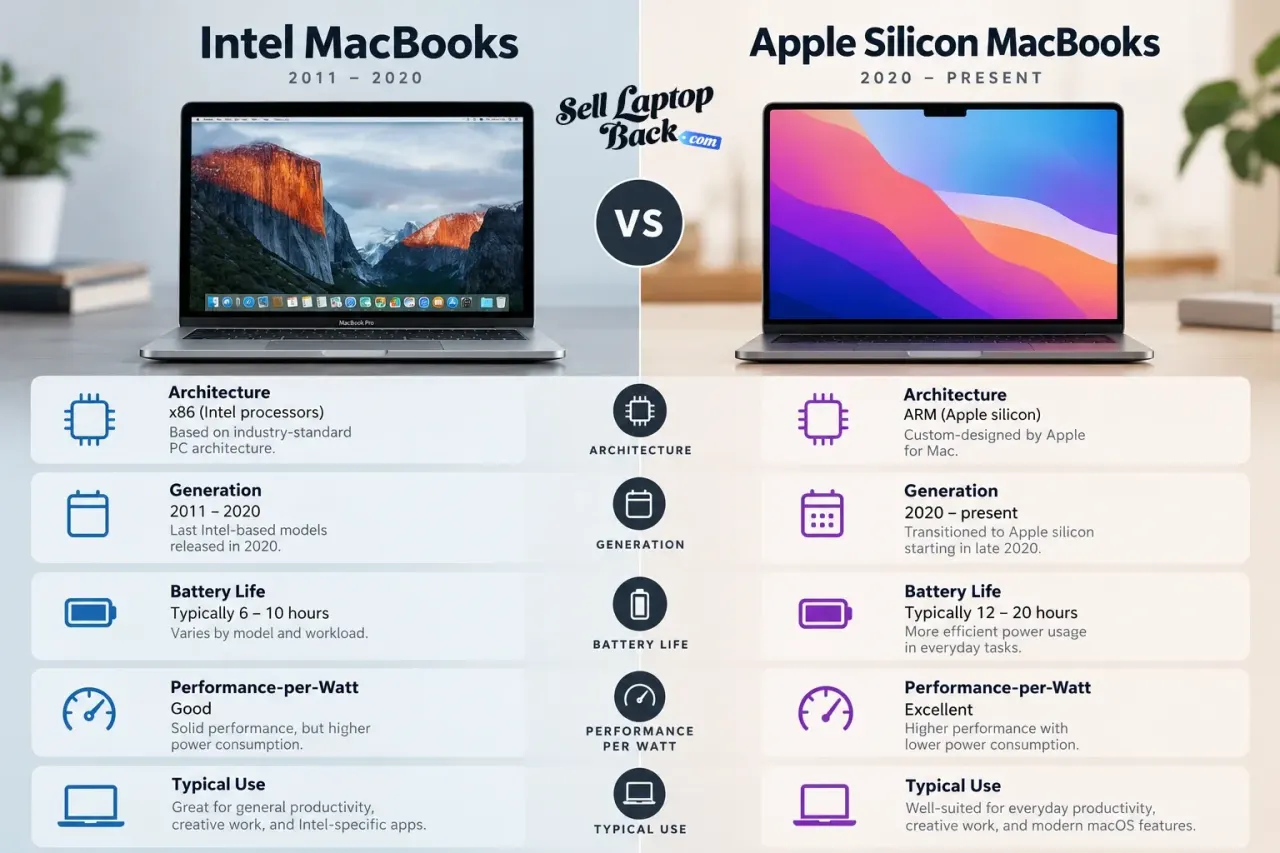
One of the biggest dividing lines in the modern Mac market is Apple's transition from Intel processors to Apple silicon.
For many years, MacBook Air and MacBook Pro systems used Intel Core processors. Apple later moved the Mac line to its own M-series chips, beginning with M1 and continuing through newer generations.
This matters because processor architecture affects much more than benchmark scores. It influences power efficiency, battery life, software compatibility, thermal behavior and how buyers evaluate the remaining useful life of a machine.
Intel MacBooks
Intel-based Macs can still have resale value, particularly better-equipped MacBook Pro models, but the exact generation matters.
Some buyers may still want an Intel Mac for:
- general everyday use
- older Intel-specific software
- specific ports or hardware
- repair projects
- replacement parts
- a lower-cost entry into macOS
However, two Intel MacBooks that look almost identical can use different processors, graphics hardware, displays, keyboards and internal components.
Apple-Silicon MacBooks
Apple silicon introduced a different approach built around Apple's M-series system-on-chip architecture.
Within the Apple-silicon family, configuration still matters greatly.
Important differences can include:
- M1, M2, M3, M4 or newer generation
- base, Pro, Max or other chip tier
- CPU and GPU configuration
- unified memory
- SSD capacity
- screen size
That is why simply saying “I have a MacBook Pro” is not enough information to determine what the machine is worth.
What Determines MacBook Resale Value?
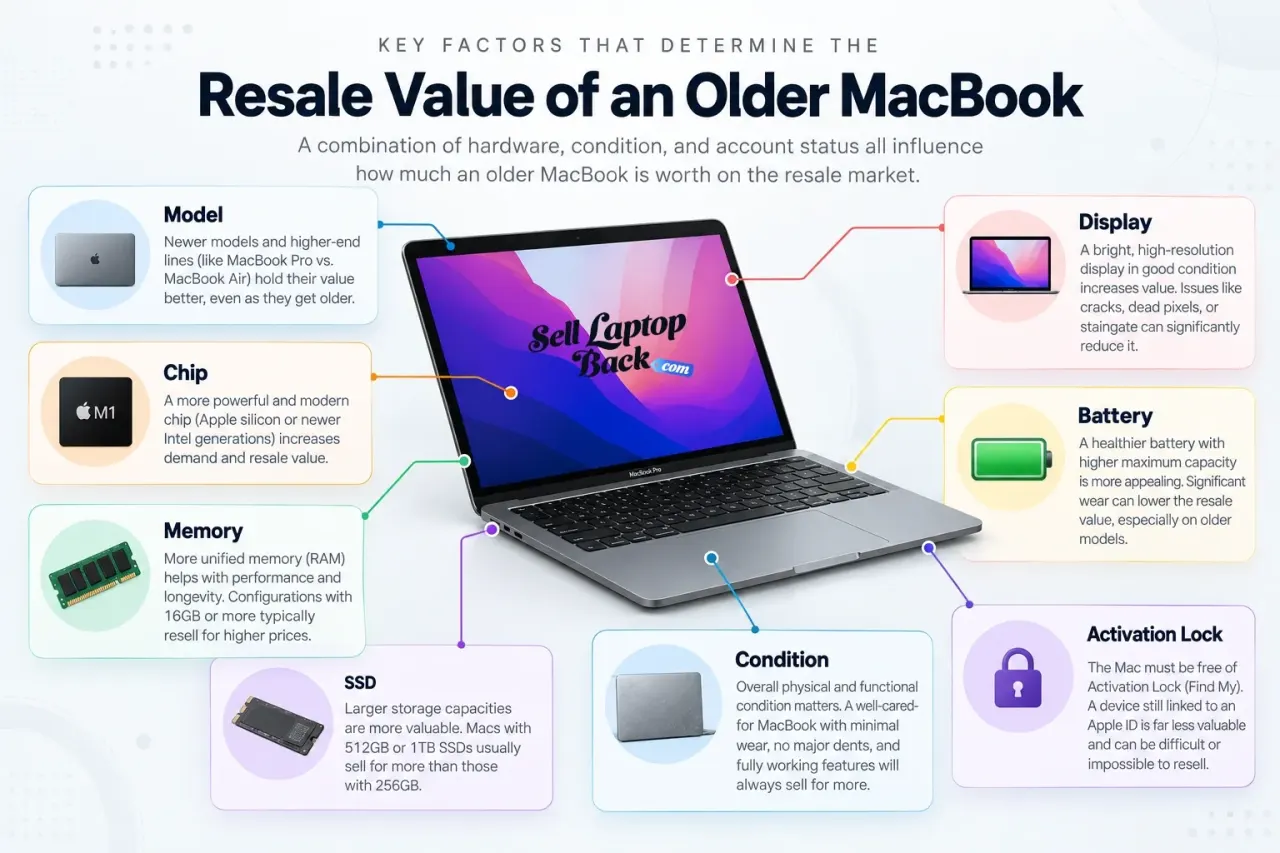
MacBook value is usually the result of several hardware and condition factors working together.
Exact Model and Generation
MacBook Air and MacBook Pro families include many generations that can look similar while containing completely different hardware.
The exact generation can determine:
- processor architecture
- maximum memory
- graphics hardware
- display technology
- available ports
- battery design
- keyboard design
- repair cost
Processor or Apple Chip
With Intel Macs, processor generation and Core i5, Core i7 or Core i9 configuration can matter significantly.
With Apple silicon, both the M-series generation and chip tier can affect value.
A base configuration intended for everyday work belongs to a different category from a higher-end Pro or Max configuration designed for demanding creative or professional workloads.
Memory
Memory is particularly important with modern Apple-silicon Macs because unified memory is integrated into the system architecture and cannot simply be upgraded later by installing another RAM module.
That means the factory configuration matters in the used market.
A buyer who needs more memory for development, large creative projects, virtual machines or professional applications may specifically search for a higher-memory configuration.
SSD Capacity
Internal storage is another factory specification worth identifying accurately.
Common MacBook configurations can include:
- 256GB
- 512GB
- 1TB
- 2TB
- larger professional configurations
A higher-capacity SSD can make the machine more useful to a buyer who works with photographs, video, development tools, large applications or local media libraries.
Display
Screen condition can have a major effect on resale economics because MacBook display assemblies can be expensive to replace.
Look for:
- cracks
- vertical or horizontal lines
- dead pixels
- backlight problems
- pressure marks
- discoloration
- damaged coating on applicable models
A computer that otherwise works perfectly can lose substantial value if the display requires replacement.
Battery
Battery wear is normal as any portable computer ages.
Reduced runtime is different from a battery that no longer charges correctly, causes unexpected shutdowns or is physically swollen.
A weak battery can reduce the value of a MacBook, but it does not automatically make the processor, display, SSD, enclosure and other components worthless.
Physical Condition
Cosmetic wear is common on older notebooks. Light scratches and normal signs of use are very different from structural damage.
More significant issues include:
- bent corners
- damaged hinges
- cracked bottom cover
- liquid damage
- missing keys
- damaged USB-C or MagSafe ports
- non-working trackpad
How to Identify Your Exact MacBook
Before comparing prices or requesting a quote, identify the Mac correctly.
On a working machine, open the Apple menu and choose About This Mac. Depending on your version of macOS, this screen can show the model, chip or processor, memory and serial number.
The serial number may also be available:
- on the bottom enclosure
- on the original packaging
- inside your Apple Account device list
SellLaptopBack's MacBook model lookup includes serial-number search and a large catalog of individual configurations.
This is far more accurate than guessing based on screen size or the year you remember buying it.
Battery Health and Cycle Count Matter
The battery is one of the first components people consider when evaluating an older portable computer.
Useful battery information can include:
- cycle count
- maximum capacity
- whether macOS reports that service is recommended
- whether the Mac charges normally
- whether it unexpectedly shuts down
- whether the battery is swollen
Apple provides official documentation for checking Mac notebook battery cycle count.
Different Mac models have different battery-cycle expectations, so use Apple's model-specific information rather than treating one number as universal.
A battery replacement may make economic sense on a higher-value MacBook. On a much older system, the repair cost may represent too much of the finished computer's value.
Screen, Keyboard and Enclosure Damage
Physical condition has a large effect on repair cost and therefore on resale value.
Display Problems
A cracked or failing Retina display can be one of the most expensive repairs on some MacBook generations.
Do not hide display defects when describing the machine. Lines, cracks, backlight failures or pressure damage should be disclosed clearly.
Keyboard Problems
Sticky keys, missing keycaps, dead keys and liquid-related keyboard problems should also be reported.
The complexity of keyboard replacement differs across generations because the keyboard may be part of a larger top-case assembly.
Enclosure Damage
A light scratch is mostly cosmetic. A bent chassis, damaged hinge or warped display lid is a structural issue.
Look carefully at:
- corners
- bottom enclosure
- display lid
- hinges
- USB-C or MagSafe ports
- keyboard
- trackpad
Can You Sell a Broken MacBook?
Yes. An Apple laptop does not necessarily become worthless when one component fails.
Broken MacBooks can still have repair or parts value, including computers with:
- cracked displays
- bad batteries
- liquid damage
- keyboard problems
- charging issues
- logic-board failure
- no power
The value depends on the exact model and the defect rather than on one generic “broken laptop” price.
A failed battery on a newer Apple-silicon MacBook is a very different repair problem from a failed logic board on a much older Intel model.
If your machine has significant damage, see the broken MacBook selling options rather than assuming you need to repair it first.
You can also read our broader guide about what gives a damaged laptop resale or parts value.
How to Prepare Your Mac Before Selling It
Preparing a MacBook is about much more than wiping fingerprints from the aluminum enclosure.
Cleaning helps presentation, but protecting your information and removing the machine from your Apple Account are far more important.

1. Back Up Anything You Need
Before erasing the Mac, make sure you have copies of documents, photographs, development projects, passwords or anything else you intend to keep.
You can use Time Machine, iCloud or another appropriate backup method.
2. Follow Apple's Current Instructions
Apple maintains official instructions covering what to do before selling, giving away, trading in or recycling a Mac.
Use Apple's current documentation rather than an old tutorial because the process differs between modern Apple-silicon Macs, T2-equipped Intel Macs and older Intel hardware.
3. Use Erase All Content and Settings When Supported
On supported Macs running compatible versions of macOS, Apple provides Erase All Content and Settings.
This modern process is considerably simpler than the old method of manually deauthorizing applications, booting from disks and formatting drives.
4. Older Macs May Require macOS Recovery
If Erase All Content and Settings is not available, Apple's current instructions may require signing out of services, starting in macOS Recovery, erasing the startup disk and reinstalling macOS.
That is one reason the old “boot disk” instructions from years ago should no longer be used as universal guidance.
5. Remove Accessories You Do Not Intend to Include
Check for:
- SD cards on applicable models
- USB receivers
- external storage
- adapters
- other personal accessories
If the correct Apple charger is part of the transaction, pack it separately from the display so the power adapter cannot strike the screen during shipping.
Our packing and shipping guide explains how to protect a laptop during transit.
Find My and Activation Lock
This is one of the most important Apple-specific parts of transferring a Mac.
A computer that remains tied to the previous owner's Apple Account can create problems for the next owner.
Apple explains how Activation Lock works on Mac and how it relates to Find My.
Before the machine changes owners, follow Apple's instructions to make sure it is no longer protected by your Activation Lock.
Do not assume that simply deleting personal files accomplishes this.
Where Should You Sell an Older MacBook?
There are several legitimate choices. The best one depends on whether you value marketplace exposure, simplicity, local payment, store credit or a direct cash sale.
Sell to a Friend or Relative
A friend, relative or coworker may be interested in an older Mac, especially if the machine still performs well for everyday tasks.
Be specific about battery condition, cosmetic wear and known problems. It is better to explain a defect before the transaction than after it.
Sell Locally
A local marketplace can eliminate shipping and may allow immediate payment.
The tradeoff is that you have to create a listing, answer messages and arrange an in-person transaction with the buyer.
If you sell directly to strangers, the Federal Trade Commission's guidance for people selling items online is worth reviewing before accepting unusual payment requests.
Sell Through an Online Marketplace
A marketplace such as eBay can expose a specific MacBook configuration to buyers across a much larger area.
The seller usually has to manage:
- photographs
- listing creation
- pricing
- buyer communication
- marketplace fees
- packing
- shipping
- possible returns
If you are considering this route, see our guide to selling laptops on eBay.
Apple Trade In
Apple operates its own Apple Trade In program.
It can be convenient when you are already purchasing another Apple product, but compare the actual trade-in value and form of compensation with your other options.
Apple also provides recycling options for hardware that no longer qualifies for trade-in value.
Direct MacBook Buyback
A direct buyback removes the individual-buyer stage.
With SellLaptopBack, you identify the model, choose the appropriate condition and receive a quote before completing the transaction.
If you continue, the MacBook is shipped using the provided prepaid label and inspected against the information submitted with the quote.
You can review the current process on the How It Works page or start directly with the MacBook model catalog.
Why MacBook Values Change
MacBooks can retain useful resale value for years, but they still depreciate.
Several forces affect that value:
- new Apple chip generations
- new MacBook Air and MacBook Pro releases
- changes in macOS support
- battery age
- display condition
- enclosure wear
- memory configuration
- SSD capacity
- repair cost
- used-market demand
The transition from Intel to Apple silicon created another major change because processor architecture and remaining software relevance became part of the value calculation.
Our MacBook depreciation guide focuses specifically on this subject rather than applying one universal depreciation percentage to every Apple laptop.
If you also own non-Apple computers, the broader laptop depreciation guide covers other notebook categories.
Should You Repair an Old MacBook Before Selling It?
Only when the repair makes economic sense.
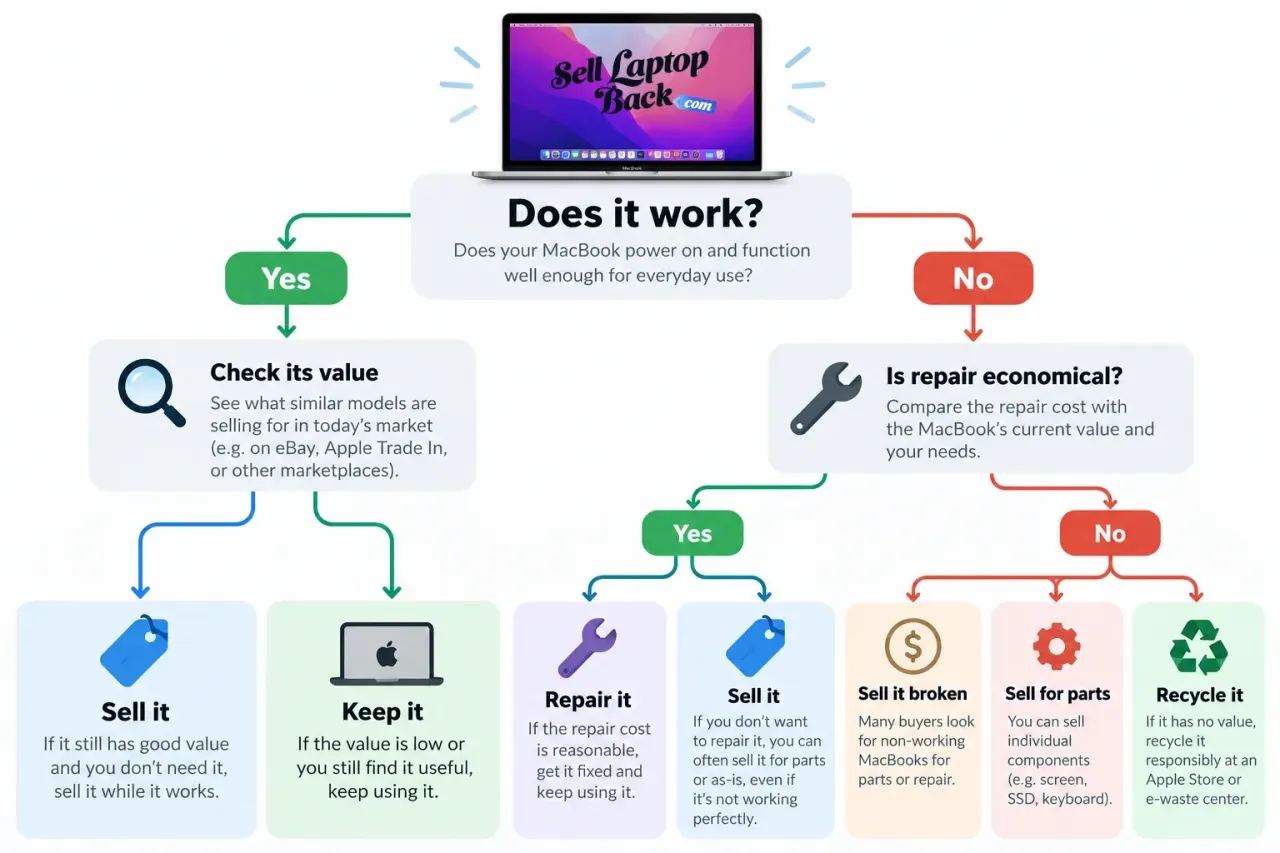
Compare:
- current value in damaged condition
- expected value after repair
- parts cost
- labor cost
- risk of additional damage
A Battery Replacement May Make Sense
If a relatively valuable MacBook works perfectly apart from an aging battery, repair may improve both usefulness and resale value.
A Display Repair Requires More Careful Math
Complete MacBook display assemblies can be expensive. Before ordering one, compare the repair cost with the actual difference between the machine's damaged value and expected working value.
Logic-Board Repairs Can Change the Economics Completely
A logic-board failure can require expensive components or board-level repair.
On an older machine, selling it in damaged condition may make more sense than spending heavily to restore it solely for resale.
This is especially true when the working value of the entire computer is approaching the cost of the repair.
What If the MacBook Is Too Old to Sell?
Eventually some computers reach the point where their normal resale value becomes very small.
That does not mean the only option is household trash.
Depending on condition, consider:
- continuing to use it
- using it as a secondary computer
- donation
- parts recovery
- responsible electronics recycling
Our laptop donation guide covers another possible route for functional machines that are no longer valuable enough to justify a normal sale.
The U.S. Environmental Protection Agency also publishes information about electronics donation and recycling.
A Simple Checklist Before You Decide
- Identify the exact MacBook.
- Check whether it is Intel or Apple silicon.
- Confirm memory and SSD capacity.
- Check battery condition and cycle count.
- Inspect the display, keyboard, trackpad and enclosure.
- Record any functional defects.
- Check the machine's current value.
- Compare repair cost with the expected increase in value.
- Choose between direct sale, marketplace, trade-in, reuse or recycling.
- Back up and correctly erase the Mac before transferring ownership.
Frequently Asked Questions About Older MacBooks
How much is my old MacBook worth?
The value depends on exact model, year, processor or Apple chip, memory, SSD capacity, battery and physical condition. Use the MacBook lookup for a model-specific current offer rather than estimating from age alone.
Is an Intel MacBook still worth selling?
Potentially. Some Intel MacBooks still have resale or parts value. Model, processor, memory, storage, screen condition and battery health all matter.
Is an Apple-silicon MacBook worth more than an Intel MacBook?
Newer Apple-silicon Macs often occupy a stronger position in the current used market, but configuration and condition still matter. A high-spec Intel machine cannot be compared with a damaged base-model Apple-silicon Mac solely by processor architecture.
Can I sell a MacBook with a bad battery?
Yes, in many cases. Report the battery condition accurately. A weak or failed battery does not automatically eliminate the value of the rest of the machine.
Can I sell a MacBook with a cracked screen?
Potentially. The effect on value depends on the exact model and the cost of replacing its display assembly.
Can I sell a MacBook that does not turn on?
Potentially. Non-working MacBooks may still have repair or parts value. See the broken MacBook options.
Do I need to erase the Mac before selling it?
Yes. Back up anything you need and follow Apple's current preparation procedure. Newer supported Macs can use Erase All Content and Settings, while older hardware may require macOS Recovery and additional steps.
Do I need to turn off Find My?
Yes. Follow Apple's current instructions to remove Activation Lock before transferring the computer to another owner.
What if I already shipped or sold the Mac and forgot about Find My?
Apple provides options for managing devices through Find My and your Apple Account. Follow Apple's current support instructions rather than sharing your Apple Account password with the buyer.
Do I need the original charger?
The correct charger can improve usability and may affect value. Include it when required by the quote or sale terms and describe honestly if it is missing.
Is Apple Trade In the same as selling my MacBook for cash?
No. Apple Trade In is a trade-in program and may provide purchase credit or an Apple Gift Card depending on the transaction. A direct buyback or private sale is a separate type of transaction.
Should I replace a cracked MacBook screen before selling it?
Only if the expected increase in value exceeds the repair cost by enough to justify the work and risk. Display repairs can be expensive, so calculate the economics before buying parts.
Where can I compare other ways to sell my laptop?
See our guide to the different places to sell a laptop, including marketplaces, local sales and direct buyback services.
Check the MacBook Before You Write It Off
An older Apple laptop may still be worth selling, repairing or reusing. The best first step is to identify the exact machine rather than judging it only by age or original purchase price.
Find the model, check the memory and storage, evaluate the battery and screen, remove your Apple Account and Activation Lock correctly, and compare the realistic options.








